
According to Modern Marketing Partners’ January 2024 “Presentation Design Statistics” report, nearly 47 percent of business presenters spend eight or more hours building a single deck, an entire workday lost to tweaking layouts.
No surprise that AI slide-design generators promise to turn a short prompt into polished slides in minutes. We put five of the most talked-about tools on the clock, timing every step from “Generate” to client-ready. What we found could give you back most of your day.
How we tested each AI slide generator
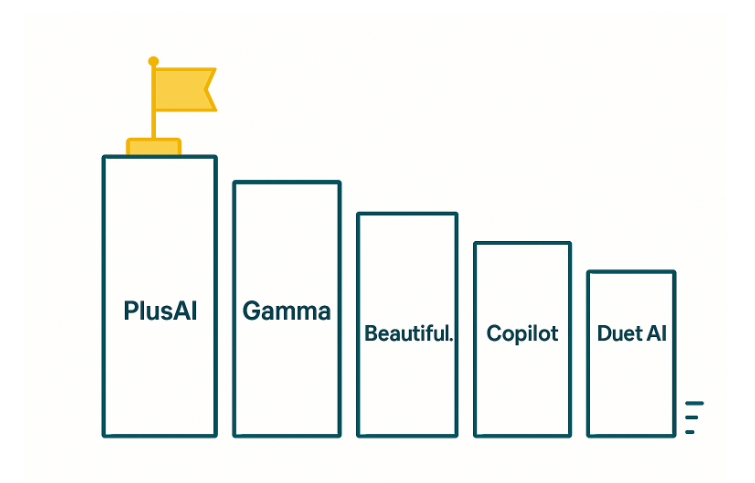
We kept the test simple and fair. Each tool received the same one-line brief: “Create a 15-slide product-launch pitch for a new smart water bottle.” PlusAI’s starter guide says a concise prompt can spin up a full deck in about a minute, so we timed every run from the moment we clicked Generate.
- Raw generation time – stopped the instant an editable deck appeared
- Polish time – logged every minute spent applying brand colors, tightening copy and exporting a clean file
Adding those numbers together yields idea-to-ready time, our primary metric.
To keep the scorecard balanced, we weighted four factors highlighted in presentation-design research:
- 40 percent – total idea-to-ready time
- 25 percent – content coherence
- 20 percent – design consistency
- 15 percent – workflow ease (exports, collaboration)
Our methodology adapts Modern Marketing Partners’ 2024 benchmark on slide-creation efficiency. Finally, we ranked the five tools from biggest time-saver to least. Next up: the one that out-ran and out-polished every competitor.
1. PlusAI – best overall time saver
Open PowerPoint, type a prompt, sip your coffee. Forty-five seconds later PlusAI delivers a 15-slide draft that already matches your template. In our hands-on test, another four minutes of light tweaks, such as changing one background and tightening a headline, turned that draft into a client-ready deck. No other tool in our lineup matched that under five-minute idea-to-ready pace.
Why the speed sticks:
- Works inside PowerPoint’s ribbon. Fonts, masters and animations stay intact, so you skip copy-paste detours.
- One-click fixes. Slide Remix swaps a busy layout for a cleaner one, and AI Rewrite sharpens wordy bullets. Each click trims seconds that add up on larger decks.
- Live Snapshots keep data current. Charts linked to Plus snapshots refresh the next time you open the file, so weekly KPI decks update themselves.
Bottom line: PlusAI pairs rapid generation with native-file editing, so you save time upfront and avoid losing it back to cleanup, ideal for teams who work in PowerPoint or Google Slides.
(Source: PlusAI product guide “Generate a presentation” and “Insert a single slide,” accessed November 3, 2025.)
2. Gamma – fastest raw generator for cohesive brainstorm decks

Gamma treats slide creation like a sprint. Drop the same smart-bottle prompt into its web editor and about 40 seconds later a 15-slide deck streams out, each slide sharing the same palette, typography and layout grid. That uniform styling means you fine-tune copy, not fonts, which kept our polish time to about six minutes. With gamma ai powering this workflow, teams can generate polished, on-brand presentations in a fraction of the usual time.
Why it works:
- One theme, zero Franken-decks. Gamma locks every layout to a single style, so colors never wander.
- Dial-in settings up front. The Advanced panel lets you pick slide count, tone (“concise,” “persuasive”) and image density before you generate, saving edits later.
- Instant sharing. Send a live link and teammates comment in-place; no files to juggle.
- Mind the export. PowerPoint downloads flatten gradients and swap a few fonts, so budget extra time if a .PPTX is essential.
Keep the deck inside Gamma’s ecosystem and you’ll bank real minutes. Need a PowerPoint hand-off? You still start miles ahead of a blank slide, just set aside a short pit stop for formatting fixes.
3. Beautiful.ai – smartest layouts for recurring reports
Beautiful.ai proves its worth as soon as you start editing. Generate a 12-slide draft in about 50 seconds and watch every text box, icon and chart snap into alignment, exactly the kind of polish top automatic PowerPoint makers aim to deliver.The invisible Smart Layout engine auto-adjusts spacing as you add or replace content, so you stay in storytelling mode instead of pixel-nudging.
In our test, another three minutes of copy tweaks turned the draft into a Monday-morning metrics deck, with no grids to fix and no slides to re-center. Swap last month’s numbers for this month’s, and the layout realigns automatically, a relief when deadlines pile up.
Where it excels:
- Keeps weekly or monthly dashboards intact; one update never wrecks five slides.
- Guardrails preserve brand consistency across teams.
Heads-up: those same guardrails can feel tight for one-off, highly creative pitches. Need full control? Convert a Smart Slide to a Classic one, or finish in another tool.
For teams who work on recurring reports, Beautiful.ai may not win the raw-speed race, but it erases the hidden cost of endless formatting tweaks, paying dividends every cycle.
4. Microsoft 365 Copilot – instant outline, plenty of homework
Copilot is lightning-fast at sketching a framework. In our test it produced five skeletal slides in about 35 seconds and even lifted a chart straight from the linked Excel file, saving the usual copy-paste shuffle.
That speed comes with trade-offs: the draft felt like wireframe slides, with short bullets, generic icons and zero visual hierarchy. We needed about eight minutes to add detail, swap images and apply our template before the deck felt client-ready.
Where Copilot helps:
- Native file leverage. Ask it to “build slides from this Word doc,” and it splits sections, titles slides and pulls quotes automatically, similar to what you’d do when building sales enablement slide decks with existing content assets.
- OneDrive fluency. If your documents already live in SharePoint or OneDrive, the hand-off is seamless.
But remember, Copilot drafts and you craft. Its outline beats a blank slide when deadlines loom, yet real polish still takes elbow grease, or another tool in your stack. Copilot also requires both a Microsoft 365 subscription and a Copilot license.
5. Google Slides Duet AI – your slide-by-slide fixer, not a deck builder
Duet AI lives inside Google Slides like an on-call editor. Ask it to tighten a bullet or generate an image, and about 60 seconds later that single slide looks sharper. Do that ten times and a 10-slide deck takes roughly 10 minutes, plus two minutes of final polish, quick, but still slower than the sprints from PlusAI or Gamma.
Where Duet saves time:
- In-context edits. Mid-meeting and notice a cluttered graph? Type “clarify this chart,” and the slide refreshes without leaving the call.
- AI images on demand. Need an on-brand photo? The “Ask Gemini” side panel can generate and insert one in a click.
Limitations:
- Generates or rewrites one slide at a time; you enter a new prompt for each page.
- Full-deck creation still requires a template or outline from elsewhere.
Treat Duet as a surgical tool, ideal for incremental fixes inside Google Workspace, less so for building an entire presentation from scratch.
Conclusion
After testing five of the top contenders, one pattern stood out: the tools that integrate directly into your existing workflow deliver the biggest real-world gains. PlusAI led the pack by blending inside PowerPoint functionality with rapid generation and minimal cleanup time, making it the clear winner for busy teams who live in .PPTX files.
If your goal is idea-to-ready speed, Gamma wins the browser-based race, while Beautiful.ai quietly dominates recurring report workflows. Copilot shines for quick outlines tied to Office files, and Duet AI serves as a precision instrument for Google Slides users who want to polish rather than rebuild.
The bottom line: the right AI slide generator won’t just make slides faster, it will change how you think about deck creation altogether, turning an eight-hour design chore into a five-minute creative sprint.
Frequently Asked Questions
Q1: Which AI slide generator produces the best overall design quality?
A: Beautiful.ai consistently delivers the most polished, visually consistent layouts out of the box, thanks to its Smart Layout engine. For brand-controlled corporate decks, it’s hard to beat.
Q2: What’s the fastest tool from idea to client-ready deck?
A: PlusAI took the crown in total turnaround—under five minutes from prompt to polished deck, largely because it works inside PowerPoint, avoiding export or formatting delays.
Q3: Can these tools handle brand guidelines or templates?
A: Yes, to varying degrees. PlusAI and Copilot preserve your existing PowerPoint templates. Beautiful.ai uses locked brand themes. Gamma allows limited customization but focuses more on consistency than brand compliance.
Q4: Are any of these tools free?
A: Most offer free tiers or trials, but full feature sets—like brand kits, PowerPoint exports, or collaboration tools, require paid plans. Expect to pay between $10 and $30 per month per user for professional-grade features.
Q5: Which one works best for teams?
A: Gamma and PlusAI both excel at collaboration. Gamma’s live links make commenting effortless, while PlusAI’s integration with PowerPoint and Google Slides supports native co-editing.
Q6: Should I replace my designer with AI?
A: Not yet. AI tools accelerate structure, consistency, and initial drafts, but human creativity and storytelling still define great presentations. Think of these tools as accelerators, not replacements.