Calendly made a simple idea popular: share a link and let people book time with you without the back and forth emails. The concept was simple and sparked an entire category of tools.
But the landscape of scheduling apps has evolved quickly. Today there are dozens of options, each promising smarter automation, smoother booking pages, and more integrations.
The problem? Most “best scheduling apps” lists throw 10-15 tools at you and expect you to sort through them. If you’re just trying to find reliable appointment scheduling software that works, that’s a lot of noise.
So we did the testing for you.
After reviewing dozens of platforms, we narrowed it down to five scheduling tools that genuinely deliver: including a free option you may not have heard of yet, but that’s quickly becoming a favorite among freelancers and small teams.
What We Looked For
Before we jump into the list, here’s how we evaluated every tool.
We focused on features that matter in real-world scheduling, not just marketing promises.
Every platform on this list had to offer:
- A strong free plan or clear value on paid tiers
- Calendar syncing with Google Calendar, Outlook, or iCloud
- Video conferencing integrations (Zoom, Google Meet, Microsoft Teams)
- Customizable booking pages
- Team scheduling support such as round robin or collective availability
- Payment processing options for paid sessions
- Reliable time-zone detection
In other words, each option had to work as primary appointment scheduling software, not just a lightweight feature inside a larger platform.
Why Calendly Isn’t the Default Anymore
Calendly deserves credit for bringing scheduling automation into the mainstream. For years, it became almost synonymous with online meeting scheduling tools.
But recently, some limitations have become harder to ignore.
The biggest challenge is the free plan restrictions. Calendly only allows one event type on its free tier, which makes it difficult to manage different types of meetings without upgrading.
Other features are locked behind higher pricing tiers, including:
- Workflows and automated reminders
- Routing forms
- SMS notifications
- Payment processing
For teams, pricing can escalate quickly as well.
To be fair, Calendly is still a solid platform. But newer alternatives now offer similar or better functionality, often with more generous free plans or significantly lower pricing.
That’s why more professionals are exploring alternatives.
| Feature | Koalendar | Cal.com | Setmore | SavvyCal | Appointlet |
| Free plan generosity | Free forever | Free for individuals | Free for up to 4 users | No free plan available | Free plan available |
| Booking / appointment limits on free plan | Unlimited bookings, unlimited booking pages | No usage limits on individual free plan | 200 appointments | Up to 25 bookings/month | |
| Calendar sync options | Google, Outlook, iCloud, 2 syncs in free, unlimited calendars on paid | Calendar connections supported; unlimited calendars on paid plans | Google and Outlook | Unlimited calendar connections | Google Calendar, Office 365 |
| Video conferencing | Google Meet on free; Zoom and Microsoft Teams on Pro | Available via integrations | Supported | Supported in paid plans | Web conference rooms / video integrations |
| Payment processing | Pro plan | Yes | Yes | Only on Premium plan | Premium Plan |
| Team features | Round robin, collective bookings, group sessions on | Collaborative features on premium plans | Team collaboration tools | Team scheduling | Team scheduling available |
| Branding removal | Pro plan | Paid plans | Paid plans | Paid plans | Paid plans |
| Starting paid price | €6.99/seat/month | $12/user/month for teams | $5/month | $12/user/month | $9/member/month |
The 5 Best Scheduling Apps – In Detail
1.Cal.com – Best for Developers & Open-Source Enthusiasts
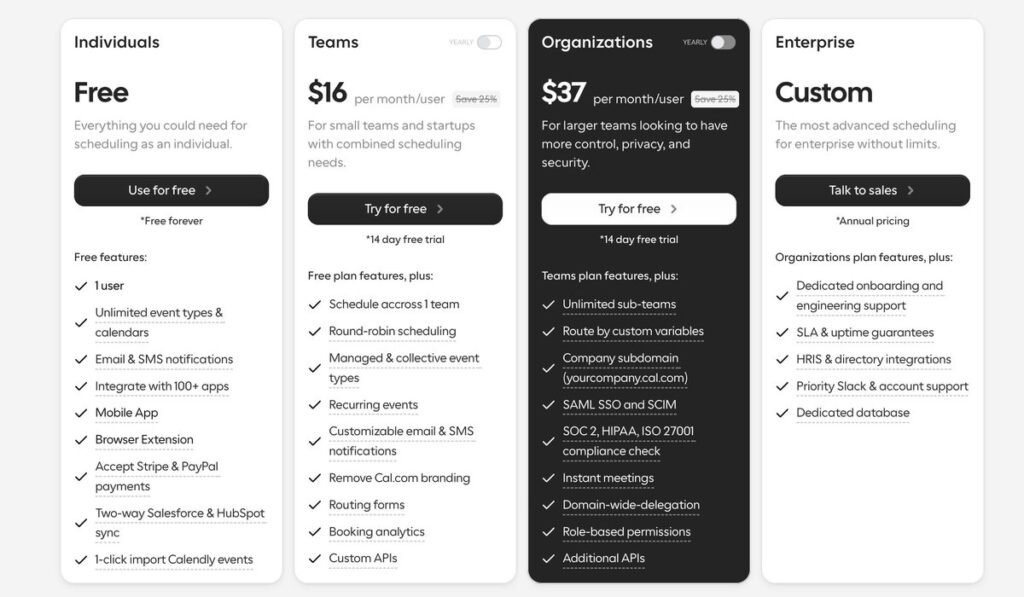
The monthly billing price per seat for Cal.com.
Cal.com takes a completely different approach to scheduling.
It’s open-source, meaning developers can inspect, modify, or even self-host the platform if they want full control over their scheduling infrastructure.
That flexibility makes it particularly attractive for engineering teams.
Highlights include:
- Unlimited bookings on the free plan
- Highly customizable booking flows
- API access for advanced integrations
- Clean booking URLs like cal.com/yourname
One interesting innovation is Cal.ai, which allows businesses to manage appointment booking through AI-powered phone calls.
The trade-off? It can feel a bit technical compared to other scheduling apps.
There’s also no dedicated mobile app, which may matter for users who manage bookings on the go.
Pricing: Free Forever plan available. Team plans start at $15 per user/month.
Best for: developers, startups, and teams that want deep customization.
2. Koalendar – Best UX and Overall Value for freelancers and small teams
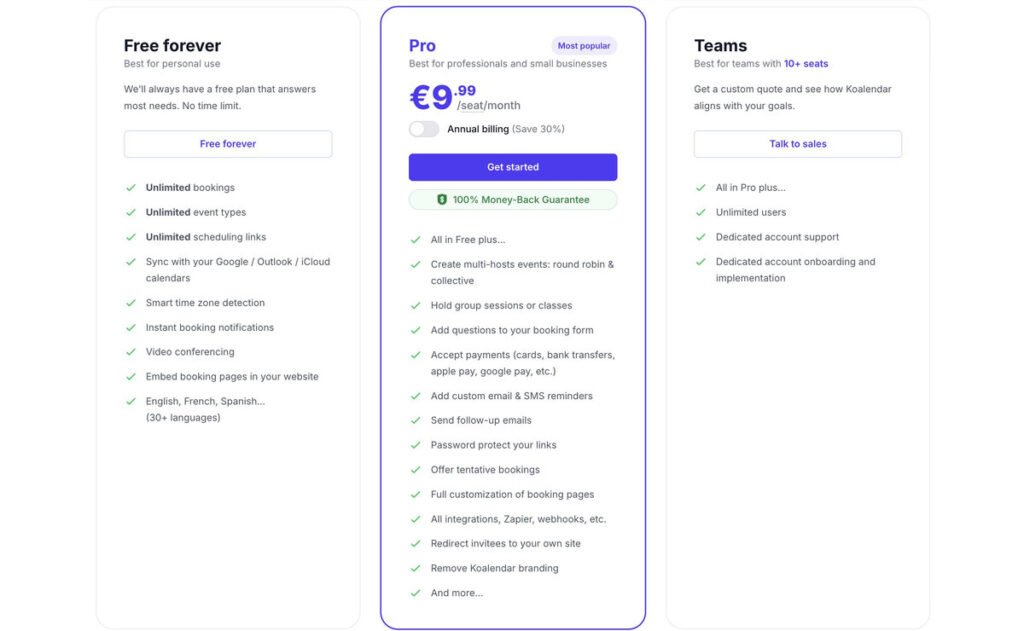
The monthly billing per-seat plan for the Koalendar Pro plan.
If you want something powerful but incredibly simple, Koalendar is one of the most impressive tools in the category.
The biggest differentiator is the free-forever plan. Unlike many scheduling apps, Koalendar offers:
- 2 sync calendars to check for conflicts
- Unlimited bookings
- Unlimited event types
- Unlimited scheduling links
That’s a huge contrast with platforms that restrict these features on free plans.
Another standout feature is the setup experience. Most users can create a booking page in under five minutes. The interface is clean, intuitive, and easy to navigate – even if you’re not particularly technical.
Key capabilities include:
- Calendar syncing with Google, Outlook, and iCloud
- Automatic time-zone detection
- Video conferencing integrations with Zoom, Google Meet, and Microsoft Teams
- Embeddable booking pages for websites
The Pro plan ($6.99/seat/month with annual billing) unlocks additional features like:
- Round-robin scheduling
- Collective bookings
- Group sessions
- Payments via Stripe, Apple Pay, and Google Pay
- SMS reminders
- Custom branding
- Zapier integrations and webhooks
The platform also holds a 4.9-star rating from 800+ Google Workspace users, reflecting strong feedback on usability and reliability.
Best for: freelancers, consultants, small teams, and anyone who wants powerful appointment scheduling software without complex pricing tiers.
3. Setmore – Best Free Plan for Teams
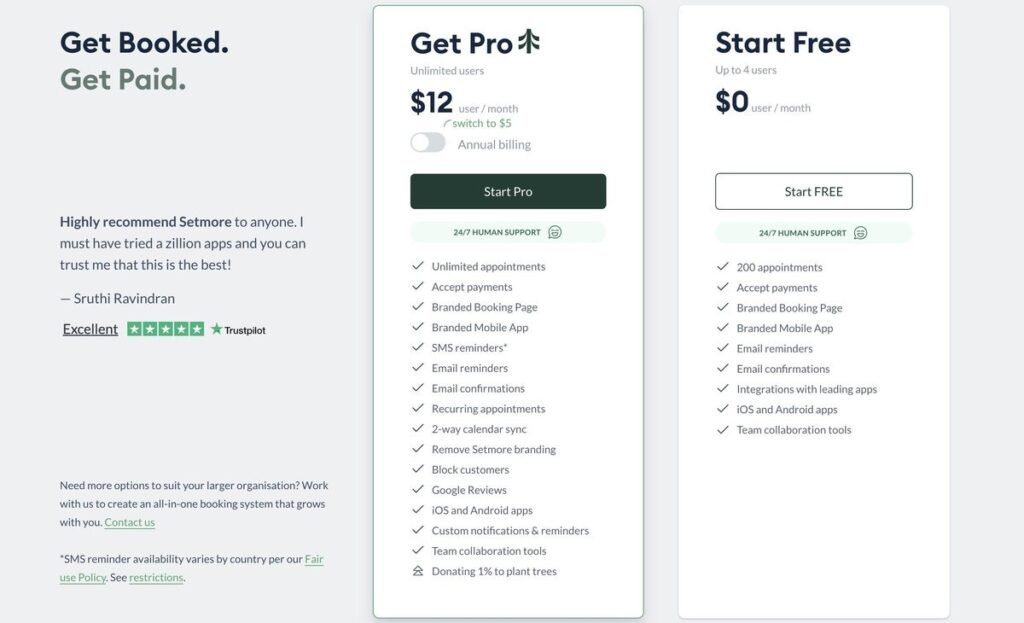
Setmore’s monthly billing pricing plans charged per seat.
Many scheduling tools focus on individual users. Setmore stands out because its free plan supports up to four staff members.
For small teams, that’s a big advantage.
The platform includes:
- A helpful setup wizard
- Desktop app for offline access
- Integrations with CRM and email marketing tools
Payments are supported via Stripe and Square, making it suitable for service providers.
However, some limitations appear on the free plan:
- SMS reminders are only available on paid tiers
- 200 appointments limit
- Booking page design options are somewhat limited
Paid plans start at $5 per month (billed annually), which remains affordable compared to many competitors.
Best for: small teams that need shared appointment scheduling software without a big budget.
4. SavvyCal – Best Scheduling UX for Client-Facing Professionals
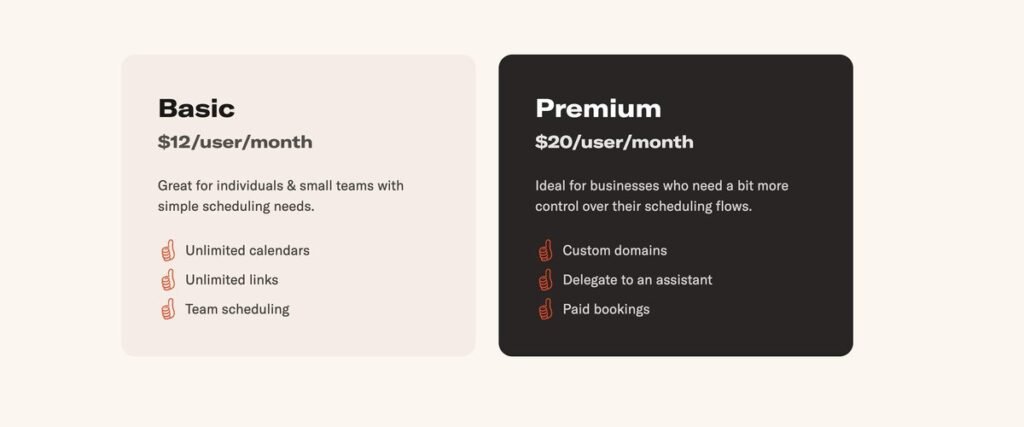
SavvyCal’s monthly per-seat pricing
SavvyCal focuses heavily on the booking experience itself.
Its signature feature is an overlay calendar view that lets invitees see their own availability alongside yours. Instead of guessing which time works, they simply pick a slot that overlaps.
This dramatically reduces friction during scheduling.
Other benefits include:
- A polished, modern interface
- Multiple meeting types
- Strong customization options
- A highly professional booking page design
The biggest drawback is the lack of a free plan. SavvyCal also does not support payment processing in Basic, which limits use cases for service providers unless they purchase Premium.
Pricing starts at $12 per user/month, $20/user/month for Premium.
Best for: consultants, agencies, and professionals where the client experience matters as much as the meeting itself.
5. Appointlet – Best Lightweight Free Option
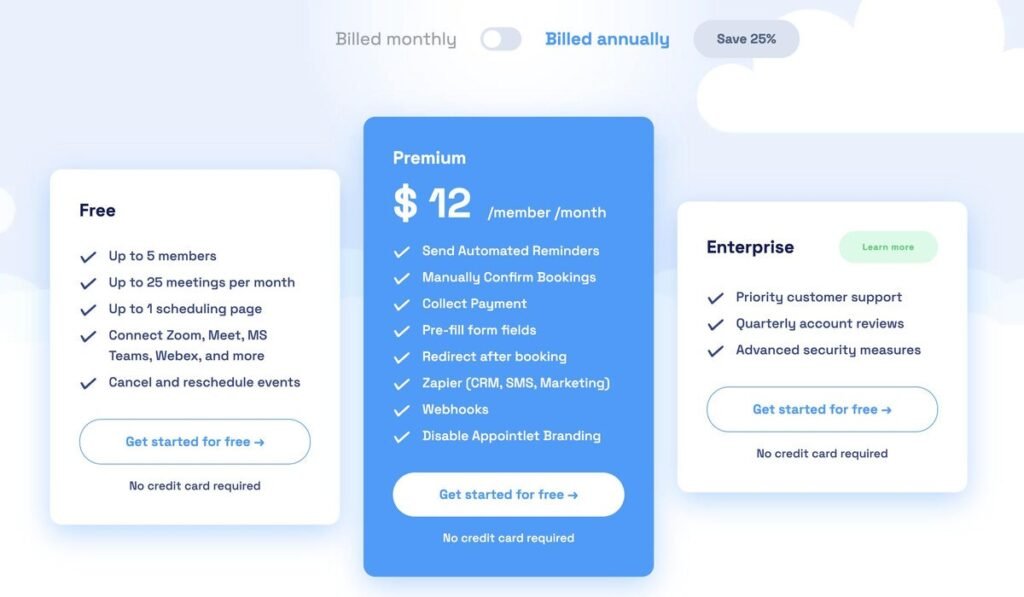
Appointlet’s premium plan is billed monthly per seat.
If you want something simple and functional, Appointlet is a solid option.
Its forever-free plan includes:
- Up to 25 meetings per month
- Up to 1 scheduling page
It integrates with Google Calendar and Office 365, allowing you to sync availability automatically.
On the downside, its free plan lacks unlimited meetings and payment processing.
Still, for solopreneurs who just need a straightforward booking link, it works well.
Paid plans: start at $9 per member/month.
Best for: freelancers who want a lightweight scheduling tool without extra complexity.
Conclusion
The scheduling software market has matured significantly. Calendly may have pioneered the category, but it’s no longer the only serious option.
Today’s scheduling apps offer a wider range of pricing models, customization options, and automation features.
Some are built for developers. Others focus on client experience or team collaboration.
But if you’re looking for a tool that balances power, simplicity, and affordability, from our tests, Koalendar stands out. Its generous free plan, intuitive setup, and low-cost Pro tier make it one of the most practical solutions available today.
And the best part? All five tools offer free plans or trials, so you can test them without risk and see which one fits your workflow best.
If you want something simple that works right away, starting with Koalendar is a great place to begin.