The exchange rate today is the price at which one currency converts to another at this exact moment, and for any app handling money across borders, getting it wrong is expensive.
A 0.5% fluctuation in EUR/USD might sound small. But if your platform processes $500,000 in daily transactions, that’s a $2,500 swing. Per day. And that’s before you account for the trust damage when a user sees a rate on your app that doesn’t match what Google or their bank shows them.
Most developers don’t have a data problem. They have a freshness problem. Their apps pull exchange rate data that’s hours old or, worse, scraped from public pages with no rate-limit guarantee. It works until it doesn’t. And when it breaks, users leave.
This article is for the developers and FinTech founders who want to fix that. Not just for curiosity, but to build a system that delivers accurate, real-time currency data inside their own product.
Why “Exchange Rate Today” Is a Moving Target
Here’s how it works. Foreign exchange markets are open 24 hours a day, five days a week. Major currency pairs like USD/EUR or GBP/JPY update every few seconds based on global trading activity. A rate that was accurate at 9:00 AM could be off by 0.3% by 9:05 AM.
For a consumer checking rates manually, that gap is acceptable. For a mobile app processing a payment or displaying a price to an international buyer, it is not.
The core issue: Most free or scraper-based solutions cache data for anywhere from 1 hour to 24 hours. That latency is invisible to developers during testing but very visible to users in production.
Why Real-Time Accuracy Matters for Your App
When a user spots a rate discrepancy between your app and Google, they don’t report it. They just leave.
Dynamic Pricing in E-Commerce
Imagine you run an online store that serves customers in the US, UK, and Germany. You display prices in local currencies. If your exchange rate data is 12 hours stale and GBP has moved sharply overnight, you’re either overcharging or undercharging every UK customer, and neither is good.
Latest exchange rates let you:
- Lock in accurate checkout prices at the moment of transaction
- Avoid the friction of “price mismatch” errors during payment processing
- Reduce refund disputes caused by currency discrepancies
User Retention: The Google Test
Developers often underestimate this: users check your rate against Google or XE. If your displayed rate is off by more than a few basis points, they notice. And they don’t file a bug report. They just stop using your app.
In my experience working with FinTech products, currency inaccuracy is one of the top silent churn drivers in international finance apps. Users don’t tell you. They just go.
Compliance and Credibility
If your app is used for bookkeeping, invoicing, or any regulated financial activity, stale rates can become a compliance issue. ISO 4217 currency codes and traceable rate sources aren’t just good practice; in some jurisdictions, they’re expected. Using a verified API provider with documented data provenance helps you build that paper trail.
XE vs. Custom API Integration: What Developers Actually Need
XE is a great product, but it was built for consumers, not for developers who need to process and own their rate data.
The XE Model
XE.com is excellent for what it’s designed for: consumer lookups. A user wants to know what their dollar is worth in euros before booking a trip; XE handles that perfectly.
But XE’s consumer product has real limits for developers:
| Criteria | XE Consumer | Developer API Integration |
| White-label support | No | Yes |
| High-volume throughput | Limited | Scalable |
| Webhook/alert support | No | Yes |
| Custom base currency | No | Yes |
| Update frequency | Varies | 60 seconds or less |
| Historical data access | Limited | Full time-series |
The XE Currency Data API does exist and is solid, but it’s priced for enterprise, which isn’t where most startups or indie developers begin.
The Developer-First Alternative
What most growing apps need is a currency converter API that skips the front-end consumer layer entirely and gives you clean, structured data you can process, transform, and display however you want.
That’s the gap services like CurrencyFreaks fill. Rather than inheriting someone else’s UI decisions, you get raw data via REST, and you build the experience yourself. You’re not just showing rates; you’re processing them inside your own business logic.
The hidden killer most developers miss is refresh frequency. Some APIs refresh hourly, others more frequently. Make sure the refresh cadence matches your application’s sensitivity to rate changes. That gap matters enormously in volatile market conditions or when a user is mid-checkout.
Technical Implementation: Getting Real-Time Rates Into Your App
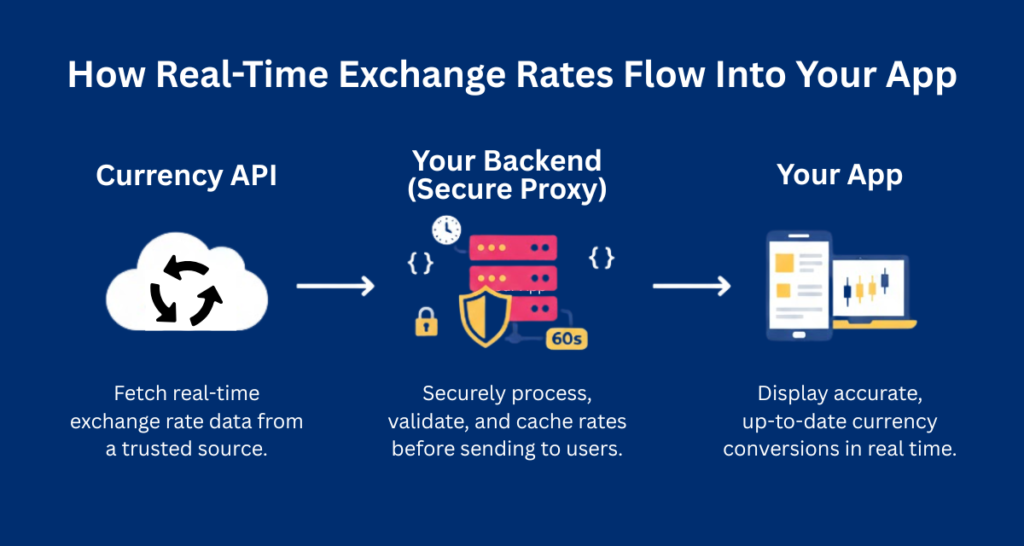
The integration itself isn’t complicated, the decisions you make before writing a single line of code are what matter most.
Step 1: Choose Your Source Carefully
Free doesn’t always mean cheap. A “free” API with a 24-hour cache and no SLA can cost you users, refunds, and reputation. Before choosing a provider, check:
- Update frequency: How often does the data actually refresh?
- Uptime history: Is there a public status page?
- Currency coverage: Do they support the 1000+ forex, crypto, and metal currencies your global users may require?
- Data source: Are rates sourced from central banks and certified financial institutions or scraped from public pages?
CurrencyFreaks provides forex, crypto, and metal exchange rates through secure REST endpoints with structured JSON and XML responses. All CurrencyFreaks API endpoints are served over secure HTTPS connections, including on the free plan.
That’s the kind of specificity you want from a provider before trusting them with your production app.
Step 2: Integration Logic
Here’s a basic implementation using the CurrencyFreaks API to fetch the latest rates:
| // Fetch latest exchange ratesconst API_KEY = process.env.CURRENCY_API_KEY; // Never expose in client-side JS async function getLatestRates(baseCurrency = ‘USD’, symbols = [‘EUR’, ‘GBP’, ‘JPY’]) { const symbolsParam = symbols.join(‘,’); const url = `https://api.currencyfreaks.com/v2.0/rates/latest?apikey=${API_KEY}&base=${baseCurrency}&symbols=${symbolsParam}`; try { const response = await fetch(url); if (!response.ok) throw new Error(`API error: ${response.status}`); const data = await response.json(); return data.rates; // { EUR: “0.9278”, GBP: “0.8172”, JPY: “149.23” } } catch (error) { console.error(‘Rate fetch failed:’, error); return getCachedRates(); // Fallback — see Step 2b below }} |
The key point: never pass your API key through client-side JavaScript. All requests should be proxied through your backend.
Implementing Exchange Rate Notifications
Push alerts for rate shifts are one of the most underused features in currency-enabled apps. A simple server-side polling loop can power them:
| // Simple rate-change notification triggerlet lastRate = null;const ALERT_THRESHOLD = 0.005; // 0.5% shift async function checkAndNotify(userId, currencyPair) { const currentRate = await getLatestRates(‘USD’, [currencyPair]); const rate = parseFloat(currentRate[currencyPair]); if (lastRate && Math.abs((rate – lastRate) / lastRate) >= ALERT_THRESHOLD) { sendNotification(userId, `${currencyPair} moved ${((rate – lastRate) / lastRate * 100).toFixed(2)}%`); } lastRate = rate;} |
This is the foundation of exchange rate notification systems, alerting users when a pair they’re watching hits a target or crosses a threshold.
Caching Strategy: Balancing Performance and Accuracy
Don’t hit the API on every page load. That’s both wasteful and fragile.
A sensible caching strategy:
- TTL of 60 seconds for apps showing live rates to active users
- TTL of 5–15 minutes for dashboards or price displays (non-transactional)
- Stale-while-revalidate pattern: Serve cached data instantly and refresh in the background.
- Store a timestamp with your cache so you can display “last updated” to users
Step 3: Use a Free Currency Converter API to Start Fast
You don’t need to build a rate aggregation system from scratch. For those in the testing or MVP phase, you can start with a free currency converter API to validate your logic before committing to a paid plan.
CurrencyFreaks offers a free tier with monthly request limits, making it suitable for prototyping and MVP validation before scaling to a paid plan.
Advanced Features: Going Beyond Simple Conversion
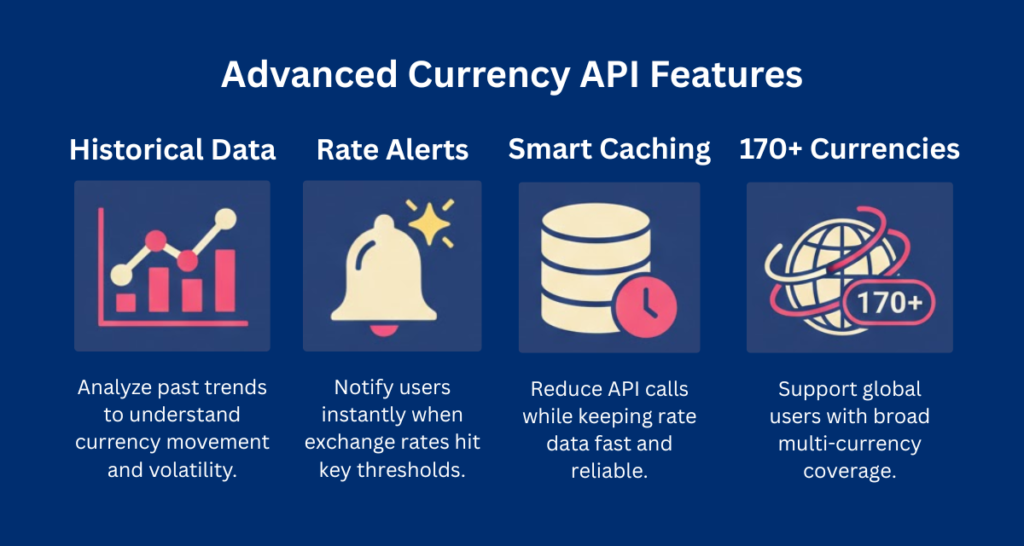
Once your core integration is solid, these features are what separate a basic currency tool from something users actually rely on.
Historical Data: Context for Your Users
Showing just the current rate leaves your users without context. Is USD/EUR strong right now? Weak? Trending up?
Historical endpoint example (CurrencyFreaks time-series):
| curl ‘https://api.currencyfreaks.com/v2.0/timeseries?startDate=2024-01-01&endDate=2024-01-07&base=USD&symbols=EUR,GBP&apikey=YOUR_APIKEY’ |
This lets you render 7-day or 30-day trend charts alongside the “exchange rate today” a feature that users of trading apps and finance dashboards have come to expect.
Multi-Currency Support Without Slowing Down the UI
Supporting 170+ currencies sounds heavy. It doesn’t have to be.
The pattern that works:
- On app load, fetch and cache the full rates table for your base currency
- Store it in memory (or Redis for server-side apps)
- Do all conversions locally from the cached table; no additional API calls per conversion
- Refresh the cache on your chosen TTL schedule
This means a single API call can power thousands of on-screen currency conversions per minute without any latency hit.
Webhooks: Automation When Rates Hit a Target
While some financial APIs offer webhook-based alerts, CurrencyFreaks currently operates as a REST-based polling API.
You can implement exchange rate alerts by periodically querying the latest endpoint and triggering notifications when predefined thresholds are crossed.
Check your provider’s documentation for webhook support before choosing a plan. Not all tiers include it.
Best Practices for Developers
Most issues developers run into with currency APIs aren’t about the data, they’re about what happens when things go wrong.
Error Handling: What to Do When the Data Source Is Down
APIs go down. Your app shouldn’t go down with them.
| Failure Scenario | Recommended Response |
| API timeout (>3s) | Serve last cached rate with a “stale data” label |
| API returns 5xx | Switch to backup provider or last-known rate |
| Rate missing for currency | Display “unavailable” rather than a zero or null |
| Rate looks anomalous (>10% shift in seconds) | Flag for review; don’t render raw value |
A fallback rate system is not complex to build, but it does need to be built before you go to production, not after your first incident.
Security: Keys, HTTPS, and Access Control
A few non-negotiables:
- Always use HTTPS. Reputable providers like CurrencyFreaks enforce SSL on all plans, including free tiers.
- Proxy all API requests through your server. Never expose API keys in frontend code or mobile app bundles.
- Rotate keys periodically. Treat your currency API key like a database password.
- Set IP allowlists if your provider supports it, limit which servers can make authenticated requests.
ISO 4217: The Standard You Should Already Be Using
ISO 4217 is the international standard for currency codes, three-letter identifiers like USD, EUR, GBP, and JPY.
Always use ISO 4217 codes in your database, API calls, and display logic. Never use currency symbols ($ vs. C$) as identifiers; they’re ambiguous. Never use free-text currency names.
Using ISO codes ensures your app is compatible with every bank, payment processor, and accounting system your users might connect to.
Frequently Asked Questions
What does “exchange rate today” actually mean?
The exchange rate today is the current market rate at which one currency can be exchanged for another. It changes continuously during market hours based on global supply and demand, geopolitical events, and economic data releases.
For developers, the practical question is, how fresh is the rate your app is showing right now?
How accurate are free currency APIs?
It depends on the provider. Some free tiers use rates sourced directly from central banks and update every hour, which is accurate enough for price estimates and dashboards.
Others rely on scraped or aggregated data with 12–24 hour delays, which introduces meaningful errors during volatile periods.
For transactional use cases, always verify the data source, update frequency, and uptime history before relying on a free plan in production.
What’s the difference between real-time and live exchange rates?
In currency APIs, “real-time” often refers to frequently refreshed rate data delivered via API, while streaming tick-level data is typically reserved for trading platforms.
This is what trading platforms use. “Live” usually means rates refreshed every 60 seconds to a few minutes, sourced from financial data providers.
For most app developers, live rates (60-second refresh) are sufficient and significantly cheaper to access than true streaming real-time data.
Conclusion: Future-Proof Your Currency Layer
Live exchange rate data delivered via REST API is infrastructure, not just a feature. The apps that get it right, with accurate data, fast refresh cycles, and resilient fallback systems, build user trust that’s very hard for competitors to replicate.
Start small. Use a free currency converter API to prove out your integration pattern. Implement caching from day one. Add rate notifications as you learn what your users actually watch. Then scale your plan as your user base grows.
The technical lift is lower than most developers expect. The business impact of getting it right is higher than most product managers plan for.Ready to build? Explore Red Stag Labs’ guides on FinTech app development and mobile API integration, or get your free API key at CurrencyFreaks and validate your first integration in under ten minutes.