Google Reviews can make or break how people see your business. A single bad review can affect trust, clicks, and even sales. That’s why many people search for ways to remove or delete reviews from Google.
In this guide, you’ll learn exactly how to remove a Google review, including how to report fake or harmful reviews, what Google allows, and what steps actually work.
If you want to understand how Google Reviews work, how they impact rankings, and why they matter, check our complete Google Reviews guide.
This guide is for:
- Business owners who want to remove bad or fake reviews
- Customers who want to delete or edit their own reviews
Before we get into the steps, here’s something important to understand:
- You cannot directly delete Google reviews from your business profile
- But you can report and remove reviews if they violate Google’s rules
Let’s break down how it works step by step.
Can Google Reviews Be Removed?
Yes, Google reviews can be removed, but only in specific cases.
Google does not remove reviews just because they are negative or critical. If a review reflects a real customer experience, even if it’s bad, it will usually stay.
However, reviews can be removed if they violate Google’s policies.
When Google Will Remove a Review
Google may remove a review if it falls under these categories:
- Fake reviews
Reviews that are not based on real experiences or are posted to manipulate ratings - Spam or promotional content
Repeated reviews, irrelevant links, or advertising - Offensive or abusive language
Hate speech, threats, or inappropriate content - Conflict of interest
Reviews posted by competitors, employees, or people with a personal bias
Important to Understand
- A 1-star review is not removable just because it’s negative
- Google focuses on policy violations, not opinions
This means your goal is not to remove every bad review, but to identify the ones that break the rules
When Should You Remove a Google Review?
Not every negative review should be removed. The key is to understand which reviews actually qualify for removal and which ones should be handled differently.
When You SHOULD NOT Remove Reviews
Some reviews may be negative, but that doesn’t mean they should be removed.
Avoid trying to remove:
- Genuine negative feedback
Real customers sharing honest experiences - Customer complaints
Issues related to service, delays, or dissatisfaction
These reviews are valid in Google’s eyes and will usually not be removed.
Important Note
Sometimes, responding is better than removing.
- A professional reply shows you care
- It builds trust with future customers
- It can even turn a negative experience into a positive one
Focus on removal only when the review breaks rules, otherwise, focus on managing your reputation.
How to Remove Google Reviews (Step-by-Step)
If a review violates Google’s policies, the best way to remove it is by reporting it through your Google Business Profile. Follow the steps below.
Method 1 – Report a Google Review (For Business Owners)
This is the most common and effective method to remove bad or fake reviews.
Step-by-Step Guide:
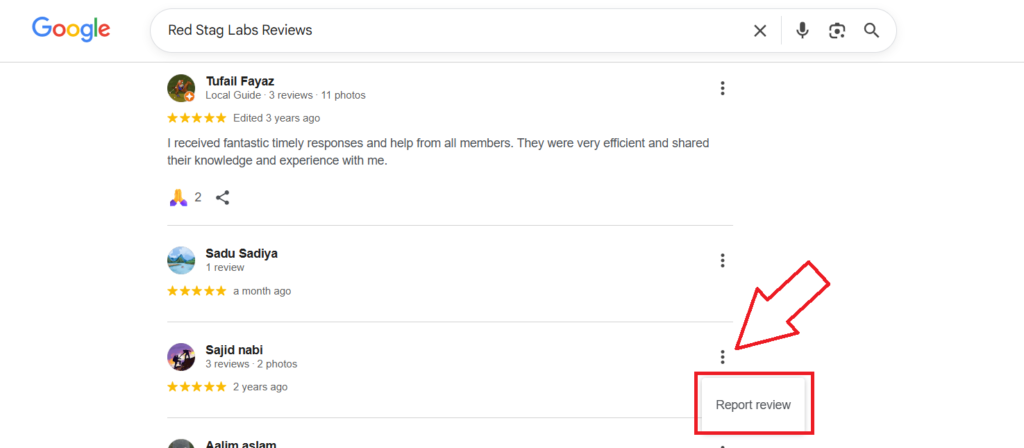
- Go to your Google Business Profile
(Search your business name on Google while logged in) - Find the review you want to remove
Scroll to the reviews section - Click on the three dots (⋮) next to the review
- Select “Report review”
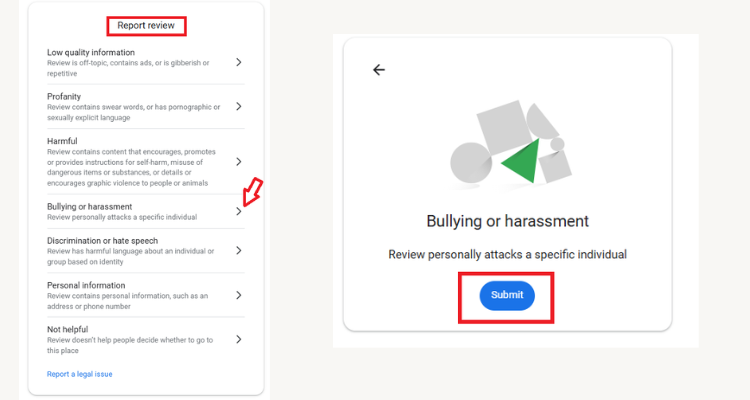
- Choose the reason (spam, fake, offensive, etc.)
- Click Submit
What Happens Next?
- Google reviews your request
- If the review violates policies → it gets removed
- If not → it stays
Screenshot Suggestion (For Better UX)
Pro Tip
- Be accurate when selecting the reason
- Don’t report every negative review
- Focus only on reviews that clearly break Google’s rules
Method 2 – Remove Your Own Google Review
If you’ve posted a review yourself, you can easily delete or edit it anytime.
Step-by-Step Guide:
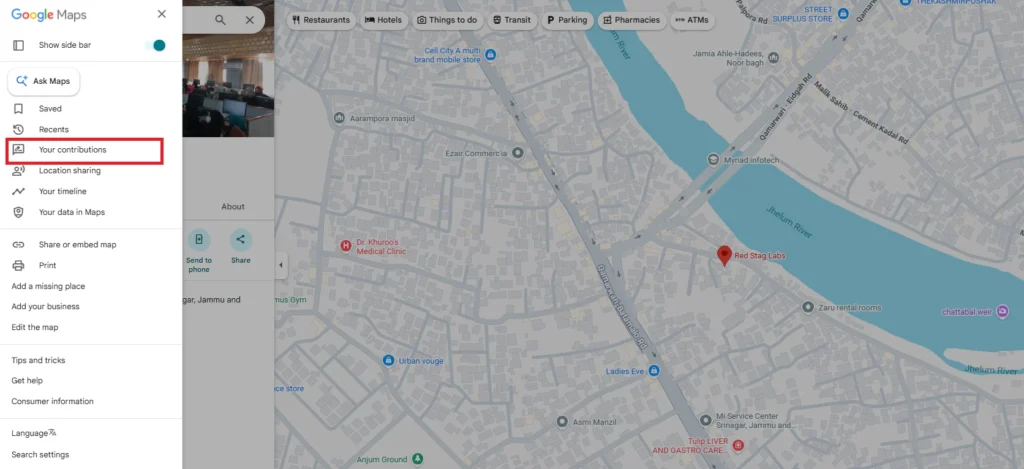
- Open Google Maps
(on mobile app or desktop) - Go to “Your contributions”
Tap your profile icon → select this option - Find your review
Look under the “Reviews” tab - Click on the three dots (⋮) next to your review
- Select “Delete review”
Optional: Edit Instead of Delete
If you don’t want to remove it completely, you can:
- Click Edit review
- Update your rating or feedback
Tip
- Deleted reviews are permanently removed
- You can always post a new review later if needed
This method only works for reviews you’ve written. In the next section, we’ll cover what to do if reporting doesn’t work.
Method 3 – Contact Google Support
If reporting a review doesn’t work, the next step is to contact Google support directly. This is useful when a review clearly violates policies but hasn’t been removed.
When to Use This Method
- Your report was rejected or ignored
- The review is clearly fake, abusive, or harmful
- You have strong evidence to support your claim
Ways to Contact Google Support
1. Google Business Support
- Go to your Google Business Profile dashboard
- Navigate to Help / Support
- Submit your issue with details
Best option for business owners
2. Twitter (X) Support
- Reach out to @GoogleSmallBiz
- Explain your issue briefly
- Include screenshots if needed
Faster responses in some cases
3. Google Community Forum
- Visit the Google Business Profile Community
- Post your issue
- Experts and moderators can guide you
Useful when you need clarification or escalation
Pro Tips
- Always provide clear evidence (screenshots, links)
- Be specific about why the review violates policy
- Avoid emotional language—stay professional
If done correctly, this method can help escalate your request and improve your chances of getting the review removed.
How to Remove Fake Google Reviews
Fake reviews can seriously damage your reputation, especially if they are misleading or posted with bad intent. The good news is, Google does remove fake reviews, but only when they clearly violate its policies.
What Counts as a Fake Review?
A review is considered fake if:
- It’s not based on a real customer experience
- It’s posted by a competitor or someone with bias
- It includes false claims or misleading information
- It’s part of a paid or bulk review campaign
These reviews are against Google’s guidelines and can be removed.
How Google Detects Fake Reviews
Google uses a mix of automated systems and manual checks to identify fake reviews:
- Unusual activity (sudden spikes in reviews)
- Duplicate or copied content
- Accounts posting multiple reviews in a short time
- Location and behavior signals
Suspicious reviews may be removed automatically or after reporting.
Steps to Remove Fake Google Reviews
Follow this process:
- Report the review
Use your Google Business Profile to flag it - Provide evidence
Explain why the review is fake (no record of customer, competitor activity, etc.) - Wait for review
Google will evaluate and decide whether to remove it
Important Tip
- Multiple reports can increase your chances of removal
- Ask team members or managers to report the same review (if valid)
Removing fake reviews takes time, but with the right approach, you can protect your business and maintain trust.
How Long Does It Take to Remove a Google Review?
Removing a Google review is not instant. Once you report a review, Google needs time to review your request and decide whether it violates their policies.
Typical Time
- 24 to 72 hours in most cases
- Sometimes it may take longer (a few days or even weeks)
- Depends on complexity
- Depends on review volume
Possible Outcomes
After Google reviews your request, one of these will happen:
- Review Removed
If it clearly violates Google’s policies - Review Not Removed
If it’s considered a genuine opinion - Under Review
If Google needs more time or signals
What You Should Know
- There is no guaranteed removal time
- Some reviews are removed quickly, others take longer
- If nothing happens after a few days, you can:
- Re-report the review
- Contact Google support
Be patient, and make sure your report clearly explains why the review violates Google’s rules for better chances of removal.
Why Google Might Not Remove a Review
Sometimes, even after reporting, a review stays live. This can be frustrating, but there are clear reasons why Google may choose not to remove it.
Common Reasons
- Doesn’t violate Google policy
If the review is based on a real experience—even if it’s negative—Google will usually keep it - Lack of proof
If you report a review without strong evidence, Google may not take action - Misunderstanding guidelines
Not every bad or unfair review breaks the rules
Many business owners report reviews that don’t actually qualify for removal
What to Do If You Can’t Remove a Review
If Google doesn’t remove a review, don’t panic. You still have effective ways to manage the situation and protect your reputation.
Respond Professionally
A well-written response can turn a negative review into a positive impression.
What to do:
- Acknowledge the issue
Show that you’ve read and understood the concern - Offer a solution
Provide help, a fix, or ask the customer to connect offline
This shows future customers that you care and handle problems responsibly
Bury Negative Reviews
You may not be able to remove a bad review, but you can reduce its impact.
How to do it:
- Get more positive reviews
Ask satisfied customers to leave honest feedback - Improve your overall rating
A higher rating builds trust and pushes negative reviews down
Pro Tip
Instead of guessing how many reviews you need, use a Google Review Calculator to plan your strategy and improve your rating faster.
Focus on long-term reputation, not just removal. A strong review profile always wins.
Impact of Negative Reviews on Business
Negative Google reviews don’t just affect your rating, they directly impact how people see and choose your business.
Lower Click-Through Rate (CTR)
- Businesses with 4+ ratings get significantly more clicks
- Even a small drop (e.g., 4.5 → 4.0) can reduce visibility
- Users naturally avoid listings with lower ratings
Fewer clicks = fewer potential customers
Reduced Trust
- Most users read reviews before making a decision
- A few bad reviews can create doubt instantly
- Negative feedback often stands out more than positive
Trust drops quickly when ratings fall below ~4.2
Conversion Drop
- Lower trust leads to fewer conversions
- Users hesitate to call, visit, or buy
- Even a 0.5 rating drop can impact sales noticeably
Less trust = fewer customers = lower revenue
void Bad Reviews Improve customer experience Ask for feedback early Resolve issues privately Train staff
Best Practices to Avoid Bad Reviews
The best way to deal with negative reviews is to prevent them in the first place. A few simple practices can help you maintain a strong rating and consistent positive feedback.
Improve Customer Experience
- Deliver what you promise
- Maintain quality in products or services
- Focus on clear communication
Happy customers are far less likely to leave negative reviews
Ask for Feedback Early
- Check in with customers during or right after service
- Ask if everything is going well
- Identify issues before they turn into public complaints
Early feedback helps you fix problems before they become reviews
Resolve Issues Privately
- Encourage customers to contact you directly
- Handle complaints through phone, email, or in person
- Offer quick solutions
Solving issues privately reduces the chances of negative public reviews
Train Your Staff
- Teach your team how to handle customers professionally
- Train them to stay calm in difficult situations
- Encourage them to ask for feedback at the right time
Your staff plays a key role in shaping customer experience
kes to Avoid Buying fake reviews Ignoring complaints Overreacting publicly Reporting everything blindly
Common Mistakes to Avoid
Trying to manage Google reviews the wrong way can do more harm than good. Avoid these common mistakes to protect your reputation and stay within Google’s guidelines.
Buying Fake Reviews
- Violates Google policies
- Can lead to review removal or profile suspension
- Easy for users to spot
Short-term gain, long-term damage
Ignoring Complaints
- Makes your business look unresponsive
- Reduces customer trust
- Misses the chance to fix issues
Every complaint is an opportunity to improve
Overreacting Publicly
- Arguing with customers damages your image
- Negative tone can turn away future customers
- Screenshots of responses can spread
Always stay calm, professional, and respectful
Reporting Everything Blindly
- Not all reviews qualify for removal
- Repeated false reports reduce credibility
- Wastes time and effort
Focus only on reviews that clearly violate Google’s rules
FAQs (People Also Ask)
Here are quick answers to the most common questions about removing Google reviews:
1. Can I delete a Google review about my business?
No, you cannot directly delete reviews from your business profile.
However, you can report the review to Google if it violates their policies.
2. How do I remove a fake Google review?
You can remove a fake review by:
- Reporting it through your Google Business Profile
- Selecting the correct violation reason
- Providing clear details if needed
Google will review and decide whether to remove it
3. How long does Google take to remove reviews?
- Usually 24–72 hours
- In some cases, it may take longer depending on the review
4. Can Google remove negative reviews?
Yes, but only if they violate Google’s policies.
If the review is genuine, even if negative, it will not be removed.
5. What happens after reporting a review?
After you report a review:
- Google reviews the request
- Checks if it violates guidelines
- Takes action (remove or keep the review)
Always report reviews with the correct reason to improve your chances of removal.
Conclusion
Removing Google reviews is not always straightforward. You can’t delete reviews directly, but you do have ways to handle them effectively.
The key is to focus on what actually works:
- Report reviews that violate Google’s policies
- Manage your reputation through professional responses
- Get more positive reviews to improve your overall rating
Instead of trying to remove every bad review, build a strong review profile over time.
A consistent flow of genuine positive reviews will always outweigh a few negative ones and help your business grow.