Most people don’t think much about office software until they need it. A document needs editing. A spreadsheet won’t open. A presentation has to be ready in an hour. In those moments, the tool either helps or gets in the way. WPS Office has slowly earned its place by staying out of the way and letting people work.
It isn’t marketed as something revolutionary. Instead, it feels familiar almost immediately. That sense of familiarity is one of the reasons users keep returning to it, especially when they want something dependable without feeling heavy or overbuilt.
A Tool Built Around Everyday Tasks
WPS Office focuses on the kinds of tasks people repeat daily. Writing, organizing numbers, preparing slides, reading PDFs. Nothing exotic. Nothing unnecessary. Everything lives in one workspace, which reduces the small but constant friction of switching between programs.
The writing experience is straightforward. You open a document and start typing. Formatting tools are where you expect them to be. The spreadsheet side of the software handles common calculations and tables without forcing users to learn complex systems. Presentations are built with clarity in mind rather than visual overload. PDF features quietly sit alongside everything else, ready when needed.
What stands out is how little explanation the software requires. People tend to figure it out by using it, not by studying it.

Why WPS Office Feels Easier Than Many Alternatives
Part of WPS Office’s appeal comes from how lightly it runs. It doesn’t demand powerful hardware or long loading times. For users with older computers, this alone can make a noticeable difference. Things open faster. The system feels less strained.
There’s also a practical advantage in how files behave. Documents usually open cleanly, even when they come from different office programs. Layouts stay where they should. Fonts don’t shift unexpectedly. That reliability matters more than most people realize, especially when sharing work with others.
Another reason people stay with WPS Office is choice. It works perfectly well offline, yet offers optional cloud features for those who want them. Users aren’t pushed in one direction. They decide how connected they want their workflow to be.
The Role of Language and Local Versions
Software becomes easier to use when it speaks the user’s language naturally. WPS Office understands this, especially when it comes to Chinese-language support. The interface, menus, and built-in resources feel native rather than translated, which changes how comfortably people interact with the software.
Some users look for the Chinese version when installing it. In that context, the phrase wps下载 is commonly used to describe downloading WPS Office in Chinese, where the language, layout, and supporting content are designed specifically for Chinese users. That localized experience removes hesitation and speeds up everyday work.
Getting Comfortable Without a Learning Curve
Once installed, WPS Office doesn’t ask much from the user. There are no complicated setup steps and no forced configuration screens. The software opens, presents clear options, and lets people begin.
Templates help in subtle ways. Instead of staring at a blank page, users can start from a structure that already makes sense. Over time, this becomes part of the routine. Open. Choose. Edit. Save.
Auto-saving and recovery features don’t draw attention to themselves, yet they quietly protect work in the background. Most users only notice them when something goes wrong and nothing is lost.
How People Actually Use WPS Office
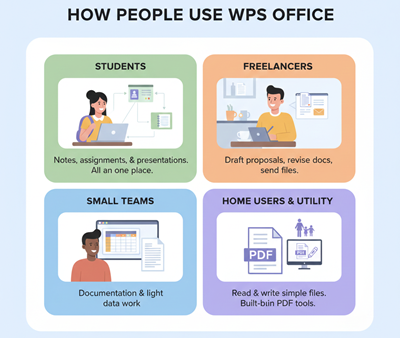
Students often treat WPS Office as their default workspace. Notes, assignments, and presentations all live in one place. Freelancers use it to draft proposals, revise documents, and send polished files without paying for more than they need.
Small teams rely on it for everyday documentation and light data work. Home users open it to read files sent by others or to write something simple. In many cases, the software becomes a utility rather than a product. It’s just there, doing its job.
The built-in PDF tools contribute to that feeling. There’s no need to open another app just to read or mark up a document. Everything stays contained.
A Quiet Fit for Modern Work
WPS Office doesn’t try to impress users with complexity. It earns trust by being consistent, familiar, and flexible. Its support for different languages, especially Chinese, makes it accessible to a wide audience that values clarity over novelty.
Over time, it becomes less noticeable, and that’s a good thing. When software fades into the background, work tends to move forward without interruption. For many users, that quiet reliability is exactly why WPS Office remains part of their daily routine.