You’re expected to ship pages fast, keep every pixel on-brand, and still leave room for the next campaign pivot. If your site depends on a dev queue or a fragile plugin stack, “small changes” turn into multi-day delays, and creative momentum dies in review threads.
Webflow hits a rare sweet spot: you get no-code speed without giving up the control creative teams need. That matters more than ever because AI-driven discovery, faster launch cycles, and distributed teams reward brands that can publish confidently, often, and without breaking things.

Designer-Led Production Without Compromising Quality
You don’t need another tool that makes your site look good in a mockup but fall apart in production. You need a system where design intent survives contact with reality, spacing, type scale, responsive behavior, and content rules.
Webflow’s visual building feels like design, but it forces the structure the way development does. That combination is why creative teams stop treating the website like a one-off project and start treating it like a product.
Turn Design Intent Into Real Structure
A Webflow build can mirror the way you think in components: sections, containers, and repeatable patterns instead of one-off pages. When you define spacing tokens and consistent typography rules early, every new page inherits polish instead of inventing it.
You spend less time “fixing alignment” and more time making intentional decisions about hierarchy and message.
Build A Reusable Component Library
You can create repeatable blocks that behave the same way across pages, so your brand stays consistent even when different people ship updates. You also reduce the risk that a late-night edit turns your homepage into a patchwork of slightly different buttons.
Keep Creative Control Without Reinventing Dev
Webflow lets you push advanced layouts and interactions while still producing predictable output, so creative control doesn’t become creative chaos. You can still drop in custom code when it’s truly needed, but the default workflow keeps most work inside a controlled system.
Collaboration That Actually Speeds You Up
The slow part of shipping isn’t design, it’s coordination, and for many teams, a B2B web design agency is great for big builds and for day-to-day approvals. Stakeholders want edits, writers want flexibility, and someone has to make sure nothing breaks before publication.
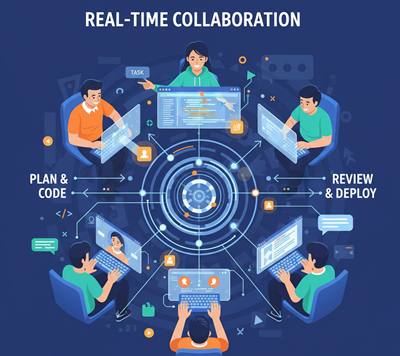
Webflow has leaned hard into team workflows, including real-time collaboration, so fewer tasks require handoffs. That shift is what turns “quick change” from a promise into a habit.
Edit Together Without The Ping-Pong
Real-time collaboration changes the feel of a web project: you can have a designer, marketer, and content editor working in parallel instead of waiting for their turn. That means fewer duplicated efforts, fewer “latest version?” messages, and less accidental rework.
When collaboration is built into the same environment, you stop losing hours to context switching.
Make Reviews Cleaner And Less Personal
Creative feedback gets messy when it’s trapped in screenshots and vague comments. Webflow makes it easier to review actual pages, in context, with responsive behavior visible instead of guessed. Your team spends less time defending choices and more time aligning on outcomes like clarity, conversion, and accessibility.
Publish With Confidence, Not Courage
High control is partly emotional, you need to trust that a change won’t trigger a chain reaction. In Webflow, safer publishing habits come from predictable structure, permissions, and review-ready environments. When “publish” feels routine, you can ship more frequently—and that’s how creative teams win.
CMS Power That Matches How You Work
When your CMS is limited, you compensate with hacks, and every update becomes tedious. Webflow’s CMS is strong because it supports design-first thinking while still enforcing content structure. You can build once, then publish many times without rebuilding layouts for every new entry.
Model Content Like A Product Team
Instead of treating content as paragraphs pasted into a page, you can model it as structured fields that appear everywhere consistently. That lets you scale pages, case studies, team bios, resource hubs, without losing design integrity. Your writers get clarity, your designers keep control, and your site stays coherent as it grows.
Launch Campaign Pages Without Waiting
Marketing speed usually dies on the “last mile,” where a page looks right in a doc but needs dev time to go live. With Webflow, you can assemble a campaign page from proven components, swap copy, and ship the same day without violating brand rules.
Localize Without Breaking SEO
Webflow’s localization tooling has matured, making it easier to manage locales, localize CMS content, and control SEO metadata per region. When localization is built into your publishing workflow, international pages stop being a side project and start being part of the product.
Built-In Optimization That Keeps Getting Smarter
Creative teams don’t just need to publish, they need to learn what works and improve it. A patchwork of analytics scripts and optimization tools slows the site and fragments insight.
Webflow has been adding more first-party measurement and AI-assisted recommendations, so your optimization loop tightens. The win is speed plus signal: you can iterate quickly while staying grounded in real behavior.
Rely On First-Party Insights, Not Plugin Piles
When insights live inside the platform, it’s easier to connect what you changed to what happened next. Webflow’s newer analysis features help you spot traffic sources, visitor patterns, and engagement signals without stitching together five dashboards.
Optimize For Search And Answer Engines
Search isn’t only about ranking, it’s about being referenced, summarized, and trusted by AI-driven answers. Webflow’s AI tooling emphasizes practical site audits and actionable SEO suggestions, which help you clean up issues you’d otherwise ignore.
When you pair strong structure with clear intent, you’re better positioned for both traditional search and answer engines.
Protect Performance And Accessibility By Default
High-conversion pages aren’t just persuasive, they’re fast, readable, and usable. Webflow encourages cleaner structure and fewer fragile dependencies, which makes performance easier to maintain over time. When accessibility is treated as a built-in habit instead of a late checklist, your site becomes more inclusive and more resilient.
The Real Game Changer Is High-Control No-Code
Many no-code sites fail because teams treat them like toys. Webflow is powerful enough to reward discipline and punish improvisation, which is exactly why it works for serious creative teams. If you build a small set of rules and stick to them, you gain speed without losing quality.
Start With A System, Not A Homepage
A high-control site starts with a design system you can actually maintain: type scale, spacing, components, and content rules – when you build those foundations first, every future page is cheaper to produce and easier to review. Your site stops feeling like a collection of pages and starts feeling like a cohesive product.
Know When To Use Custom Code
Webflow’s visual tools cover most needs, but the smartest teams keep a clear boundary for code. Use custom code for truly unique logic, integrations, or edge interactions, not to patch inconsistent builds. That boundary keeps your site maintainable and prevents “quick fixes” from becoming permanent debt.
Run Your Website Like A Creative Product
Treat the site like something you iterate on weekly, not something you redesign every two years. Set ownership, define review standards, and document the components your team is allowed to use. When the process is clear, creative energy goes into ideas and storytelling, not into re-learning how the site works.
Conclusion
Webflow is a game-changer because it turns creative teams into reliable publishers without forcing you to become a developer. You get speed, control, and a workflow that supports how creative work actually happens: iterative, collaborative, and brand-sensitive.
The best part is that Webflow fits the reality, real-time teamwork, AI-assisted optimization, and content systems that scale across markets. If you want no-code that still respects craft, Webflow is the rare platform that makes “move fast” and “do it right” compatible.