It is 2 a.m. An alert fires. A finance employee’s account has just logged in from another country, and files on a shared drive are being renamed one by one. Who decides if this is a real attack? Who is allowed to shut down the server? Who calls the lawyer?
If your team has to argue about those answers while the incident is happening, you lost time you will not get back. A security incident response plan exists to settle those questions in advance.
A security incident response plan is a documented set of procedures that helps an organization detect, contain, investigate, and recover from cybersecurity incidents. It defines who does what, how people communicate, when to escalate, and how to restore normal operations with as little damage as possible.
This guide shows you how to build one that people can actually use. You will get the key components, a step-by-step process, a severity matrix, a roles table, common incident scenarios, and a checklist. We also cover the April 2025 update to NIST’s incident response guidance, which many articles still skip.
What Is a Security Incident Response Plan?
Think of it as a fire drill for your digital systems. Nobody wants to use it, but everyone is glad it exists when smoke appears.
1. Understanding Cybersecurity Incident Response
Incident response is the work of handling a security event from the first warning sign to full recovery. The field is also called computer security incident management. Teams spot the problem, work out how bad it is, stop it from spreading, remove the cause, restore systems, and learn from what happened.
A security event is anything observable, such as a failed login or a blocked connection. A security incident is an event that actually harms, or threatens to harm, your data, systems, or operations. Most events are harmless. The plan helps you tell the difference quickly.
2. What Is the Purpose of an Incident Response Plan?
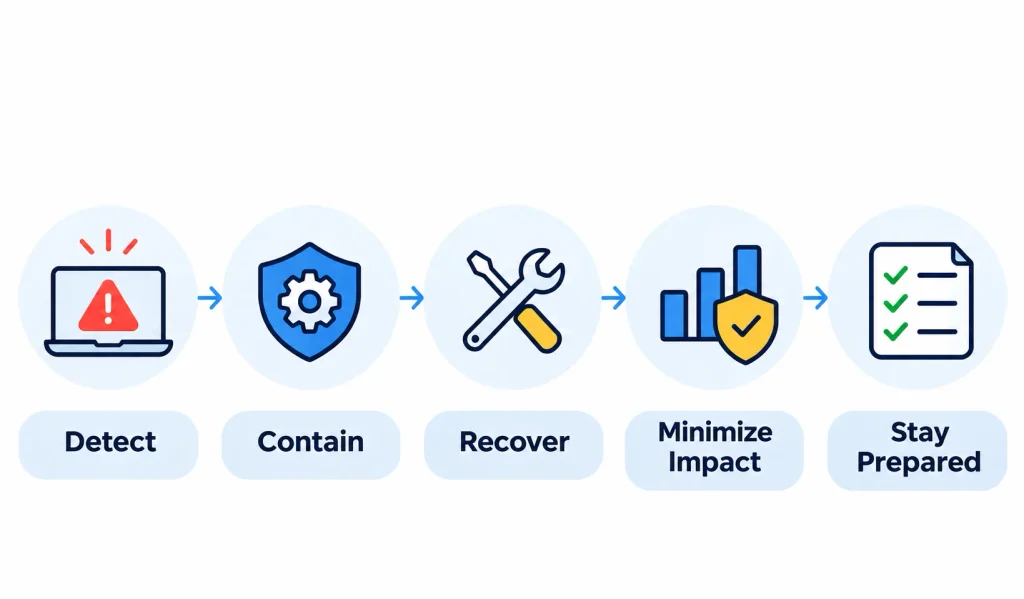
A good plan does six jobs:
- Limits the damage from an attack
- Reduces downtime and business disruption
- Protects sensitive data
- Gives the team clear direction under pressure
- Supports legal, regulatory, and contractual duties
- Helps the organization recover faster each time
A plan does not stop attacks from happening. It controls what happens next.
3. Security Incident Response Plan vs. Policy vs. Playbook
People mix up these three documents. They work together, but they are not the same.
| Document | What it answers | Typical length | Who reads it |
| Incident response policy | Why do we respond, and who has authority? | 1–3 pages | Leadership, auditors |
| Incident response plan | How does our organization handle incidents overall? | 10–30 pages | Response team, managers |
| Incident response playbook | What exact steps do we follow for this attack type? | 1–5 pages each | Analysts, engineers |
Your plan sets the structure. Playbooks, such as one for ransomware or one for phishing, give step-by-step actions for specific situations.
Why Is a Security Incident Response Plan Important?
Every organization that stores data or relies on connected systems can be hit. Size does not protect you. Small companies often have fewer defenses and fewer people to respond.
1. It Limits the Impact of Cyberattacks
Speed matters. The longer an attacker stays inside your network, the more accounts, files, and systems they can reach. A plan helps you contain the problem in hours instead of days.
2. It Protects Sensitive Business Data
Customer records, payment data, health information, and intellectual property all attract attackers. A clear process helps you find out what was accessed and stop further exposure.
3. It Reduces Financial and Operational Costs
Incidents cost money in several ways: recovery work, lost sales during downtime, legal fees, and customer churn. Prepared teams make fewer expensive mistakes, such as wiping a machine before evidence is saved.
4. It Supports Regulatory Compliance
Not every organization is legally required to have a written plan. Requirements depend on your industry, location, and contracts. But many rules make a plan the practical way to comply. Examples include:
- GDPR: organizations must generally notify the supervisory authority of a personal data breach within 72 hours of becoming aware of it, where feasible.
- HIPAA: covered entities and business associates must follow breach notification rules, including notifying affected individuals without unreasonable delay and no later than 60 days after discovery.
- SEC rules: public companies must disclose a material cybersecurity incident on Form 8-K within four business days after determining it is material.
- ISO/IEC 27001 and SOC 2: auditors commonly expect documented, tested incident handling.
Check with your legal counsel to confirm which rules apply to you.
5. It Improves Business Continuity
When systems go down, the business still needs to serve customers. Your incident response plan should connect to your disaster recovery and continuity plans so recovery priorities match business priorities.
6. It Builds Trust
Customers, partners, and regulators judge you by how you respond. Clear, timely, honest communication protects your reputation far better than silence or confusion.
What Are the Key Components of a Security Incident Response Plan?
Most plans that fail in practice are not missing a section. They are missing detail. A section that says “escalate to management” is useless at 2 a.m. unless it names who and how.
Here is what a working plan should include.
| Component | Purpose |
| Objectives and scope | Define what the plan covers |
| Incident classification | Set priority levels |
| Response team | Assign responsibilities |
| Detection and reporting | Explain how incidents are found and raised |
| Communication plan | Coordinate people inside and outside the company |
| Containment procedures | Limit the spread |
| Eradication procedures | Remove the threat and root cause |
| Recovery procedures | Restore systems safely |
| Documentation | Keep records and evidence |
| Testing and maintenance | Keep the plan current |
1. Objectives and Scope
State what the plan protects and what it applies to: which systems, locations, business units, cloud accounts, and third parties. Name the executive who approved it. Approval from leadership gives the team authority to act quickly.
2. Incident Classification and Severity Levels
Severity levels tell your team how fast to move and who to involve. Use the table below as a starting point, then adjust it to your own business impact and risk tolerance.
| Severity | Example | Response expectation |
| Critical | Active ransomware on core business systems | Immediate escalation, full team activated |
| High | Confirmed unauthorized access to sensitive data | Urgent investigation, executive notified |
| Medium | Malware found on one isolated workstation | Prioritized investigation |
| Low | Suspicious activity with no confirmed compromise | Standard investigation queue |
Write the criteria in plain terms. For example, “any confirmed exposure of customer personal data is High or above.” Avoid vague words like “serious.”
3. Response Team and Responsibilities
Your team is often called a CSIRT (Computer Security Incident Response Team). Larger companies may also have a security operations center (SOC), which monitors systems around the clock.
| Role | Primary responsibility |
| CISO | Security leadership and major decisions |
| Incident Commander | Runs the response and keeps everyone coordinated |
| SOC analyst | Detects, triages, and investigates alerts |
| IT administrator | Carries out containment and recovery actions |
| Forensics (DFIR) specialist | Investigates and preserves evidence |
| Legal counsel | Advises on legal duties and privilege |
| Compliance officer | Tracks regulatory and contractual obligations |
| Communications manager | Handles approved internal and external messages |
Name a backup for every role. People take holidays and get sick, and attackers know it.
A RACI chart (Responsible, Accountable, Consulted, Informed) helps here. It makes clear who makes the final call on decisions such as taking a system offline or notifying customers.
4. Detection and Reporting Procedures
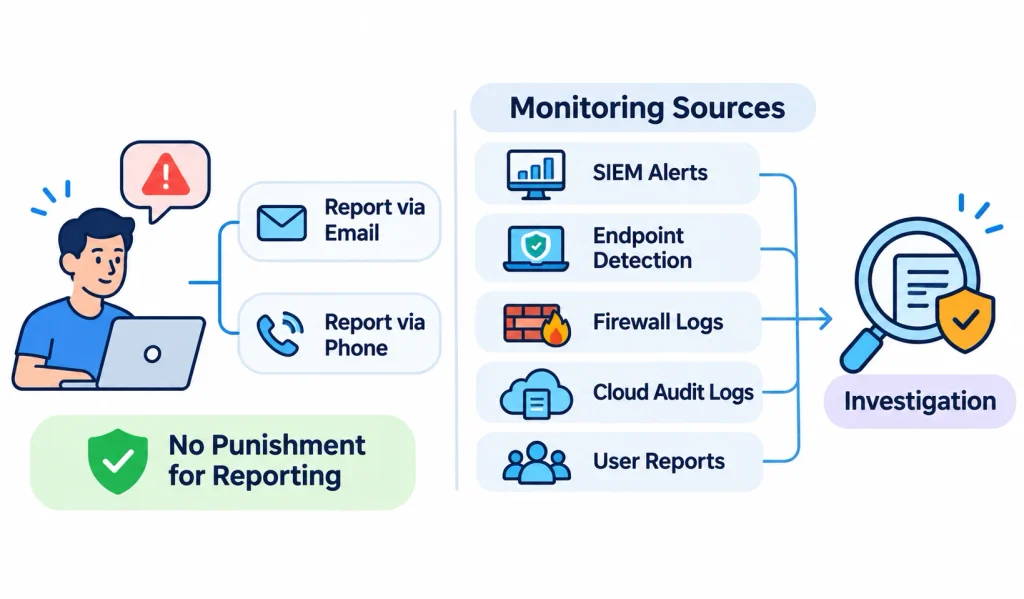
Employees are often the first to notice something wrong. Give them a simple, well-known way to report it, such as a dedicated email address or phone line, and make clear that reporting a mistake will not be punished.
On the technical side, list the monitoring sources that feed your investigations: SIEM alerts, endpoint detection, firewall logs, cloud audit logs, and user reports.
5. Communication and Escalation
Decide in advance:
- Who can declare an incident
- Who must be told at each severity level
- Who may speak to customers, media, regulators, and law enforcement
- How you will communicate if email or chat is compromised
Keep pre-approved message templates for internal alerts, executive updates, customer notices, and regulators. Writing them during a crisis leads to errors.
6. Containment and Eradication Procedures
List the actions responders are allowed to take, such as isolating a device, disabling an account, or blocking an IP address. Also note who must approve actions that affect the business, like shutting down a production system.
7. Recovery and Business Continuity
Define how you restore systems, how you confirm backups are clean, and which services come back first. Tie these priorities to your recovery time objective (RTO) and recovery point objective (RPO).
8. Documentation and Evidence Management
Record what happened, when, who did what, and why. Preserve evidence carefully. A documented chain of custody shows who handled each piece of evidence and when, which matters if the case goes to court or an insurer.
Maintaining strong data security practices, such as encryption and access controls, also helps protect sensitive information throughout the incident investigation process.
9. Testing and Maintenance
Set a review schedule, keep version history, and update contacts regularly. We cover this in detail below.
What Are the Steps in a Security Incident Response Process?
Many teams use a six-step lifecycle based on the SANS Institute model and the older NIST approach. It is simple, widely understood, and easy to turn into checklists. Later, we explain how this connects to NIST’s newer guidance.
The six steps are:
- Preparation
- Detection and identification
- Containment
- Eradication
- Recovery
- Post-incident review (lessons learned)
Step 1: Preparation
This step happens before anything goes wrong, and it decides how everything else will go.
- Identify your most important assets and data
- Build and train your response team
- Define incident types and severity levels
- Deploy monitoring and logging tools
- Set up communication channels, including a backup channel
- Write playbooks for likely attacks
- Train employees to recognize and report threats
Step 2: Detection and Identification
Here the team works out whether an alert is a real incident.
- Review alerts from SIEM, EDR, and intrusion detection tools
- Validate the activity and rule out false alarms
- Estimate the scope: which systems, accounts, and data are involved
- Assign a severity level
- Activate the plan and start a timeline log
Tip: start the timeline the moment you suspect an incident. Memory fades fast.
Step 3: Containment
Containment stops the problem from growing. Think of it as closing the doors before you search the house.
Short-term containment buys time:
- Isolate infected devices from the network
- Disable compromised accounts
- Block malicious IP addresses or domains
- Restrict suspicious traffic
Long-term containment keeps the business running while you prepare a full cleanup:
- Segment affected network areas
- Apply emergency patches
- Move critical services to clean systems
- Add temporary security controls
Before you wipe or rebuild anything, capture evidence such as logs, memory, and disk images. Containment and evidence preservation should happen together.
Step 4: Eradication
Now you remove the cause, not just the symptoms.
- Delete malware and attacker tools
- Remove persistence, such as hidden accounts or scheduled tasks
- Patch the vulnerability that let them in
- Reset compromised passwords and keys
- Find the root cause
If you skip root cause analysis, the attacker may come back through the same door.
Step 5: Recovery
Recovery returns systems to normal service, carefully.
- Restore from known clean backups or rebuild systems
- Check system integrity before reconnecting
- Test restored services
- Watch closely for signs of the attacker returning
- Bring business operations back in priority order
Define clear recovery criteria in advance. For example: “The system is restored from a verified backup, patched, scanned clean, and monitored for 72 hours without new alerts.” Measurable criteria prevent rushed decisions.
NIST also publishes SP 800-184, a guide to cybersecurity event recovery, which is a helpful companion for this step.
Step 6: Post-Incident Review
Hold a review soon after the incident, ideally within a couple of weeks while details are fresh. Keep it blameless. The goal is to fix the process, not punish people.
Cover these points:
- A clear timeline of events
- Root cause
- What worked and what did not
- Business and financial impact
- Improvements, with owners and due dates
Then update the plan. A lessons-learned meeting that does not change the document is wasted effort.
What Are the Common Types of Security Incidents?
Your plan should work for any incident, but playbooks for the most likely types make response faster. Here are the main ones, with a practical note on each.
1. Ransomware Attacks
Ransomware encrypts files and demands payment. Many attackers also steal data first, so recovery from backups may not end the problem.
A realistic example: A manager reports that files will not open and a ransom note appears on the screen.
- The SOC confirms encryption on several machines and classifies the incident as Critical.
- The Incident Commander activates the team.
- IT isolates affected devices and disconnects backup systems from the network so they are not encrypted too.
- Forensics captures evidence and looks for how the attackers got in.
- Legal assesses whether data was stolen and what notification duties apply.
- IT restores from clean backups after confirming the entry point is closed.
- The team runs a review and fixes the gaps.
Whether to pay a ransom is a leadership and legal decision. Law enforcement agencies generally discourage payment, and sanctions rules may also apply. Involve legal counsel early.
2. Phishing and Email Account Compromise
An employee clicks a link and enters their password on a fake login page.
Respond by resetting the password, revoking active sessions, and checking for suspicious mailbox rules, such as automatic forwarding. Then search for similar emails sent to other staff and block the sender. Multi-factor authentication (MFA) greatly reduces the damage from stolen passwords.
3. Data Breaches and Data Leaks
This covers any unauthorized access or exposure of sensitive data. The key questions are: what data, whose data, and for how long? Your legal and compliance leads need those answers quickly to meet notification deadlines.
4. Malware Infections
Isolate the device, identify the malware type, check whether it spread, and remove it. Rebuilding the machine is often safer than trying to clean it.
5. Insider Threats
Insiders may act with bad intent or make honest mistakes. Handle these cases with HR and legal involved from the start, limit access quietly if needed, and protect evidence carefully.
6. DDoS Attacks
A distributed denial-of-service attack floods a service with traffic. Work with your internet provider or a DDoS mitigation service, and communicate clearly with customers about service issues.
7. Cloud Security Incidents
Common causes include stolen cloud credentials and misconfigured storage. Key evidence sources include AWS CloudTrail, Azure Monitor, and Google Cloud Audit Logs. Remember the shared responsibility model: the cloud provider secures the platform, and you secure your configuration, identities, and data.
Implementing effective cloud security measures, including identity management, encryption, and continuous monitoring, helps organizations reduce the risk of unauthorized access and cloud-related incidents.
8. Third-Party and Supply Chain Incidents
A vendor breach can become your breach. Your plan should say how vendors notify you, what your contracts require, and how you will coordinate. Review these terms before you sign, not after an incident.
Who Is Responsible for Security Incident Response?
Clear ownership is one of the biggest factors in a smooth response.
- CISO: owns the security program and makes high-level decisions, including when to brief executives and the board.
- Incident Commander: runs the incident day to day. One person should lead so that decisions are not made by committee.
- SOC team: monitors, triages, and investigates.
- IT and infrastructure team: carries out containment and recovery.
- DFIR specialists: investigate and preserve evidence. DFIR stands for digital forensics and incident response.
- Legal and compliance: advise on notification duties, privilege, and regulator contact.
- Communications and PR: manage approved messages to employees, customers, and the press.
Small businesses may not have all these roles. One person can fill several, or you can use an outside incident response provider on retainer. What matters is that every task has an owner.
Which Incident Response Frameworks and Standards Should You Follow?
You do not need to invent your plan from scratch. These frameworks give you a proven base.
1. NIST SP 800-61 Rev. 3
NIST published Special Publication 800-61 Revision 3 in April 2025. It replaces Revision 2.
The older Revision 2 described a four-phase lifecycle: preparation; detection and analysis; containment, eradication, and recovery; and post-incident activity. Revision 3 takes a different approach. It treats incident response as part of overall cybersecurity risk management and aligns its recommendations with the functions of NIST Cybersecurity Framework (CSF) 2.0.
In plain terms, the update says: do not treat incident response as a separate technical task that starts when an alert fires. Build it into how your organization governs risk, prepares, detects, and improves. You can read the publication on the NIST Computer Security Resource Center.
That is why we call the six-step model above a common operational lifecycle rather than the current NIST model. It is still useful for writing procedures, but it is not a word-for-word copy of Revision 3.
2. NIST Cybersecurity Framework 2.0
CSF 2.0 has six functions:
- Govern: set strategy, roles, policy, and oversight
- Identify: understand your assets and risks
- Protect: put safeguards in place
- Detect: find attacks and compromises
- Respond: act on detected incidents
- Recover: restore normal operations
Here is a rough map between the two models:
| Operational step | Closest CSF 2.0 function |
| Preparation | Govern, Identify, Protect |
| Detection and identification | Detect |
| Containment and eradication | Respond |
| Recovery | Recover |
| Post-incident review | Improvement across all functions |
This mapping is a simplification to help you think, not an official NIST table.
3. SANS Incident Response Framework
The SANS Institute’s six-step approach (preparation, identification, containment, eradication, recovery, lessons learned) is popular because it is easy to teach and turn into checklists.
4. ISO/IEC 27001 and ISO/IEC 27035
ISO/IEC 27001 is the international standard for information security management systems. ISO/IEC 27035 focuses specifically on information security incident management. Organizations seeking certification often use both.
5. MITRE ATT&CK
MITRE ATT&CK is a public knowledge base of adversary tactics and techniques seen in real attacks. Responders use it to describe what an attacker did, improve detection rules, and plan tests. Its techniques help you think in terms of attacker behavior, not just indicators of compromise (IOCs), which can change quickly.
6. CISA Guidance
The US Cybersecurity and Infrastructure Security Agency (CISA) publishes practical material on incident response planning, including its Incident Response Plan Basics. It is a good, plain-language resource for smaller teams.
What Tools Are Used in Security Incident Response?
Tools support your process. They do not replace it. A great tool with no plan still produces a slow, confused response.
| Category | Purpose | Examples |
| SIEM | Collects and correlates logs, raises alerts | Microsoft Sentinel, Splunk Enterprise Security, IBM QRadar |
| EDR/XDR | Monitors endpoints, isolates devices, hunts threats | CrowdStrike Falcon, Microsoft Defender XDR |
| SOAR | Automates repetitive response steps | Palo Alto Cortex XSOAR |
| Case management | Tracks incidents and tasks | TheHive |
| Network and forensic analysis | Examines traffic and evidence | Wireshark |
| Cloud logging | Records cloud activity | AWS CloudTrail, Azure Monitor, Google Cloud Audit Logs |
A SIEM gathers log data from across your environment so analysts can spot patterns. EDR watches individual endpoints for suspicious behavior.
These are examples, not endorsements. The right choice depends on your size, budget, cloud footprint, and skills. A small team may do better with a managed detection and response service than with a complex tool stack it cannot staff.
Best Practices for Security Incident Response Planning
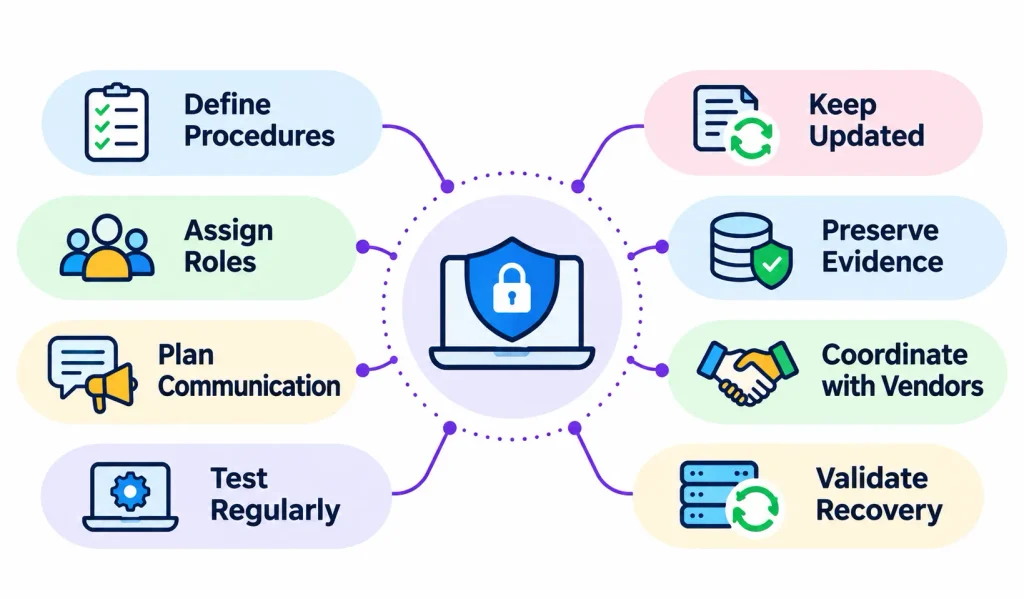
Define escalation paths. Spell out who gets called, in what order, and what happens if they do not answer.
Use out-of-band communication. If attackers control your email or chat, you cannot use them to coordinate. Keep a backup method, such as a separate messaging app or a phone tree, and print key contact lists.
Keep documents current. An outdated contact list is worse than none. Review it at least every quarter. Organizations should also follow cybersecurity best practices to stay informed about emerging threats and strengthen their overall security posture.
Preserve evidence early. Capture logs and system images before cleanup. Evidence you destroy cannot be recovered.
Involve vendors. Know who to call at your cloud provider, managed service provider, and cyber insurer. Many insurance policies require you to notify them quickly or use approved responders.
Run exercises. People perform under stress the way they practice.
Test your backups. A backup you have never restored is only a hope. Test restoration, and keep at least one copy offline or immutable.
Plan for absences. Name deputies for every key role.
Cover AI systems. If you run AI models or tools, consider risks such as compromised model access, leaked prompts or training data, and tampered data. Add them to your incident types.
How Do You Test and Maintain a Security Incident Response Plan?
A plan that has never been tested is a draft.
1. Tabletop Exercises
A tabletop is a guided discussion of a scenario, such as “ransomware hits on Friday evening.” No systems are touched. Participants talk through what they would do. It is cheap, fast, and reveals gaps in roles and communication.
2. Technical Simulations
These test actual procedures, such as restoring a server from backup or isolating a test endpoint. They show whether your tools and access really work.
3. Red, Blue, and Purple Team Exercises
In a red team exercise, authorized testers simulate an attack. The blue team defends. A purple team exercise has both work together, so defenders learn from each technique as it is tried. Use these once your basics are solid.
4. How Often Should You Review the Plan?
Many organizations review the plan at least once a year and run at least one exercise a year. Also review it after:
- A real incident
- Major changes in systems, cloud, or vendors
- Mergers, reorganizations, or staff turnover in key roles
- New laws or contract requirements
5. How to Measure Effectiveness
| Metric | Meaning |
| MTTD | Mean time to detect |
| MTTA | Mean time to acknowledge |
| MTTC | Mean time to contain |
| MTTR | Mean time to respond or recover |
Define each metric the same way across your organization. For example, decide whether MTTR means “respond” or “recover,” and when the clock starts. Otherwise, trends will mislead you. Track the numbers over time and use them to find bottlenecks, not to rank people.
Security Incident Response Plan vs. Disaster Recovery Plan vs. Business Continuity Plan
These plans overlap, so teams often confuse them.
| Factor | Incident response plan | Disaster recovery plan | Business continuity plan |
| Main goal | Manage security incidents | Restore IT systems | Keep essential operations running |
| Focus | Detection, containment, investigation | Technology recovery | Business processes and people |
| Typical trigger | Cyberattack or breach | Outage, disaster, major failure | Any major business disruption |
| Led by | Security and IT | IT and infrastructure | Business leadership |
| Outcome | Threat contained and understood | Systems restored | Critical work continues |
In a ransomware attack, all three come into play. The incident response plan contains and investigates the attack, the disaster recovery plan restores systems, and the business continuity plan keeps orders and customer service moving in the meantime.
Common Mistakes to Avoid
Never testing the plan. Untested plans fail in surprising ways.
Skipping severity levels. Without them, every alert feels equally urgent, or nothing does.
Unclear roles. If everyone is in charge, nobody is.
Ignoring third parties. Vendors often hold your data and have access to your systems.
Using compromised channels. Do not coordinate over email an attacker may be reading.
Destroying evidence. Rebuilding machines before capturing evidence removes your best clues.
Never restoring a backup in practice. Find out it fails during a drill, not a crisis.
Not updating after incidents. Every incident teaches something. Write it down.
Security Incident Response Plan Checklist
Copy this list into your own document and adapt it.
Before an incident
- [ ] Identify critical assets and data
- [ ] Document incident types and severity levels
- [ ] Assign roles and name backups
- [ ] Keep emergency contacts current, including legal, insurer, and vendors
- [ ] Set up a secure backup communication channel
- [ ] Configure logging and monitoring
- [ ] Test backups and recovery
- [ ] Train employees to report suspicious activity
During an incident
- [ ] Validate and classify the incident
- [ ] Start a timeline log
- [ ] Activate the response team
- [ ] Notify stakeholders according to severity
- [ ] Contain affected systems
- [ ] Preserve evidence
- [ ] Investigate the root cause
- [ ] Remove the threat
- [ ] Track notification deadlines with legal
After an incident
- [ ] Restore and validate systems
- [ ] Monitor for repeat activity
- [ ] Complete the incident report
- [ ] Hold a blameless review
- [ ] Assign and track improvements
- [ ] Update the plan and playbooks
Frequently Asked Questions About Security Incident Response Plans
What is a security incident response plan?
It is a documented set of procedures that tells an organization how to detect, contain, investigate, and recover from cybersecurity incidents. It assigns roles, sets escalation and communication rules, and guides recovery.
What are the six steps of incident response?
The commonly used six steps are preparation, detection and identification, containment, eradication, recovery, and post-incident review.
What are the four phases of incident response?
The four phases come from NIST SP 800-61 Revision 2: preparation; detection and analysis; containment, eradication, and recovery; and post-incident activity. NIST replaced that revision with Revision 3 in April 2025.
What should a security incident response plan include?
At minimum: scope, severity levels, team roles, reporting and detection procedures, communication and escalation rules, containment, eradication and recovery steps, documentation requirements, and a schedule for testing and updates.
Who is responsible for incident response?
An Incident Commander usually leads, supported by security analysts, IT staff, forensics specialists, legal and compliance advisors, and communications staff. The CISO or an equivalent executive owns the overall program.
How often should you test the plan?
Most organizations test at least once a year, and more often if they face high risk or major changes. A tabletop exercise is a low-cost place to start.
What is the difference between an incident response plan and a disaster recovery plan?
An incident response plan handles security incidents. A disaster recovery plan restores IT systems after any major disruption. They work together during events such as ransomware.
What tools are used for incident response?
Common categories include SIEM, EDR or XDR, SOAR, case management, network analysis tools, and cloud logging services.
What is the NIST incident response framework?
NIST SP 800-61 is NIST’s guide to incident response. Revision 3, published in April 2025, aligns incident response with the CSF 2.0 functions and treats it as part of cybersecurity risk management.
Final Thoughts
A strong security incident response plan is not a binder on a shelf. It is a living set of decisions your team has already made, so they do not have to invent them in the middle of an attack.
Start small if you need to. Name your roles, define three or four severity levels, write one playbook for your most likely threat, and run a tabletop exercise. Then improve it after each test and each real event.
Align your work with recognized guidance such as NIST SP 800-61 Rev. 3, CSF 2.0, and CISA’s resources. Most of all, treat the plan as an ongoing practice, not a one-time compliance document.