Temp Mail Ninja-style services are fine for low-stakes jobs and a poor choice for any account you may need to recover later.
You need a quick download link. The site wants your email address first. You know what comes next: weeks of promotional emails you never asked for. Temporary email services exist to solve that problem, and Temp Mail Ninja is one of many that promise to fix it. This guide explains what the service is, how it works, where the privacy risks sit, how to test it yourself, and when you should pick something else.
One thing to know upfront: more than one website uses the Temp Mail Ninja name, so always confirm which exact site you are on before you type anything into it.
What Is a Temp Mail Ninja?
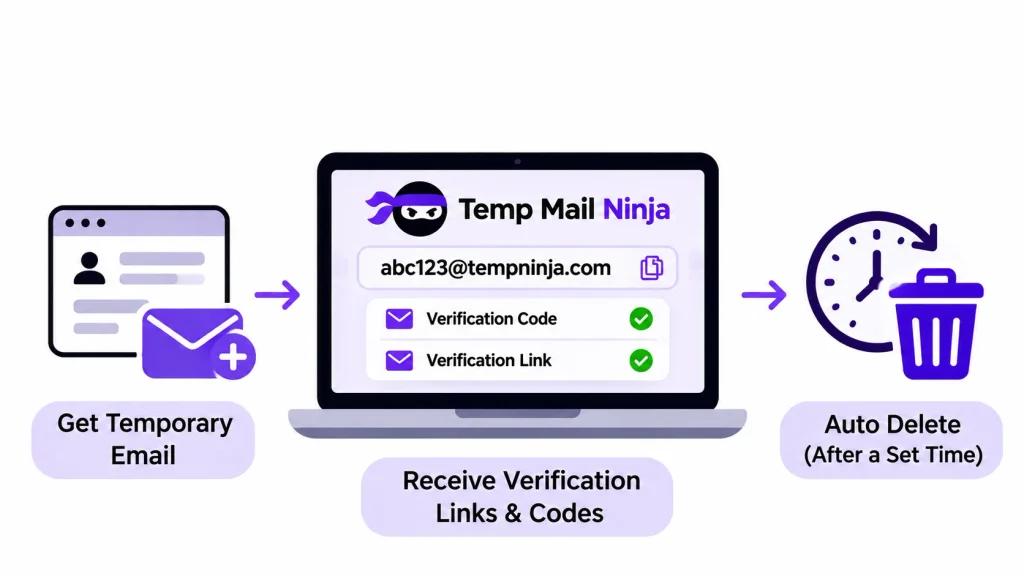
Temp Mail Ninja is a disposable email service that gives you a temporary address, usually without sign-up, so you can receive verification links and codes without exposing your real inbox. The address and its messages are normally deleted after a set time.
This follows the idea of disposable email addressing: use a separate address for one contact or purpose, and if it lands on a spam list, abandon it while your main inbox stays clean.
1. Several sites share the name
Public listings show more than one product with a similar name. Ownership is not confirmed, so treat them as separate products.
| Name you may see | What public listings say | Why it matters |
| TempMailNinja.com | Described on Product Hunt as a fast temporary email service with no registration | Check its own privacy policy and terms |
| Temp Mail Ninja PW | Listed on AlternativeTo as freemium, developer shown as unknown | Operator and plans may differ from the others |
| Other “Ninja” sites and extensions | Similar names, separate products | Never assume the same features or policies |
Features, plans and data handling can differ between them. Confirm the exact domain in your address bar, and type it yourself rather than clicking an ad, because look-alike domains are a common trap in this category.
2. How it differs from a normal email account
| Normal account (Gmail, Outlook) | Temporary inbox | |
| Login and password | Yes | Usually none |
| Account recovery | Yes | No |
| Storage | Long term | Minutes to days |
| Who can read it | Only you | Often anyone with the address |
| Can send mail | Yes | Often receive-only |
Common uses
- Downloading a free guide, template or sample
- Signing up for a trial you may not keep
- Testing a registration form during development
- Avoiding marketing email from a site you do not know yet
How Does Temp Mail Ninja Work?
A temporary email service runs its own mail server and a pool of domain names, then shows any message sent to a random address on those domains in a web inbox.
Behind the scenes
- The service owns several domains and points their mail records (MX records) at its own server.
- When you open the site, it generates a random address on one of those domains.
- You give that address to another website.
- That website sends its email to the service’s mail server, exactly as it would to any inbox.
- The server accepts mail for any address on its domains and files each message under the matching address.
- Your browser shows the message, either live or after a refresh.
- After a set time, the address and its messages are deleted.
Because most services have no login, the address itself acts as the key. That is what makes these inboxes convenient, and also why they are not private the way a real account is.
Step-by-step: using it
- Open the right site. Type the address yourself rather than clicking an ad.
- Copy the generated address, usually shown at the top of the page.
- Paste it into the sign-up form of the other website.
- Wait for the email, keeping the tab open and refreshing if needed.
- Copy the code or click the link in the message.
- Close the tab or delete the inbox when you are done.
Keep the tab open until you finish. On many disposable services, closing it loses access to the address.
Why mail sometimes never arrives
- The sending site delays or throttles messages to new or unknown domains.
- The sender filters out domains it knows are disposable.
- The address was mistyped, or the inbox already expired.
- The service is under heavy load, which slows delivery.
Temp Mail Ninja Features: What to Expect
These are features disposable inbox services commonly offer, not a promise that every Temp Mail Ninja site has each one. Check the specific site first.
| Feature | What it means for you | Verify before relying on it |
| Instant address | An address appears on page load, with no form | Any captcha or ad gate in the way |
| Live inbox | New mail appears automatically or via a refresh button | How fast mail actually lands |
| Code and link support | The main reason people use these tools | Whether links open correctly |
| Multiple domains | More domains help when a site rejects one | How many are offered |
| Expiry and deletion | Mail is removed after a period the service sets | The exact lifetime |
| Browser extension | Some Ninja-named products offer one | Developer, reviews and permissions |
| Free and paid tiers | AlternativeTo lists Temp Mail Ninja PW as freemium | What each tier includes today |
Features not to assume
- Sending email (many services are receive-only)
- Long-lived inboxes
- Custom or chosen addresses
- Attachment support
- Any guarantee of deletion
Test each of these yourself before you depend on them. The testing checklist later in this guide shows how.
Is Temp Mail Ninja Safe? Privacy and Security
It is reasonably safe for throwaway tasks and unsafe for sensitive ones, because safety depends on what you put through it, not only on the site.
Think of a temporary inbox as a public bulletin board with a hard-to-guess name. It works only while nobody guesses the name and nothing posted there matters.
1. The main risks
- Open inboxes. If the address is the only key, anyone who guesses or learns it can read your mail.
- Unknown operators. Free services have to pay for servers somehow, through ads, data or both. If the operator is hidden, you cannot judge which.
- Intercepted codes and links. A verification link in a shared inbox can be used by someone else before you.
- Look-alike sites and fake extensions. Copycat domains and unreviewed browser extensions can harvest what you enter or read what you browse.
- No recovery. Once the inbox expires, so does your path to resetting any password tied to it.
- Logging. The site may record your IP address, browser details and the messages themselves. If your personal email details are exposed through a data breach or phishing attack, understanding what a compromised email address means can help you recognize the risks and take appropriate action.
2. What to check in the privacy policy
Read the policy of the specific site you plan to use and look for plain answers to these:
- Retention: how long are messages kept, and are they truly deleted?
- Logs and IP addresses: are visitors recorded, and for how long?
- Cookies and ads: does it use advertising partners or analytics?
- Inbox access: can anyone who knows the address read the inbox?
- Operator: does the site say who runs it and how to contact them?
If the policy is vague or the operator is hidden, treat the service as untrusted. That is a sensible default for any free disposable mail tool. The same caution applies to online platforms generally, making cybersecurity considerations when building custom software important for protecting user information and sensitive data.
3. HTTPS is not inbox privacy
HTTPS protects data in transit between your browser and the site. It does not decide who can open an inbox or what the operator stores afterward. Do not read a padlock icon as a privacy guarantee.
4. What never to send through a temporary inbox
- Banking, tax or payment account emails
- Password resets for accounts you care about
- Anything with ID numbers, medical details or private documents
- Work, school or any account tied to your identity
If you want spam protection but still need access later, a forwarding alias is the better tool. Privacy International’s guide to disposable addresses and security writer Brian Krebs’s coverage of email aliases both explain the trade-offs.
Why Websites Block Disposable Emails
Many sites reject temporary addresses because a disposable address cannot be used to reach the customer again, which makes it useful to abusers and useless to the business.
Why businesses block them
- Fraud and abuse. Fake accounts, free-trial farming, coupon abuse and review spam often rely on throwaway addresses.
- Lost marketing value. A list full of dead addresses lowers delivery rates and inflates costs. Businesses can improve communication reliability by using proper email automation practices to manage confirmations, reminders, and other important messages.
- Account recovery. Support teams cannot help a user whose inbox no longer exists.
- Compliance. Some regulated services must be able to contact a verified person.
How detection usually works
- Domain blocklists. The site checks the part after the @ against lists of known disposable domains. Fraud-prevention vendors such as SEON describe email validation tools that flag these.
- Mail-server checks. Some validators look up a domain’s mail records and spot patterns shared by throwaway services.
- Behavior signals. A brand-new domain, a very recent registration or many sign-ups from one IP can raise suspicion.
What to do when an address is rejected
- Try another domain from the same service, since lists lag behind new domains.
- Switch to a forwarding alias such as Apple Hide My Email or a Gmail plus tag. These look like real addresses and keep your main inbox out of view.
- Ask yourself whether the site really needs your email. If it does and you want the account long term, use a real or alias address.
Do not try to evade fraud checks on services where the rules forbid temporary emails. That can get the account banned and, on some platforms, breach the terms you agreed to.
Temp Mail vs Aliases vs Plus-Addressing vs Burner Accounts
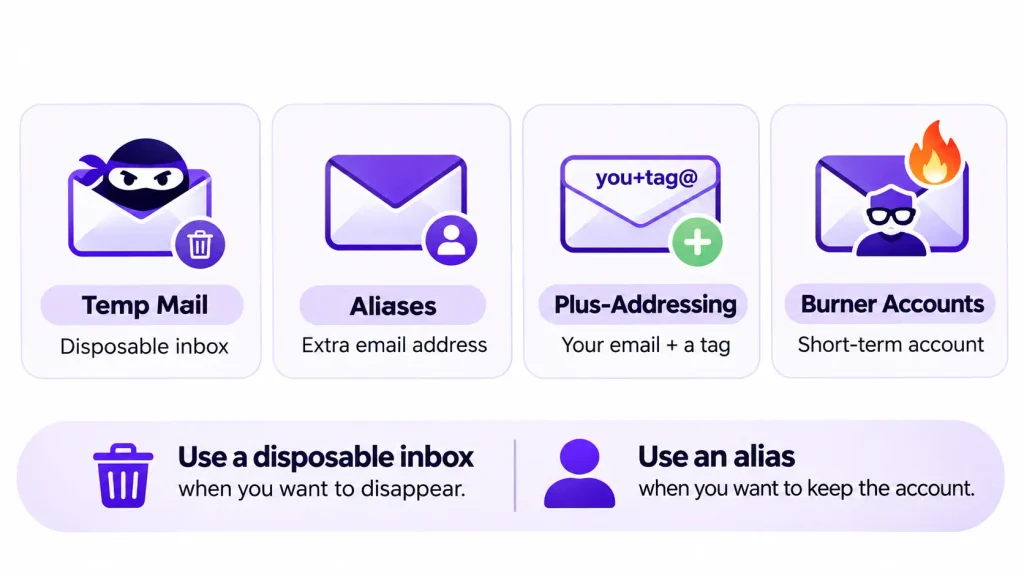
Use a disposable inbox when you want to disappear, and an alias when you want to keep the account.
| Option | How it works | Keeps recovery access | Blocked by sites | Best for |
| Temp mail (Ninja-style) | Random public inbox that expires | No | Often | One-time codes, free downloads |
| Forwarding alias (Apple Hide My Email, similar services) | Unique address that forwards to your real inbox | Yes | Rarely | Accounts you will keep |
| Plus-addressing (name+shop@gmail.com) | Tag added to your real address | Yes | Sometimes | Tracking who sold your address |
| Burner Gmail or Outlook account | A real second account | Yes, if you keep the login | Rarely | Long-running separate identity |
| Your main address | Normal inbox | Yes | Never | Banks, work, anything important |
The Spark team makes a useful distinction: use a disposable address for anonymity and an alias for organization.
How to choose in 10 seconds
- Will you ever need to log back in? If yes, use an alias or a real address.
- Do you only need a code or a file once? A temp inbox is fine.
- Is money, identity or work involved? Use your real address.
- Do you just want to know who leaked your address? Use plus-addressing or an alias.
Who Should Use It: Use Cases by Audience
Temp mail helps most when the cost of losing the inbox is zero.
| Who | Good use | Avoid |
| Students | Downloading free study templates, sample chapters or one-off resources | School portals, scholarship or exam accounts |
| Developers and QA testers | Testing sign-up, verification and welcome-email flows without real addresses | Production systems or real customer data |
| Freelancers | Trying a free tool or trial before deciding to commit | Client accounts, invoicing and payment tools |
| Online shoppers | Getting a first-order coupon from a store you may never use again | Any store account with order history or returns |
| Researchers and writers | Viewing gated content such as a free report or whitepaper | Subscriptions you will want to keep |
| Privacy-conscious users | Joining a forum or newsletter you do not trust yet | Anything that needs to stay private after the first message |
Example: a developer testing a sign-up form
A developer wants to confirm that the verification email arrives and the link works. Instead of creating ten real mailboxes, they generate a temp address for each test run, submit the form and check delivery time and content. A public inbox service such as Mailinator suits this better than a casual consumer tool, because it is designed for QA and does not pretend to be private.
Example: a shopper chasing a coupon
A store offers 10% off for subscribing. A temp address gets the code in under a minute and keeps promotional mail away from the real inbox. If the shopper later creates a real account, they sign up again with an alias so order and return emails stay accessible.
Test It Yourself: A 5-Minute Checklist
This guide contains no performance numbers because none were measured. You can run these checks in about five minutes and get an honest picture of how any disposable mail site performs.
| Test | How to do it | What to record |
| Address generation | Open the site and time how long an address takes to appear | Seconds to load, captchas, ads |
| Delivery speed | Sign up for a newsletter and time the confirmation email | Seconds until arrival |
| Verification code | Use a site that sends a one-time code | Whether it arrived complete |
| Refresh behavior | Reload the page after receiving mail | Whether the address and inbox survive |
| Attachments | Email a small file from another account | Whether it displays or downloads |
| Mobile | Repeat on your phone | Layout, copy button, ad clutter |
| Rejection | Try the address on a few popular sites | Which ones refuse it |
| Expiry | Note the countdown or stated lifetime, then check back | Whether mail really disappears |
Run the test twice on different days, since delivery speed can change with load. Write down the date so your results stay meaningful when the site changes.
Quick safety check before you start
- The address bar shows the exact domain you intended
- A privacy policy and contact details exist
- You are not logged into anything important in the same browser profile
- You will not enter real personal details in the test sign-ups
Pros and Cons
The strengths and weaknesses below apply to Temp Mail Ninja-style services as a category.
Pros
- Fast. No account is needed in most cases, so you can finish in under a minute.
- Protect your main inbox. A spam-prone site never learns your real address.
- Free to start. Public listings describe a free tier, with paid options on some products.
- Good for testing. Developers can check sign-up flows without real addresses.
- Low commitment. Nothing to unsubscribe from or delete afterward.
Cons
- Short-lived inboxes. Lose the address and you lose the account recovery path.
- Blocked by some sites. Many services check sign-ups against lists of known disposable domains.
- Limited privacy. Anyone with the address may be able to read the inbox.
- Name confusion. Several sites share the name, so it is easy to land on the wrong one.
- Unclear operators. The AlternativeTo listing shows the developer of Temp Mail Ninja PW as unknown, which is a reason for caution.
- Ads and clutter. Free tools often fund themselves with ads, which can be intrusive on mobile.
Pricing: Is It Really Free?
Public listings describe a free option with no registration, and the Temp Mail Ninja PW listing labels the product freemium with a subscription. Plans change, so confirm current details on the site itself.
For comparison, TechRadar’s review of Temp Mail reported a premium subscription starting at $10 per month and an API for developers. That shows what paid tiers in this category usually add: extra addresses, longer storage and developer access.
Three questions before you pay
- Is the payment page on the same domain, with a clear company name?
- Is there a refund policy you can read before paying?
- What exactly do you get that the free tier lacks?
Some Trustpilot reviews of other temporary mail services complain about refunds and ads, so read recent reviews before paying any provider.
How to avoid fake sites and extensions
- Type the domain yourself instead of following ads or social posts.
- Install extensions only from official store listings, and check the developer name, review count and requested permissions.
- Be suspicious of any “premium” prompt that appears inside the inbox itself.
- Never enter a card number on a page whose domain differs from the site you started on.
- Do not reuse a real password on any disposable service, even for a free account.
Temp Mail Ninja vs Other Temporary Email Services
Pick the alternative by your goal: a short-lived inbox for one code, a public inbox for testing, or an alias for anything you want to keep.
| Service | What it is | Worth knowing |
| Guerrilla Mail | Free disposable address service launched in 2006 | Random address on visit; sending has been suspended at times, so check current status |
| Temp-Mail (temp-mail.org) | Long-running temporary inbox with paid plans | TechRadar notes paid plans and an API; user reviews are mixed |
| 10 Minute Mail | Very short-lived inbox | Good for a single code, not for anything longer |
| YOPmail | Reusable public inboxes | Anyone who knows the name can read it |
| Mailinator | Public inbox popular with testers | Suited to development and QA, not private mail |
| Alias services (Apple Hide My Email, Gmail + tags) | Forward to your real inbox | You keep recovery access; not anonymous |
Features and availability change, so verify each service’s current status before relying on it.
Which one should you choose?
- One-time verification code: a short-lived inbox like 10 Minute Mail or a Ninja-style site.
- Developer testing: Mailinator or a service with an API.
- Accounts you want to keep: an alias that forwards to your real inbox.
- Heavy spam protection with recovery: a permanent alias, not a disposable inbox.
Best Practices for Using Temp Mail Safely
Treat every temporary inbox as public and permanent-loss, and the habits below follow naturally.
- Verify the domain. Type the address yourself and bookmark the right site.
- Keep the tab open until the email arrives and you have used the code.
- Use a fresh address for each site. Reusing one links your activity together.
- Never reuse a real password. Use a unique password on any account made with a temp address.
- Do not put personal details in the inbox. Assume the next reader could be a stranger.
- Save what matters immediately. Copy downloads or links before the inbox expires.
- Use a separate browser profile if you test several unfamiliar services.
- Keep ad blockers on, but allow the page if it fails to load.
- Switch to an alias the moment you decide to keep an account.
- Delete the inbox when you are done, if the service offers it.
Moving an account off a temp address
If you signed up with a temp address and later want to keep the account, change the email in the account settings while you can still receive the confirmation message. Do this before the inbox expires. If the site does not allow changing the email, treat the account as disposable and create a new one with an alias.
Common Problems, Fixes, and Ethical Use
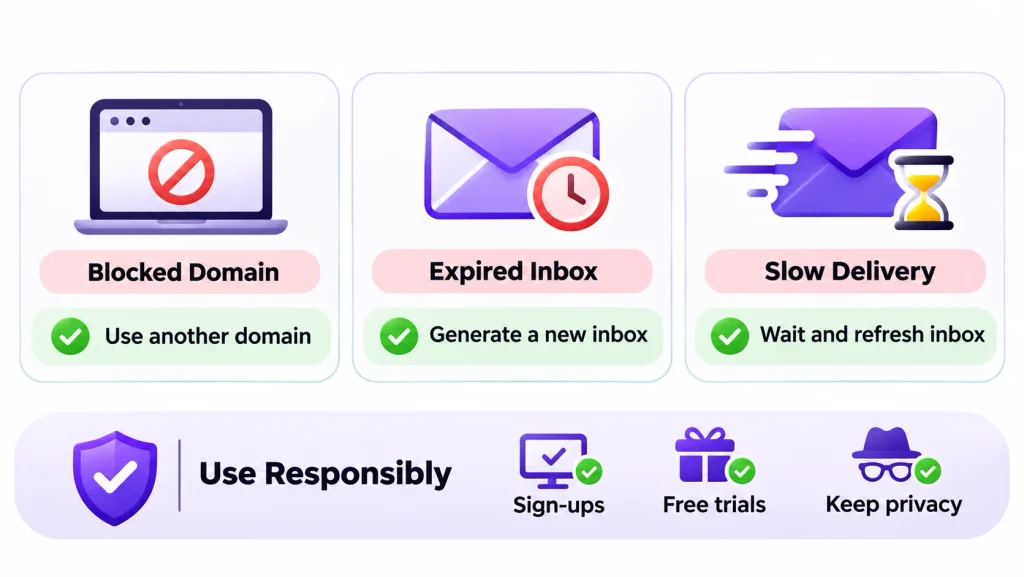
Most problems come down to a blocked domain, an expired inbox or slow delivery.
| Problem | Likely cause | Fix |
| Verification email not arriving | Delay, typo or sender filtering | Wait a minute, refresh, check the spelling, then generate a new address |
| Website rejects the address | Domain is on a disposable blocklist | Try another domain from the service, or use a forwarding alias |
| Inbox disappeared | It expired or the browser session was lost | Start over; most inboxes cannot be recovered |
| Page will not load on mobile | Ad blocking, network or browser issue | Try another browser, relax ad blocking for that tab, or switch networks |
| Extension not working | Outdated or broken install | Update or reinstall from the official store, and be wary of extensions with few reviews |
| Code expired before you used it | Slow delivery or reload | Request a new code and keep the tab open |
Legal and ethical considerations
Using a temporary address to avoid marketing email is generally fine. Some uses are not.
- Many services forbid temporary emails in their terms, and breaking those terms can get an account closed.
- Using throwaway addresses to farm free trials, dodge bans or abuse promotions can breach terms and, in some cases, the law.
- Services that must verify identity, such as financial, tax or regulated platforms, expect a real, reachable address.
- Do not use a temp inbox to receive anyone else’s private information, since the next reader may not be who you expect.
This is general information, not legal advice. When in doubt, read the terms of the site you are signing up to.
Frequently Asked Questions
Is Temp Mail Ninja safe?
It is reasonably safe for throwaway use such as free downloads. It is not suitable for banking, work or any account you need to recover. Check the privacy policy of the exact site you use.
Is Temp Mail Ninja free?
Public listings describe a free option with no sign-up, and some products list paid or subscription tiers. Confirm current pricing on the official site.
Does it require registration?
Public descriptions say no. Verify this on the site you plan to use, since several products share the name.
Can it receive OTP codes?
Temporary inboxes can generally receive one-time codes sent by email, but some sites block disposable domains. Test the specific site you need.
How long does an address last?
It depends on the product and plan. Check the site’s FAQ or terms for the exact period.
Can I send emails with it?
Many disposable services are receive-only. Do not assume sending is available unless the site says so.
Final Verdict
For quick, low-risk jobs, a Temp Mail Ninja-style inbox does the job: it is fast, usually needs no sign-up, and keeps junk out of your main email.
The weak spots are the ones every disposable service shares. Inboxes expire, some sites block them, privacy is limited, and several sites share the name, so you must confirm which one you are using. Operator transparency also varies, so read the policy first.
Use it for throwaway sign-ups, test it yourself with the checklist above, and move anything you might need later to an alias or a real address. If you want crowd opinions before trying it, search communities such as r/privacy on Reddit for recent user experiences, and weigh them as anecdotes, not proof.