In storytelling and content creation, pacing is everything. Whether you’re making a short-form TikTok video, a YouTube documentary, or even writing a blog, the way you structure your content determines how well your audience stays engaged. Too slow, and they might lose interest. Too fast, and they might feel overwhelmed.
Great pacing isn’t just about speed—it’s about rhythm, flow, and timing. It ensures that your message is delivered effectively while keeping your audience hooked. In this blog, we’ll explore why pacing matters, how modern tools like CapCut Desktop Video Editor help refine it, and how AI-powered features like text-to-voice and AI video generators contribute to seamless storytelling.
The Role of Pacing in Storytelling
Pacing is the heartbeat of storytelling. It dictates how a story unfolds, controls emotional impact, and influences audience retention.
- Slow pacing is useful for building suspense, developing characters, or emphasizing emotion. Think of a mystery novel or a cinematic scene where the camera lingers on a character’s expression.
- Fast pacing works well in action-packed sequences, social media clips, and high-energy promotional videos. Jump cuts, quick transitions, and snappy dialogue keep the momentum going.
Bad pacing—whether too slow or too fast—can ruin a piece of content. A well-paced video or story keeps the audience engaged, making them feel immersed in the experience.
Pacing in Digital Content
Different platforms demand different pacing styles:
- YouTube videos often follow a medium-to-fast pace, balancing storytelling with audience retention tactics like cliffhangers and quick cuts.
- TikTok and Instagram Reels thrive on rapid, engaging pacing since viewers tend to scroll quickly.
- Podcasts and documentaries benefit from a mix of slow and fast pacing to keep listeners engaged.
Knowing when to speed up or slow down is key to creating compelling content.
Pacing in Video Content: Keeping Viewers Engaged
Video content is one of the most demanding formats when it comes to pacing. A well-paced video keeps the audience watching, while a poorly paced one results in viewers dropping off within seconds.
Elements That Affect Pacing in Videos
- Cutting and Trimming – Removing unnecessary footage tightens the pacing.
- Transitions – Smooth transitions help maintain flow without abrupt jumps.
- Speed Adjustments – Speed ramping can emphasize dramatic moments.
- Music and Sound Effects – Well-timed beats enhance pacing and emotional impact.
One of the best video editing software, i.e., the CapCut Desktop Video Editor makes adjusting pacing effortless with its intuitive cutting tools, speed controls, and transition effects. Whether you need fast jump cuts or a cinematic slow-motion effect, CapCut provides the right tools to refine your storytelling pace.
Using AI for Pacing: Text-to-Voice & AI Video Generators
AI-powered tools have revolutionized content creation, making it easier than ever to control pacing. Two key innovations that help with pacing are text-to-voice conversion and AI video generators.
How Text-to-Voice Improves Voice Pacing
A robotic or poorly paced voiceover can ruin an otherwise great video. The text to voice feature in CapCut ensures a natural, well-paced narration that aligns with the flow of your video. It helps:
- Maintain consistent timing in voiceovers.
- Reduce human recording errors and retakes.
- Speed up content production by instantly generating voiceovers.
The Power of AI Video Generators
An AI video generator takes pacing a step further by automatically creating videos based on pre-set styles and pacing preferences, and can even generate AI characters to enhance storytelling. These tools analyze content to suggest cuts, transitions, and scene arrangements, ensuring a professional flow without manual effort.
CapCut incorporates AI-driven tools that simplify pacing adjustments, making video editing more efficient and accessible for creators of all levels.
Editing Tools That Help Control Pacing
Mastering pacing requires the right editing tools. CapCut offers several features that simplify pacing adjustments:
Key CapCut Features for Pacing Control
- Auto Captions: Helps maintain natural rhythm in videos.
- Beat Sync: Automatically aligns clips with music beats for dynamic pacing.
- Speed Ramping: Adjusts playback speed for smooth slow-mo or fast-motion effects.
- AI Speech Enhancement: Ensures clear, well-paced voiceovers.
With CapCut’s easy-to-use interface, even beginners can experiment with pacing techniques to create engaging content.
Using CapCut’s Text-to-Voice Feature
Want to add a professionally paced voiceover to your video? Here’s how you can use CapCut’s text-to-voice feature:
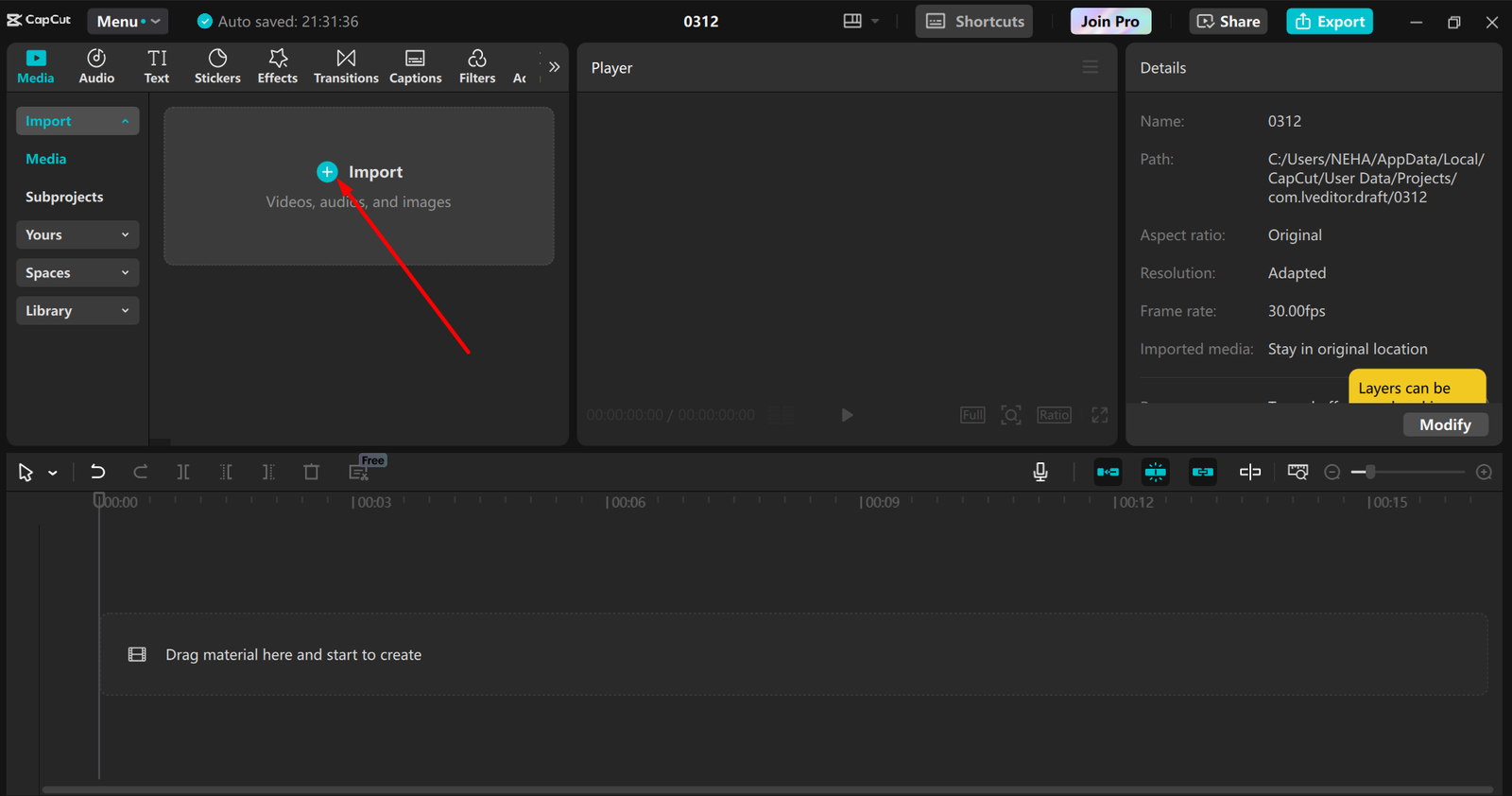
Step 1: Import Your Video
Open CapCut Desktop Video Editor. Then, click “Import” to add your video footage to the timeline.
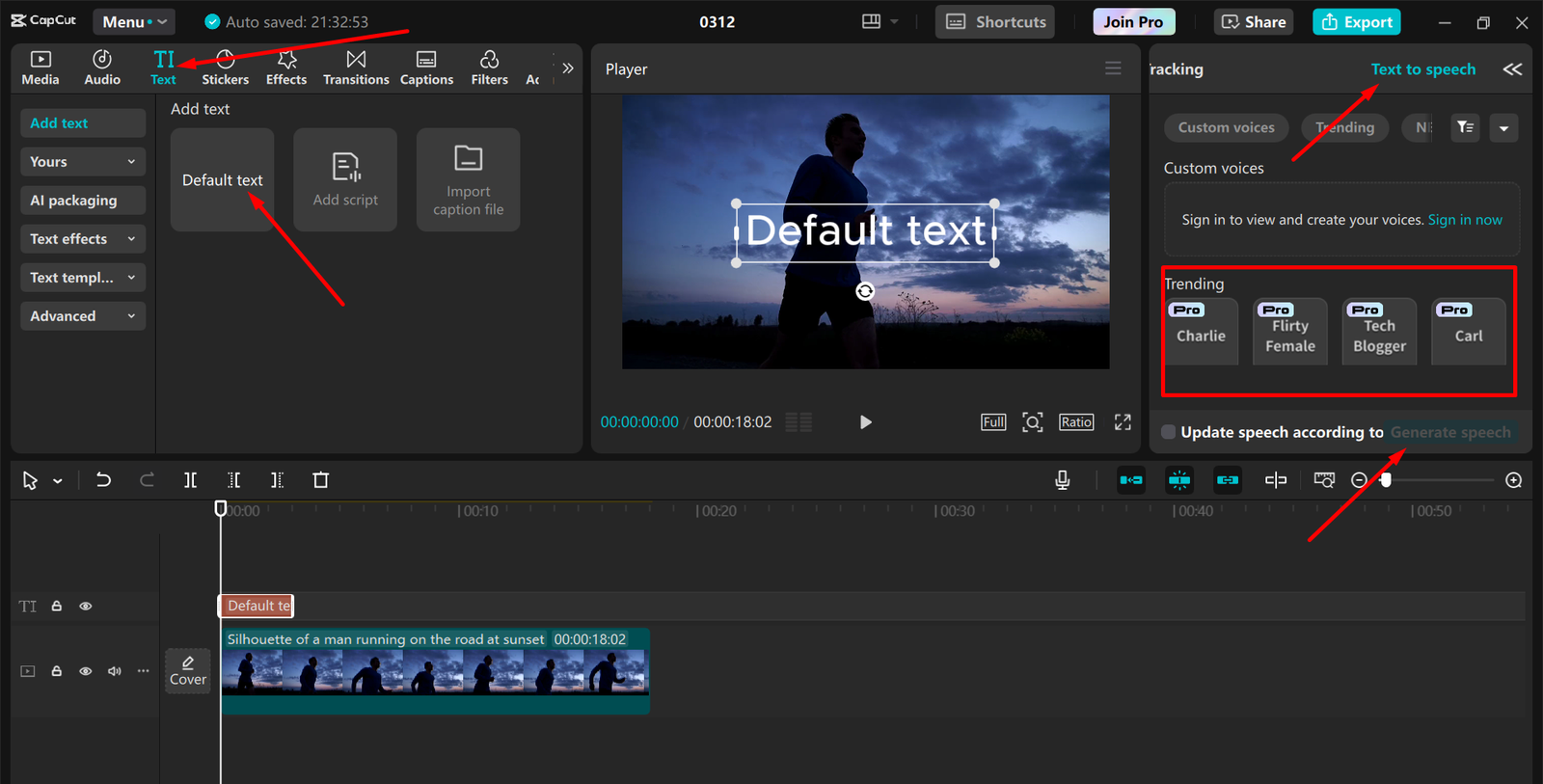
Step 2: Convert Text to Voice
Click “Text” in the toolbar. Select “Add Text” and type your script. Click “Text-to-Speech” and choose a voice style (e.g., male, female, energetic, calm). Adjust the voice speed and tone to match your pacing preference.
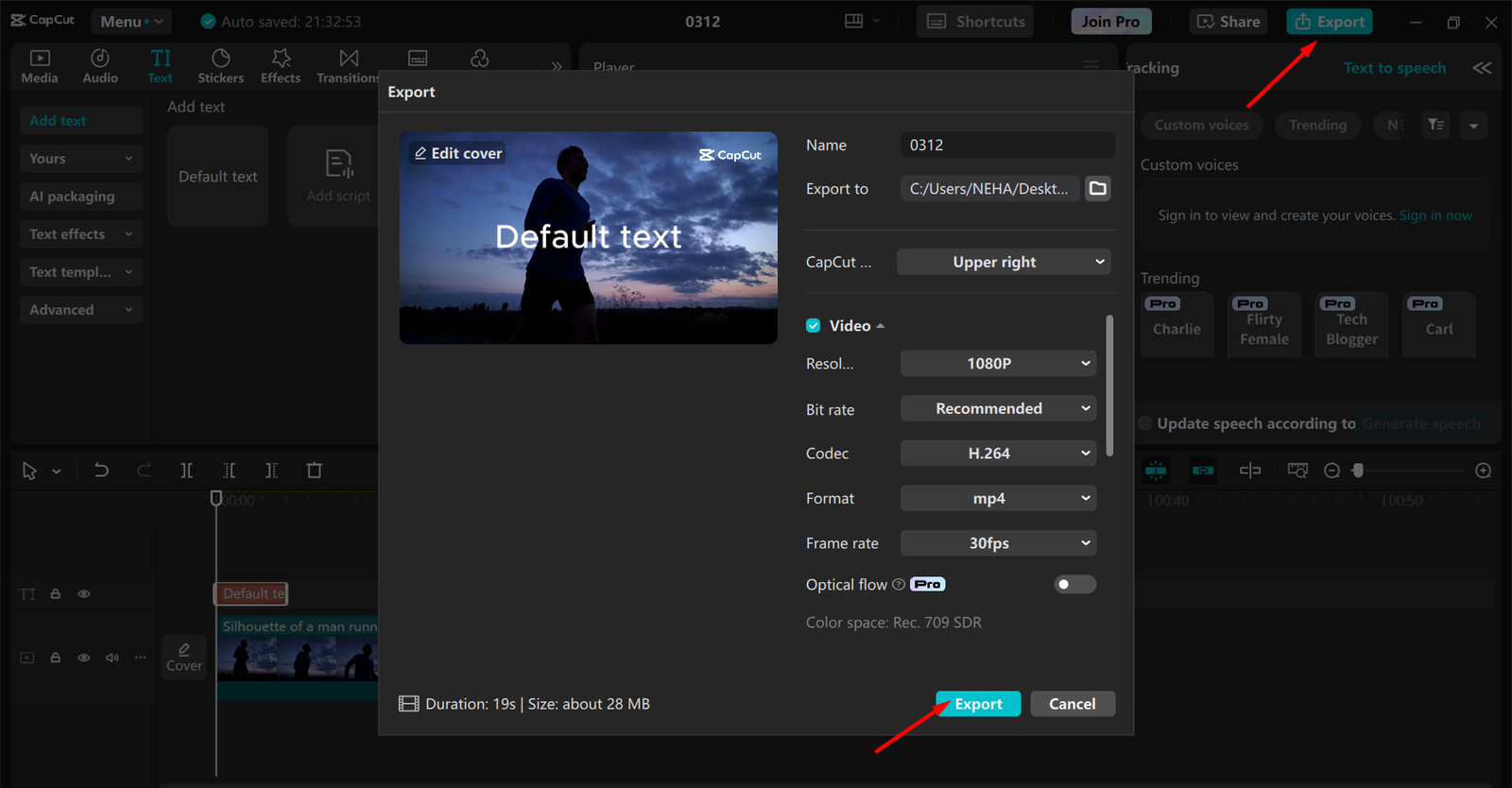
Step 3: Export Your Video
Once the voiceover is synced with your video, preview the pacing. Make any final edits (trimming, transitions, music). Click “Export” and select your desired format and resolution.
That’s it! In just a few clicks, CapCut helps you create a perfectly paced video with AI-powered narration.
Tips for Mastering Pacing in Your Content
- Know Your Audience: Adjust pacing based on their preferences (short, snappy content for Gen Z, slower, in-depth content for older audiences).
- Match Pacing to Your Platform: A fast-paced edit works best for TikTok, while YouTube videos can have more breathing room.
- Use CapCut’s Tools to Experiment: Try different speeds, transitions, and AI-powered features to find what works best.
Conclusion
Pacing is the invisible force that shapes how stories unfold and how audiences engage with content. Whether it’s a thrilling movie, a compelling blog post, or a fast-paced social media video, the right rhythm keeps viewers hooked from start to finish. By understanding how to balance speed, timing, and flow, creators can craft content that resonates, entertains, and informs effectively.
With the help of modern editing tools and AI-powered features like text-to-voice and automated pacing adjustments, refining storytelling has never been more accessible. The key is to experiment, fine-tune, and always keep the audience’s experience in mind. Mastering pacing isn’t just about keeping content moving—it’s about creating an emotional journey that leaves a lasting impact.