A network intrusion prevention system (NIPS) is a security technology that watches network traffic in real time, spots suspicious or malicious activity, and blocks it before it reaches protected systems. It usually sits inline, so traffic passes through it, and it relies on signature-based detection, anomaly detection, and protocol analysis to stop attacks.
Most networks now carry far more than web pages and email. Cloud apps, remote staff, APIs, and connected devices all send traffic across your infrastructure, and attackers know it. A firewall alone cannot judge what is inside every connection.
That is the gap a network intrusion prevention system fills. In this guide, I explain how NIPS works, where it fits, what it can and cannot stop, and how to choose and run one. I keep the jargon light and the examples practical.
What Is a Network Intrusion Prevention System (NIPS)?
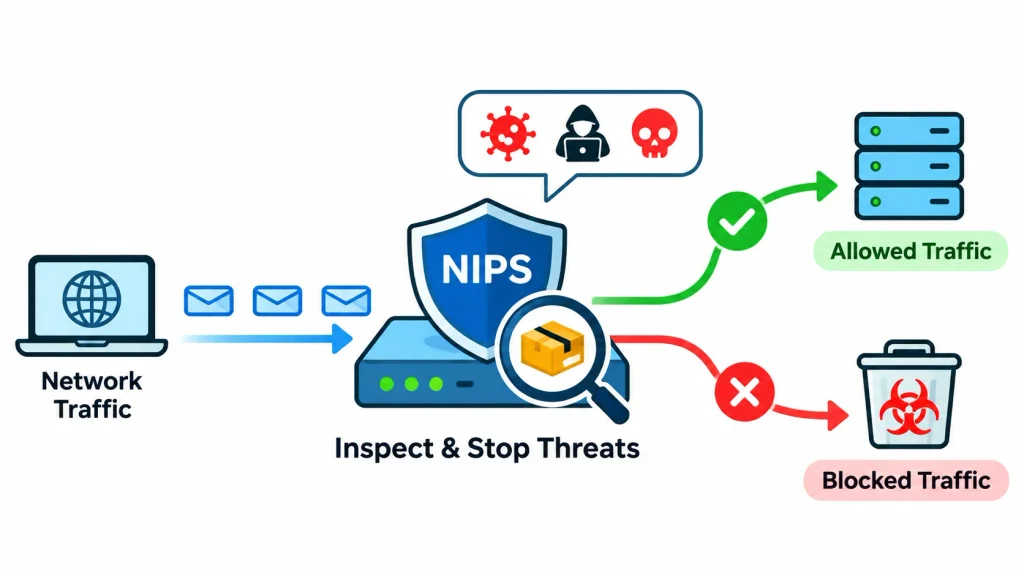
A network intrusion prevention system is a tool that inspects the traffic moving across your network and stops harmful traffic automatically. Think of it as a security checkpoint that opens every package, compares it with a list of known threats, and refuses entry to anything that looks dangerous.
Unlike a basic alarm, a NIPS does not just tell you something is wrong. It can drop the bad packets, reset the connection, or block the sender. That ability to act in real time is what makes it a prevention tool, not only a monitoring tool.
1. What Does NIPS Stand For?
NIPS stands for Network-based Intrusion Prevention System. The “network-based” part means it watches traffic on the wire, across many devices at once. A host-based system, by contrast, runs on a single computer or server.
2. What Is the Main Purpose of NIPS?
The main purpose of NIPS is to stop network attacks before they reach servers, applications, and user devices. It does this by finding malicious patterns in traffic and applying a response you have configured. It also records what it sees, which helps your team investigate incidents later.
3. How Is NIPS Different From Traditional Network Monitoring?
Traditional monitoring tools collect data and raise alerts. A person then decides what to do. That works, but attacks can finish in seconds, long before anyone reads the alert.
A NIPS adds automatic action. It still logs and alerts, but it can also block the threat on the spot, within the rules you set.
How Does a Network Intrusion Prevention System Work?
A NIPS works in seven steps, and they happen in a fraction of a second for each packet:
- Network traffic enters the NIPS, usually because the device sits inline on the traffic path.
- The system captures the packets and reads them.
- Detection engines compare traffic with known attack patterns and normal behavior.
- Suspicious activity is flagged.
- Your prevention policy decides what to do with it.
- The NIPS drops the packets, resets the connection, or blocks the source.
- The event is logged and, if configured, sent to your security team or SIEM.
Let’s look at the main parts of that process.
1. Network Traffic Monitoring
The NIPS sees traffic going in and out of the network segment it protects. It follows connections over time, not just single packets. That context matters, because many attacks only look suspicious when you see several packets together.
2. Deep Packet Inspection (DPI)
Every packet has a header, which says where it is going, and a payload, which carries the actual data. A basic filter reads only the header. Deep packet inspection goes further and reads into the payload and the protocol and application details too.
This is how a NIPS can tell the difference between a normal web request and one that hides an exploit string.
3. Threat Detection and Analysis
NIST SP 800-94 groups detection into three common methods. Most products mix them.
Signature-Based Detection
The NIPS compares traffic with a library of known attack patterns, called signatures. It is fast and accurate for known threats. It cannot catch an attack that has no signature yet.
Anomaly-Based Detection
Here the system learns what normal traffic looks like, then flags big departures from it. This can reveal new or unusual attacks. The trade-off is more false alarms, especially when your network changes.
Stateful Protocol Analysis
The NIPS knows how protocols such as TCP, HTTP, and DNS are supposed to behave. If a session breaks those rules, it stands out. For example, a client that sends data in an order the protocol does not allow is a warning sign.
4. Automated Threat Prevention
When the NIPS decides traffic is malicious, it can act in several ways:
- Drop the malicious packets.
- Reset the connection.
- Block the source IP address for a set time.
- Apply a custom policy, such as alert only for low-risk rules.
Most teams start with alert-only mode for new rules, then switch proven rules to block mode.
5. Security Logging and Reporting
Every decision creates a record: what was seen, which rule matched, and what action followed. Sending these logs to a SIEM lets your team connect NIPS events with data from firewalls, servers, and endpoints. That makes investigations faster and more complete.
Organizations can further strengthen their security operations by adopting managed detection and response services to continuously monitor threats, investigate suspicious activities, and respond to potential security incidents.
Businesses can strengthen this process by combining SIEM with other security monitoring tools to improve threat visibility, identify suspicious activities, and coordinate incident responses.
What Are the Different Types of Intrusion Prevention Systems?
NIPS is one of several categories. NIST SP 800-94 describes four classes of intrusion detection and prevention technology: network-based, wireless, network behavior analysis, and host-based. They differ mainly in what they watch and where they run.
| Type | What it watches | Where it runs | Best for |
| NIPS (network-based) | Traffic across network segments | Inline at key network points | Stopping attacks in transit |
| HIPS (host-based) | One server or workstation | On the device itself | Protecting critical endpoints |
| WIPS (wireless) | Wi-Fi traffic and devices | Sensors near access points | Finding rogue access points |
| NBA (network behavior analysis) | Traffic patterns and volume | Sensors or flow data collectors | Spotting unusual flows, such as DDoS behavior |
1. Network-Based Intrusion Prevention System (NIPS)
NIPS protects whole network segments. You place it at a gateway, between zones, or in front of a data center. One device can protect many systems, including ones that cannot run security software.
2. Host-Based Intrusion Prevention System (HIPS)
HIPS runs on the endpoint. It sees things a network device cannot, such as file changes and local processes. The cost is that you must install and manage it on every protected host.
3. Wireless Intrusion Prevention System (WIPS)
WIPS focuses on Wi-Fi. It looks for rogue access points, unauthorized wireless devices, and attacks against wireless networks.
4. Network Behavior Analysis (NBA)
NBA studies traffic patterns to find odd behavior, such as a sudden surge of connections. NIST treats it as its own technology class rather than a subtype of NIPS, and many products blend it with network-based inspection.
The four are not rivals. Mature security programs often combine them.
What Types of Cyberattacks Can NIPS Prevent?
A NIPS can help stop many network-borne attacks. How well it does depends on four things: the signatures and rules you have loaded, how it is configured, whether it can see the traffic, and what the specific product supports. No NIPS stops everything.
1. Malware and Ransomware Attacks
A NIPS can block known malware downloads and the traffic that spreads infections between systems. It does not replace endpoint protection, because it cannot see what happens inside a device. Ransomware that arrives through an encrypted channel or a USB drive may never cross the NIPS.
2. Distributed Denial-of-Service (DDoS) Attacks
A NIPS can drop some malformed or abusive traffic and limit certain connection floods. Large volumetric DDoS attacks, however, can overwhelm the link before traffic even reaches your NIPS. For those, you need upstream DDoS protection from your ISP or a cloud scrubbing service.
3. Brute-Force Attacks
Repeated login attempts from one source create a clear pattern. A NIPS can detect that pattern and block the source for a set period.
4. Port Scanning and Network Reconnaissance
Attackers often probe many ports to find open services. A NIPS can flag that behavior and block the scanner before it maps your network.
5. SQL Injection and Exploit Attempts
With the right signatures or protocol inspection, a NIPS can block packets that carry known exploit strings aimed at a vulnerable service. It helps most as a safety net while you patch. A web application firewall is usually better for deep protection of web apps.
6. Trojan and Worm Attacks
Worms spread by scanning and exploiting other machines. NIPS signatures can recognize the exploit traffic and stop the spread between network segments.
7. Command-and-Control (C2) Communication
An infected computer often “calls home” to an attacker’s server. If that traffic matches known malicious patterns or destinations, a NIPS can block the connection and cut the attacker off.
8. Suspicious and Unauthorized Network Traffic
A NIPS can also enforce rules about protocols and behavior, such as blocking unusual protocols on a server segment.
What Are the Key Features and Benefits of a Network Intrusion Prevention System?
Key Features
When you compare products, these are the capabilities that matter most:
- Real-time traffic monitoring: inspects traffic as it flows, with no waiting for a scheduled scan.
- Deep packet inspection: reads headers and payloads, plus protocol details.
- Automated blocking: drops packets, resets sessions, or blocks sources based on policy.
- Signature and behavior-based detection: covers both known and unusual threats.
- Threat intelligence integration: uses feeds of known malicious IP addresses, domains, and patterns.
- Protocol analysis: checks that traffic follows the rules of TCP, HTTP, DNS, and other protocols.
- Logging and reporting: records events for audits and investigations.
- Centralized management: lets you set policies and review alerts from one console.
- High availability and failover: keeps traffic flowing if a device fails.
Benefits
These features add up to practical gains:
- Faster response. The NIPS acts in milliseconds, not minutes.
- Protection for unpatched systems. It can block known exploits while you wait for a maintenance window.
- Better visibility. You see scans, probes, and blocked attacks you would otherwise miss.
- Consistent policy enforcement. Rules apply to every device behind the NIPS, including old or unmanaged ones.
- Lower breach risk. Stopping an attack early reduces the chance of data loss, though it cannot remove the risk entirely.
- Compliance support. Logs and controls can help you show regulators and auditors that you monitor and protect network traffic. Always check the exact requirements of the standard that applies to you.
What Are the Limitations of NIPS?
A NIPS is a strong layer, but it is not a complete answer. Knowing its limits helps you plan around them.
1. False Positives and False Negatives
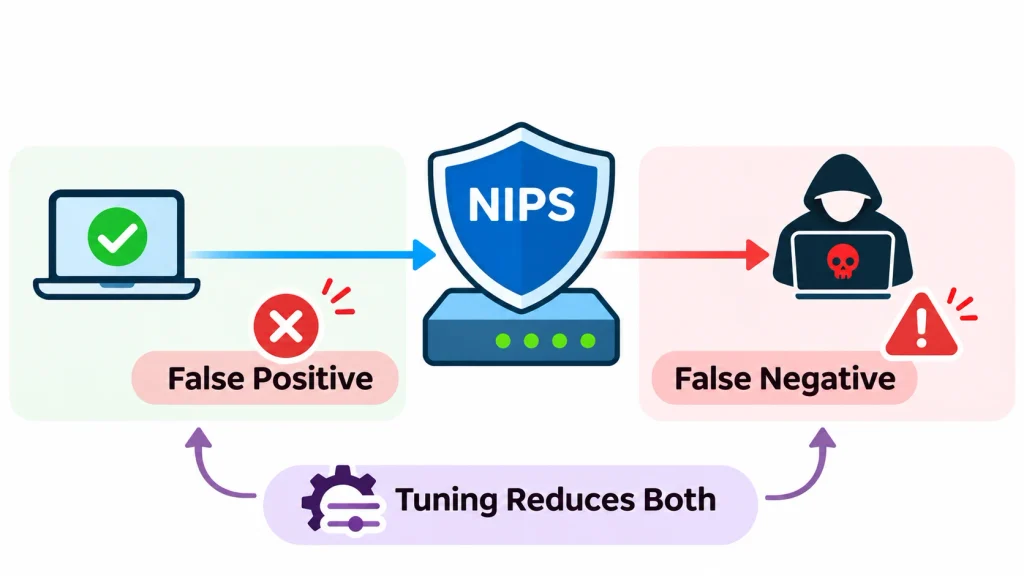
A false positive is a harmless connection that gets blocked. A false negative is a real attack that slips through. Because a NIPS sits inline, a bad false positive can interrupt real business traffic. Tuning is part of the job, not an optional extra.
2. Network Latency and Performance Impact
Inspecting traffic takes processing power. If the device is too small for your traffic, it can slow the network or become a bottleneck. Wikipedia’s overview of intrusion detection makes the same point: scanning everything can create a bottleneck if the system is underpowered. Size your NIPS for peak traffic, not average traffic.
3. Encrypted Traffic Inspection Challenges
Most web traffic is now encrypted with TLS. A NIPS cannot read the payload of encrypted traffic unless it decrypts it first. Decryption adds cost, can affect performance, and raises privacy and legal questions. Many organizations decrypt only selected traffic.
4. Configuration and Maintenance Complexity
Signatures need regular updates. Policies need review as your network changes. A NIPS left on default settings often does too little or blocks too much.
5. Limited Visibility Into Some Endpoint Activities
A NIPS sees network traffic only. It cannot see a malicious file that arrives on a USB stick, or what a process does once it runs. That is why teams pair it with endpoint tools.
6. Evasion Techniques and Unknown Threats
Attackers try to dodge detection by splitting payloads, changing encodings, or using new exploits. Signature-based detection cannot catch a zero-day attack with no known pattern. Anomaly detection and threat intelligence can help, but neither is perfect.
7. Infrastructure and Licensing Costs
Costs include hardware or virtual capacity, licenses, signature subscriptions, and staff time. The staff time is the one people forget.
NIPS vs. IDS vs. IPS: What Is the Difference?
An IDS (intrusion detection system) watches for threats and alerts you. An IPS (intrusion prevention system) also acts on them. A NIPS is an IPS that works at the network level. In other words, NIPS is a type of IPS, and IPS is the prevention-focused cousin of IDS.
The lines are blurry in practice. Wikipedia’s intrusion detection system article notes that systems with response capabilities are typically called intrusion prevention systems, and many products can run in either mode.
| Feature | IDS | IPS | NIPS |
| Full form | Intrusion Detection System | Intrusion Prevention System | Network Intrusion Prevention System |
| Main job | Detect and alert | Detect and prevent | Prevent threats in network traffic |
| What it monitors | Network or host | Network or host | Network traffic |
| Typical deployment | Passive, often on a copy of traffic | Inline | Inline |
| Blocks traffic | No | Yes | Yes |
| Scope | Depends on placement | Depends on placement | Network segments it sits on |
When Should Businesses Use IDS?
Choose IDS when you want visibility without any risk of blocking real traffic. It suits sensitive environments, such as some industrial networks, where an accidental block could cause harm. It is also a safe way to learn what your traffic looks like.
When Should Businesses Use IPS?
Choose an IPS when you need automatic protection and you can accept the small risk of a wrong block. It makes sense for internet-facing systems and for any place where speed of response matters.
When Is NIPS the Better Choice?
NIPS is the right pick when you want to protect many systems at once, including ones that cannot run security agents. It works well at the network edge, in front of data centers, and between sensitive zones.
NIPS vs. Firewall vs. Next-Generation Firewall (NGFW)
These three tools overlap, but they do different jobs. A firewall decides who may talk to whom. A NIPS inspects what is being said. A next-generation firewall bundles both ideas, and often more, into one platform.
| Feature | Traditional firewall | NIPS | NGFW |
| Security purpose | Control access by address, port, and protocol | Detect and block attacks in traffic | Combine access control with deeper inspection |
| Traffic inspection | Mostly headers and connection state | Deep packet inspection | Deep inspection plus application awareness |
| Threat detection | Limited | Core function | Included, often through an IPS engine |
| Automated blocking | Rule-based allow or deny | Yes | Yes |
| Application awareness | Little or none | Varies | Strong |
| Typical deployment | Network perimeter | Inline, at key points | Perimeter or internal |
1. NIPS vs. Traditional Firewall
A traditional firewall might allow web traffic on port 443 and block everything else. That is useful, but if an attacker sends an exploit over port 443, the firewall may let it through. A NIPS looks inside the traffic and can catch it.
2. NIPS vs. Next-Generation Firewall
Many NGFWs include intrusion prevention as a built-in feature. For smaller networks, that single box is often enough and easier to manage. A standalone NIPS can make sense when you need very high inspection capacity, separate control by a dedicated security team, or protection between internal zones.
3. Can NIPS and Firewalls Work Together?
Yes, and they usually do. The firewall filters what should never enter. The NIPS inspects what is allowed in. Together they cover each other’s blind spots.
Where Should a Network Intrusion Prevention System Be Deployed?
The right spot depends on what you want to protect. NIST SP 800-94 describes two main modes. In inline mode, traffic passes through the sensor, so it can block attacks. In passive mode, the sensor watches a copy of the traffic, so it can only alert.
One common layout looks like this:
Internet → Perimeter firewall → NIPS → Core network → Servers and endpoints
This is one possible design, not a universal one. Your own placement will follow your network layout and what you need to inspect.
1. Network Perimeter Deployment
Placing a NIPS behind the perimeter firewall lets it inspect everything the firewall allows in. This is the most common starting point because it protects the whole network from outside threats.
2. Data Center Deployment
Here the NIPS sits in front of server racks and critical applications. Traffic volumes are high, so capacity and failover matter most.
3. Internal Network Segmentation
Perimeter protection does not help once an attacker is inside. A NIPS between internal zones, for example between user networks and finance servers, can stop an intruder from moving sideways.
4. Cloud Network Deployment
In public clouds, you cannot place a physical box on the wire. Instead, you use virtual appliances or the cloud provider’s own inspection services, and you steer traffic through them. Check your provider’s documentation, because options and limits vary.
5. Hybrid Network Environments
Many organizations run both on-premises and cloud systems. The goal is consistent policy across both, with logs flowing into one place, such as a SIEM.
How to Implement a Network Intrusion Prevention System
A careful rollout avoids the most common problem: blocking real traffic on day one. Here is a practical path.
Step 1: Assess Your Network Security Requirements
List what you must protect, what rules apply to you, and what attacks worry you most. This keeps the project focused.
Step 2: Identify Critical Network Segments
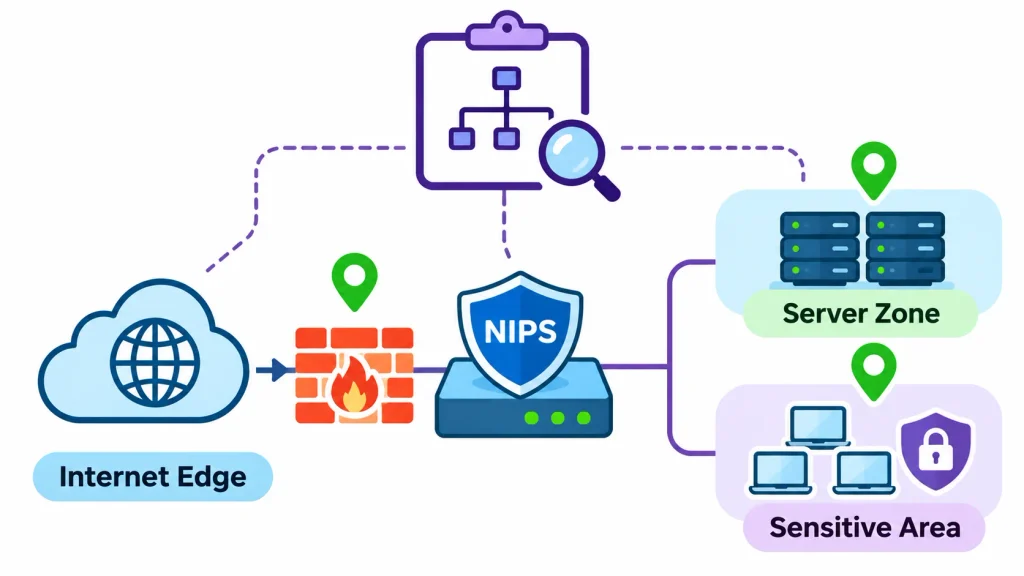
Map your network. Mark the internet edge, server zones, and sensitive internal areas. These are your inspection points.
Step 3: Choose the Right NIPS Solution
Match capacity, features, and budget to your needs. The next section covers the criteria.
Step 4: Determine Deployment Architecture
Decide on inline or passive placement, and plan for failure. Many teams add a bypass or a second unit so a device fault does not cut off the network.
Step 5: Configure Detection and Prevention Policies
Start with vendor-recommended profiles. Turn off signatures for software you do not run, because they add noise. Begin in alert-only mode.
Step 6: Test Detection and Blocking Capabilities
Use a lab or a maintenance window. Run a vulnerability scan or harmless test traffic and confirm the NIPS sees it and blocks it as expected.
Step 7: Monitor Alerts and Network Performance
Watch alerts for a few weeks. Check latency and CPU use at peak hours. Look for blocks that should not have happened.
Step 8: Update Signatures and Security Policies
Automate signature updates where you can. New vulnerabilities appear constantly, and old signatures lose value.
Step 9: Review and Optimize NIPS Performance
Review your rules every quarter. Move proven rules to block mode, retire useless ones, and adjust policies after network changes.
Implementation checklist
- Security goals and compliance needs written down
- Network map with inspection points marked
- Capacity sized for peak traffic
- Failover or bypass plan in place
- Alert-only trial completed
- Block mode enabled for tested rules
- Logs sent to SIEM or central log store
- Update schedule and rule review owner assigned
How to Choose the Right NIPS Solution for Your Business
The best NIPS is the one that fits your traffic, your team, and your budget. Use these criteria to compare options.
Network Throughput and Processing Capacity
Ask for throughput with inspection turned on, not just the headline number for plain forwarding. The gap can be large. Then test with your own traffic mix if you can.
Detection Accuracy and False-Positive Management
Look for good tuning tools: per-rule control, easy exceptions, and clear explanations of why traffic was blocked. A product that is hard to tune will be turned down to “alert only” and forgotten.
Deployment Flexibility
Check that it supports the places you need: physical, virtual, and cloud. Confirm that it supports both inline and passive modes if you plan a staged rollout.
Encrypted Traffic Inspection
If you plan to decrypt TLS, ask what happens to performance and how certificates and exceptions are managed.
Threat Intelligence Capabilities
Find out how often signatures and feeds update, and whether you can add your own rules or feeds.
SIEM and Security Tool Integration
Good integration means standard log formats, APIs, and connectors for the tools you already use.
High Availability and Redundancy
Because a NIPS sits in the traffic path, a failure can break connectivity. Look for failover pairs and bypass options.
Scalability and Total Cost of Ownership
Compare more than the purchase price. Include licenses, signature subscriptions, support, training, and staff time over three to five years.
Vendor Support and Security Updates
Check how quickly the vendor publishes protection for newly disclosed vulnerabilities, and what support hours you get.
Popular Network Intrusion Prevention System Tools and Solutions
These five names come up often, but they are not direct equivalents. Snort and Suricata are open-source inspection engines. FortiGate IPS and Palo Alto Networks Threat Prevention are security services built into commercial firewalls. TippingPoint is a dedicated network IPS product line. Compare them by use case, not as a ranked list.
Snort
Snort is a free, open-source IDS and IPS. Martin Roesch created it in 1998, and Cisco now develops it after buying Sourcefire in 2013. It uses rule-based detection and can run as a sniffer, a packet logger, or a network intrusion detection engine.
- Best for: budget-conscious teams and learners who are comfortable writing and tuning rules.
- Consider: you manage the platform, rules, and logging yourself.
Suricata
Suricata is open-source threat detection software from the Open Information Security Foundation. It works as an IDS or an IPS and can also log network transactions. Its documentation describes it as a high-performance engine for network IDS, IPS, and network security monitoring.
- Best for: teams that want a flexible open-source engine with strong logging.
- Consider: like Snort, it needs setup, tuning, and regular upkeep.
Fortinet FortiGate IPS
FortiGate IPS is intrusion prevention delivered as a service on Fortinet’s FortiGate firewalls. Signature updates come from Fortinet’s threat research team.
- Best for: organizations that want firewall and IPS in one platform.
- Consider: it works as part of a FortiGate deployment rather than as a separate standalone device.
Palo Alto Networks Threat Prevention
Threat Prevention is a subscription for Palo Alto Networks next-generation firewalls. It adds intrusion prevention and related protections to the firewall’s application-aware inspection.
- Best for: teams that already use or plan to use Palo Alto firewalls.
- Consider: licensing and platform choice shape your total cost.
Trend Micro TippingPoint
TippingPoint is Trend Micro’s network IPS line, built to sit inline and block attacks in network traffic.
- Best for: organizations that want a dedicated network IPS and central policy management.
- Consider: check current models, throughput, and licensing with the vendor.
Feature sets and product lines change often. Confirm details on each vendor’s current documentation before you decide.
NIPS Best Practices for Better Network Security
Buyers and administrators on forums such as r/AskNetsec keep returning to the same practical worries: throughput, TLS inspection, high availability, and deployment flexibility. The habits below address them.
1. Keep Detection Signatures Updated
Outdated signatures miss new exploits. Automate updates and check that they actually apply.
2. Configure Appropriate Prevention Policies
Block what you are confident about. Alert on the rest until you have evidence. Match rules to the systems you run. Alongside intrusion prevention, businesses should follow established cybersecurity best practices to protect applications, sensitive information, and connected systems from potential threats.
3. Monitor False Positives Regularly
Review blocked and alerted events weekly at first. Add narrow exceptions rather than switching off whole rule groups.
4. Integrate NIPS With SIEM Platforms
Send logs to a central system so analysts can connect NIPS events with firewall, endpoint, and server data.
5. Use Network Segmentation
Split the network into zones, then place inspection points between them. A NIPS has more to see, and attackers have fewer places to hide.
6. Monitor Network Performance
Track latency, CPU, and dropped packets, especially at peak hours. Upgrade capacity before users notice.
7. Conduct Regular Security Testing
Test that your NIPS still blocks what it should. Vulnerability scans and approved penetration tests are good checks.
8. Maintain High Availability
Use failover pairs or a tested bypass. Practice the failover, because untested failover often fails.
Real-World Examples of NIPS in Enterprise Networks
These are illustrative scenarios, not case studies from a specific organization. They show how a NIPS fits into typical environments.
1. Protecting Financial Institution Networks
Threat: An attacker tries many passwords against an internal banking application.
How NIPS helps: It spots the repeated login pattern from one source.
Response: It blocks that source for a set time and logs the event for the security team.
2. Securing E-Commerce Infrastructure
Threat: Crafted requests aimed at a known flaw in a web component behind the online store.
How NIPS helps: A matching signature recognizes the exploit pattern in the request.
Response: It drops the packets. The team then patches the component, and the NIPS acts as a safety net in the meantime. A web application firewall adds deeper protection for the app itself.
3. Protecting Enterprise Data Centers
Threat: A laptop infected with malware starts scanning the server network and probing many ports.
How NIPS helps: A NIPS placed between user and server zones sees the scan.
Response: It blocks the scanning host and alerts analysts, which limits sideways movement.
4. Securing Cloud-Based Applications
Threat: A compromised virtual machine tries to contact a known malicious server.
How NIPS helps: A virtual inspection appliance, with traffic steered through it, matches the destination or pattern.
Response: It blocks the outbound connection and logs it, so the team can isolate the machine.
Frequently Asked Questions About Network Intrusion Prevention Systems
What Is a Network Intrusion Prevention System?
It is a security tool that inspects network traffic in real time and blocks malicious activity automatically, usually from an inline position on the network.
What Is the Main Purpose of NIPS?
Its purpose is to stop attacks in transit, before they reach servers and devices, and to log what it sees for later investigation.
How Does NIPS Work?
It captures traffic, inspects packets with signature, anomaly, and protocol analysis, then applies your policy to drop, reset, or block anything malicious.
What Is the Difference Between NIPS and IDS?
An IDS detects threats and alerts you. A NIPS sits inline and can also block them.
What Is the Difference Between NIPS and HIPS?
NIPS watches network traffic across segments. HIPS runs on one host and sees local activity such as file changes and processes.
Conclusion
A network intrusion prevention system gives your network something a firewall alone cannot: a close look inside traffic, with the power to block threats as they happen. Used well, it shortens response time, protects systems that are hard to patch, and gives your team better visibility.
It is not a cure-all. It can miss new attacks, it needs tuning, and it cannot see everything. Treat it as one layer in a defense-in-depth plan, next to firewalls, endpoint protection, patching, backups, and monitoring.
If you are starting out, begin with your most critical network segment. Choose a solution that fits your throughput and team skills, run it in alert mode first, and move proven rules to blocking. That steady approach delivers the benefits of NIPS without surprises.