Customer reviews are one of the most valuable marketing assets a brand can collect. They reveal what customers care about, which product benefits feel most important, and how real buyers describe the product in their own words.
But most brands leave those insights buried on product pages. A strong review may influence shoppers who already visit the website, yet it rarely reaches new audiences on TikTok, Instagram Reels, YouTube Shorts, or paid social channels.
AI makes it possible to turn customer feedback into UGC-style video ads quickly. Instead of inventing generic scripts, I can build ads around real customer problems, objections, experiences, and outcomes.
In this guide, I will show you how I turn customer reviews into AI UGC ads that feel natural and encourage action.
Why Customer Reviews Make Strong UGC Ads
Traditional advertising usually describes a product from the brand’s perspective. Customer reviews explain it from the buyer’s perspective.
That difference matters because customers often use more relatable language. They talk about the problem they were trying to solve, what almost stopped them from buying, how they used the product, and which result surprised them.
A skincare brand might describe a product as:
A lightweight hydrating serum formulated for daily use.
A customer might say:
I usually hate sticky serums, but this one absorbs quickly enough to use before makeup.
The second version contains several useful advertising insights:
- The customer dislikes sticky products.
- Texture is an important object.
- Fast absorption is a differentiator.
- The product fits into a morning routine.
- Makeup users may be a valuable audience.
One short review can therefore provide the hook, problem, benefit, use case, and target customer for an entire ad.
My Step-by-Step Review to UGC Ad Workflow
Step 1: Collect Reviews and Find Customer Insights
I start by gathering customer reviews from product pages, surveys, social media, support conversations, marketplaces, and other relevant channels. After removing unnecessary personal information, I organize the feedback by common themes such as customer problems, favorite features, purchase reasons, objections, and results after using the product.
The goal is not to collect as many reviews as possible, but to identify repeated patterns and real customer language. Each strong theme can become a separate advertising angle.
Step 2: Turn Reviews into UGC Video Scripts
Next, I select reviews with clear story potential: the problem before purchase, why the customer tried the product, how they used it, and what changed afterward. A detailed review can often inspire multiple ad concepts based on the same insight.
I then use AI to transform the review into a natural UGC script while keeping the original customer experience. The final script follows a simple structure: hook, personal story, product demonstration, key benefit, and call to action. I also create multiple hook variations to test different openings without changing the main message.
Step 5: Create the UGC Visual Concept
Once the script is ready, I break it into short visual scenes.
For the desk lamp example, the shot list might include:
- Creator sitting at a dark desk
- Poorly lit video call
- Product placed beside the computer
- Close-up of brightness controls
- Switching between warm and cool lighting
- Improved video call appearance
- Product photography setup
- Final product shot with call to action
The visuals should support the spoken message rather than compete with it.
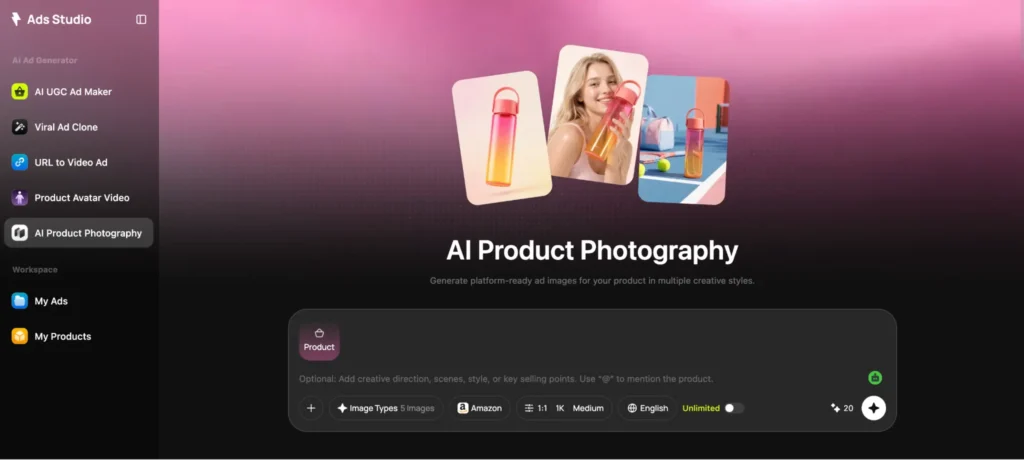
I use Loova AI to keep image and video creation within one workflow. If I need new lifestyle images or scene references, I can create them before moving into animation. Loova Ads Studio is a good choice for batch generation of ad campaign visuals.
The most important requirement is consistency. The product, room, creator, and lighting should not change unpredictably between shots.
Step 6: Generate UGC Style Video Scenes
I usually create each scene as a separate short clip in the AI video creation platform.
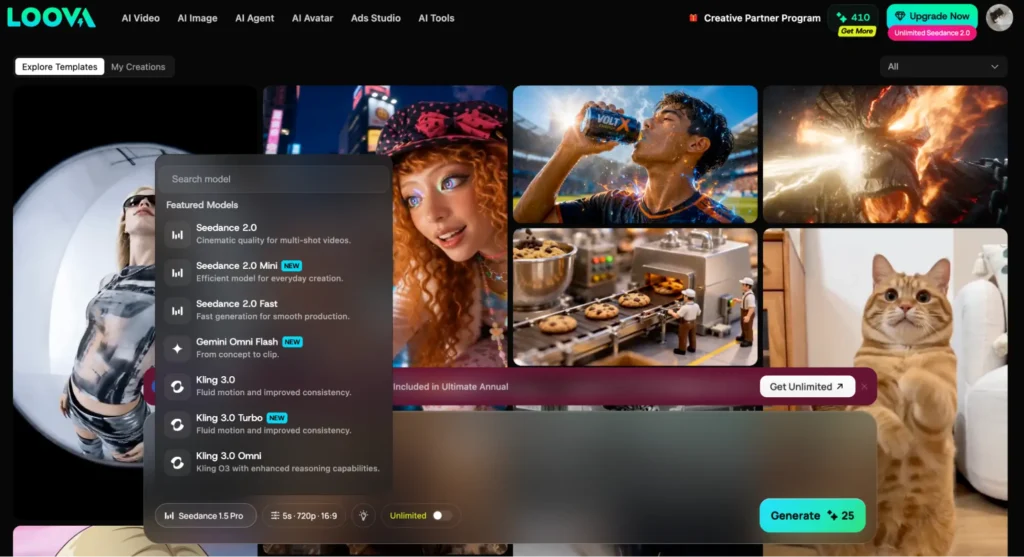
For scenes based on an approved product image, an AI Image to Video tool helps preserve the original visual direction while adding controlled motion.
Useful movements include:
- Picking up the product
- Turning or opening it
- Demonstrating a feature
- Moving from a problem scene to a solution scene
- Showing the product in a real environment
- Creating a subtle handheld camera effect
For supporting footage that does not require an exact reference image, AI Text to Video can help generate lifestyle moments, transitions, or contextual scenes.
I keep the motion simple. Excessively cinematic camera movement can make the ad feel more like a brand commercial than customer-created content.
UGC usually feels more believable when the framing is slightly informal, the environment looks lived-in, and the creator appears to be speaking from personal experience.
Step 7: Create Multiple Ad Versions
One review should rarely produce only one ad.
I use an AI Ad Generator to explore different campaign structures from the same customer insight.
Possible variations include:
- Problem and solution
- Before and after
- Three reasons I recommend it
- Product demonstration
- First impression
- Objection handling
- Unexpected benefit
- Day in the life
I can also use Viral Ad Clone to study the structure of an effective ad and adapt that structure to the customer review and product.
The goal is not to copy another brand’s claims, identity, or creative assets. I borrow the format—such as pacing, hook style, or scene sequence—while keeping the review, product details, and brand message original.
Step 8: Edit for Authenticity and Conversion
The final editing stage determines whether the video feels natural.
I review:
- The first two seconds
- Speaking speed
- Caption length
- Product visibility
- Scene changes
- Background music
- Call to action
- Brand accuracy
- Product claim accuracy
I remove phrases that sound too polished or promotional. Real people use contractions, short sentences, and occasional informal transitions.
Instead of:
“This innovative product provides an efficient solution for maintaining an organized workspace.”
I would use:
“My desk finally stays organized, and I can actually find everything.”
I also make sure captions emphasize the core customer language rather than repeating every spoken word.
What Makes a Review-Based UGC Ad Convert
A customer review does not automatically become a strong video script. The message still needs structure.
The best review-based UGC ads usually contain five elements.
A Recognizable Problem
The opening should make the intended audience think, “That sounds like me.”
Examples include:
- “I could never find a sunscreen that worked under makeup.”
- “My coffee always went cold before I finished it.”
- “I wanted better product photos without organizing another shoot.”
Specific problems are usually more persuasive than broad claims.
A Natural Product Introduction
The product should appear as part of the story rather than as an interruption.
Instead of saying, “You need to buy this,” the script might say:
“I kept seeing this portable coffee warmer, so I finally decided to test it.”
This creates a more believable transition from problem to solution.
A Concrete Detail
The strongest reviews contain details that generic advertising would rarely invent:
- A specific situation
- A previous failed solution
- A surprising feature
- A daily habit
- A measurable improvement
- An emotional reaction
These details help the ad feel grounded.
Visible Evidence
The video should show the benefit wherever possible. A review about easy cleaning should include a cleaning scene. A review about portability should show the product being carried or used outside the home.
A Clear Next Step
The ad still needs a call to action. It can be direct without sounding disconnected from the story:
- See why customers keep recommending it.
- Try it in your own routine.
- Explore the full collection.
- Get the launch offer while it is available.
Example: Turning One Review into Five Ads
Imagine a customer leaves this review for a pet hair remover:
“I have two cats and I’m constantly using disposable lint rollers on my sofa. This picks up more hair, takes less time, and I do not need to keep buying refills.”
This review contains three strong benefits:
- Removes a large amount of pet hair
- Saves time
- Eliminates disposable refills
From this single review, I could create:
- A problem and solution video showing the sofa before and after
- A cost-saving ad comparing the tool with disposable lint rollers
- A demonstration focused on how much hair it collects
- A “things I wish I bought sooner” UGC video
- A two-cat-owner lifestyle ad
The scripts can share the same product footage while using different hooks and scene orders.
This approach creates more useful testing material than producing five unrelated advertisements.
Common Mistakes to Avoid
Inventing Customer Results
AI should never add benefits, timelines, or outcomes that are not supported by the review or product information.
Copying the Review Word for Word
Written reviews do not always sound natural when spoken. Preserve the meaning and distinctive details while adapting the sentence structure for video.
Making Every Review Sound the Same
Different customers should have different priorities, vocabulary, and situations. Over-standardizing the scripts makes the ads feel artificial.
Hiding the Product
Viewers should see the product while its benefits are being discussed. Visual proof strengthens the customer story.
Final Thoughts
Customer reviews already contain many of the ingredients needed for effective UGC ads: real problems, natural language, objections, product benefits, and believable use cases.
My process is to collect the reviews, group them by angle, select the strongest stories, turn them into conversational scripts, create supporting visuals, and test several video formats.
AI makes this process faster, but accuracy and authenticity remain essential. The best review-based ad does not sound like a brand pretending to be a customer. It sounds like a clear, relatable product experience that helps the right viewer make a decision.
FAQ
How many reviews do I need before creating UGC ads?
You can start with a few detailed reviews, but a larger collection makes it easier to identify repeated customer themes and avoid relying on an unusual experience.
Can I use negative reviews in an ad campaign?
Negative reviews can reveal valuable objections and product expectations. Use them to improve messaging or create objection-handling content, but do not misrepresent the reviewer’s opinion.
Should the UGC script quote the review exactly?
Not necessarily. Spoken scripts often require shorter and more conversational sentences. Preserve the original meaning and do not add unsupported claims.
How long should a review-based UGC ad be?
A focused ad can often communicate one customer problem and one benefit in 15–30 seconds. More detailed demonstrations may need additional time.
Can one customer review produce multiple ads?
Yes. One detailed review may contain several hooks, benefits, use cases, and objections. Each can become a separate creative variation.
How do I make an AI UGC ad feel realistic?
Use natural language, simple camera movement, recognizable environments, accurate product visuals, and small details taken from the original customer experience.