An AI influencer is a virtual personality developed with artificial intelligence technologies. These digital characters can resemble real people and engage audiences through social media content.
They are also becoming useful marketing assets for brands seeking a recognizable identity and a reliable content production process.
In this guide, you will learn how to create an AI influencer from the ground up and discover how to get started with Magiclight AI.
Part 1. How to Build an AI Influencer from Scratch: A Step-by-Step Guide
You do not need programming expertise or professional filmmaking experience to develop an AI influencer. With a well-defined concept and suitable AI tools, you can establish a virtual character and start producing content. Follow these steps to learn how to create an AI model influencer.
Step 1. Establish Your Influencer’s Identity
Begin by deciding what your influencer will represent, who the intended audience is, and which social platforms you want to target. Prepare a character profile that outlines the person’s name, approximate age, personality, background story, and signature appearance.
You can also use an AI assistant to explore potential names, identify content themes, and develop creative ideas that fit your chosen niche.
Step 2. Design the Influencer’s Appearance
Use your character description as a prompt to produce several AI-generated portraits. Compare the results and select images with appealing facial features, suitable lighting, and a recognizable visual identity. Create a collection of reference images that can guide future generations.
If your chosen platform supports character references or identity preservation, configure these options to help maintain a consistent appearance.
Step 3. Develop a Voice and Write Video Scripts
Select a voice that reflects your influencer’s personality, whether that means a conversational, entertaining, or professional delivery. Prepare concise scripts for videos lasting approximately 15–45 seconds, covering topics such as useful tips, personal-style stories, or product introductions. Make sure the language, pacing, and vocal tone match the character so that the content feels cohesive and engaging.
Step 4. Maintain a Consistent Character Design
Establish a repeatable process for generating the same character across different scenes. Test your reference images in a variety of poses, clothing combinations, facial expressions, and environments. Review each result for changes in facial structure, hairstyle, proportions, and other recognizable features. Once you have selected reliable outputs, organize them into a reusable asset library for future posts, Reels, and video thumbnails.
Step 5. Turn Your AI Character into Videos
Import three to five reference images into a compatible avatar or image-to-video tool. Add your prepared script, choose a suitable voice, and select a vertical aspect ratio when creating content for short-form social platforms. Depending on the tool’s capabilities, you can generate clips featuring speech, walking, posing, or other movements. Export the finished videos and prepare them for publication on your chosen channels.
Part 2. How to Create an AI Model Influencer More Efficiently
Developing a successful AI influencer involves more than generating an attractive face. You also need an organized workflow for planning, writing, visual production, and character management. The following tools can support different stages of the process.
Planning and Concept Development: Define your influencer’s niche, target audience, personality, and publishing strategy before producing content. Tools such as Notion, Google Docs, and AI chat assistants can help you organize character information, content calendars, and creative concepts.
Scriptwriting and Content Preparation: Strong scripts and captions help communicate your message and encourage audience interaction. ChatGPT and other AI writing assistants can help you brainstorm topics, prepare video dialogue, and adapt captions to different social platforms.
Video Production and Animation: Animated content gives your virtual character more opportunities to communicate with viewers. MagicLight AI and Hailuo can be considered for producing AI-generated video clips, depending on the type of motion and visual output you need.
Image Generation and Visual Design: High-quality portraits, outfits, and backgrounds contribute to a distinctive influencer identity. Midjourney and DALL-E can help you explore different appearances, visual aesthetics, and scene concepts.
Character Consistency Management: A recognizable appearance across multiple posts makes your virtual personality easier to identify. Reference-image workflows and character consistency features in tools such as Alici AI and MagicLight AI can help organize and reproduce your character’s visual identity.
Part 3. Best AI Tool for Creating an AI Model Influencer
Producing AI influencer content can become complicated when creators need to coordinate character images, scripts, voiceovers, animation, and editing across separate applications. Some workflows also involve a steep learning curve, particularly for beginners without video editing experience.
MagicLight AI offers an alternative workflow for creators who want to turn written ideas and stories into AI-generated videos. It can be used to explore how to create an AI influencer for Instagram and other social channels by combining script-based production with visual and audio customization.
The platform supports long-form story-to-video workflows, with script inputs described as supporting up to 12,000 words. Users can configure video settings, including aspect ratio, to suit different content formats.
Its voice options include 37 voiceovers and voice cloning capabilities, helping creators develop narration that fits their virtual character. The platform also offers more than 20 AI video models and 40 background music options for different production needs.
Key Features of MagicLight AI
- Long-Form Video Generation and Character Consistency: Character-locking capabilities help preserve a recognizable appearance across multiple scenes. The platform supports video creation of up to 50 minutes, making it suitable for creators exploring both short-form and longer storytelling formats.
- Visual Style Models: A range of visual styles, including options such as Midjourney V7 and MagicLight 3.0, can help creators develop an appearance that fits their influencer’s niche, personality, and intended audience.
- Story Models: MagicLight AI offers nine story models for organizing ideas into different creative formats. These models can help structure narratives and improve the flow of influencer videos across social platforms.
- Storyboard-to-Animation Conversion: Creators can transform storyboard concepts into animated videos using more than 20 AI models. This workflow provides different options for adding movement and developing more polished influencer content.
How to Generate an AI Influencer Video with MagicLight AI
Follow this walkthrough to turn a concept into a finished video featuring an AI influencer.
Step 1. Create a Project in MagicLight AI
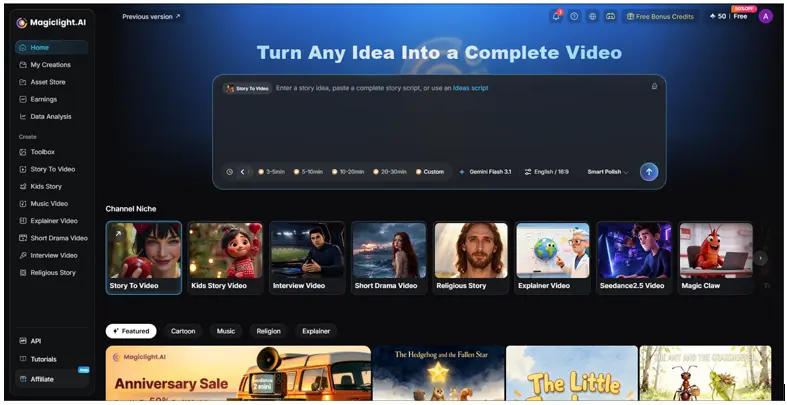
Open MagicLight AI and navigate to the Story to Video feature from the main interface. Start a new project to begin building your video.
Step 2. Enter Your Idea and Configure Video Settings
Type your video concept into the prompt field and select the language for your content. Use the settings panel to choose an aspect ratio that matches your intended platform. Next, select a suitable AI story model, such as GPT-5.4, if it is available in your interface. Choose your preferred visual style and video duration, then click Next to proceed.
Step 3. Review the Generated Scenes
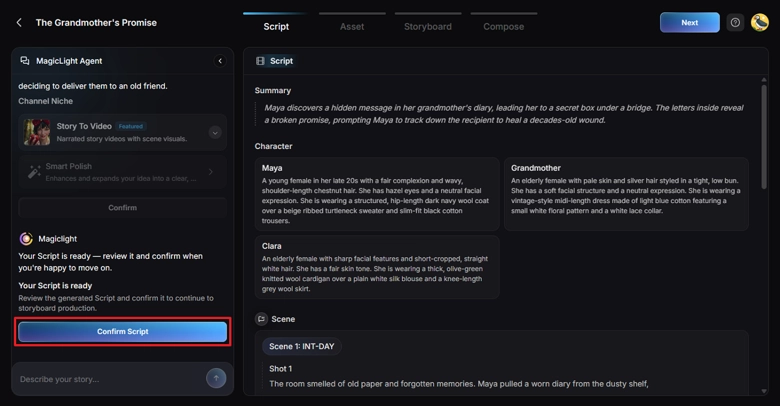
Once the platform has generated the initial scenes, preview them to evaluate the visuals and overall storytelling direction. Check whether the scenes match your original idea and make any necessary adjustments using the available options. When the result meets your expectations, continue by clicking Next.
Step 4. Choose or Create an AI Influencer Character
Browse the available character library to find a virtual personality that suits your project. If you need a different appearance, use the More Characters option to explore or create additional characters. Select the appropriate character and proceed to the next stage.
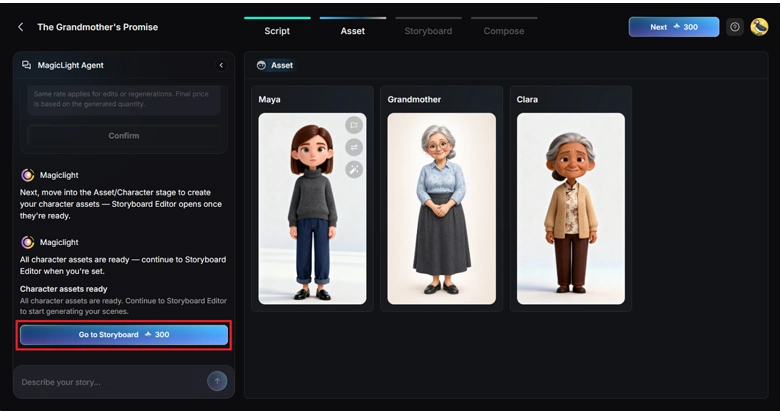
Step 5. Personalize the Character’s Appearance and Voice
In the storyboard interface, adjust the voiceover speed to suit the pace of your video. Where the relevant controls are available, customize details such as clothing and body shape to better match your character design. Review the settings and click Next when you are ready to continue.
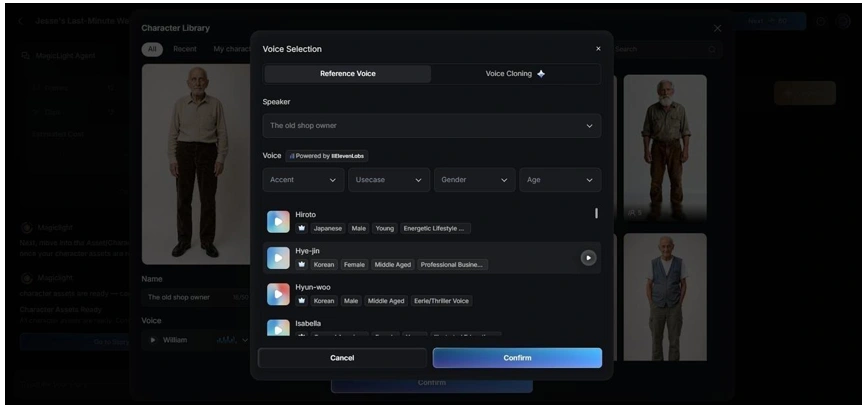
Step 6. Add Captions and Background Music
Open the subtitle settings to configure captions for your video. Then visit the background music section and choose a suitable soundtrack that complements the content’s mood. Review the audio and text settings before clicking Generate to create the video.
Step 7. Preview and Export Your Finished Video
After generation is complete, watch the video from beginning to end. Check the character’s appearance, scene transitions, voiceover, subtitles, and music. If the final result meets your requirements, select Download to save the generated video to your device for further editing or social media publication.
Conclusion
Creating an AI influencer is an accessible way to explore virtual personalities, social media storytelling, and digital marketing.
By defining a clear character identity, producing consistent visuals, developing an appropriate voice, and following a repeatable video workflow, beginners can start building their own virtual presence without extensive technical experience.