Before a shopper buys, they ask your website five or six questions, but nobody on your team hears any of them.
Does the jacket run small? Does the software export to CSV? Who pays for return shipping?
Visitors carry questions like these while they scroll, and each page either answers them or leaves them open. When the answers are hard to find or too vague, they may leave to keep researching elsewhere.
Content that answers a question as it forms keeps people reading. Generative engines like ChatGPT and Google’s AI Overviews now read those same pages to answer shoppers who never visit your site.
This article shows how to find the questions your customers ask and answer them in the places they look.
Interactive Buying Guides Help Customers Narrow Down Their Choices
A store with 400 products asks visitors to do a lot of sorting. Quizzes, product finders, and guided questionnaires take over that sorting.
With these tools, the visitor answers a few questions about how they’ll use the product, what they prefer, and how much they want to spend. Then, the tools remove everything that doesn’t match and return a short list of relevant options. Shoppers skip the filters, spec sheets, and tabs they’d otherwise compare, and spend their time on products that fit their situation.
Interactive content also holds attention well. Brands report that it doubles engagement compared to static formats such as blog posts and banner pages. Personalized guidance gives each visitor a reason to keep going.
- Start with the decision your customers struggle with most, and build the quiz around it.
- Limit the quiz to three to five questions, and write each one in plain language.
- Ask about use, preference, and budget, since those three factors drive most choices.
- Show a result page with two or three products, a one-line reason for each match, and links to the full product pages.
- Place the entry point on your homepage and category pages.
- Review the collected answers monthly to learn what shoppers actually want.
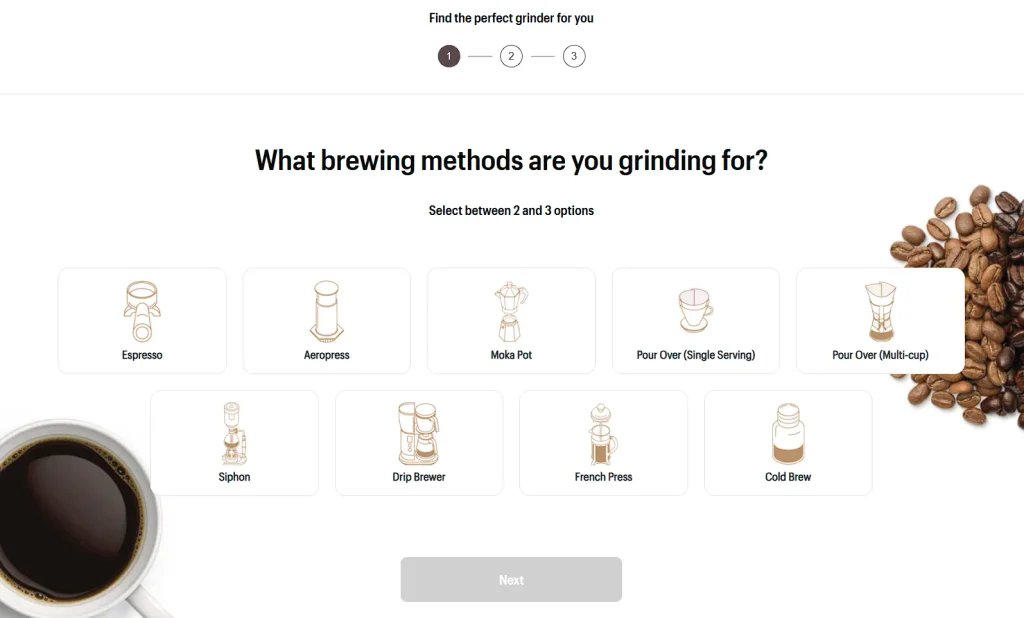
An excellent example of this approach is Baratza, a maker of precision coffee grinders. They run a quiz on their website that asks visitors three quick questions and recommends the grinder that suits them best.
The quiz asks for little. Visitors don’t need an account, an email address, or ten minutes to spare. That low commitment makes starting easy, and it shows that Baratza cares about helping the customer find the right grinder before it asks for a sale.
This way, shoppers who’d feel lost in a lineup of similar-looking machines leave with a clear starting point.
Source: baratza.com
Product Infographics Help Customers Visualize the Details Behind Their Choices
A product infographic puts illustrations, labels, and short explanations in one image. It lets shoppers see how a product is built, which materials go into it, which colors exist, and how it arrives, all in a few seconds.
Visual breakdowns replace paragraphs of description. A labeled diagram of a seam, a swatch row of color options, or a cutaway of the packaging answers questions that text takes much longer to explain.
Product images get attention first, too. Research shows that 56% of customers explore product images as their first action on a product page, so an infographic placed in the image gallery reaches shoppers where they already look. Readers who skim still absorb the key details.
- Pick the product details that cause the most customer questions, such as materials, sizing, colors, or packaging.
- Sketch the layout before you design it, with one clear focus per image.
- Use short labels of five words or fewer, and keep the type large enough to read on a phone.
- Add the infographic to the product image gallery, ideally as the second or third image.
- Write alt text that describes the content so search engines and AI tools can read it.
- Update the graphic whenever the product changes.
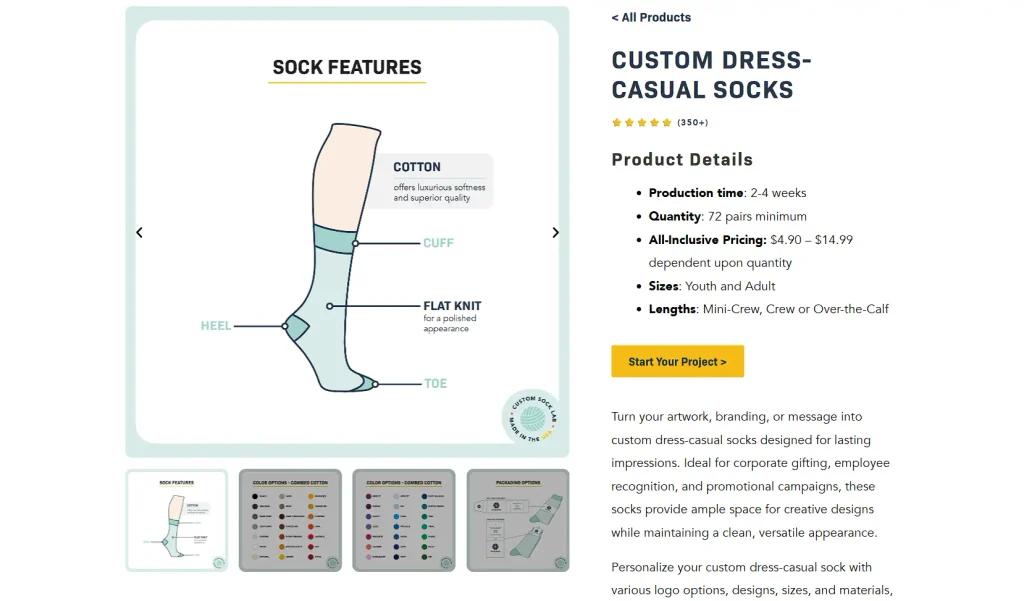
Custom Sock Lab makes custom socks for businesses and private buyers. Their custom dress-casual socks product page uses product infographics to explain the sock’s features, the available color selections, and the custom packaging options.
Shoppers can inspect the style up close and understand each design choice before they commit. Once they’ve reviewed the details, they pick a color and a packaging option while designing their own pair.
The infographics answer common questions early, so shoppers reach the design step knowing what they’re choosing and why each option matters.
Source: customsocklab.com
Step-by-Step Instructions Help Customers Assess Product Usability
Shoppers often wonder whether they can set up a product before they spend money on it. Clear setup instructions on the product page answer that question early:
- Illustrated steps show what the process involves, from unboxing to first use.
- Compatibility details list the phones, apps, and operating systems a product works with, so shoppers can check their own devices in seconds.
- Setup requirements, such as an account, a battery, or a Bluetooth connection, tell buyers what they need to have ready.
Each detail reduces worry about technical difficulty. When a customer sees the whole process upfront, they can judge whether it matches their skills and their existing devices. Fewer unanswered questions also means fewer support emails.
- Write the setup steps before you design the page, and keep each step to one action.
- Photograph or illustrate every step so the image carries the instruction.
- Number the steps and limit them to five or six.
- State the compatibility details near the top of the page, listing supported devices and software versions.
- Test the instructions with someone new to the product, and revise any step that causes a pause.
- Add the steps as page text as well, so search engines and AI tools can read them.
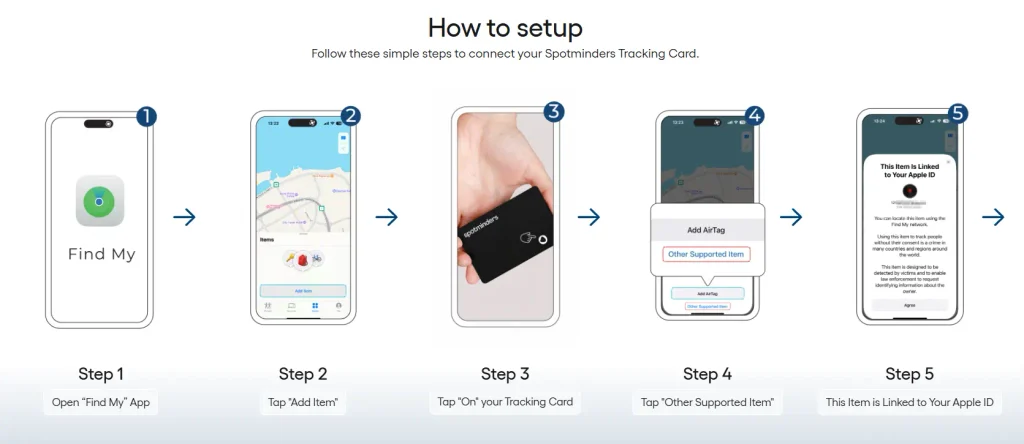
Spotminders makes trackers that help people locate everyday essentials such as wallets and bags. Their wallet tracking card product page shows how to connect the card to Apple Find My.
The product page presents the setup in five steps. Each step describes one simple action and pairs it with a clear image. That lets shoppers see the process before buying and lets them know right away that it takes little effort.
In short, a buyer who owns an iPhone knows the card will work with an app on the phone.
Source: spotminders.com
Real-World Case Studies Make Complex Services Easier to Evaluate
Complex services raise questions that a service list can’t answer. A visitor choosing a lawyer, an advisor, or a clinic wants to know how the professional thinks when a situation gets complicated.
Case studies show that thinking in action. They describe a real challenge, the options the professional considered, the steps taken, and the result. Readers learn what the common problems look like and how decisions get made, which matters most for services tied to personal or financial stakes.
A case study should give realistic context, and it should state that outcomes depend on the facts of each situation and that past results don’t guarantee future ones. Visitors use these details to judge the provider’s approach.
- Choose cases that reflect the questions prospects ask most often.
- Remove names and identifying details, and get written client permission when your field requires it.
- Structure each story in four beats – the setup, the complication, your actions, and the resolution.
- Write in plain language and explain technical terms.
- Add a short note that results vary.
- Give each case its own heading so search engines and AI tools can pull it out.
- Link each case to the related service page and place a contact option at the end.
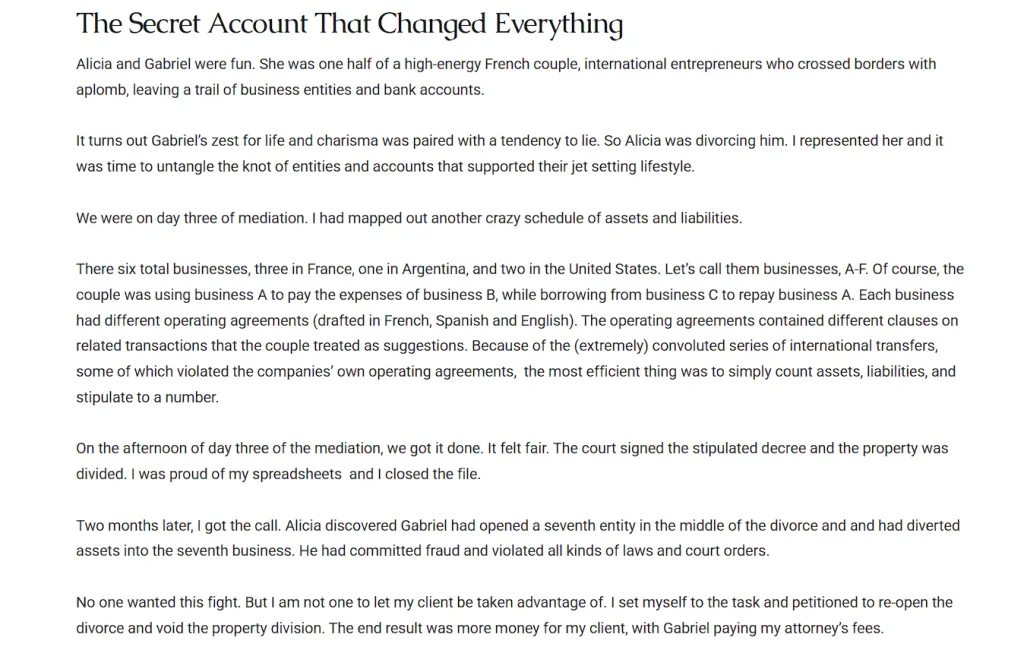
Freeburg Law, a firm that handles personal injury and criminal defense cases, uses this tactic on its family law attorney page. The page presents four anonymized family law cases about divorce, asset division, and custody, with names and details changed.
One case covers a hidden trust found during a high-net-worth divorce. Another follows the search for a spouse who moved assets into a secret business after the settlement.
Each story reads like a mini case file with a setup, a complication, the firm’s actions, and a resolution.
Source: tetonattorney.com
Consistent Comparison Criteria Help Customers Evaluate Alternatives
Comparing products gets hard when every listing describes different things. One product highlights materials, another highlights price, and a third lists only features. This leaves shoppers sorting through the mismatch themselves.
Structured reviews fix this by judging every product against the same criteria. Common criteria include suitability, features, materials, performance, and pros and cons:
- Suitability tells readers who the product fits.
- Features and materials show what they’re buying.
- Performance describes how the product behaves in use.
- Pros and cons give a quick summary of the trade-offs.
When each entry follows the same order, readers spot differences in seconds and don’t need to hunt for details. Readers compare two options directly and choose the one that fits best.
- Pick five or six criteria that matter most in your category, and use them for every product. Write each criterion as a question, such as who the product suits or what it’s made of. Keep the order identical on every entry. Use the same units, scales, and terms so readers can compare numbers directly. Include weaknesses next to strengths, since honest pros and cons build credibility. Format the entries with clear subheadings so search engines and AI tools can extract each answer. Update it as questions change.
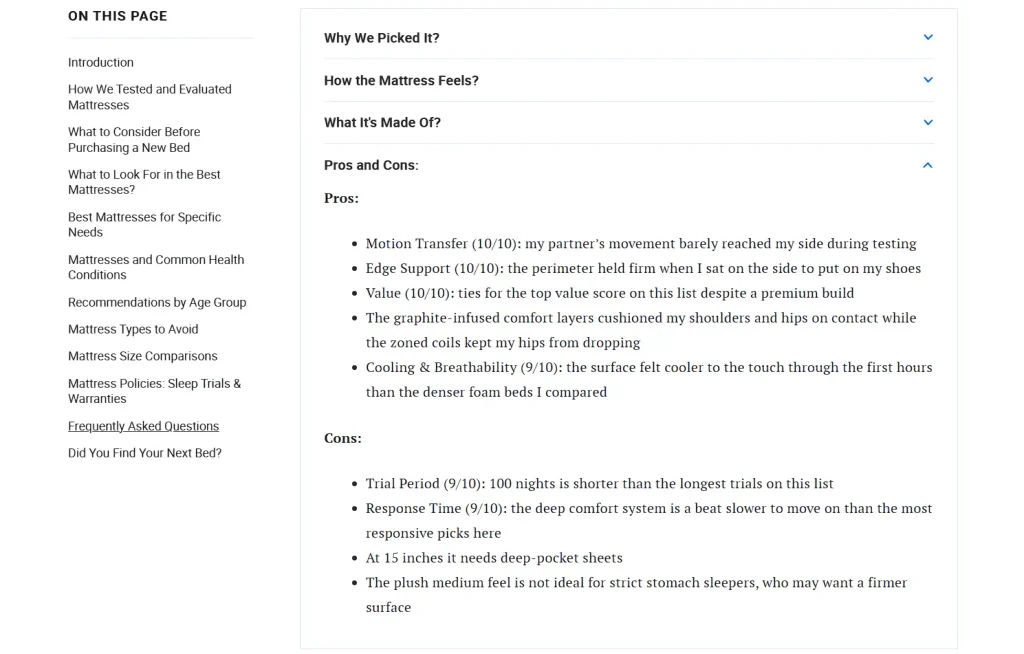
Sleep Junkie, a wellness platform covering mattress reviews, sleep science, and bedroom products, applies this tactic in their best mattresses of 2026 guide.
The guide organizes every review around the same question-led sections, so reviews stay consistent. Each entry holds four collapsible sections: Why We Picked It, How the Mattress Feels, What It’s Made Of, and Pros and Cons.
This gives readers the knowledge of where to find each answer in every entry. A shopper comparing three mattresses opens the same section on each and sees the differences right away.
Source: sleepjunkie.com
Customer Reviews Answer Questions That Product Descriptions Cannot
Product descriptions list specifications and benefits. Customer reviews add what buyers learn after purchase – how the product performs in daily life, how it holds up after months of regular use, and where it falls short.
A shopper with oily skin, a small apartment, or a tight budget can find a reviewer in the same situation and read that person’s experience. Detailed written reviews supply context that a spec sheet leaves out. Customer-submitted photos and videos show real size, real color, and real results under ordinary home lighting.
Shoppers use these firsthand accounts to judge fit and set realistic expectations. Critical reviews help shoppers too, because they show the limits of a product before anyone buys it.
- Ask for reviews in a follow-up email sent after the product has had time to prove itself.
- Include a direct link to the review form and keep the form short.
- Invite photos and videos, and offer prompts such as usage period and what the buyer expected.
- Publish critical reviews along with positive ones, since a mix looks credible.
- Add filters so shoppers can sort by rating, topic, and reviewer profile.
- Mark up reviews with structured data so search engines and AI tools can read them.
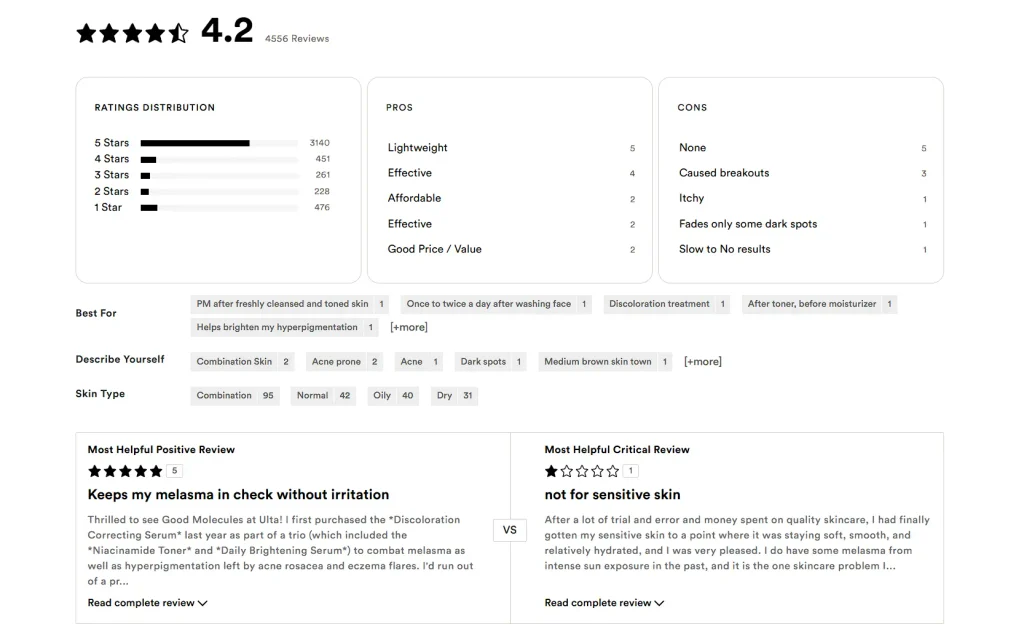
Ulta Beauty, a retailer of skincare, haircare, and beauty products, runs a review section on its product pages that shoppers find easy and quick to use.
For instance, the page for a discoloration-correcting serum shows customer photos of real results after use. It summarizes the biggest pros and cons across all reviews, notes which needs the product suits, and features the most helpful positive and critical reviews.
This gives shoppers a clear picture of what other buyers say about the product without reading the thousands of reviews it has collected.
Source: ulta.com
Final Thoughts
Your customers already tell you what they need to know. The answers sit in your support inbox, your live chat logs, your sales calls, and your existing reviews.
So, pull the ten questions that appear most often and match each one to a format – a quiz, an infographic, a setup guide, a case study, a comparison, or a review prompt. Publish one this week and track which page visitors reach next.
As search engines send more shoppers to websites with a question already in mind, the brands with ready answers will get the first look.