What Are Google Reviews?
Google Reviews are public feedback left by customers about a business on Google. These reviews include star ratings (1 to 5) along with written comments, photos, or videos that reflect a customer’s real experience.
In simple terms, Google Reviews help people decide whether a business is worth visiting or not.
Where Do Google Reviews Appear?
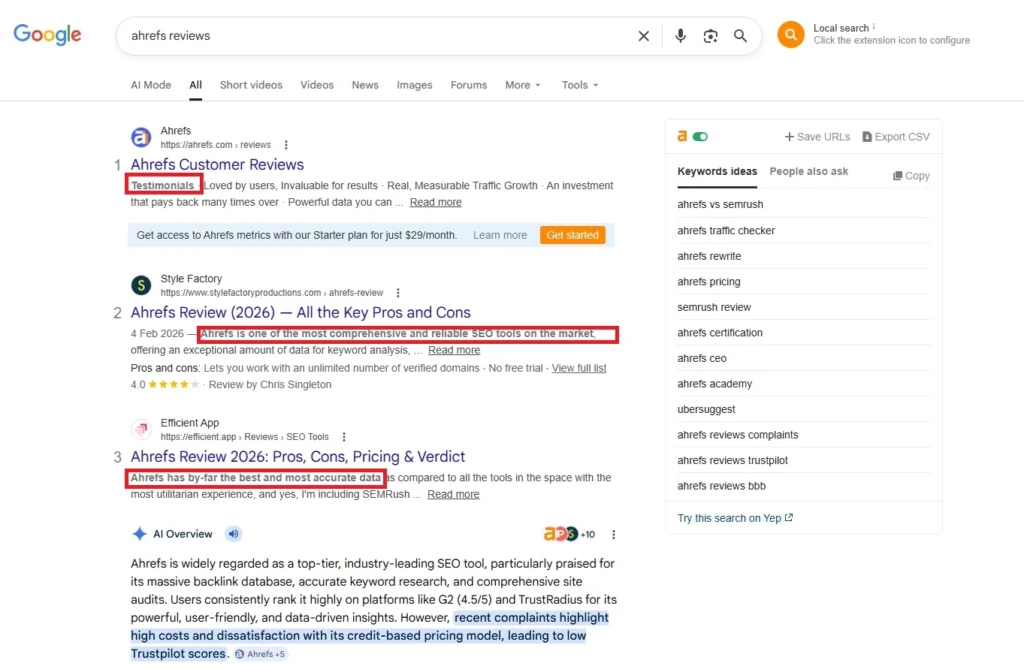
Google Reviews show up in multiple places across Google’s ecosystem:
- Google Search
When someone searches for a business name, reviews appear on the right-hand side (desktop) or top section (mobile). - Google Maps
Users can see reviews directly when browsing or searching for places nearby. - Google Business Profile
Every verified business has a profile where all reviews are stored and displayed.
Who Can Leave Google Reviews?
Anyone with a Google account can leave a review. This includes:
- Customers who visited the business
- People who interacted with the service
- Even users who want to share their experience publicly
No special permission is needed, just a logged-in Google account.
Types of Google Reviews
Google allows different types of reviews to give a complete picture:
- ⭐ Star Ratings
Users rate businesses from 1 (poor) to 5 (excellent) - 📝 Text Reviews
Written feedback describing the experience - 📸 Photo Reviews
Customers can upload images of products, services, or locations - 🎥 Video Reviews
Short videos that showcase real experiences (less common but powerful)
How Google Reviews Work
Google Reviews follow a simple flow, from submission to display, but behind the scenes, Google uses systems to check quality, relevance, and authenticity.
Review Submission Process
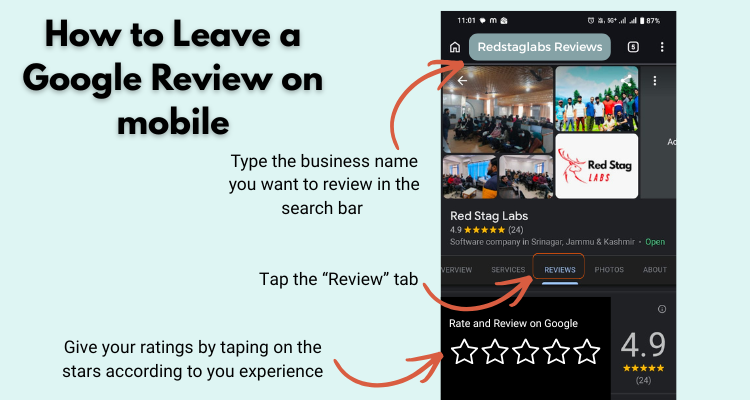
Here’s how a typical review is submitted:
- A user signs into their Google account
- Searches for a business on Google or Google Maps
- Clicks on “Write a Review”
- Selects a star rating (1–5 stars)
- Adds text, photos, or videos (optional)
- Clicks Post
Once submitted, the review goes through Google’s checks before it becomes visible.
Google Moderation System
Google uses a mix of automated systems and manual checks to maintain quality.
- AI systems scan reviews for spam, fake content, or policy violations
- Suspicious reviews may be removed or hidden
- In some cases, human reviewers step in for deeper checks
This helps keep reviews useful and trustworthy. If you’re facing this issue, learn more about why Google reviews are not showing and how to fix it.
Review Publishing Rules
Not every review gets published. Google has clear rules:
- Reviews must be based on real experiences
- No spam, fake content, or misleading information
- No offensive or harmful language
- No promotional or paid reviews
If a review breaks these rules, it may be removed automatically or after reporting.
How the Google Reviews Algorithm Works
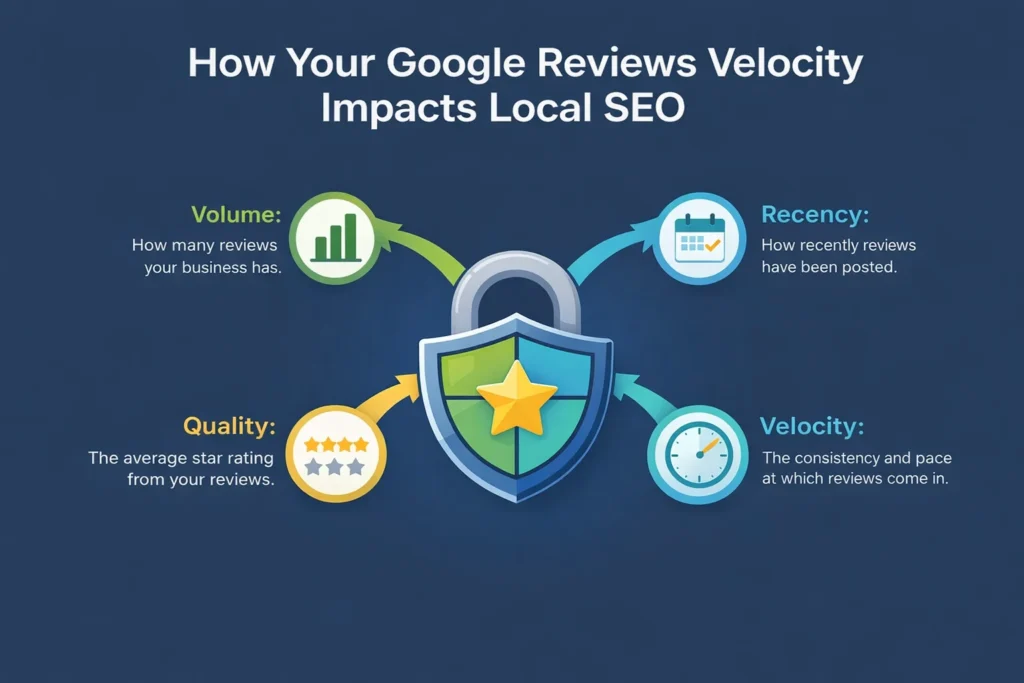
Google uses several factors to decide how reviews impact visibility:
1. Recency
- New reviews matter more than old ones
- Regular reviews signal an active business
2. Rating (Star Score)
- Higher average ratings improve trust
- Extreme ratings (very low or very high spikes) may be analyzed
3. Keywords in Reviews
- Words used in reviews help Google understand the business
- Example: “best pizza in Srinagar” helps local relevance
4. Review Volume
- More reviews = stronger credibility signal
How Google Filters Fake Reviews
Google actively works to detect and remove fake reviews:
- Identifies unusual patterns (sudden review spikes)
- Detects duplicate or copied content
- Flags accounts posting multiple reviews in a short time
- Uses location and behavior signals
Businesses and users can also report suspicious reviews, which may trigger further checks.
Why Google Reviews Are Important for Businesses
The importance of Google Reviews goes far beyond simple feedback. They directly impact how your business ranks, how customers trust you, and how many people choose you over competitors, especially on Google.
Impact on Local SEO Rankings
Google Reviews play a major role in local search rankings. When users search for services nearby, Google uses reviews as a key ranking signal.
Key Ranking Factors Influenced by Reviews:
- Relevance
Reviews help Google understand what your business offers through keywords used by customers. - Distance
While location matters, strong reviews can help you compete even if you’re slightly farther away. - Prominence
Businesses with more reviews and better ratings are seen as more trustworthy and rank higher.
Trust and Social Proof
People trust people. Google Reviews act as digital word-of-mouth.
What the data shows:
- Most users read reviews before visiting a business
- A higher star rating builds instant trust
- Customers often choose businesses with more reviews,
- even over cheaper options
Reviews reduce doubt and help users make faster decisions.
Conversion Rate Improvement
Your reviews directly impact whether someone clicks, calls, or visits.
How reviews improve conversions:
- ⭐ Higher ratings = more clicks
Users are naturally drawn to 4+ star businesses - 📝 Detailed reviews = better decisions
Real experiences help customers feel confident - 📍 Strong presence on Maps = more visits
Reviews influence foot traffic and calls
Even a small increase in rating (e.g., 3.8 → 4.2) can significantly improve conversions. Want to estimate how many reviews you need to improve your rating? Try our Google Review Calculator to get a quick answer.
Brand Reputation
Google Reviews shape your online reputation more than any ad or website.
Why it matters:
- Reviews are often the first impression of your business
- Negative reviews, if ignored, can damage trust
- Responding to reviews shows you care about customers
What strong reputation looks like:
- Consistent positive feedback
- Active responses from the business
- Balanced, authentic reviews (not all perfect)
Managing reviews = managing your brand image online.
Benefits of Google Reviews for Businesses
Using Google Reviews for business is one of the easiest ways to grow visibility, trust, and sales—without spending on ads. Reviews influence how your business appears and how customers interact with you on Google.
Increased Visibility on Google Maps
- Businesses with more reviews and better ratings appear higher on Google Maps
- Reviews improve your chances of showing in the local 3-pack
- Active profiles with frequent reviews signal that your business is relevant
More visibility = more calls, visits, and customers.
Higher Click-Through Rates (CTR)
- Star ratings stand out in search results
- Users are more likely to click on businesses with 4+ stars
- Positive reviews make your listing look more trustworthy at a glance
Even if you rank lower, strong reviews can bring more clicks than competitors.
Better Customer Insights
Google Reviews are not just for customers, they are valuable data for you.
- Understand what customers like about your service
- Identify common complaints or issues
- Spot trends and improve your offerings
Think of reviews as free feedback to improve your business.
Free Marketing Channel
- Every positive review acts like a recommendation
- Customers promote your business without you spending money
- User-generated content (photos, feedback) builds authenticity
Reviews work like ongoing word-of-mouth marketing—24/7.
Competitive Advantage
- Businesses with more and better reviews stand out instantly
- Customers compare ratings before making decisions
- A strong review profile can outperform bigger competitors
In many cases, the business with the best reviews wins, not the biggest one.
How to Get Google Reviews (Overview)
Getting Google Reviews doesn’t have to be complicated. With a few simple steps, you can consistently collect real feedback from your customers on Google.
This section gives you a quick overview. (You can link to a detailed guide for full strategies.)
Ask at the Right Time
Timing makes a big difference.
- Ask right after a positive experience
- Request reviews when the customer is satisfied (after purchase or service)
- Train your team to ask naturally
Happy customers are more likely to leave reviews immediately.
Use Direct Review Links
Make it as easy as possible.
- Generate your Google review link from your Business Profile
- Share it via:
- SMS
- Website
The fewer steps, the more reviews you’ll get.
Automate Review Requests
Save time and stay consistent.
- Use email or SMS automation tools
- Send review requests after every transaction
- Set reminders for customers who didn’t respond
Automation helps you collect reviews regularly without manual effort.
How to Manage Google Reviews Effectively
Managing reviews is just as important as getting them. A well-managed review profile on Google builds trust, improves customer relationships, and strengthens your online presence.
Responding to Positive Reviews
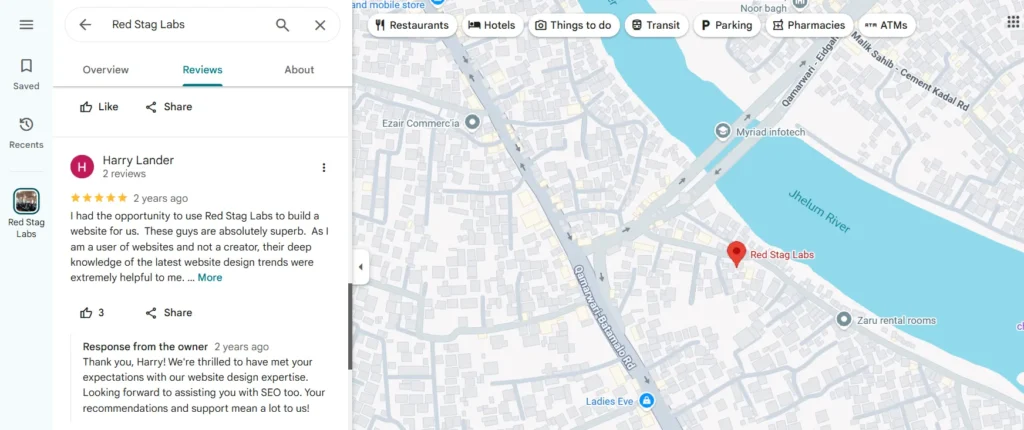
Positive reviews are opportunities to strengthen your brand.
Best practices:
- Thank the customer by name (if available)
- Keep the reply short and genuine
- Mention specific details from their review
- Invite them to visit again
Example:
“Thank you for your kind words, Sarah! We’re glad you enjoyed our service. Looking forward to seeing you again.”
This shows appreciation and builds loyalty.
Handling Negative Reviews
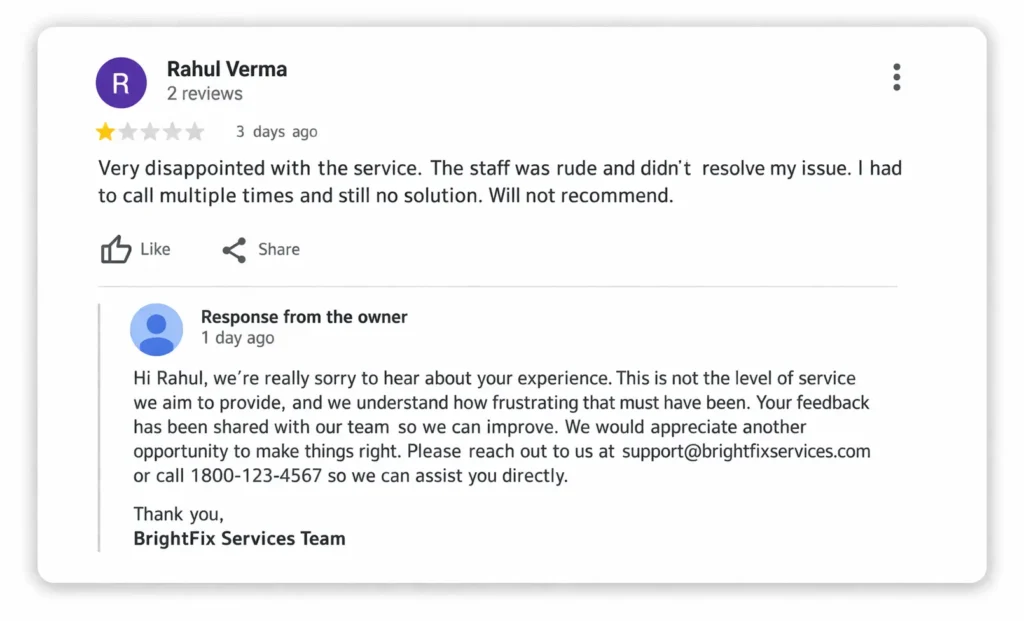
Negative reviews are normal, but how you respond matters most.
What to do:
- Stay calm and professional
- Acknowledge the issue
- Apologize if needed
- Offer a solution or ask to continue offline
What to avoid:
- Arguing or blaming the customer
- Ignoring the review
- Posting generic replies
Example:
“We’re sorry to hear about your experience. Please contact us so we can fix this for you.”
A good response can turn a negative experience into trust.
Reporting Fake Reviews
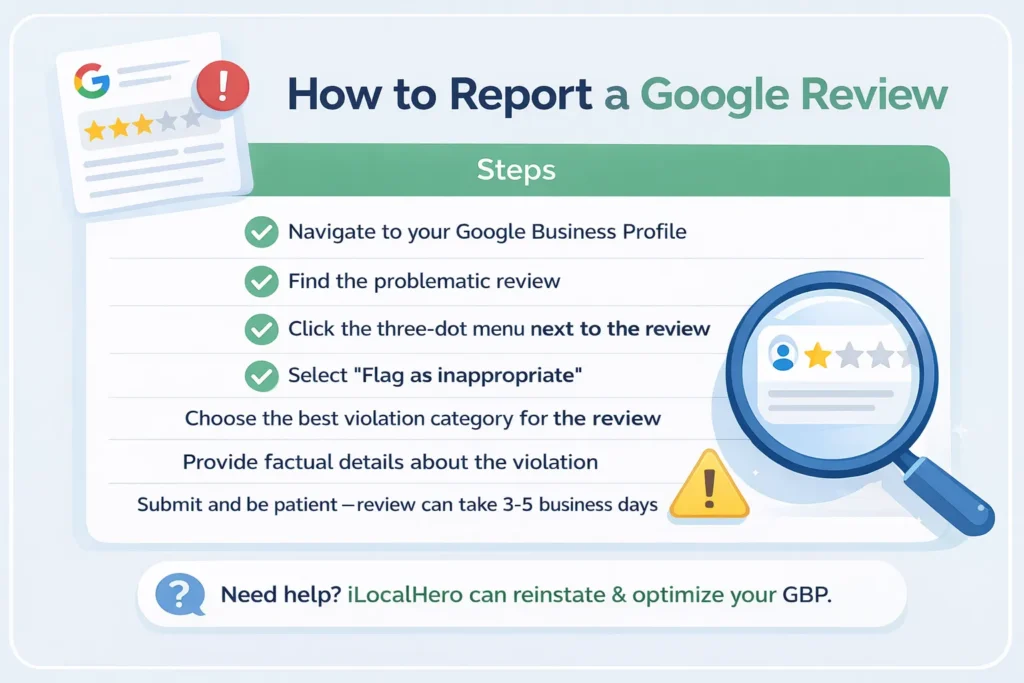
Not all reviews are genuine. If you spot a fake or harmful review, take action.
Steps to report:
- Go to your Google Business Profile
- Find the review
- Click “Report” or “Flag as inappropriate”
- Select the reason
Common reasons:
- Spam or fake content
- Offensive language
- Conflict of interest
Google reviews flagged for violations may be removed after review.
Not all reviews are genuine. If you spot a fake or harmful review, take action. Learn how to remove Google reviews step by step using the correct method.
Google Reviews and Local SEO (Deep Dive)
Google Reviews are one of the strongest signals for local SEO. They directly influence how your business appears in search results and on Google, especially through your Google Business Profile.
Role in Google Business Profile Optimization
Your Google Business Profile (GBP) relies heavily on reviews to stay active and competitive.
- Reviews signal that your business is active and trusted
- Frequent reviews keep your profile fresh
- Businesses with strong review profiles are more likely to appear in the local 3-pack
Reviews are not separate from GBP, they are a core part of optimization.
Keyword Relevance in Reviews
- When customers mention services or products in their reviews, it helps Google understand your business better
- Example: “best bakery in Srinagar” or “fast laptop repair service”
These keywords improve your local relevance without you doing manual SEO work.
Tip:
Encourage customers to describe their experience naturally (without forcing keywords).
Review Velocity (Consistency Matters)
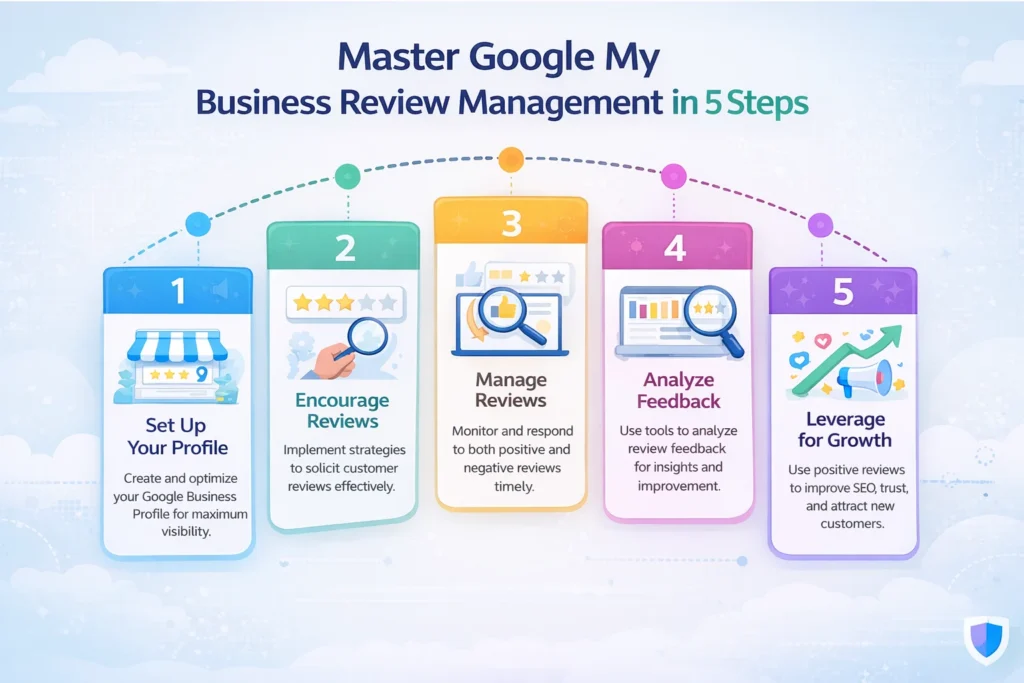
Review velocity means how often you receive new reviews.
- A steady flow of reviews signals ongoing business activity
- Sudden spikes may look unnatural
- Businesses with consistent reviews tend to rank better over time
It’s better to get 5 reviews every week than 50 in one day.
Star Rating Impact on Rankings
- Higher average ratings improve click-through rates (CTR)
- Businesses with 4.0–4.8 stars often perform best
- Extremely low ratings reduce trust and visibility
Star ratings influence both:
- Rankings (indirectly)
- User behavior (directly)
Common Google Review Guidelines (Avoid Mistakes)
To get the full benefit of reviews, you need to follow the rules set by Google. Ignoring these guidelines can lead to removed reviews, penalties, or even suspension of your Business Profile.
No Fake Reviews

Fake reviews are strictly against Google’s policies.
What counts as fake:
- Reviews written by the business owner or team
- Paid or purchased reviews
- Reviews from accounts that never interacted with your business
Google’s systems can detect unnatural patterns and remove such reviews automatically.
No Incentivized Reviews (Policy Overview)
Offering rewards in exchange for reviews is not allowed.
Avoid:
- Discounts for leaving a review
- Gifts, cashback, or coupons for positive feedback
- Asking only for 5-star reviews
Reviews must be honest and unbiased, not influenced by incentives.
Avoid Review Gating
Review gating means filtering customers before asking for reviews.
Example:
- Asking happy customers to leave reviews
- Redirecting unhappy customers away from review platforms
This creates a biased review profile and violates Google guidelines.
Best practice:
- Ask all customers for reviews, not just satisfied ones.
Follow Google Policies
Always follow Google’s official review policies.
Key rules include:
- Content must be based on real experiences
- No offensive or harmful language
- No misleading or irrelevant content
- No conflicts of interest
Staying compliant ensures your reviews stay live and your profile remains safe.
Google Reviews vs Other Review Platforms
When comparing review platforms, Google Reviews stands out because it directly connects with search visibility and local SEO. However, platforms like Yelp, Facebook Reviews, and Trustpilot also play an important role in building trust.
Comparison Table
| Platform | SEO Impact | Trust Level | Visibility |
|---|---|---|---|
| Google Reviews | Very High (direct ranking factor in local SEO) | Very High | Appears in Google Search & Maps |
| Yelp | Medium (strong for niche/local directories) | High | Popular in specific industries (restaurants, services) |
| Facebook Reviews | Low–Medium (limited SEO impact) | Medium | Strong within social media audience |
| Trustpilot | Medium–High (ranks well for branded searches) | High | Often appears in search results for brand reviews |
Key Differences Explained
Google Reviews (Best for SEO + Visibility)
- Directly impacts rankings on Google
- Shows star ratings in search and maps
- Ideal for local businesses
Yelp (Strong for Local Discovery)
- Popular for restaurants and service-based businesses
- Trusted platform but less influence on Google rankings
Facebook Reviews (Social Proof Focus)
- Works well for engagement and community trust
- Limited impact on search engine rankings
Trustpilot (Brand Reputation Focus)
- Great for online businesses and SaaS companies
- Often ranks for “[brand name] reviews” searches
Tools to Manage Google Reviews
Managing reviews manually can become time-consuming as your business grows. The right tools help you collect, respond, and track reviews efficiently on Google.
CRM Tools
CRM tools help you connect customer data with review management.
Popular CRM tools:
- HubSpot CRM
- Zoho CRM
- Salesforce
What they help with:
- Track customer interactions
- Identify happy customers for review requests
- Store feedback for future improvements
CRM tools make your review strategy more organized and data-driven.
Automation Tools
Automation tools help you collect reviews consistently without manual effort.
Popular tools:
- Birdeye
- Podium
- NiceJob
Key features:
- Automated email/SMS review requests
- Follow-up reminders
- Review funnel tracking
Automation ensures a steady flow of reviews over time.
Monitoring Tools
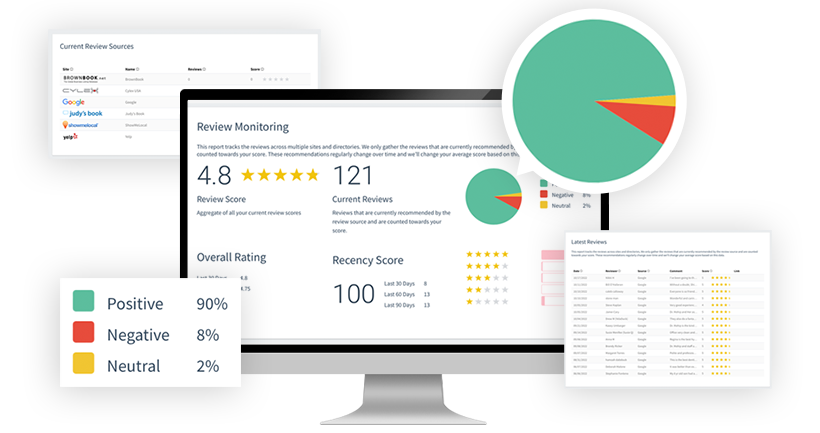
Monitoring tools help you stay updated and respond quickly.
Popular tools:
- Google Business Profile (built-in)
- Reputation.com
- Grade.us
What they do:
- Notify you when new reviews are posted
- Track ratings and trends over time
- Help manage responses from one dashboard
Quick responses improve trust and customer experience.
FAQs About Google Reviews (People Also Ask)
Here are clear, snippet-friendly answers to the most common questions about Google Reviews.
1. What are Google reviews?
Google Reviews are ratings and feedback left by customers about a business on Google. They include star ratings (1–5), written comments, and sometimes photos or videos, helping others decide whether to choose that business.
2. Are Google reviews free?
Yes, Google Reviews are completely free. Customers can leave reviews at no cost, and businesses can collect and manage them without paying anything. This makes them one of the most valuable free marketing tools available.
3. How do Google reviews affect ranking?
Google Reviews influence local search rankings through:
- Number of reviews
- Average star rating
- Recency of reviews
- Keywords used in reviews
Strong and consistent reviews improve your chances of appearing higher in local search results and Google Maps.
4. Can businesses delete Google reviews?
No, businesses cannot directly delete reviews. However, they can:
- Report fake or policy-violating reviews
- Request removal through Google
Google will only remove reviews that violate its guidelines.
5. How many reviews do I need?
There is no fixed number, but general benchmarks are:
- 10–20 reviews → Builds basic trust
- 50+ reviews → Strong local credibility
- 100+ reviews → Competitive advantage
Focus on getting reviews consistently rather than aiming for a one-time number.
Conclusion
Google Reviews are more than just feedback, they directly impact your trust, SEO, and sales. A strong review profile helps your business rank higher, attract more clicks, and convert more customers on Google.
The key is not just getting reviews, but getting them consistently.
- A steady flow of real reviews builds long-term credibility
- Fresh reviews signal that your business is active and reliable
- Consistency always beats one-time spikes in volume
Focus on creating a simple system to collect and manage reviews regularly.