The feature ships on time. It does exactly what was described in the kickoff call. Then the client looks at it and says, “That’s not what we meant.”
Nobody lied, and nobody was careless. The requirement simply lived in a meeting and a few emails. Each person filled the gaps differently, and the build followed one version of the story.
Clear requirements make a measurable difference to whether a software project succeeds. According to a 2024 study of 600 software engineers in the UK and US, projects with clear requirements before development began were 97% more likely to succeed, the single biggest factor the researchers measured. The figures come from engineers’ own reports on their projects, but the direction is hard to argue with.
This guide covers how much to document for a given project and how to gather requirements before writing them. It also covers what the document should include and how to make each requirement testable. Finally, it shows how to keep the whole thing accurate once the build starts.
Match the Documentation to the Size of the Project
Not every project needs a forty-page specification. Writing one for a small internal tool wastes time, and nobody reads it. Skipping documentation on a large client build is a much bigger risk.
A useful rule: the more expensive a misunderstanding would be, the more detail the document needs.
• A full specification suits fixed scope builds and projects in regulated industries such as healthcare or finance. It also suits any project where an outside team is building to an agreed budget.
• A lighter version suits MVPs and agile teams. User stories with clear acceptance criteria often cover what an early stage product needs.
In the lighter format, a single requirement might read: “As a returning customer, I want to reorder a past purchase in one click, so I can save time.” The acceptance criteria then add the details. The reorder button appears on every past order. The cart opens with the same items and quantities.
When a business hires a team for custom software development, the requirements document often becomes the agreed scope. Every later conversation about whether something is included goes back to it. That alone is a good reason to write it carefully.
Gather Requirements Before You Write Anything
A requirements document is only as good as the conversations behind it. A few habits make those conversations more useful.
Talk to the people who will use the system. The person paying for the project knows the business goal. The people doing the daily work know where the current process breaks. You need both.
Watch the current process before designing a new one. Ask someone to show you how they handle a task today. Gaps that nobody mentions in a meeting can show up quickly once you watch the work happen.
Show, then confirm. Wireframes or a rough prototype catch misunderstandings that words miss. A client who nods along to a description may spot a problem the moment they see a screen.
Write decisions down as you go. After each conversation, send a short summary of what was agreed. If nobody corrects it, it becomes part of the record. If someone does, you caught a misunderstanding before it cost anything.
What a Requirements Document Should Include
Templates vary, but most solid requirements documents cover the same ground. For a closer look at structure, this guide to writing a software requirements document covers the standard sections in more depth.
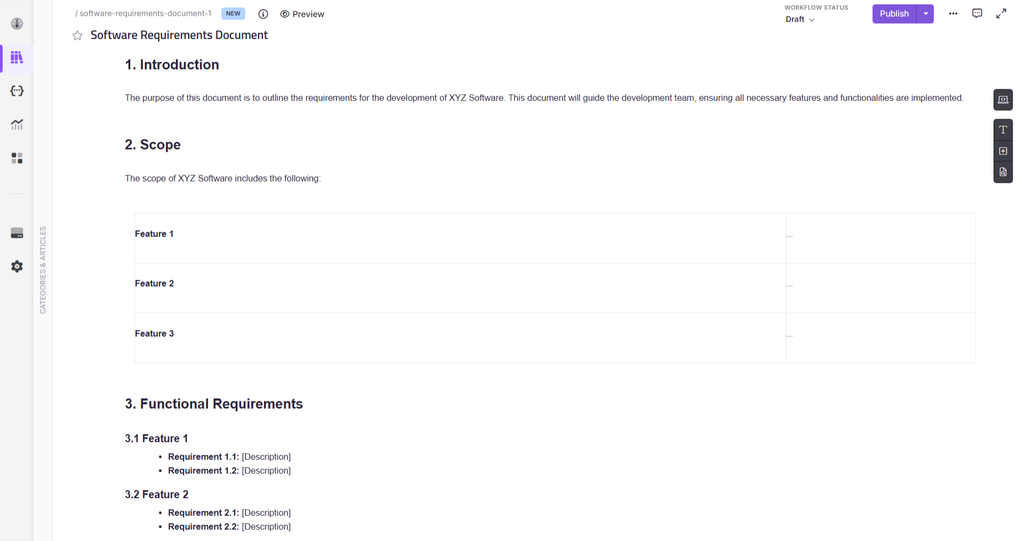
Purpose and Scope
State what the software is for and what it will cover. Then list what it will not cover. An explicit “not included” list can prevent many scope disputes, because it settles the question before anyone asks it.
Users and Stakeholders
Name the types of users and what each one needs to do. Then name who approves the document. A requirement nobody signed off on is only a suggestion.
Functional Requirements
These describe what the system does. Write each one as a numbered statement, such as “The system shall send a password reset link to the registered email address within one minute of a request.” Keep one behavior per statement.
Non-Functional Requirements
These describe how well the system performs. Speed and security belong here. So does availability, meaning how much of the time the system must be running. Each one needs a measurable target. “The site should be fast” cannot be tested. “Pages load in under two seconds with 500 users online at once” can.
Assumptions and Dependencies
Write down what the plan relies on, including any constraints. That covers deadlines and budget limits, plus any outside services or existing systems the software must connect to. If a payment provider changes its API halfway through the build, this section explains why the timeline moved.
Use Cases for Flows With Several Stages
Some behavior is easier to follow as a sequence than as a list of separate rules. Checkout and onboarding are typical examples, as are approval chains. A short use case describes who starts the flow and what they are trying to achieve. It then follows the main path, plus what happens when something goes wrong, such as a declined payment.
A Short Glossary
Define the terms that could mean different things to different people. If “customer” means a paying account to the client but any registered user to the developers, the software will reflect whichever meaning the developer assumed. An agreed glossary carries forward too. When the team moves on to creating a user manual, the same terms keep the software and its documentation consistent.
How to Write Requirements Your Team Can Test
A requirement is only useful if someone can check whether it was met.
One requirement per statement. “Users can upload and share files” is two requirements. Split them, because one might be finished while the other is still in progress.
Swap vague words for measurable ones. Words like “fast” and “intuitive” mean something different to everyone who reads them. Replace them with a result a tester can verify.
Add acceptance criteria. Each requirement should state what “done” looks like. A common format is a short scenario. Given a starting situation, when the user does something, then a specific result happens.
Give every requirement an ID. A label like FR-12 lets the team link a requirement to its ticket and its test case. When something changes later, you can see exactly what it affects.
Here is how that looks in practice.
*Before:* “The search should be fast and return relevant results.”
*After:* “FR-12: When a user searches by product name, the system returns matching products within two seconds. Results with an exact name match appear first.”
The first version invites an argument at the end of the project. The second can be tested the moment the feature is built.
How to Keep Requirements Accurate After Approval
Requirements change once the build starts. A client sees a working screen and realizes what they actually need. That is normal. The problem starts when the change happens in a chat thread and never reaches the document.
Use a simple change process. Someone requests a change. The team estimates its effect on time and cost. A named person approves it, and the document is updated before the work begins.
Keep a version history. Each update should record what changed and why, with a date. Weeks later, when someone asks why a feature works the way it does, the answer is already written down. A version note can be as short as this: “v1.4, 12 March. FR-12 updated so search also matches product codes, approved by the client after the beta review.” That one line can save a long conversation later.
Review the document at each milestone. A quick check at the end of each phase catches requirements that no longer match what is being built.
Keep it in one findable place. Requirements scattered across emails and slide decks are as good as lost. Many software documentation tools can hold requirements next to the rest of a project’s documentation, with version history included.
This video looks at why scattered documentation fails and what changes when it lives in one searchable place-
Good requirements also pay off after launch. When the software’s behavior is already described precisely, the documentation that follows gets a head start. Much of what support content and user guides need to explain is already written down, so nobody has to work out how the software behaves from scratch.
How to Write Requirements That AI Coding Tools Can Use
Developers can now paste requirements into AI coding tools to produce a first draft of code or tests. These tools rely heavily on what they are given, so the quality of the requirement shapes the quality of the output.
The habits from the previous sections help here too. A requirement with one behavior and a clear ID gives an AI tool something precise to work from. A measurable result helps even more, because the tool can draft a test against it.
Format matters as well. Requirements stored as plain text or markdown are easy for these tools to read. Requirements locked inside screenshots or slide decks are much harder to use reliably.
AI can help on the writing side too. AI tools for technical writing can turn interview notes into a rough first draft of requirements. Treat that draft as a starting point. Every requirement still needs review by someone who was in the conversations.
If your team publishes requirements or developer documentation on a documentation site, Agent Score is a free check worth running. It rates how easily AI tools can find and read a documentation site, from 0 to 100 with a letter grade, based on 23 checks from the open Agent-Friendly Docs specification (AFDocs). Requirements kept private won’t need it, but published docs can end up feeding the AI tools developers use every day.
Before Your Next Project Starts
Match the level of detail to the cost of getting it wrong. Gather requirements from the people who do the work, then write each one so it can be tested. Keep the document current as the project changes, so it stays the one place everyone trusts.
You don’t need a perfect template to start. Before your next kickoff, write down what the software must do and what it will not do. Then add how you will know each requirement is met.