If your Google reviews are not showing, you’re not alone. Many business owners notice missing Google reviews or wonder why, If your Google reviews are not showing or a Google review disappeared suddenly, you’re not alone. Many businesses face issues with missing Google reviews, and it can directly impact trust and local rankings.
Quick answer: Google reviews may not show due to policy violations, spam filtering, delays in publishing, technical glitches, or issues with your Google Business Profile.
Common reasons include:
- Reviews that violate Google policies (spam, fake, or promotional content)
- Google’s automated filtering system hiding suspicious reviews
- Delays in review approval or publishing
- Temporary technical glitches or display issues
- Problems with your business profile (unverified, duplicate, or recently updated)
This can be frustrating, especially when reviews are important for your business growth. The good news is that most reviews are not permanently lost, they are usually filtered, delayed, or temporarily hidden.
In this guide, you’ll learn:
- Step-by-step fixes to recover missing reviews fast
- Why Google reviews are not showing
- The most common reasons reviews disappear
Top Reasons Google Reviews Are Not Showing
If your Google reviews are missing, there’s usually a clear reason behind it. Google uses automated systems and strict guidelines to decide which reviews are shown publicly.
In most cases, reviews are not randomly removed, they are either filtered, delayed, or affected by specific issues related to content, user activity, or your business profile.
Below are the most common reasons why Google reviews are not showing and what might be causing them to disappear.
1. Review Violates Google Policy (Most Common)
One of the most common reasons why Google reviews are not showing is that they don’t meet Google’s content guidelines. Google strictly monitors reviews to keep them genuine and useful for users.
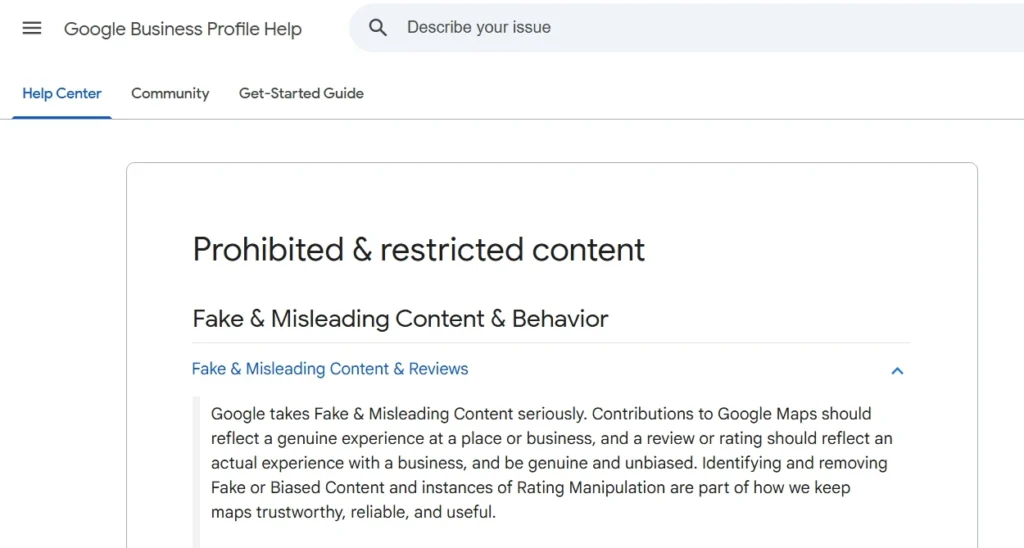
Reviews may be removed or hidden if they include:
- Fake or misleading feedback
- Spam or overly promotional content
- Conflict of interest (e.g., reviewing your own business or competitors)
If a review violates Google’s policies, it may be automatically removed or never published at all.
2. Google’s Spam Filter Blocked It
Google uses automated systems to detect and filter out suspicious reviews. These systems analyze patterns like review frequency, wording, and user behavior to decide whether a review should be shown.
Sometimes, even genuine reviews get caught in this filter if they look unusual, for example, multiple reviews posted quickly or similar wording across different reviews.
Automated filters can mistakenly hide real reviews, making it seem like your Google reviews are not showing.
3. Review Is Still Pending (Delay Issue)
Not all reviews appear instantly. In some cases, Google may take time to process and verify a review before it becomes publicly visible.
This delay can happen due to:
- Manual or automated checks for authenticity
- High review activity on the listing
- Temporary system processing delays
It’s common for reviews to take anywhere from a few hours to 3–5 days to show, so a missing review may simply still be under review.
4. Reviewer Deleted It or Account Removed
Sometimes, the issue isn’t on your end. A Google review may disappear if the person who posted it deletes the review or removes their Google account.
This can happen when:
- The user manually deletes their review
- The reviewer’s Google account is deactivated or suspended
- The account is removed due to policy violations
When the account or review is deleted, the review is permanently removed and will no longer be visible on your business profile.
5. Google Business Profile Issues
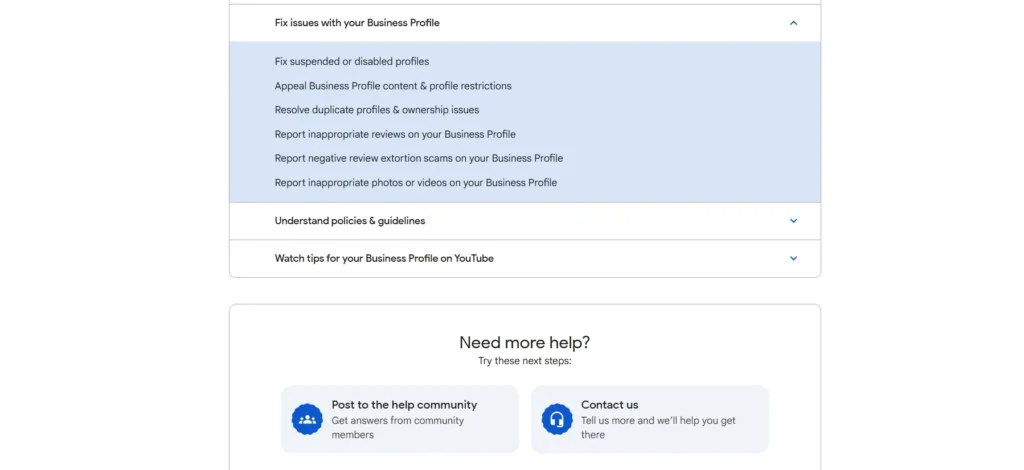
Issues with your Google Business Profile can also cause reviews to go missing or not appear correctly. When there are changes or inconsistencies in your listing, Google may temporarily hide reviews while updating or verifying the information.
Common problems include:
- Your business listing is not verified
- Duplicate or merged listings exist
- Recent changes to business name, address, or category
These profile-related issues can temporarily affect review visibility until everything is properly synced and verified.
6. Duplicate or Similar Reviews
Google aims to keep reviews authentic and useful, so it may remove or hide reviews that appear repetitive or duplicated. If multiple reviews look too similar, they can be flagged as low-quality or spam.
This usually happens when:
- Reviews use the same or very similar wording
- A user tries to post multiple reviews for the same business
- Reviews are copied and pasted across listings
Google may automatically remove or filter these duplicate-looking reviews, causing them to not show publicly.
7. Google Temporarily Disabled Reviews
In some cases, Google may temporarily disable reviews for certain business listings. When this happens, new reviews won’t be published, and existing reviews may not display properly.
This can occur during:
- Platform updates or system maintenance
- Policy enforcement in specific regions or categories
- Situations where Google limits user contributions
When reviews are disabled, it’s usually temporary, and visibility returns once the issue is resolved.
8. Technical Glitch or Bug (Common in 2025–2026)
Sometimes, the issue isn’t related to policy or filtering at all. Google can experience temporary bugs where reviews are not displayed correctly, even though they still exist.
You might notice:
- A sudden drop in total review count
- Reviews missing from the list but still counted
- Inconsistent review numbers across devices
These are often display issues, and reviews usually reappear once Google fixes the glitch.
9. Review Count vs Visible Reviews Mismatch
A common issue is when your Google listing shows a certain number of reviews, but fewer reviews are actually visible when you open them.
This happens when:
- Some reviews are filtered by Google’s system
- Certain reviews are hidden due to quality checks
- Display bugs prevent all reviews from loading properly
For example, your profile may show 100 reviews, but only 80 are visible.
In most cases, these reviews are not deleted, they are either filtered or temporarily hidden by Google.
10. Reviews Not Showing in Some Locations
Google may display reviews differently based on a user’s location, search history, or device. This means a review might be visible to some users but not to others.
This can happen due to:
- Location-based filtering or personalization
- Differences between Google Search and Google Maps
- Device or account-specific display variations
As a result, it may seem like reviews are missing, even though they are still visible to users in other locations or contexts.
11. New Business Profile Filtering
If your Google Business Profile is new, reviews may be filtered more strictly in the beginning. Google applies tighter checks to newer listings to prevent spam and ensure authenticity.
This can happen when:
- Your business profile was recently created
- You start receiving reviews quickly in a short time
- The profile has limited activity or history
In such cases, some reviews may not show immediately and could be delayed or filtered until your profile builds more trust over time.
12. Sudden Drop in Reviews
If you notice a sudden drop in your total number of reviews, it’s usually not random. Google often removes or hides multiple reviews at once during updates or spam cleanups.
This can happen due to:
- Algorithm updates that remove low-quality or suspicious reviews
- Bulk filtering of reviews that violate guidelines
- Temporary bugs affecting review display
In many cases, some reviews may return after the issue is resolved, especially if it’s caused by a technical glitch rather than a policy violation.
How to Check If Reviews Are Actually Missing
Before trying to fix the issue, it’s important to confirm whether your Google reviews are truly missing or just not visible to you.
Use these simple checks:
- Check in incognito mode
Open your business profile in a private browser window to rule out account-based or cache issues - View from another device or account
Ask someone else to check your reviews from their phone or Google account - Compare Google Search vs Google Maps
Sometimes reviews appear in one but not the other due to display differences - Check from different locations
Reviews may show differently based on region or personalization - Look at review count vs visible reviews
If the total count is higher than visible reviews, some may be filtered or hidden
These steps help you confirm whether reviews are actually missing or just temporarily hidden due to display or filtering issues.
How to Fix Google Reviews Not Showing
If your Google reviews are not showing, the fix depends on the root cause. In many cases, reviews are not permanently lost, they are just delayed, filtered, or affected by profile issues.
Follow these steps to recover missing Google reviews:
Step 1: Check Google Policy Compliance
Make sure the review follows Google’s guidelines.
Avoid:
- Spam or promotional language
- Fake or incentivized reviews
- Conflicts of interest
Reviews that violate policies will not appear at all.
Step 2: Wait 24–72 Hours
Some reviews take time to process before becoming visible.
If the review was recently posted, wait at least 1–3 days before taking further action.
Step 3: Check in Incognito Mode
Open your business profile in a private browser window.
- If the review appears → it’s a display issue
- If not → it may be filtered or removed
Step 4: Verify Your Google Business Profile
Make sure your listing is:
- Verified
- Active
- Free from duplicate listings
Profile issues can affect review visibility.
Step 5: Ask the Customer to Repost the Review
If the review was removed or filtered:
- Ask the customer to rewrite it naturally
- Avoid repeated or copied text
A slightly different version may pass the filter.
H3: Step 6: Contact Google Support
If reviews are still missing:
- Go to Google Business Profile support
- Submit a request or appeal
This is useful for technical issues or sudden review loss.
H3: Step 7: Monitor for Technical Glitches
Sometimes the issue is temporary.
- Check review count regularly
- Wait for Google to fix display bugs
Reviews often reappear once the issue is resolved.
How to Prevent Google Reviews from Disappearing
While you can’t control Google’s system completely, you can reduce the chances of missing Google reviews by following best practices. The goal is to keep reviews natural, authentic, and within Google’s guidelines.
Here’s how to prevent reviews from disappearing:
- Ask for genuine reviews only
Encourage real customers to share honest feedback—avoid fake or paid reviews - Avoid incentives or rewards
Offering discounts or gifts in exchange for reviews can lead to removal - Encourage unique, detailed feedback
Reviews with original wording are less likely to be flagged as spam - Avoid bulk review requests at once
A sudden spike in reviews can trigger Google’s spam filter - Keep your business profile updated
Ensure your name, address, and details are accurate and consistent - Don’t ask employees or competitors for reviews
This creates a conflict of interest and can lead to removal - Monitor reviews regularly
Check your profile to spot missing reviews early and take action
Following these practices helps ensure your Google reviews stay visible and reduces the risk of them being filtered or removed.
FAQs
Why are my Google reviews not showing publicly?
Google reviews may not show due to spam filters, policy violations, delays in publishing, or issues with your Google Business Profile.
How long does it take for Google reviews to show?
Most reviews appear instantly, but in some cases, it can take 24 to 72 hours or even a few days if the review is under verification.
Can Google remove real reviews?
Yes, Google can remove real reviews if they are flagged by the system or violate guidelines, even unintentionally.
Why did my Google review disappear after posting?
A review may disappear if it was filtered as spam, edited in a suspicious way, or removed due to policy checks.
How do I recover missing Google reviews?
You can try contacting Google support or ask the customer to repost the review in a more natural way.
Why is my review count higher than visible reviews?
This happens when some reviews are filtered or hidden by Google, even though they are still included in the total count.
Do Google reviews show differently for different users?
Yes, reviews may appear differently based on location, device, or personalization settings.
Related Tools & Resources
If you’re dealing with missing Google reviews, these official resources and tools can help you troubleshoot issues, manage reviews, and improve your overall review strategy.
Official Google Resources
- Google Business Profile Help Center
Access guides on managing reviews, fixing profile issues, and understanding Google policies. - Google Business Profile Review Management Tool
Use this to report missing reviews or check review status directly. - Google Business Profile
Manage your listing, verify your business, and ensure your profile is active and optimized.
Helpful Review Management Actions
- Get your Google review link
Generate a direct link so customers can easily leave reviews. - Share review links or QR codes
Makes it easier for customers to submit reviews quickly. - Report inappropriate or missing reviews
You can request removal or investigate missing reviews via Google tools.
Internal Tools (Your Website)
- Google Review Calculator (estimate rating impact)
- Review Monitoring Checklist
- Google Reviews Guide
Using these tools and resources can help you quickly identify issues, recover missing reviews, and maintain a healthy review profile over time.
Conclusion
If your Google reviews are not showing, it’s usually not random. In most cases, reviews go missing due to policy checks, spam filtering, delays, or temporary technical issues.
The key is to first identify the cause, then apply the right fix, whether it’s waiting for approval, resolving profile issues, or asking the customer to repost the review.
Going forward, focus on:
- Getting genuine, high-quality reviews
- Avoiding spammy or repetitive content
- Keeping your Google Business Profile accurate and active
With the right approach, you can reduce the chances of missing Google reviews and maintain a strong, trustworthy online presence.