ETL process optimization is the practice of improving extraction, transformation, and loading workflows to reduce processing time, lower infrastructure costs, improve reliability, and scale data pipelines efficiently.
Modern organizations process massive volumes of data from applications, databases, IoT devices, and cloud platforms. Without optimization, ETL pipelines can become slow, expensive, and difficult to maintain. By applying proven optimization techniques such as incremental loading, parallel processing, query tuning, and automated monitoring, businesses can build faster and more scalable data pipelines that support analytics, reporting, artificial intelligence, and real-time decision-making.
In this guide, you’ll discover 21 proven ETL optimization techniques, common performance bottlenecks, modern ETL and ELT strategies, and practical ways to improve pipeline speed, scalability, and reliability in 2026.
Why ETL Optimization Matters
Data volumes are growing faster than ever. Businesses now collect information from websites, mobile apps, SaaS platforms, customer interactions, sensors, and AI systems around the clock. As data grows, ETL pipelines often become one of the biggest bottlenecks in the data ecosystem.
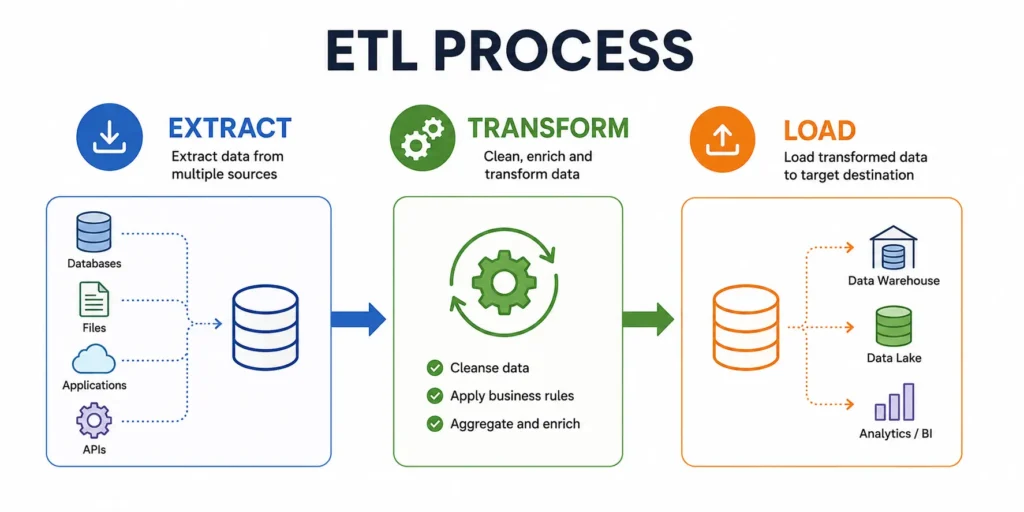
A slow ETL process can delay business reports, increase cloud infrastructure costs, create data quality issues, and prevent teams from making timely decisions. What once took minutes may start taking hours as datasets expand and workloads become more complex.
The challenge is even greater in 2026 as organizations adopt cloud-native architectures, real-time analytics, machine learning, and AI-driven applications. These workloads require faster and more reliable data movement than traditional ETL systems were originally designed to handle.
Optimizing ETL processes helps organizations:
- Reduce pipeline execution time
- Lower storage and compute costs
- Improve data availability for analytics
- Increase system reliability and stability
- Support larger datasets without performance degradation
- Meet reporting and SLA requirements consistently
- Enable real-time and near-real-time insights
Simply put, ETL optimization is no longer optional. It is a critical requirement for organizations that want to scale their data operations efficiently.
21 Proven ETL Optimization Techniques
Optimizing ETL pipelines requires improvements across every stage of the data workflow. While some organizations focus only on transformation performance, the extraction layer often contains significant opportunities for reducing processing time and resource consumption.
Data extraction is the foundation of every ETL process. If data is retrieved inefficiently, performance issues can cascade through the entire pipeline. The following techniques help reduce extraction overhead, improve throughput, and create a more scalable ETL architecture.
Data Extraction Optimization
The extraction phase involves collecting data from source systems such as databases, APIs, SaaS applications, flat files, and data streams. As data volumes increase, extraction can become one of the largest contributors to ETL latency.
By minimizing unnecessary data movement and reducing source system workload, organizations can significantly improve overall pipeline performance.
Technique 1: Incremental Loading
Incremental loading is one of the most effective ETL optimization techniques because it processes only new or modified records instead of reloading entire datasets.
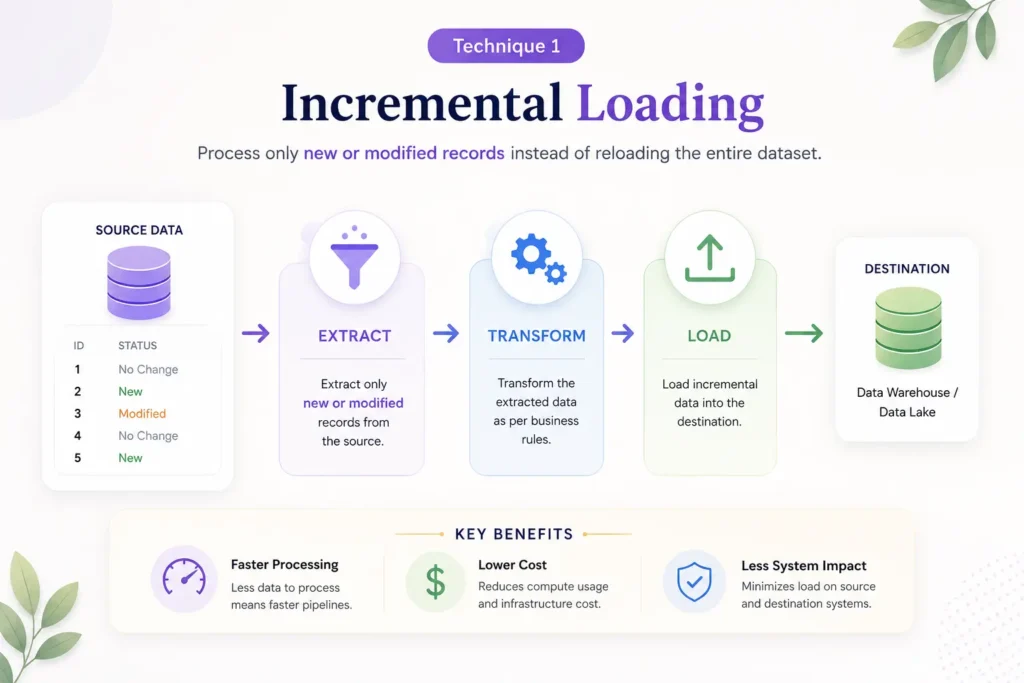
In a traditional full-load approach, the ETL system extracts all records during every execution cycle, regardless of whether the data has changed. As datasets grow, this method becomes increasingly inefficient and resource-intensive.
Incremental loading solves this problem by identifying records that have been created, updated, or deleted since the previous ETL run.
How Incremental Loading Works
The ETL pipeline tracks a unique indicator such as:
- Timestamp columns
- Last modified dates
- Sequence numbers
- Transaction IDs
- Version fields
During each execution, only records that have changed since the last successful run are extracted and processed.
Benefits of Incremental Loading
- Dramatically reduces data extraction volumes
- Lowers processing time
- Reduces network traffic
- Minimizes database workload
- Improves scalability
- Decreases cloud infrastructure costs
Example
Instead of extracting 100 million customer records every night, an incremental ETL process may retrieve only 50,000 records that changed during the previous 24 hours.
This can reduce extraction times from hours to minutes while lowering resource consumption across the entire pipeline.
Best Practices
- Maintain reliable change tracking mechanisms
- Store extraction checkpoints securely
- Implement validation processes to detect missed records
- Periodically perform reconciliation checks against source systems
Technique 2: Change Data Capture (CDC)
Change Data Capture (CDC) is an advanced extraction method that identifies and captures changes made to source data in near real time.
Rather than scanning entire tables to find modified records, CDC monitors database transaction logs and records only actual data changes.
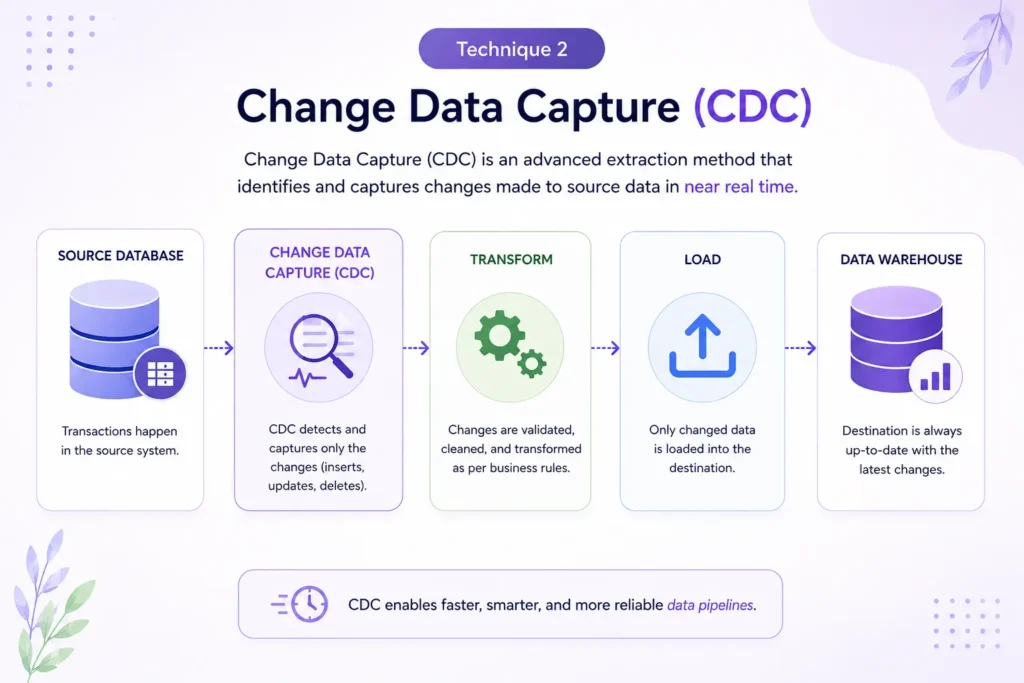
This approach provides a highly efficient alternative to traditional extraction methods.
How CDC Works
CDC tracks operations such as:
- INSERT statements
- UPDATE statements
- DELETE statements
The ETL pipeline then processes only those changes rather than re-reading the entire dataset.
Benefits of CDC
- Near-real-time data synchronization
- Reduced source database impact
- Faster ETL execution
- Lower infrastructure costs
- Improved scalability
- Better support for modern analytics workloads
Common CDC Approaches
| CDC Method | Description |
|---|---|
| Log-Based CDC | Reads database transaction logs |
| Trigger-Based CDC | Uses database triggers to track changes |
| Timestamp-Based CDC | Tracks updates using timestamp fields |
| Snapshot Comparison | Compares current and previous snapshots |
Log-based CDC is typically preferred because it provides high performance with minimal impact on production systems.
Ideal Use Cases
- Real-time analytics
- Data warehousing
- Cloud migration projects
- Data replication
- Event-driven architectures
Organizations processing large datasets often see significant performance improvements after implementing CDC-based extraction.
Technique 3: Source Query Optimization
Even the most advanced ETL architecture can suffer if extraction queries are poorly designed.
Inefficient queries increase extraction time, place unnecessary load on source systems, and slow down downstream processing.
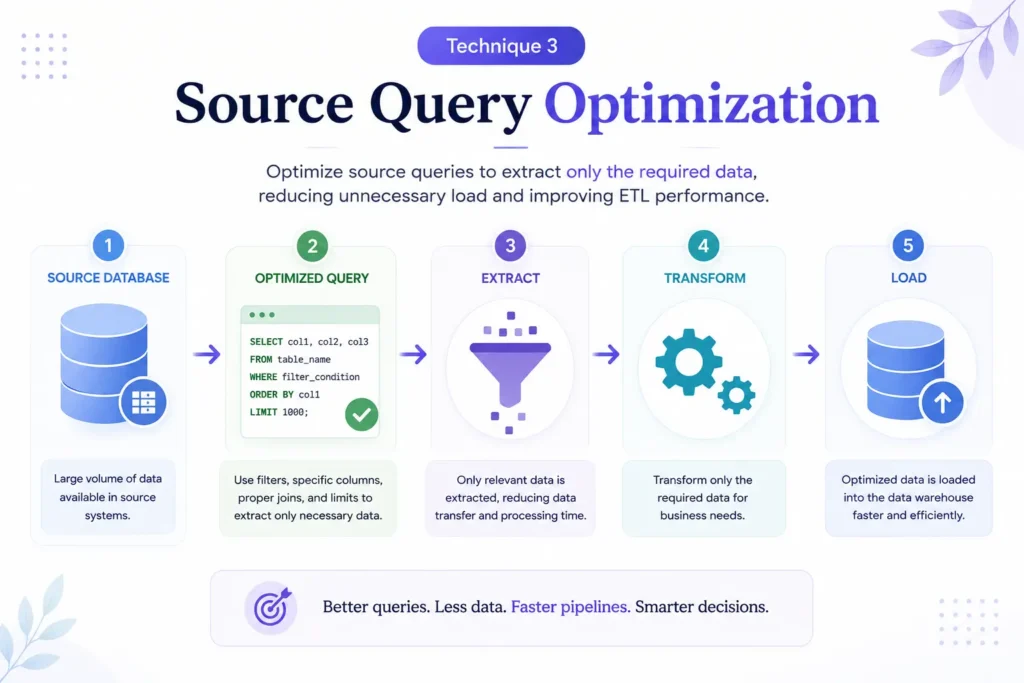
Query optimization focuses on retrieving only the data required for the ETL process while minimizing database resource consumption.
Common Query Performance Issues
- Full table scans
- Missing indexes
- Excessive joins
- Nested subqueries
- Unnecessary columns
- Poor filtering conditions
Query Optimization Strategies
Select Only Required Columns
Avoid using:
SELECT *
Instead, retrieve only the fields needed for downstream processing.
Filter Data Early
Apply filtering conditions during extraction to reduce data volume before transformation begins.
Use Proper Indexing
Indexes help databases locate records more efficiently and significantly reduce query execution time.
Optimize Join Operations
Review large joins carefully and eliminate unnecessary relationships where possible.
Avoid Redundant Queries
Consolidate multiple extraction queries into fewer optimized operations when practical.
Benefits of Query Optimization
- Faster extraction performance
- Lower database workload
- Reduced network utilization
- Improved source system responsiveness
- Better ETL throughput
Regular query analysis should be part of every ETL optimization strategy, especially for large-scale enterprise environments.
Technique 4: Data Partitioning
Data partitioning divides large datasets into smaller, manageable segments that can be processed independently.
As data volumes grow, processing entire tables or files as a single unit becomes increasingly inefficient.
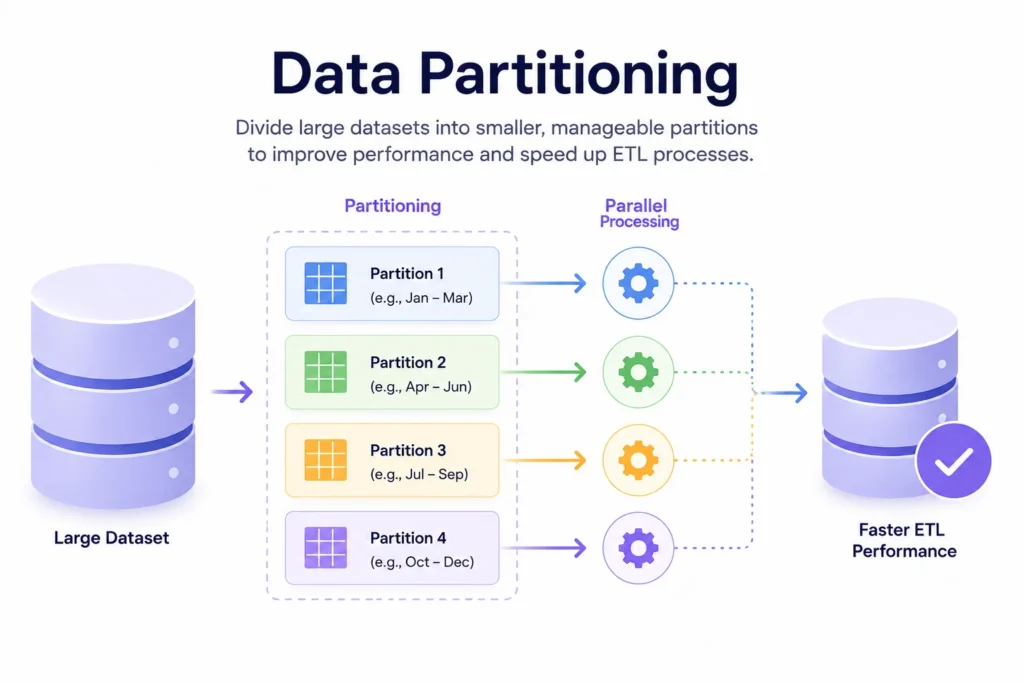
Partitioning allows ETL systems to work with smaller chunks of data, improving both performance and scalability.
Common Partitioning Methods
Range Partitioning
Data is divided based on value ranges.
Examples:
- Date ranges
- Sales amounts
- Geographic regions
Hash Partitioning
Records are distributed across partitions using a hashing function.
List Partitioning
Data is grouped according to predefined categories.
Examples:
- Country
- Product category
- Department
Time-Based Partitioning
One of the most common ETL approaches.
Examples:
- Daily partitions
- Weekly partitions
- Monthly partitions
Benefits of Data Partitioning
- Faster query execution
- Reduced I/O operations
- Improved parallel processing
- Better resource utilization
- Easier data management
- Enhanced scalability
Example
A transaction table containing five years of historical data may be partitioned by month. Instead of scanning billions of records, ETL jobs can process only the required monthly partitions.
This significantly reduces processing time while improving overall system efficiency.
Best Practices
- Align partitions with common query patterns
- Avoid creating excessively small partitions
- Monitor partition growth regularly
- Combine partitioning with indexing strategies
- Automate partition maintenance where possible
Transformation Optimization
The transformation stage is often the most resource-intensive component of an ETL pipeline. This is where raw data is cleaned, validated, enriched, standardized, aggregated, and converted into formats suitable for analytics and reporting.
While extraction and loading can usually be optimized through infrastructure improvements, transformation performance depends heavily on workflow design, processing logic, and resource utilization. Poorly designed transformations can consume excessive CPU, memory, and storage resources, causing ETL jobs to run significantly longer than necessary.
The following techniques help streamline transformation workloads, reduce processing overhead, and improve overall pipeline efficiency.
Technique 5: Push Transformations to Database
One of the most effective optimization strategies is performing transformations directly within the database instead of moving large datasets to external ETL engines for processing.
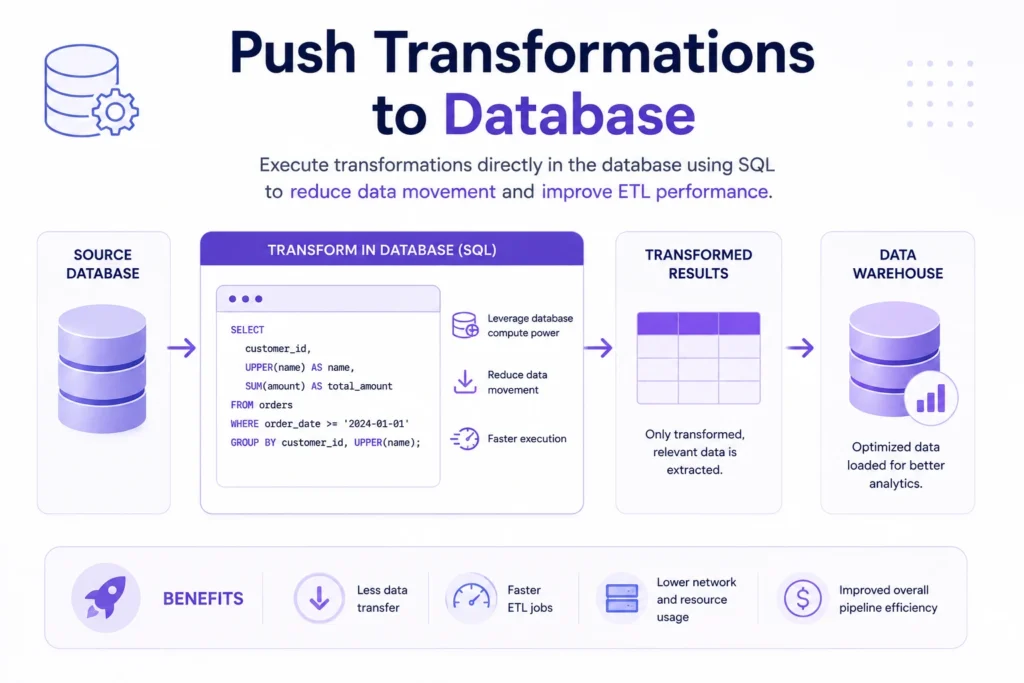
Modern databases and cloud data warehouses are designed to handle complex operations efficiently using built-in processing capabilities. By pushing transformations closer to where the data resides, organizations can reduce data movement and improve performance.
Common Database-Level Transformations
- Filtering records
- Data aggregation
- Sorting operations
- Joins
- Data validation
- Calculated fields
- Deduplication
Benefits of Database Pushdown Processing
- Reduced network traffic
- Faster execution times
- Lower ETL server workload
- Better resource utilization
- Improved scalability
Example
Instead of extracting 50 million records and performing calculations externally, an optimized ETL workflow can execute SQL transformations directly within the database and transfer only the final results.
This significantly reduces processing time and infrastructure requirements.
Best Practices
- Use database-native functions whenever possible
- Leverage materialized views for frequently accessed data
- Optimize SQL execution plans
- Avoid unnecessary data movement between systems
Organizations using cloud data warehouses often achieve substantial performance gains through pushdown optimization.
Technique 6: Eliminate Redundant Transformations
As ETL environments evolve, transformation logic often becomes increasingly complex. Multiple developers, changing business requirements, and years of incremental modifications can introduce redundant processing steps that waste resources.
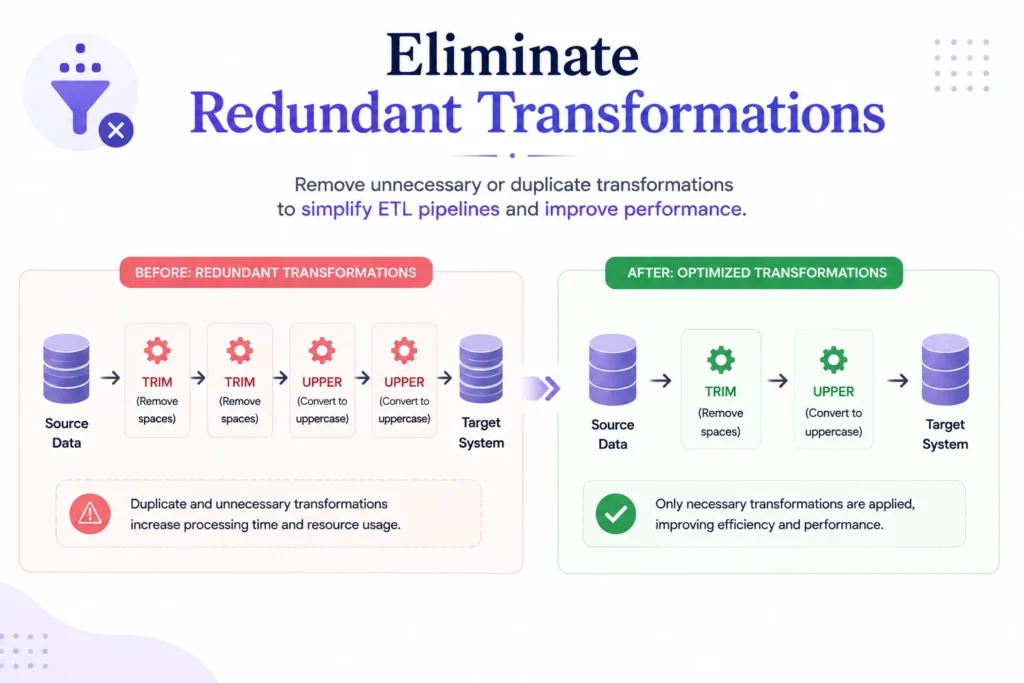
Redundant transformations increase execution times without adding meaningful value.
Common Examples of Redundancy
- Repeated data cleansing operations
- Multiple format conversions
- Duplicate calculations
- Unnecessary intermediate datasets
- Repeated validation checks
- Multiple joins producing the same result
How to Identify Redundant Transformations
Review workflows for:
- Duplicate business rules
- Repeated transformations across pipelines
- Unused calculated fields
- Legacy processing steps
- Obsolete data requirements
Benefits of Eliminating Redundancy
- Faster pipeline execution
- Lower compute utilization
- Reduced maintenance complexity
- Improved workflow reliability
- Easier troubleshooting
Example
A customer data pipeline may perform email validation during extraction, transformation, and loading stages. Consolidating validation into a single step can significantly reduce processing overhead.
Regular ETL audits help identify opportunities to simplify workflows and improve performance.
Technique 7: Optimize Data Mapping
Data mapping defines how information from source systems is transformed and loaded into target destinations.
Poorly designed mappings can create unnecessary processing complexity and increase transformation time.
Optimized data mapping ensures data flows efficiently through the pipeline while maintaining accuracy and consistency.
Common Data Mapping Challenges
- Complex field relationships
- Excessive lookup operations
- Large reference tables
- Inconsistent data formats
- Unnecessary field conversions
Optimization Strategies
Simplify Mapping Rules
Reduce unnecessary transformation logic and focus only on required business rules.
Minimize Lookup Operations
Frequent lookups against large datasets can become major performance bottlenecks.
Standardize Data Formats Early
Converting formats multiple times throughout the workflow increases processing overhead.
Reuse Shared Mapping Logic
Centralized mapping definitions improve consistency and reduce duplication.
Benefits of Optimized Data Mapping
- Faster transformations
- Reduced complexity
- Improved maintainability
- Better data consistency
- Lower processing costs
Organizations managing multiple source systems often see significant performance improvements by simplifying and standardizing mapping processes.
Technique 8: Use Parallel Processing
Traditional ETL workflows often execute tasks sequentially, meaning each operation must complete before the next one begins.
As data volumes grow, sequential processing becomes increasingly inefficient.
Parallel processing allows multiple tasks to run simultaneously, significantly improving throughput and reducing overall execution time.
Areas Suitable for Parallel Processing
- Data extraction
- File processing
- Transformation workflows
- Partitioned datasets
- Loading operations
- Validation tasks
Example
A pipeline processing customer data from ten regions can handle each region simultaneously rather than processing them one after another.
This can reduce total runtime from several hours to a fraction of the original duration.
Benefits of Parallel Processing
- Faster ETL execution
- Improved scalability
- Better hardware utilization
- Higher throughput
- Reduced processing windows
Considerations
While parallel processing delivers significant performance gains, organizations should monitor:
- Resource contention
- Memory utilization
- Network bandwidth
- Dependency management
Proper workload balancing is essential to maximize benefits without introducing new bottlenecks.
Technique 9: In-Memory Processing
Traditional ETL systems frequently rely on disk-based operations for sorting, joining, aggregating, and transforming data. Disk access is significantly slower than memory access, making storage operations a common source of ETL latency.
In-memory processing addresses this issue by performing transformations directly in RAM.
Modern data processing frameworks use memory-intensive architectures to accelerate complex transformation workloads.
How In-Memory Processing Works
Data is loaded into memory where transformations are executed without repeated disk access.
This enables:
- Faster aggregations
- Quicker joins
- Accelerated sorting operations
- Improved iterative processing
Benefits of In-Memory Processing
- Dramatically reduced execution times
- Faster complex transformations
- Improved support for large-scale analytics
- Better resource efficiency
- Enhanced user responsiveness
Common Use Cases
- Large-scale data transformation
- Machine learning workflows
- Real-time analytics
- Interactive data processing
- Complex aggregation workloads
Technologies Commonly Used
- Apache Spark
- Distributed in-memory databases
- Cloud-native analytics engines
- High-performance data processing platforms
Organizations handling large datasets often achieve substantial performance improvements when moving critical transformation workloads from disk-based processing to memory-based architectures.
Loading Optimization
After data has been extracted and transformed, it must be loaded efficiently into a target system such as a data warehouse, data lake, analytics platform, or operational database. While loading is often viewed as the final stage of an ETL process, it can become a major performance bottleneck when handling large datasets.
Slow loading operations increase overall pipeline runtime, consume additional infrastructure resources, and delay data availability for reporting and analytics. Optimizing the loading phase ensures data reaches target systems quickly while minimizing resource consumption and operational costs.
The following techniques help improve loading performance and scalability.
Technique 10: Bulk Loading
Bulk loading is one of the fastest methods for transferring large volumes of data into a target system.
Instead of inserting records one row at a time, bulk loading processes thousands or even millions of records in a single operation. This significantly reduces the overhead associated with individual insert transactions.
Why Row-by-Row Loading Is Slow
Traditional insert operations require:
- Individual transaction processing
- Repeated network communication
- Multiple disk writes
- Frequent index updates
As datasets grow, these overheads can dramatically increase loading times.
Benefits of Bulk Loading
- Faster data ingestion
- Reduced transaction overhead
- Lower database resource consumption
- Improved scalability
- Better throughput for large datasets
Common Bulk Loading Methods
| Method | Description |
|---|---|
| Native Bulk Load Utilities | Database-specific bulk import tools |
| CSV File Imports | Loading data from structured files |
| Parallel Bulk Inserts | Multiple bulk loads executed simultaneously |
| Cloud Data Import Services | Managed loading services provided by cloud platforms |
Example
A pipeline inserting 50 million records individually may require several hours to complete. Using bulk loading, the same operation could finish in a fraction of the time while consuming fewer resources.
Best Practices
- Disable nonessential indexes during large loads when appropriate
- Validate data before loading
- Use staging tables for large imports
- Monitor transaction log growth during load operations
Bulk loading is often one of the quickest ways to achieve substantial ETL performance improvements.
Technique 11: Batch Processing
Batch processing improves loading efficiency by grouping records into manageable sets before transferring them to the target system.
Instead of processing records individually, batches allow the ETL system to handle multiple records within a single operation.
How Batch Processing Works
A dataset is divided into smaller groups, such as:
- 1,000 records per batch
- 10,000 records per batch
- 100,000 records per batch
The optimal batch size depends on:
- Available memory
- Network bandwidth
- Database capacity
- Workload characteristics
Benefits of Batch Processing
- Reduced transaction overhead
- Improved throughput
- Better resource utilization
- Lower network costs
- Enhanced reliability
Example
Loading one million records as 100 batches of 10,000 records is typically far more efficient than executing one million separate insert operations.
Choosing the Right Batch Size
Batch sizes that are too small create unnecessary overhead.
Batch sizes that are too large can:
- Consume excessive memory
- Increase failure recovery time
- Create database locking issues
Performance testing helps identify the optimal batch size for each environment.
Technique 12: Partitioned Writes
Partitioned writes improve loading performance by distributing data across multiple partitions instead of writing everything into a single storage structure.
This approach is especially valuable for large-scale data warehouses, data lakes, and distributed analytics environments.
How Partitioned Writes Work
Data can be partitioned based on:
- Date
- Geographic region
- Product category
- Customer segment
- Business unit
Each partition can then be loaded independently.
Benefits of Partitioned Writes
- Faster loading operations
- Improved parallelism
- Better query performance
- Reduced storage bottlenecks
- Easier data maintenance
Example
A retail organization storing transaction data may create separate partitions for each month. New data is loaded directly into the appropriate partition rather than being added to a single massive table.
This reduces write contention and improves overall system efficiency.
Best Practices
- Align partitions with reporting requirements
- Avoid excessive partition counts
- Monitor partition growth regularly
- Combine partitioning with indexing strategies
When implemented correctly, partitioned writes improve both loading performance and downstream query execution.
Technique 13: Compression Strategies
Data compression reduces the amount of storage space and network bandwidth required during ETL operations.
Large datasets often contain repetitive information that can be compressed before transfer or storage.
By reducing data size, organizations can accelerate loading operations and lower infrastructure costs.
Types of Compression
File Compression
Compresses source files before transfer or loading.
Common formats include:
- GZIP
- Snappy
- ZIP
- Parquet compression
- ORC compression
Network Compression
Reduces data transferred between systems.
Storage Compression
Compresses data within databases and data warehouses.
Benefits of Compression
- Faster data transfers
- Reduced storage requirements
- Lower network utilization
- Improved loading performance
- Reduced cloud storage costs
Example
A 500 GB dataset compressed to 100 GB can be transferred and loaded significantly faster while consuming fewer storage resources.
Considerations
Compression introduces additional CPU overhead because data must be compressed and decompressed during processing.
Organizations should balance:
- Compression ratio
- Processing overhead
- Available compute resources
- Loading speed requirements
For most large-scale ETL environments, the performance and cost benefits of compression far outweigh the additional processing requirements.
Infrastructure Optimization
Even the most efficient extraction, transformation, and loading processes can suffer from poor infrastructure design. As data volumes increase and workloads become more complex, underlying infrastructure becomes a critical factor in ETL performance.
Infrastructure optimization focuses on ensuring compute, storage, memory, and networking resources are configured to support growing workloads without creating bottlenecks. Modern ETL environments increasingly rely on cloud-native architectures, distributed systems, and intelligent resource management to maintain performance while controlling costs.
The following techniques help organizations build scalable and efficient ETL infrastructure.
Technique 14: Autoscaling Resources
Traditional ETL environments often rely on fixed infrastructure capacity. While this approach may work for predictable workloads, it can lead to performance issues during peak demand and wasted resources during periods of low activity.
Autoscaling solves this problem by automatically adjusting infrastructure resources based on workload requirements.
How Autoscaling Works
Cloud platforms continuously monitor resource utilization and automatically:
- Add compute resources when demand increases
- Remove unused resources during low-usage periods
- Balance workloads across available infrastructure
- Optimize resource allocation in real time
Benefits of Autoscaling
- Improved ETL performance during peak workloads
- Reduced infrastructure costs
- Better resource utilization
- Increased operational efficiency
- Enhanced scalability
Example
A nightly ETL job processing 500 million records may require significantly more computing power than daytime workloads. Autoscaling provisions additional resources during processing and releases them once the job completes.
This allows organizations to pay only for resources they actually use.
Best Practices
- Define appropriate scaling thresholds
- Monitor resource consumption trends
- Configure automatic alerts for abnormal scaling activity
- Test autoscaling policies under different workloads
Autoscaling is particularly valuable in cloud environments where resource demands can fluctuate significantly.
Technique 15: Distributed Processing
As data volumes grow into terabytes or petabytes, processing data on a single server becomes increasingly inefficient.
Distributed processing improves performance by dividing workloads across multiple machines that operate simultaneously.
Instead of relying on one server to process an entire dataset, distributed systems split the workload into smaller tasks that run in parallel.
How Distributed Processing Works
Large datasets are divided into partitions that are processed independently across multiple nodes.
Each node performs a portion of the workload before results are combined into a final output.
Benefits of Distributed Processing
- Faster execution times
- Improved scalability
- Higher throughput
- Better fault tolerance
- Efficient handling of large datasets
Common Use Cases
- Big data analytics
- Machine learning pipelines
- Large-scale ETL workloads
- Real-time data processing
- Enterprise data warehousing
Example
A pipeline processing one billion transaction records may require several hours on a single server. Using distributed processing, the workload can be spread across dozens of nodes and completed significantly faster.
Popular Distributed Processing Technologies
- Apache Spark
- Hadoop
- Google Dataflow
- Databricks
- Distributed SQL engines
For organizations managing rapidly growing data volumes, distributed processing is often essential for maintaining acceptable ETL performance.
Technique 16: Storage Optimization
Storage performance directly affects ETL speed because every pipeline depends on reading, writing, and moving data efficiently.
Poor storage design can create bottlenecks even when compute resources are sufficient.
Storage optimization focuses on improving how data is stored, accessed, and managed throughout the ETL lifecycle.
Common Storage Bottlenecks
- Slow disk performance
- Excessive data fragmentation
- Poor partition design
- Unoptimized file formats
- Inefficient storage tiering
Storage Optimization Strategies
Use High-Performance Storage
Solid-state drives (SSDs) generally provide significantly faster read and write performance than traditional hard drives.
Implement Data Partitioning
Partitioned storage structures reduce the amount of data scanned during ETL operations.
Choose Efficient File Formats
Columnar formats such as Parquet and ORC improve performance for analytics workloads.
Archive Historical Data
Moving rarely accessed information to lower-cost storage tiers reduces the size of active datasets.
Optimize Storage Layout
Organizing files according to query patterns can significantly improve retrieval speed.
Benefits of Storage Optimization
- Faster data access
- Reduced I/O bottlenecks
- Lower storage costs
- Improved ETL performance
- Better scalability
Proper storage design often delivers performance improvements without requiring major architectural changes.
Technique 17: Caching Frequently Used Data
Many ETL workflows repeatedly access the same reference data, lookup tables, configuration files, and business rules during processing.
Repeatedly retrieving this information from databases or storage systems creates unnecessary latency and resource consumption.
Caching improves performance by storing frequently accessed data in memory or high-speed storage for rapid retrieval.
Common Data Suitable for Caching
- Lookup tables
- Product catalogs
- Customer reference data
- Business rules
- Metadata repositories
- Configuration settings
How Caching Improves Performance
Instead of repeatedly querying a database, the ETL process retrieves data directly from the cache.
This reduces:
- Database workload
- Network traffic
- Query execution time
- Overall processing latency
Benefits of Caching
- Faster transformation operations
- Reduced database load
- Improved throughput
- Lower infrastructure utilization
- Enhanced pipeline responsiveness
Example
A product lookup table used millions of times during a transformation process can be loaded into memory at the beginning of the ETL run. Subsequent lookups occur instantly without repeatedly querying the source database.
Best Practices
- Cache only frequently accessed datasets
- Monitor cache hit rates
- Establish cache refresh policies
- Avoid storing outdated reference data
When implemented correctly, caching can deliver substantial performance gains for ETL pipelines that rely heavily on repetitive data access.
Monitoring and Reliability
Performance optimization does not end after implementing faster queries, parallel processing, or infrastructure improvements. As data volumes grow and business requirements evolve, new bottlenecks and reliability issues can emerge over time.
This is why monitoring and reliability are critical components of a high-performing ETL environment. Organizations that continuously track pipeline health can detect issues early, reduce downtime, and maintain consistent performance.
The following techniques help ensure ETL pipelines remain reliable, scalable, and efficient long after initial optimization efforts are completed.
Technique 18: ETL Observability
ETL observability provides deep visibility into the health, performance, and behavior of data pipelines.
Traditional monitoring focuses on whether a job succeeds or fails. Observability goes further by helping teams understand why issues occur and how they affect downstream systems.
Key Components of ETL Observability
Pipeline Monitoring
Tracks the execution status of ETL workflows.
Data Quality Monitoring
Identifies:
- Missing records
- Duplicate data
- Invalid values
- Schema changes
Performance Monitoring
Measures:
- Execution times
- Throughput
- Latency
- Resource consumption
Dependency Tracking
Monitors relationships between pipelines, data sources, and reporting systems.
Benefits of ETL Observability
- Faster issue detection
- Improved troubleshooting
- Reduced downtime
- Better SLA compliance
- Increased confidence in analytics data
Example
Instead of discovering a failed transformation after users report missing dashboard data, observability tools can immediately alert teams when anomalies occur.
Best Practices
- Monitor every stage of the ETL process
- Establish baseline performance metrics
- Create automated alerts for anomalies
- Track historical performance trends
- Monitor data quality alongside system performance
Organizations with mature observability practices often resolve issues significantly faster than those relying solely on traditional monitoring methods.
Technique 19: Automated Failure Recovery
ETL failures are inevitable. Hardware issues, network disruptions, source system outages, data quality problems, and configuration errors can all interrupt pipeline execution.
Manual recovery processes increase downtime and place additional burdens on data engineering teams.
Automated failure recovery helps pipelines recover from common issues without human intervention.
Common Automated Recovery Strategies
Automatic Job Retries
Failed tasks are retried after a predefined waiting period.
Checkpointing
Pipelines resume from the last successful processing point instead of restarting from the beginning.
Workflow Restart Mechanisms
Specific workflow stages can restart independently when failures occur.
Failover Systems
Backup infrastructure automatically takes over when primary systems become unavailable.
Benefits of Automated Recovery
- Reduced downtime
- Faster issue resolution
- Improved reliability
- Lower operational workload
- Better SLA performance
Example
If a network interruption occurs while processing a large dataset, checkpointing allows the ETL job to resume from the last completed batch instead of restarting the entire workflow.
This can save hours of processing time and improve overall pipeline resilience.
Technique 20: Resource Utilization Monitoring
Infrastructure resources play a major role in ETL performance. Without proper monitoring, organizations may overlook resource bottlenecks until performance begins to decline.
Resource utilization monitoring helps teams understand how efficiently infrastructure is being used during ETL execution.
Key Resources to Monitor
CPU Usage
High CPU utilization may indicate:
- Complex transformations
- Inefficient queries
- Insufficient processing capacity
Memory Usage
Memory shortages can force workloads to rely on slower disk-based operations.
Storage Performance
Monitor:
- Read speeds
- Write speeds
- I/O wait times
- Storage capacity utilization
Network Utilization
Track data transfer rates and network latency between systems.
Benefits of Resource Monitoring
- Early detection of bottlenecks
- Improved capacity planning
- Better workload balancing
- Reduced infrastructure costs
- Enhanced performance stability
Example
A transformation job consistently consuming 95% CPU utilization may indicate the need for query optimization, workload redistribution, or additional processing resources.
Continuous monitoring helps teams make data-driven optimization decisions instead of relying on assumptions.
Recommended Metrics
| Metric | Purpose |
|---|---|
| CPU Utilization | Measures processing demand |
| Memory Usage | Identifies memory constraints |
| Disk I/O | Detects storage bottlenecks |
| Network Throughput | Tracks data transfer performance |
| Resource Cost | Evaluates infrastructure efficiency |
Regular analysis of these metrics helps maintain optimal ETL performance as workloads evolve.
Technique 21: Continuous Performance Testing
Many organizations optimize ETL pipelines once and assume performance improvements will last indefinitely. However, data environments change constantly.
New data sources, growing datasets, changing business rules, and infrastructure updates can all introduce performance degradation over time.
Continuous performance testing helps organizations proactively identify issues before they impact production workloads.
What Continuous Performance Testing Involves
Load Testing
Evaluates pipeline behavior under expected workloads.
Stress Testing
Determines performance limits under extreme conditions.
Scalability Testing
Measures how pipelines perform as data volumes increase.
Regression Testing
Ensures new updates do not negatively affect performance.
Benefits of Continuous Testing
- Early detection of performance issues
- Improved reliability
- Better scalability planning
- Reduced production incidents
- Consistent user experience
Example
An ETL pipeline that performs well with 100 million records today may struggle with 500 million records next year. Continuous testing identifies these limitations before they affect business operations.
Best Practices
- Automate testing whenever possible
- Establish performance benchmarks
- Test using realistic production workloads
- Monitor performance trends over time
- Include performance testing in deployment workflows
Organizations that regularly test ETL performance are better prepared for growth and less likely to experience unexpected bottlenecks.
ETL Tools for ETL Optimization
The ETL tool you use has a direct impact on pipeline performance, scalability, and maintenance.
While optimization techniques such as indexing, parallel processing, and incremental loading can improve any ETL workflow, modern ETL tools include built-in features that make these optimizations easier to implement.
They can automate scheduling, monitor pipeline health, detect errors, and manage data movement more efficiently than manual scripts.
Features to Look for in an ETL Tool
When selecting an ETL tool for optimized data pipelines, consider these capabilities:
- Support for incremental data loading
- Parallel processing to speed up large data transfers
- Built-in data transformation features
- Real-time or near real-time data integration
- Pipeline monitoring and alerting
- Error handling and automatic retries
- Data quality validation
- Broad connector support for databases, cloud services, APIs, and applications
- Scalability for growing data volumes
- Security features such as encryption and role-based access control
Popular ETL Tools
Several ETL platforms are widely used across different industries, each offering unique strengths.
| ETL Tool | Best For | Key Strength |
|---|---|---|
| Fivetran | Cloud data integration | Automated connectors with minimal maintenance |
| Airbyte | Open-source ETL | Large connector library and self-hosting options |
| AWS Glue | AWS environments | Serverless ETL with native AWS integration |
| Azure Data Factory | Microsoft ecosystem | Visual pipeline creation and Azure integration |
| Google Cloud Data Fusion | Google Cloud users | Managed ETL service with graphical interface |
| Informatica | Large enterprises | Advanced data integration and governance |
| Talend | Hybrid environments | Strong data quality and transformation features |
| Matillion | Cloud data warehouses | Optimized for Snowflake, Redshift, and BigQuery |
ETL Optimization vs ETL Performance Tuning
Although the terms are often used interchangeably, ETL optimization and ETL performance tuning are not exactly the same.
| Aspect | ETL Optimization | ETL Performance Tuning |
|---|---|---|
| Scope | Broad and strategic | Narrow and technical |
| Focus | Entire ETL architecture and workflow | Specific performance issues |
| Objective | Improve speed, scalability, reliability, and cost efficiency | Improve execution speed |
| Areas Covered | Data extraction, transformation, loading, infrastructure, monitoring, and architecture | Queries, indexes, memory usage, resource allocation |
| Time Horizon | Long-term improvements | Immediate performance gains |
Performance tuning is usually one part of a larger optimization strategy.
For example:
- Adding database indexes to improve query speed is performance tuning.
- Redesigning a pipeline to use parallel processing and incremental loading is ETL optimization.
Organizations that focus only on performance tuning may achieve short-term improvements but still face scalability challenges as data volumes grow. A complete optimization strategy addresses both current bottlenecks and future growth requirements.
Key Goals of Optimization
Effective ETL optimization aims to achieve several business and technical objectives.
1. Reduce Processing Time
Faster pipelines allow organizations to generate reports, dashboards, and analytics more quickly. Shorter processing windows also improve data freshness and support faster decision-making.
2. Improve Scalability
As data volumes increase, optimized ETL systems can handle larger workloads without significant performance degradation. This ensures long-term sustainability as business needs evolve.
3. Lower Infrastructure Costs
Efficient pipelines consume fewer compute, storage, and network resources. This can significantly reduce operational costs, especially in cloud environments where organizations pay based on usage.
4. Increase Reliability
Optimization helps minimize failures, data inconsistencies, and workflow interruptions. Reliable ETL pipelines improve trust in business intelligence and analytics systems.
5. Enhance Data Quality
Optimized workflows often include stronger validation, cleansing, and monitoring processes that improve data accuracy and consistency across systems.
6. Support Real-Time Analytics
Modern businesses increasingly rely on near-real-time insights. ETL optimization reduces latency and enables faster data delivery to analytics platforms and AI applications.
7. Improve Resource Utilization
Efficient pipelines make better use of available CPU, memory, storage, and network resources, helping organizations maximize the value of their infrastructure investments.
Ultimately, ETL process optimization is about creating data pipelines that are fast, scalable, reliable, and cost-effective while supporting the growing demands of modern data-driven organizations.
Why ETL Pipelines Become Slow
ETL pipelines are designed to move and transform data efficiently, but their performance often declines as data volumes, business requirements, and system complexity increase. What begins as a fast and reliable workflow can gradually become a bottleneck that delays reporting, increases infrastructure costs, and affects business operations.
Understanding the root causes of slow ETL pipelines is the first step toward effective optimization. While every environment is different, most performance issues can be traced back to a handful of common factors.
Data Volume Growth
One of the most common reasons ETL pipelines slow down is the rapid growth of data.
When ETL processes are first designed, they are often built to handle a specific amount of data. Over time, organizations collect information from more applications, customers, devices, and digital channels. As datasets grow, ETL workflows must process significantly larger volumes of information than originally planned.
Common challenges caused by data growth include:
- Longer extraction times from source systems
- Increased transformation workloads
- Larger data transfers across networks
- Slower loading into data warehouses and data lakes
- Higher storage and compute requirements
For example, a pipeline processing 1 million records per day may perform well initially. However, when the same pipeline must process 100 million records daily, execution times can increase dramatically if the architecture has not been optimized for scale.
Without techniques such as incremental loading, partitioning, and parallel processing, growing data volumes can quickly overwhelm ETL workflows.
Inefficient Transformations
The transformation stage is often the most resource-intensive part of an ETL process.
Data transformations may include:
- Data cleansing
- Validation checks
- Data enrichment
- Format conversions
- Aggregations
- Joins and lookups
- Business rule calculations
When transformations are poorly designed, they can consume excessive CPU, memory, and processing resources.
Common transformation inefficiencies include:
- Performing unnecessary calculations
- Repeated data conversions
- Multiple transformation steps on the same dataset
- Excessive joins across large tables
- Processing full datasets instead of changed records only
For instance, applying complex calculations to millions of rows when only a small subset requires processing can significantly increase execution time.
Modern optimization strategies focus on simplifying transformation logic and pushing processing closer to the database whenever possible.
Resource Bottlenecks
ETL performance is heavily dependent on the availability of computing resources.
Even well-designed pipelines can slow down when critical resources become constrained.
Typical resource bottlenecks include:
CPU Limitations
Complex transformations, aggregations, and calculations require significant processing power. When CPU resources are exhausted, ETL jobs may take much longer to complete.
Memory Constraints
Insufficient memory can force systems to use disk-based processing, which is considerably slower than in-memory operations.
Storage Performance Issues
Slow storage systems can create delays when reading source data or writing transformed datasets.
Network Latency
Large data transfers between systems, cloud environments, or geographic regions can introduce significant delays.
Concurrent Workloads
Multiple ETL jobs competing for the same resources can reduce overall performance and create processing queues.
Monitoring resource utilization is essential for identifying infrastructure-related bottlenecks before they impact business operations.
Poor Query Design
The extraction phase often relies on database queries to retrieve source data. Poorly optimized queries can become a major source of ETL delays.
Common query-related issues include:
- Full table scans
- Missing indexes
- Excessive joins
- Unnecessary data retrieval
- Complex nested queries
- Poor filtering conditions
For example, extracting every record from a large transactional database each day is far less efficient than retrieving only new or updated records.
Poor query design can create problems not only for ETL performance but also for source systems that must handle the additional workload.
Best practices such as query optimization, indexing, partitioning, and Change Data Capture (CDC) can significantly reduce extraction times and improve overall pipeline efficiency.
Legacy Architecture Constraints
Many organizations continue to rely on ETL architectures that were designed years ago for smaller datasets and less demanding workloads.
While these systems may still function, they often struggle to meet modern performance expectations.
Common legacy architecture limitations include:
- Monolithic ETL workflows
- Batch-only processing models
- Limited scalability
- On-premises infrastructure constraints
- Manual workflow management
- Lack of automation and monitoring
Older architectures are typically harder to scale because they depend on fixed hardware resources and sequential processing methods.
In contrast, modern ETL environments use cloud-native services, distributed processing frameworks, and automated orchestration tools that can dynamically scale based on workload requirements.
As organizations adopt advanced analytics, artificial intelligence, and real-time reporting, legacy ETL architectures often become one of the biggest obstacles to performance and scalability.
Signs Your ETL Process Needs Optimization
Many organizations don’t realize their ETL pipelines have performance issues until those problems start affecting business operations. A workflow that once completed efficiently may gradually become slower, more expensive, and less reliable as data volumes and processing requirements increase.
Recognizing the warning signs early allows data teams to address bottlenecks before they lead to missed deadlines, reporting delays, or unnecessary infrastructure spending.
If your ETL environment is experiencing any of the following issues, it may be time to implement an optimization strategy.
Missed SLA Targets
Service Level Agreements (SLAs) define the expected performance and availability standards for data processing workflows. When ETL pipelines consistently fail to meet these targets, it is often a clear indication of underlying performance problems.
Common SLA-related issues include:
- Daily jobs exceeding scheduled processing windows
- Delayed data availability for business users
- Missed reporting deadlines
- Increased backlog of pending ETL tasks
- Inconsistent job completion times
For example, if a pipeline is expected to finish by 6:00 AM so dashboards are ready for business teams at the start of the day, but the process frequently runs until 8:00 AM or later, optimization is likely needed.
Missed SLAs not only affect operational efficiency but can also reduce confidence in the organization’s data systems.
Long Processing Times
One of the most obvious signs of ETL performance issues is a steady increase in processing time.
As data volumes grow, ETL jobs often require more time to complete. While some increase is expected, significant performance degradation usually indicates inefficiencies within the pipeline.
Warning signs include:
- Jobs that take hours instead of minutes
- Processing windows that continue to expand over time
- Increasing delays during extraction, transformation, or loading phases
- Longer batch completion cycles
- Reduced data freshness
For instance, a nightly ETL workflow that originally completed in 30 minutes but now requires four hours may be suffering from inefficient queries, resource constraints, or poorly optimized transformations.
Tracking execution times regularly helps teams identify performance trends before they become critical issues.
Escalating Infrastructure Costs
Rising infrastructure expenses are often a hidden indicator of ETL inefficiency.
Cloud platforms charge based on resource consumption, including compute, storage, and network usage. When ETL workflows become inefficient, organizations may unknowingly spend more money compensating for performance problems rather than solving them.
Signs of cost-related inefficiencies include:
- Increasing cloud bills without corresponding business growth
- Higher compute consumption during ETL execution
- Excessive storage utilization
- Increased network transfer costs
- Frequent need to provision additional resources
Many organizations attempt to improve performance by allocating more hardware or cloud resources. While this may provide temporary relief, it often masks underlying inefficiencies that continue driving costs upward.
Optimization focuses on improving efficiency so pipelines can process more data using fewer resources.
Frequent Pipeline Failures
Reliable ETL processes should run consistently with minimal manual intervention.
When workflows begin failing regularly, it often signals deeper performance or architectural issues that require attention.
Common failure indicators include:
- Job timeouts
- Memory-related crashes
- Resource exhaustion errors
- Data loading failures
- Incomplete transformations
- Dependency failures between workflow stages
Frequent failures can create operational challenges such as:
- Increased troubleshooting efforts
- Delayed reporting cycles
- Data inconsistencies
- Reduced trust in analytics outputs
As ETL environments grow more complex, optimization and monitoring become essential for maintaining reliability and reducing operational risk.
Delayed Analytics Reporting
The ultimate purpose of an ETL pipeline is to make data available for analytics, reporting, and decision-making.
When ETL performance declines, business users are often the first to notice the impact through delayed dashboards and outdated reports.
Common reporting issues include:
- Dashboards displaying stale data
- Delayed KPI updates
- Incomplete reporting datasets
- Slower business intelligence queries
- Missed reporting deadlines
Decision-makers rely on timely information to respond to market conditions, customer behavior, and operational challenges. Delayed reporting can reduce agility and create missed business opportunities.
If stakeholders frequently complain that reports are outdated or unavailable when needed, ETL optimization should become a priority.
ETL Optimization Framework
Successful ETL optimization requires more than applying random performance improvements. Without a structured approach, organizations often spend time and resources addressing symptoms instead of solving the root causes of performance issues.
A proven ETL optimization framework helps teams systematically evaluate pipeline performance, identify bottlenecks, implement targeted improvements, and measure the impact of those changes. This process ensures optimization efforts deliver measurable business value while supporting long-term scalability.
The following five-step framework can be used to optimize ETL pipelines of any size, from small reporting workflows to enterprise-scale data platforms.
Step 1: Measure Current Performance
Before making any changes, establish a clear baseline of your current ETL performance.
Many organizations begin optimization projects without understanding how their pipelines are performing. As a result, they struggle to determine whether improvements are actually delivering value.
Key metrics to measure include:
- Pipeline execution time
- Data throughput
- Processing latency
- Resource utilization
- Error rates
- Data freshness
- Infrastructure costs
- SLA compliance rates
For example, if a nightly ETL job takes four hours to process 50 million records, document this performance benchmark before implementing any optimizations.
Important questions to answer include:
- How long does each ETL stage take?
- Which workflows consume the most resources?
- What is the cost per pipeline run?
- How often do failures occur?
- Are SLA targets consistently met?
Creating a performance baseline allows teams to accurately compare results after optimization efforts are completed.
Step 2: Identify Bottlenecks
Once baseline metrics are available, the next step is identifying where performance issues occur.
ETL bottlenecks can appear during extraction, transformation, loading, infrastructure, or orchestration processes. Identifying the exact source of delays prevents unnecessary optimization efforts.
Common bottlenecks include:
Extraction Bottlenecks
- Slow source system queries
- Full-table data extraction
- Missing database indexes
- Network transfer limitations
Transformation Bottlenecks
- Complex joins and aggregations
- Redundant transformations
- Large-scale data validation processes
- Memory-intensive calculations
Loading Bottlenecks
- Slow write operations
- Row-by-row inserts
- Storage performance limitations
- Unoptimized target database structures
Infrastructure Bottlenecks
- CPU saturation
- Memory shortages
- Disk I/O constraints
- Network congestion
Useful diagnostic methods include:
- Pipeline execution logs
- Query performance analysis
- Resource monitoring dashboards
- Workflow tracing tools
- Data observability platforms
The goal is to identify the specific areas causing delays rather than assuming the entire pipeline is inefficient.
Step 3: Prioritize Improvements
Not every optimization opportunity will deliver the same level of impact.
After identifying bottlenecks, rank potential improvements based on business value, implementation complexity, and expected performance gains.
A simple prioritization framework can be used:
| Priority Level | Characteristics |
|---|---|
| High Impact, Low Effort | Implement immediately |
| High Impact, High Effort | Plan strategically |
| Low Impact, Low Effort | Complete when resources allow |
| Low Impact, High Effort | Consider postponing |
Examples of high-priority improvements include:
- Incremental loading
- Query optimization
- Eliminating unnecessary transformations
- Database indexing
- Workflow scheduling improvements
Examples of larger strategic initiatives include:
- Migrating to distributed processing frameworks
- Modernizing legacy ETL architectures
- Implementing cloud-native pipelines
- Introducing real-time data processing capabilities
Prioritization ensures resources are focused on changes that provide the greatest return on investment.
Step 4: Implement Changes
Once priorities are established, begin implementing improvements in a controlled and measurable manner.
Avoid making multiple major changes simultaneously. When several modifications are introduced at once, it becomes difficult to determine which changes are producing results.
Best practices for implementation include:
- Optimize one bottleneck at a time
- Test changes in non-production environments
- Validate data accuracy after modifications
- Document all updates and configurations
- Use version control for ETL workflows
- Create rollback plans before deployment
Examples of implementation activities may include:
- Replacing full loads with incremental loads
- Introducing parallel processing
- Optimizing SQL queries
- Partitioning large datasets
- Deploying autoscaling infrastructure
- Improving workflow orchestration
Each optimization should be validated against the baseline metrics established in Step 1.
Step 5: Monitor Results
Optimization is not a one-time project. As data volumes, business requirements, and infrastructure environments evolve, new bottlenecks will eventually emerge.
Continuous monitoring helps organizations maintain performance gains and identify future optimization opportunities before they become critical problems.
Key monitoring areas include:
Performance Metrics
- Runtime trends
- Throughput levels
- Processing latency
- Resource consumption
Reliability Metrics
- Pipeline success rates
- Job failure frequency
- Recovery times
- SLA compliance
Cost Metrics
- Compute utilization
- Storage costs
- Network usage
- Cost per data processed
Data Quality Metrics
- Validation errors
- Missing records
- Duplicate data
- Data freshness
Modern monitoring and observability platforms can automatically alert teams when performance metrics deviate from expected thresholds.
Regular performance reviews should be conducted to ensure optimization gains remain effective as workloads continue to grow.
ETL vs ELT Optimization
As modern data platforms continue to evolve, organizations are increasingly evaluating whether ETL (Extract, Transform, Load) or ELT (Extract, Load, Transform) is the better approach for managing data pipelines.
While both methods move data from source systems to analytics platforms, they differ significantly in how and where transformations occur. These architectural differences directly impact performance, scalability, cost, and optimization strategies.
Understanding the strengths and limitations of each approach helps organizations choose the right architecture for their data workloads and optimization goals.
Key Differences
The primary difference between ETL and ELT lies in the sequence of operations and the location where data transformations are performed.
ETL (Extract, Transform, Load)
In the ETL model:
- Data is extracted from source systems.
- Data is transformed in an ETL engine.
- Transformed data is loaded into the target system.
This approach has traditionally been used in data warehouse environments where storage and computing resources were expensive.
ELT (Extract, Load, Transform)
In the ELT model:
- Data is extracted from source systems.
- Raw data is loaded into the target platform.
- Transformations are performed within the target system.
ELT has become increasingly popular with cloud-based data warehouses that provide scalable processing power.
ETL vs ELT Architecture Comparison
| Feature | ETL | ELT |
|---|---|---|
| Transformation Location | ETL engine before loading | Target platform after loading |
| Data Loading Speed | Slower | Faster |
| Raw Data Storage | Usually not retained | Typically retained |
| Scalability | Moderate | High |
| Cloud Compatibility | Good | Excellent |
| Real-Time Processing Support | Limited | Strong |
| Infrastructure Complexity | Higher | Lower |
| Data Flexibility | Lower | Higher |
In simple terms, ETL transforms data before storage, while ELT stores data first and transforms it when needed.
Performance Comparison
Performance is often one of the most important factors when choosing between ETL and ELT architectures.
The best option depends on workload size, transformation complexity, and available infrastructure.
ETL Performance Characteristics
ETL performs transformations before data reaches the destination system.
Advantages include:
- Reduced storage requirements
- Cleaner data before loading
- Better control over transformation workflows
- Suitable for structured datasets
However, ETL performance may decline as data volumes increase because transformation workloads are handled outside the target platform.
Common ETL performance limitations include:
- Longer processing windows
- Higher ETL server workloads
- Increased data movement
- Scaling challenges for very large datasets
ELT Performance Characteristics
ELT leverages the processing power of modern cloud data warehouses and distributed analytics platforms.
Advantages include:
- Faster initial data ingestion
- Better support for massive datasets
- Improved scalability
- Efficient parallel processing
- Reduced data movement
Modern cloud platforms can process billions of records using distributed compute resources, making ELT highly effective for large-scale analytics environments.
Performance Comparison Summary
| Performance Factor | ETL | ELT |
|---|---|---|
| Initial Data Loading | Slower | Faster |
| Transformation Speed | Depends on ETL infrastructure | Depends on warehouse compute resources |
| Scalability | Limited by ETL engine capacity | Highly scalable |
| Large Dataset Processing | Moderate | Excellent |
| Real-Time Analytics | Limited | Better suited |
| Parallel Processing | Available but often limited | Extensive support |
For organizations managing large-scale cloud analytics environments, ELT often provides superior performance and scalability.
Cost Comparison
Cost optimization is another important consideration when selecting an architecture.
The total cost of ownership includes:
- Compute resources
- Storage costs
- Data transfer costs
- Infrastructure management
- Maintenance overhead
ETL Cost Considerations
ETL environments typically require dedicated infrastructure for transformations.
Common costs include:
- ETL servers
- Processing resources
- Workflow orchestration platforms
- Additional maintenance requirements
Advantages:
- Lower storage costs because only transformed data is retained
- Reduced target system workload
Challenges:
- Additional infrastructure expenses
- Higher operational complexity
- Scaling costs increase as workloads grow
ELT Cost Considerations
ELT relies heavily on the target data platform for transformations.
Advantages include:
- Reduced ETL infrastructure requirements
- Simplified architecture
- Better use of cloud-native services
Challenges:
- Increased storage requirements
- Higher warehouse compute consumption
- Potential cost increases from frequent transformation workloads
Cost Comparison Summary
| Cost Factor | ETL | ELT |
|---|---|---|
| ETL Infrastructure | Higher | Lower |
| Storage Costs | Lower | Higher |
| Compute Costs | External ETL resources | Data warehouse resources |
| Maintenance Effort | Higher | Lower |
| Scalability Costs | Can increase rapidly | Usually more predictable |
| Cloud Cost Efficiency | Moderate | Often better for large-scale environments |
Organizations should evaluate both current and future workloads when assessing cost efficiency.
When to Choose Each Approach
There is no universal winner between ETL and ELT. The right choice depends on business objectives, data volume, compliance requirements, and infrastructure capabilities.
Choose ETL When:
- Data must be cleaned before entering the warehouse
- Strict compliance requirements exist
- Storage capacity is limited
- Workloads are relatively predictable
- Legacy data warehouse systems are being used
- Transformation logic is highly complex and tightly controlled
Choose ELT When:
- Working with cloud-native data warehouses
- Processing very large datasets
- Supporting real-time analytics
- Managing rapidly growing data volumes
- Running advanced analytics and AI workloads
- Needing flexible access to raw historical data
Hybrid Approach
Many modern organizations use a hybrid model that combines elements of both ETL and ELT.
For example:
- Sensitive data may be transformed before loading.
- Large-scale analytical data may be loaded first and transformed later.
This approach provides greater flexibility while balancing performance, cost, and governance requirements.
ETL Optimization for Cloud Data Platforms
Cloud computing has transformed how organizations design, deploy, and optimize ETL pipelines. Unlike traditional on-premises environments that rely on fixed infrastructure, cloud platforms provide elastic resources, managed services, and distributed processing capabilities that make large-scale data integration more efficient.
However, cloud ETL optimization requires a different approach. Simply migrating an existing ETL process to the cloud does not guarantee better performance. Organizations must take advantage of cloud-native features such as autoscaling, serverless computing, managed data services, and distributed architectures to maximize performance and cost efficiency.
The optimization strategy varies depending on the cloud platform being used.
AWS Environments
Amazon Web Services (AWS) offers a wide range of services for building and optimizing ETL workflows.
Common AWS ETL services include:
- AWS Glue
- Amazon Redshift
- Amazon S3
- AWS Lambda
- Amazon EMR
- Amazon RDS
ETL Optimization Best Practices for AWS
Use Incremental Data Processing
Avoid processing entire datasets whenever possible. AWS Glue supports job bookmarking, which allows ETL workflows to process only newly added or modified data.
Optimize S3 Storage Layout
Data stored in Amazon S3 should be organized using logical folder structures and partitioning strategies.
Examples include:
- Year/month/day partitions
- Regional partitions
- Product-based partitions
Proper partitioning reduces scan times and improves query performance.
Use Columnar Storage Formats
Formats such as:
- Parquet
- ORC
can significantly reduce storage requirements and improve processing performance compared to CSV or JSON files.
Leverage Autoscaling Services
AWS services such as Glue and EMR can automatically scale resources based on workload demands.
Benefits include:
- Faster ETL execution
- Reduced operational management
- Improved cost efficiency
Optimize Redshift Workloads
For ETL processes loading into Amazon Redshift:
- Use sort keys
- Configure distribution keys properly
- Implement workload management queues
- Schedule vacuum and analyze operations
These optimizations improve both loading performance and query execution speed.
Common AWS Performance Challenges
- Excessive S3 scanning
- Poor partition design
- Inefficient Redshift configurations
- Large-scale data movement between services
- Overprovisioned compute resources
Organizations that optimize storage structures and leverage managed services often achieve substantial performance improvements while reducing costs.
Azure Environments
Microsoft Azure provides a comprehensive ecosystem for building modern ETL and analytics solutions.
Common Azure ETL services include:
- Azure Data Factory
- Azure Synapse Analytics
- Azure Data Lake Storage
- Azure Databricks
- Azure SQL Database
ETL Optimization Best Practices for Azure
Use Azure Data Factory Pipelines Efficiently
Optimize orchestration workflows by:
- Minimizing unnecessary activities
- Running independent tasks in parallel
- Using parameterized pipelines
- Reducing data movement between services
Leverage Azure Databricks for Large Transformations
Azure Databricks provides distributed processing capabilities that are well suited for:
- Big data workloads
- Complex transformations
- Machine learning pipelines
Optimize Data Lake Storage
Implement:
- Hierarchical namespace structures
- Partitioned storage
- Lifecycle management policies
- Efficient file formats
These practices improve processing speed and reduce storage costs.
Use Serverless Processing When Appropriate
Azure Synapse serverless capabilities can reduce infrastructure management overhead while supporting scalable analytics workloads.
Monitor Resource Consumption
Azure Monitor and related services help identify:
- CPU bottlenecks
- Memory constraints
- Storage performance issues
- Pipeline failures
Continuous monitoring supports proactive optimization efforts.
Common Azure Performance Challenges
- Inefficient pipeline orchestration
- Excessive data duplication
- Large numbers of small files
- Underutilized distributed processing resources
- Improper workload scheduling
Well-designed Azure ETL environments typically combine Azure Data Factory for orchestration and Databricks or Synapse for large-scale processing.
Google Cloud Environments
Google Cloud Platform (GCP) provides highly scalable data processing services designed for modern analytics workloads.
Popular Google Cloud ETL services include:
- Google Cloud Dataflow
- BigQuery
- Cloud Storage
- Dataproc
- Pub/Sub
ETL Optimization Best Practices for Google Cloud
Push Transformations to BigQuery
BigQuery is designed for large-scale analytical processing.
Instead of moving data to external transformation engines, organizations can perform many transformations directly within BigQuery.
Benefits include:
- Reduced data movement
- Faster execution
- Better scalability
Use Dataflow for Stream and Batch Processing
Google Cloud Dataflow automatically scales resources and supports both real-time and batch ETL workloads.
Optimization strategies include:
- Windowing configurations
- Efficient pipeline design
- Resource tuning
- Parallel processing
Optimize BigQuery Queries
Focus on:
- Partitioned tables
- Clustering
- Query pruning
- Efficient joins
These practices reduce processing costs and improve performance.
Reduce Small File Problems
Large numbers of small files can negatively affect processing performance.
Combining files into larger datasets often improves throughput and resource utilization.
Implement Cost Controls
BigQuery charges based on data processed.
Optimizing queries and minimizing unnecessary scans can significantly reduce operating expenses.
Common Google Cloud Performance Challenges
- Unoptimized BigQuery queries
- Excessive table scans
- Poor partition design
- Inefficient streaming configurations
- Large-scale data duplication
Organizations that leverage BigQuery’s native processing capabilities often experience excellent scalability for analytics and reporting workloads.
Hybrid Architectures
Many organizations operate hybrid environments that combine on-premises infrastructure with one or more cloud platforms.
Hybrid architectures are often used when organizations need to:
- Meet compliance requirements
- Maintain legacy systems
- Support phased cloud migrations
- Process data across multiple environments
While hybrid architectures provide flexibility, they also introduce unique ETL optimization challenges.
Common Hybrid ETL Challenges
Network Latency
Moving large datasets between environments can significantly increase processing times.
Data Synchronization Complexity
Maintaining consistency across multiple platforms requires additional coordination and monitoring.
Resource Management
Different infrastructure environments often have varying performance characteristics and operational requirements.
Security and Compliance
Data movement between environments must comply with governance and regulatory requirements.
Optimization Strategies for Hybrid Architectures
Minimize Data Movement
Process data as close to its source as possible to reduce network overhead.
Use Incremental Transfers
Avoid full dataset transfers whenever possible.
Implement Change Data Capture (CDC)
CDC reduces synchronization costs and improves data freshness.
Standardize Data Formats
Using consistent formats such as Parquet or ORC simplifies data exchange between environments.
Monitor Cross-Environment Performance
Track:
- Transfer times
- Network utilization
- Data consistency
- Infrastructure costs
When Hybrid Architectures Make Sense
Hybrid ETL architectures are particularly useful when organizations:
- Have significant legacy investments
- Require local data processing
- Need gradual cloud adoption
- Operate in heavily regulated industries
Proper optimization ensures hybrid environments deliver flexibility without sacrificing performance.
ETL Optimization Metrics That Matter
Optimization efforts are only successful when they can be measured. Without clear performance metrics, organizations have no reliable way to determine whether ETL improvements are delivering meaningful results.
Tracking the right metrics helps data teams identify bottlenecks, validate optimization initiatives, maintain service level agreements (SLAs), and make informed decisions about future infrastructure investments.
While dozens of performance indicators can be monitored, a handful of metrics provide the clearest picture of ETL efficiency, reliability, and cost effectiveness.
Pipeline Runtime
Pipeline runtime measures the total amount of time required for an ETL workflow to complete from start to finish.
It is often the first metric organizations monitor because it directly affects data availability, reporting schedules, and business operations.
Why Pipeline Runtime Matters
Long-running ETL jobs can:
- Delay analytics and reporting
- Increase infrastructure costs
- Create processing bottlenecks
- Reduce data freshness
- Impact SLA compliance
How to Measure Runtime
Pipeline runtime is typically calculated as:
Pipeline Runtime = End Time − Start Time
Key measurements include:
- Total pipeline duration
- Extraction duration
- Transformation duration
- Loading duration
- Average runtime per execution
Example
| Pipeline | Before Optimization | After Optimization |
|---|---|---|
| Daily Sales ETL | 4 Hours | 1.5 Hours |
| Customer Data ETL | 3 Hours | 50 Minutes |
A significant reduction in runtime is often one of the most visible outcomes of ETL optimization efforts.
Best Practice
Track runtime trends over time rather than focusing solely on individual executions. Consistent increases in runtime often indicate emerging scalability issues.
Throughput
Throughput measures the amount of data an ETL pipeline can process within a specific period.
It helps organizations understand the processing capacity of their ETL infrastructure.
Common Throughput Measurements
- Records processed per second
- Records processed per minute
- Gigabytes processed per hour
- Terabytes processed per day
Why Throughput Matters
Higher throughput allows organizations to:
- Process larger datasets
- Handle increasing workloads
- Reduce processing windows
- Improve scalability
Example
| Pipeline Version | Records Processed Per Hour |
|---|---|
| Before Optimization | 5 Million |
| After Optimization | 25 Million |
In this example, throughput increased fivefold without requiring additional processing windows.
Factors Affecting Throughput
- Query efficiency
- Transformation complexity
- Hardware capacity
- Network bandwidth
- Parallel processing capabilities
Monitoring throughput helps teams evaluate whether optimization efforts are improving overall pipeline capacity.
Latency
Latency measures the time it takes for new data to become available in the target system after it is generated in the source system.
While runtime measures total job duration, latency focuses on data freshness.
Why Latency Matters
Low latency is essential for:
- Real-time analytics
- Operational dashboards
- Customer-facing applications
- Fraud detection systems
- AI and machine learning workflows
Example
A customer places an order at 10:00 AM.
- Data appears in analytics platform at 10:05 AM → 5-minute latency
- Data appears at 11:00 AM → 1-hour latency
The shorter the latency, the faster organizations can act on new information.
Latency Categories
| Latency Type | Typical Range |
|---|---|
| Real-Time | Seconds |
| Near Real-Time | Minutes |
| Batch Processing | Hours |
| Traditional ETL | Daily or longer |
Modern cloud architectures increasingly prioritize latency reduction to support faster decision-making.
Error Rate
Error rate measures the frequency of failures, data quality issues, and processing errors within ETL workflows.
A fast pipeline is not useful if it consistently produces inaccurate or incomplete data.
Common Error Types
- Extraction failures
- Data validation errors
- Transformation failures
- Loading failures
- Schema mismatches
- Duplicate records
- Missing records
Error Rate Formula
Error Rate = Failed Jobs ÷ Total Jobs × 100
Example
| Metric | Value |
|---|---|
| Total ETL Runs | 1,000 |
| Failed Runs | 20 |
| Error Rate | 2% |
Why Error Rate Matters
High error rates can result in:
- Inaccurate reporting
- Delayed analytics
- Increased operational costs
- Reduced trust in data
Optimization efforts should focus on improving both speed and reliability.
Best Practice
Track both technical failures and data quality issues to gain a complete view of pipeline health.
Cost Per Pipeline Run
As organizations move ETL workloads to cloud environments, cost has become one of the most important optimization metrics.
Cost per pipeline run measures the total expense associated with executing an ETL workflow.
Cost Components
- Compute resources
- Storage usage
- Data transfer charges
- Managed service fees
- Licensing costs
Why Cost Per Run Matters
This metric helps organizations:
- Identify inefficient workflows
- Evaluate optimization ROI
- Improve budget forecasting
- Control cloud spending
Example
| Pipeline | Cost Per Run |
|---|---|
| Before Optimization | $120 |
| After Optimization | $45 |
Reducing runtime, minimizing data movement, and improving resource utilization often lead to significant cost savings.
Best Practice
Measure cost alongside performance metrics. Faster pipelines are valuable only if performance improvements justify associated expenses.
Resource Utilization
Resource utilization measures how effectively ETL pipelines use available infrastructure resources.
Monitoring utilization helps identify bottlenecks, inefficiencies, and opportunities for optimization.
Key Resources to Monitor
CPU Utilization
Measures processing demand during ETL execution.
Memory Utilization
Tracks how much memory workloads consume.
Storage Performance
Measures read and write activity.
Network Utilization
Evaluates data transfer efficiency between systems.
Example Metrics
| Resource | Healthy Range |
|---|---|
| CPU Usage | 60%–80% |
| Memory Usage | 60%–85% |
| Disk Utilization | Below Critical Thresholds |
| Network Usage | Consistent Without Saturation |
Warning Signs
- Constant CPU saturation
- Memory exhaustion
- High disk I/O wait times
- Network bottlenecks
These conditions often indicate opportunities for optimization through scaling, workload balancing, or architectural improvements.
Best Practice
Resource utilization should be monitored continuously to ensure infrastructure remains aligned with workload demands.
Common ETL Optimization Mistakes
Many ETL optimization projects fail to deliver expected results because organizations focus on the wrong priorities or overlook critical aspects of pipeline design. While implementing new technologies and scaling infrastructure can improve performance, these efforts often produce limited benefits when underlying issues remain unresolved.
Understanding common optimization mistakes can help data teams avoid wasted resources, reduce operational risks, and achieve more sustainable performance improvements.
Over-Engineering Pipelines
One of the most common mistakes in ETL optimization is adding unnecessary complexity to workflows.
As business requirements evolve, ETL pipelines often accumulate additional transformations, custom logic, integrations, and processing steps. Over time, what started as a simple workflow can become difficult to maintain, troubleshoot, and optimize.
Signs of Over-Engineered Pipelines
- Excessive transformation layers
- Multiple intermediate datasets
- Complex workflow dependencies
- Unnecessary custom code
- Duplicate processing logic
- Overly complicated orchestration processes
Why It Hurts Performance
Complex pipelines typically:
- Consume more resources
- Increase execution times
- Create additional failure points
- Require more maintenance effort
- Slow troubleshooting and debugging
Example
A pipeline may perform multiple cleansing and validation operations across several stages when a single transformation step could achieve the same result.
Best Practice
Focus on simplicity whenever possible.
Ask:
- Does this transformation add value?
- Can multiple steps be consolidated?
- Is there a simpler approach?
The most efficient ETL pipelines are often the simplest ones.
Ignoring Data Quality
Many organizations focus exclusively on improving speed while overlooking data quality.
A faster ETL pipeline provides little value if it produces inaccurate, incomplete, or inconsistent data.
Common Data Quality Issues
- Duplicate records
- Missing values
- Invalid formats
- Incorrect mappings
- Data inconsistencies
- Schema mismatches
Risks of Poor Data Quality
- Inaccurate reporting
- Faulty business decisions
- Regulatory compliance issues
- Reduced trust in analytics
- Increased troubleshooting costs
Example
An optimization project may reduce pipeline runtime from four hours to one hour, but if validation checks are removed during the process, reporting accuracy may suffer.
Best Practice
Performance optimization should always be balanced with data quality controls.
Maintain:
- Validation rules
- Data profiling processes
- Quality monitoring
- Automated anomaly detection
Reliable data is just as important as fast data.
Premature Scaling
When ETL performance declines, many organizations immediately add more infrastructure resources.
While increasing compute capacity may provide temporary relief, it often fails to address the root cause of performance problems.
Common Premature Scaling Scenarios
- Increasing server size before optimizing queries
- Adding more processing nodes without reviewing workflow design
- Expanding storage capacity without addressing inefficient data structures
- Increasing cloud spending to compensate for poor architecture
Why Premature Scaling Is Problematic
- Increases operational costs
- Masks underlying inefficiencies
- Delays necessary optimization efforts
- Creates unnecessary infrastructure complexity
Example
A transformation job consuming excessive CPU resources may appear to require larger servers. However, optimizing a poorly written query could eliminate the bottleneck without increasing infrastructure costs.
Best Practice
Optimize first, scale second.
Before adding resources:
- Identify bottlenecks.
- Optimize workflow design.
- Review queries and transformations.
- Evaluate storage efficiency.
- Measure performance improvements.
Scaling should support growth, not compensate for inefficiencies.
Poor Monitoring
Many ETL environments lack adequate visibility into pipeline performance and health.
Without effective monitoring, teams often discover problems only after business users report missing reports or outdated dashboards.
Common Monitoring Gaps
- Limited performance tracking
- No resource utilization monitoring
- Lack of failure alerts
- Insufficient data quality monitoring
- No historical performance analysis
Consequences of Poor Monitoring
- Longer troubleshooting times
- Increased downtime
- Missed SLA targets
- Delayed issue detection
- Higher operational costs
Example
A query that gradually slows down over several months may go unnoticed until ETL jobs begin missing processing windows.
With proper monitoring, teams could identify performance degradation early and take corrective action before it impacts business operations.
Best Practice
Implement comprehensive monitoring that covers:
- Pipeline execution times
- Resource utilization
- Error rates
- Data quality metrics
- Infrastructure costs
- SLA compliance
Monitoring should be proactive rather than reactive.
Lack of Documentation
Documentation is often overlooked during ETL optimization projects, especially when teams are focused on delivering performance improvements quickly.
However, poor documentation can create long-term operational challenges.
Common Documentation Gaps
- Missing workflow diagrams
- Undocumented transformation logic
- Incomplete data mappings
- Undefined business rules
- Lack of operational procedures
Risks of Poor Documentation
- Increased onboarding time for new team members
- Difficult troubleshooting processes
- Knowledge loss when employees leave
- Slower optimization initiatives
- Greater operational risk
Example
An ETL pipeline may contain dozens of custom transformations developed over several years. Without proper documentation, understanding the purpose of each step becomes difficult, making future optimization efforts more time-consuming.
Best Practice
Maintain documentation for:
- Pipeline architecture
- Data flows
- Transformation logic
- Business rules
- Monitoring procedures
- Recovery processes
Well-documented ETL systems are easier to optimize, maintain, and scale.
ETL Optimization Checklist
Optimizing an ETL pipeline is most effective when approached systematically. Without a structured process, organizations may overlook critical bottlenecks, implement unnecessary changes, or fail to measure the impact of optimization efforts.
This ETL optimization checklist provides a practical framework that can be used before, during, and after optimization projects. Whether you’re improving an existing pipeline or preparing for future growth, these checklists help ensure performance, reliability, scalability, and cost efficiency remain top priorities.
Pre-Optimization Assessment
Before making any changes, conduct a thorough assessment of your current ETL environment. This establishes a performance baseline and helps identify the areas that require the most attention.
Performance Assessment Checklist
✓ Measure current pipeline runtime
✓ Document extraction, transformation, and loading durations
✓ Calculate throughput metrics
✓ Measure data latency
✓ Review SLA compliance rates
✓ Identify peak workload periods
✓ Analyze historical performance trends
Infrastructure Assessment Checklist
✓ Review CPU utilization
✓ Analyze memory consumption
✓ Evaluate storage performance
✓ Monitor network bandwidth usage
✓ Identify resource bottlenecks
✓ Assess scalability limitations
✓ Review cloud infrastructure costs
Data Assessment Checklist
✓ Measure data volume growth trends
✓ Review source system performance
✓ Evaluate data quality issues
✓ Identify duplicate processing activities
✓ Analyze data retention requirements
✓ Review partitioning strategies
Architecture Assessment Checklist
✓ Map current ETL workflows
✓ Document dependencies between systems
✓ Identify legacy components
✓ Evaluate orchestration processes
✓ Review automation capabilities
✓ Assess disaster recovery readiness
Key Questions to Answer
- Which ETL jobs consume the most resources?
- Which pipelines experience the longest runtimes?
- Are SLA targets consistently met?
- What are the primary causes of failures?
- Where do the largest performance bottlenecks exist?
Completing this assessment helps ensure optimization efforts focus on areas with the highest potential impact.
Implementation Checklist
Once bottlenecks and optimization opportunities have been identified, use the following checklist to guide implementation.
Data Extraction Optimization
✓ Implement incremental loading where possible
✓ Deploy Change Data Capture (CDC) for suitable workloads
✓ Optimize source system queries
✓ Eliminate unnecessary data extraction
✓ Apply data partitioning strategies
✓ Minimize network data transfers
Transformation Optimization
✓ Push transformations closer to the database
✓ Remove redundant processing steps
✓ Simplify transformation logic
✓ Optimize data mapping rules
✓ Enable parallel processing
✓ Leverage in-memory processing when appropriate
Loading Optimization
✓ Use bulk loading techniques
✓ Configure optimal batch sizes
✓ Implement partitioned writes
✓ Apply compression strategies
✓ Reduce write contention
✓ Optimize target database configurations
Infrastructure Optimization
✓ Configure autoscaling resources
✓ Implement distributed processing frameworks
✓ Optimize storage architecture
✓ Cache frequently used reference data
✓ Balance workloads across resources
✓ Eliminate infrastructure bottlenecks
Reliability Improvements
✓ Implement ETL observability tools
✓ Configure automated failure recovery
✓ Establish alerting systems
✓ Create rollback procedures
✓ Test disaster recovery processes
✓ Document recovery workflows
Validation Checklist
✓ Validate data accuracy after changes
✓ Compare results against baseline metrics
✓ Confirm SLA compliance
✓ Test failure scenarios
✓ Review security and compliance requirements
✓ Obtain stakeholder approval before production deployment
Implementation should be performed incrementally whenever possible to simplify troubleshooting and performance evaluation.
Monitoring Checklist
Optimization is not a one-time project. Continuous monitoring ensures performance improvements are maintained as data volumes and business requirements evolve.
Performance Monitoring Checklist
✓ Track pipeline runtime
✓ Monitor throughput trends
✓ Measure data latency
✓ Monitor query performance
✓ Compare results against baseline metrics
✓ Review workload growth patterns
Reliability Monitoring Checklist
✓ Monitor job success rates
✓ Track pipeline failures
✓ Review error logs regularly
✓ Monitor recovery times
✓ Track SLA compliance
✓ Validate data freshness
Resource Monitoring Checklist
✓ Monitor CPU utilization
✓ Track memory usage
✓ Review storage performance
✓ Monitor network activity
✓ Analyze infrastructure efficiency
✓ Identify emerging bottlenecks
Cost Monitoring Checklist
✓ Measure cost per pipeline run
✓ Track cloud spending trends
✓ Monitor storage expenses
✓ Review compute utilization costs
✓ Identify underutilized resources
✓ Evaluate optimization ROI
Data Quality Monitoring Checklist
✓ Detect duplicate records
✓ Monitor missing values
✓ Validate schema consistency
✓ Track data validation failures
✓ Monitor anomaly detection alerts
✓ Verify reporting accuracy
Continuous Improvement Checklist
✓ Conduct monthly performance reviews
✓ Reassess optimization opportunities regularly
✓ Review infrastructure scaling needs
✓ Test new optimization techniques
✓ Update documentation after changes
✓ Incorporate lessons learned into future projects
ETL Optimization Audit Summary
Use the following quick audit to determine whether your ETL environment is operating efficiently:
| Area | Status |
|---|---|
| Runtime Performance Measured | □ Yes □ No |
| Bottlenecks Identified | □ Yes □ No |
| Incremental Loading Implemented | □ Yes □ No |
| CDC Implemented Where Appropriate | □ Yes □ No |
| Parallel Processing Enabled | □ Yes □ No |
| Monitoring Configured | □ Yes □ No |
| Automated Recovery Enabled | □ Yes □ No |
| Cost Tracking Implemented | □ Yes □ No |
| Data Quality Monitoring Active | □ Yes □ No |
| Documentation Updated | □ Yes □ No |
Organizations that can confidently check most of these items are typically better positioned to maintain high-performing, scalable ETL pipelines.
Future Trends in ETL Optimization
The ETL landscape is evolving rapidly as organizations generate larger volumes of data and demand faster access to insights. Traditional optimization methods such as query tuning and infrastructure scaling remain important, but emerging technologies are reshaping how data pipelines are designed, managed, and optimized.
As businesses continue investing in cloud computing, artificial intelligence, real-time analytics, and distributed architectures, ETL optimization strategies are becoming increasingly automated, intelligent, and scalable.
The following trends are expected to play a major role in the future of ETL optimization through 2026 and beyond.
AI-Assisted Optimization
Artificial intelligence is beginning to transform how organizations monitor, optimize, and manage ETL pipelines.
Rather than relying solely on manual analysis, AI-powered systems can automatically identify bottlenecks, predict failures, recommend improvements, and optimize workloads in real time.
How AI Is Improving ETL Optimization
Intelligent Query Optimization
AI systems can analyze query execution patterns and suggest more efficient approaches.
Automated Resource Allocation
Machine learning models can predict workload requirements and dynamically adjust infrastructure resources.
Predictive Failure Detection
AI can identify patterns that indicate upcoming failures before they occur.
Anomaly Detection
Unusual performance behavior, data quality issues, and resource spikes can be detected automatically.
Self-Healing Pipelines
Advanced systems can trigger automated corrective actions without human intervention.
Benefits of AI-Assisted Optimization
- Faster issue detection
- Reduced operational workload
- Improved resource efficiency
- Better performance forecasting
- Lower infrastructure costs
Example
An AI-powered observability platform may detect that a transformation job consistently slows down when processing certain data volumes and automatically recommend partitioning strategies to improve performance.
As AI capabilities mature, organizations will increasingly move toward autonomous ETL optimization models.
Real-Time Data Processing
Traditional ETL systems were designed primarily for batch processing, where data is collected and processed at scheduled intervals.
Modern organizations, however, increasingly require immediate access to information for analytics, customer experiences, fraud detection, and operational decision-making.
As a result, real-time and near-real-time processing are becoming standard requirements.
Drivers of Real-Time ETL
- Customer behavior analytics
- Financial transaction monitoring
- IoT applications
- E-commerce platforms
- Supply chain visibility
- AI and machine learning systems
Key Technologies Supporting Real-Time Processing
- Streaming data platforms
- Event-driven architectures
- Change Data Capture (CDC)
- Stream processing engines
- Cloud-native messaging systems
Benefits
- Faster decision-making
- Improved customer experiences
- Reduced data latency
- Enhanced operational responsiveness
- Better support for AI applications
Example
Instead of updating dashboards once per day, real-time ETL pipelines can deliver insights within seconds of a customer interaction or transaction.
Organizations that rely on time-sensitive analytics will continue prioritizing low-latency data architectures.
Data Observability Platforms
Data observability has emerged as one of the fastest-growing areas within modern data engineering.
Traditional monitoring tools focus primarily on infrastructure and application health. Data observability platforms extend visibility to the data itself.
These platforms help organizations understand not only whether a pipeline is running but also whether the data being delivered is accurate, complete, and trustworthy.
Core Capabilities of Data Observability Platforms
Data Quality Monitoring
Tracks missing values, duplicates, and anomalies.
Lineage Tracking
Shows how data moves through systems and transformations.
Schema Monitoring
Detects unexpected structural changes.
Pipeline Health Monitoring
Provides visibility into workflow performance.
Root Cause Analysis
Helps teams identify the source of issues quickly.
Benefits
- Faster troubleshooting
- Improved data reliability
- Better SLA compliance
- Reduced downtime
- Increased trust in analytics
Example
A schema change in a source database can be detected immediately, allowing teams to resolve the issue before reports and dashboards are affected.
As data ecosystems become more complex, observability platforms will become a standard component of ETL optimization strategies.
Serverless ETL
Serverless computing is changing how ETL infrastructure is managed.
In traditional environments, organizations must provision, configure, and maintain servers to execute ETL workloads. Serverless architectures remove much of this operational burden.
With serverless ETL, cloud platforms automatically manage infrastructure while allocating resources only when processing is required.
Characteristics of Serverless ETL
- No server management
- Automatic scaling
- Pay-per-use pricing
- Event-driven execution
- Simplified deployment
Benefits
- Reduced operational complexity
- Lower infrastructure costs
- Automatic workload scaling
- Faster deployment cycles
- Improved resource efficiency
Example
A serverless ETL workflow can automatically scale from processing thousands of records to millions of records without requiring manual intervention.
This flexibility makes serverless architectures particularly attractive for organizations with variable workloads.
Challenges
While serverless ETL provides many advantages, organizations must still consider:
- Execution limits
- Cold-start latency
- Vendor-specific dependencies
- Complex workload requirements
Despite these challenges, serverless adoption continues to accelerate across cloud data platforms.
Data Mesh Architectures
As organizations grow, centralized data teams often struggle to manage increasing numbers of pipelines, datasets, and business requirements.
Data mesh is an emerging architectural approach that distributes data ownership across business domains while maintaining governance and interoperability standards.
Rather than relying on a single centralized ETL team, individual departments become responsible for managing their own data products.
Core Principles of Data Mesh
Domain-Oriented Ownership
Business units own and manage their data.
Data as a Product
Datasets are treated as products with clear quality standards.
Self-Service Infrastructure
Teams have access to shared platforms and tools.
Federated Governance
Governance standards are maintained across domains.
Impact on ETL Optimization
Data mesh changes optimization priorities by encouraging:
- Decentralized pipeline ownership
- Domain-specific optimizations
- Faster development cycles
- Improved scalability
- Greater organizational agility
Benefits
- Reduced bottlenecks
- Better scalability
- Faster delivery of data products
- Improved accountability
- Enhanced collaboration
Example
Instead of a central team managing every customer, finance, and marketing pipeline, each department can optimize its own workflows while following shared governance standards.
As organizations continue scaling their data operations, data mesh architectures are expected to play a growing role in ETL strategy and optimization.
Conclusion
ETL process optimization is no longer just a performance improvement initiative—it is a business necessity. As organizations generate larger volumes of data and rely more heavily on analytics, artificial intelligence, and real-time decision-making, inefficient ETL pipelines can quickly become a major obstacle to growth.
Throughout this guide, we’ve explored how ETL performance is affected by data volume growth, inefficient transformations, resource bottlenecks, poor query design, and outdated architectures. We’ve also covered 21 proven optimization techniques that help improve speed, scalability, reliability, and cost efficiency across every stage of the ETL lifecycle.
Whether you’re managing a small reporting workflow or a large-scale enterprise data platform, the principles remain the same: reduce unnecessary processing, eliminate bottlenecks, optimize resource usage, and continuously monitor performance.
Key Takeaways
- ETL optimization improves pipeline speed, scalability, reliability, and cost efficiency.
- Data extraction can be optimized through incremental loading, Change Data Capture (CDC), query tuning, and partitioning.
- Transformation performance improves with pushdown processing, parallel execution, simplified mappings, and in-memory computing.
- Loading optimization techniques such as bulk loading, batch processing, partitioned writes, and compression reduce processing time significantly.
- Infrastructure strategies including autoscaling, distributed processing, storage optimization, and caching support long-term scalability.
- Monitoring, observability, automated recovery, and performance testing are essential for maintaining ETL reliability.
- ETL and ELT require different optimization approaches, and the best choice depends on workload characteristics and business goals.
- Cloud-native platforms offer powerful optimization capabilities that should be leveraged whenever possible.
- Measuring metrics such as runtime, throughput, latency, error rates, resource utilization, and cost per run is critical for evaluating optimization success.
- Future trends including AI-assisted optimization, serverless architectures, real-time processing, observability platforms, and data mesh architectures will continue shaping modern ETL strategies.