If you’ve been posting consistently on Instagram but still feel invisible to new people, the problem probably isn’t your content quality. It’s that Instagram doesn’t know what your content is about.
Instagram search query optimization is the practice of fixing that, helping Instagram’s search engine understand your profile and posts well enough to show them to the right people.
This guide walks through how Instagram search actually works, what ranks a profile or post higher, and a step-by-step process you can use today, regardless of whether you run a local business account, a personal brand, or an ecommerce store.
What Is Instagram Search Query Optimization?
Definition
Instagram search query optimization is the process of improving your profile, captions, hashtags, and content so that Instagram’s search engine matches you to relevant search queries and ranks you higher in the results.
In short: it’s SEO, applied to Instagram instead of Google.
Why It Matters
Instagram is no longer just a photo-sharing app, it’s a discovery engine.
People search Instagram directly for restaurants, product recommendations, workout routines, and business services, often before they open Google.
If your account isn’t optimized for search, you’re relying entirely on hashtags, luck, and the Explore algorithm to get found.
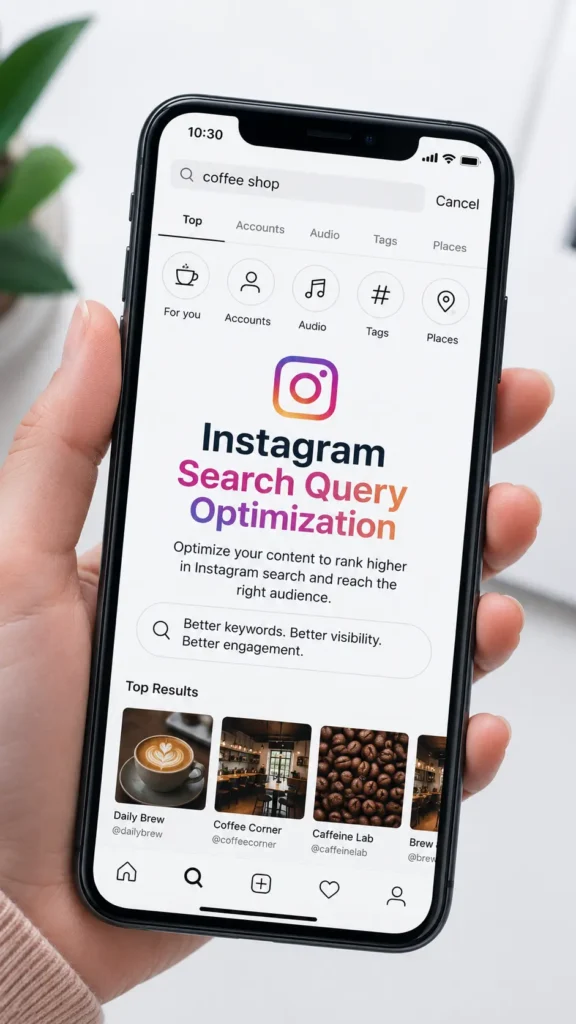
A few reasons this matters right now:
- Instagram’s own leadership has repeatedly described search and Explore as major discovery surfaces, not just the following feed.
- Search behavior on Instagram increasingly mirrors Google, users type full phrases (“best vegan bakery Austin”) instead of single hashtags.
- Accounts that rank well in search get discovered by people who are actively looking to buy, book, or follow — which converts better than passive scrolling.
How Instagram Search Has Changed
Instagram search used to be almost entirely username-matching, you typed a name, and if it matched an account or hashtag, it appeared. That’s no longer true. Instagram now indexes captions, bios, alt text, and even the content inside photos and video to understand topics, not just keywords.
This shift means older tactics, like stuffing usernames with keywords or spamming hashtags, matter far less than genuine topical relevance and consistent content quality.
How Instagram Search Works
Search Algorithm Overview
When someone types a query into Instagram search, the platform doesn’t just look for a text match.
It evaluates a combination of the query’s meaning, the searcher’s history and interests, and signals from millions of accounts and posts to decide what’s most relevant.
The result is a ranked list of accounts, posts, Reels, and hashtags, not a single “correct” answer, but a personalized ranking.
Ranking Signals
Instagram’s search ranking draws on several signal categories:
- Text relevance – how closely your username, name field, bio, captions, and alt text match the query.
- Engagement signals – likes, comments, saves, shares, and watch time relative to your follower count.
- Account signals – posting consistency, account category, and overall content quality.
- User signals – the searcher’s past behavior, who they follow, and what they’ve engaged with before.
Personalization
No two people see identical search results for the same query. Instagram weighs your search and engagement history heavily, if you frequently engage with fitness content, a search for “protein recipes” will favor fitness-adjacent accounts in your results over general food accounts.
This is why two marketers searching the same term from different accounts often see different rankings.
Search Intent
Instagram tries to interpret why someone is searching, not just what they typed. A search for “wedding photographer” could mean the person wants to browse portfolios, find a local vendor, or research pricing. Instagram increasingly clusters results to serve multiple intents at once, mixing local business profiles, educational Reels, and inspirational carousel posts in the same results page.
How Instagram Understands Search Queries

Keywords
Keywords are still the foundation. Instagram’s search index looks for exact and partial text matches across your profile fields and captions. If someone searches “dog training tips,” an account with that exact phrase in its bio or a recent caption has a built-in relevance advantage.
Entities
Beyond literal keywords, Instagram identifies entities, specific people, places, brands, and products mentioned or tagged in your content. Tagging a location, mentioning a brand name, or geotagging a city helps Instagram associate your account with that entity for future searches.
Topics
Instagram groups related keywords and entities into broader topics. A bakery that consistently posts about “sourdough,” “gluten-free bread,” and “custom cakes” gets classified under a baking/bakery topic cluster, which helps it surface for related searches it never explicitly used, like “birthday cake near me.”
User Behavior
Aggregate behavior, what people search for after viewing your content, whether they follow you after finding you via search, and how long they engage, feeds back into how Instagram classifies and ranks your account for future queries.
AI and Semantic Understanding
Instagram, like Google, now uses machine learning to understand meaning rather than just matching text strings. This is called semantic search.
It means a caption about “budget-friendly meal prep” can rank for a search like “cheap healthy lunch ideas,” even without an exact keyword match, because the underlying meaning is the same.
Why Instagram Search Optimization Is Important
More Profile Visibility
Optimized profiles show up for a wider range of related searches, not just your exact brand name. That means people who’ve never heard of you can still find you while searching for what you offer.
Better Reach
Search-driven discovery reaches people outside your existing follower base. Unlike the following feed, search puts your content in front of users actively looking for something, a much warmer audience than a cold Explore impression.
Higher Engagement
People who find you through search are usually closer to a decision, ready to follow, save, or buy, which tends to produce stronger engagement rates than passive scrolling traffic. Higher engagement then reinforces your ranking, creating a positive feedback loop.
Better Google Visibility
Public Instagram profiles and posts can be indexed by Google. A well-optimized Instagram presence effectively becomes a secondary SEO asset, capable of ranking in Google search results for branded and non-branded queries alike (more on this in a later section).
Instagram Search Ranking Factors
Instagram doesn’t publish an exact ranking formula, but based on how the platform surfaces results, these are the factors that consistently influence Instagram search rankings.
| Ranking Factor | Why It Matters | How to Optimize |
|---|---|---|
| Username | Highest-weighted text field for exact-match searches | Keep it close to your brand name; avoid random numbers |
| Display Name | Heavily indexed for keyword matching | Add one clear descriptor (e.g., “Jane — Nutrition Coach”) |
| Bio | Tells Instagram and users what you do | Include your niche and location in plain language |
| Captions | Main source of topical and semantic relevance | Write naturally, include relevant terms early |
| Hashtags | Secondary discovery signal, not primary ranking | Use 3–8 specific, relevant tags, not generic ones |
| Alt Text | Helps Instagram understand image content | Describe the image accurately, don’t keyword-stuff |
| Engagement | Signals content quality and relevance | Encourage saves, shares, and comments, not just likes |
| Posting Consistency | Signals an active, reliable account | Post on a predictable schedule |
| Content Quality | Affects watch time, saves, and shares | Prioritize clarity and value over polish |
| Relevance | Ties everything together for a given query | Stay consistent within your niche |
Username
Your username is the single most heavily weighted field for exact and partial-match searches. If your business is called “Maple & Rye Bakery,” a username like @mapleandryebakery will outperform something unrelated like @mrb_official for search purposes, even if the second one is more brandable at a glance.
Display Name
The name field (separate from username) is also indexed and is one of the few places you can naturally include a keyword describing what you do, for example, “Maple & Rye | Austin Bakery”, without it looking like spam.
Bio
Your bio should state, in plain language, who you are and what you offer. Avoid vague taglines only. “Handmade sourdough & custom cakes in Austin, TX” tells both Instagram and human visitors exactly what to expect.
Captions
Captions are Instagram’s richest source of context. The first one to two sentences carry the most weight, so lead with the topic instead of burying it under a long personal story.
Hashtags
Hashtags still help with categorization and community discovery, but they’re a secondary signal now, not the primary ranking driver they were several years ago. A handful of specific, relevant tags outperforms a wall of generic ones.
Alt Text
Alt text, normally an accessibility feature, doubles as a machine-readable description of your image for Instagram’s search index. Writing accurate, descriptive alt text is a low-effort, high-value optimization most accounts skip entirely.
Engagement
Instagram treats engagement, especially saves and shares, as a strong quality signal. A post that gets saved is treated as more valuable than one that only gets liked, because saving implies real usefulness.
Posting Consistency
Accounts that post on a predictable rhythm tend to be treated as more active and reliable, which supports better ranking over time. Long gaps between posts can quietly reduce your search visibility even if older content still performs well.
Content Quality
Quality here doesn’t mean production value, it means whether the content actually holds attention and gets people to save or share it. A well-lit but shallow Reel underperforms a simply-shot Reel that teaches something useful.
Relevance
Above everything else, Instagram rewards topical consistency. An account that jumps between unrelated niches confuses Instagram’s classification system and dilutes its ranking for any single topic.
How to Research Instagram Search Queries
Instagram Search Suggestions
Start typing a relevant term into the Instagram search bar and note the autocomplete suggestions. These are drawn from real, high-volume search behavior and are one of the fastest free ways to find phrases your audience actually uses.
Competitor Research
Look at how top-performing accounts in your niche write their bios and captions. Note recurring phrases and topics they cover repeatedly, that repetition usually signals what’s working for their audience.
Google Trends
Google Trends won’t show Instagram-specific data, but it’s useful for spotting rising interest in a topic or seasonal patterns you can plan content around in advance.
Keyword Tools
General SEO keyword tools (covered later in the Tools section) can surface related terms and questions people search for around your topic, many of which translate directly to Instagram search behavior.
Audience Language
The most reliable keyword source is your own audience. Read your comments, DMs, and saved-post patterns to see the exact words people use to describe their problems, then mirror that language in your captions and bio.
Step-by-Step Instagram Search Query Optimization
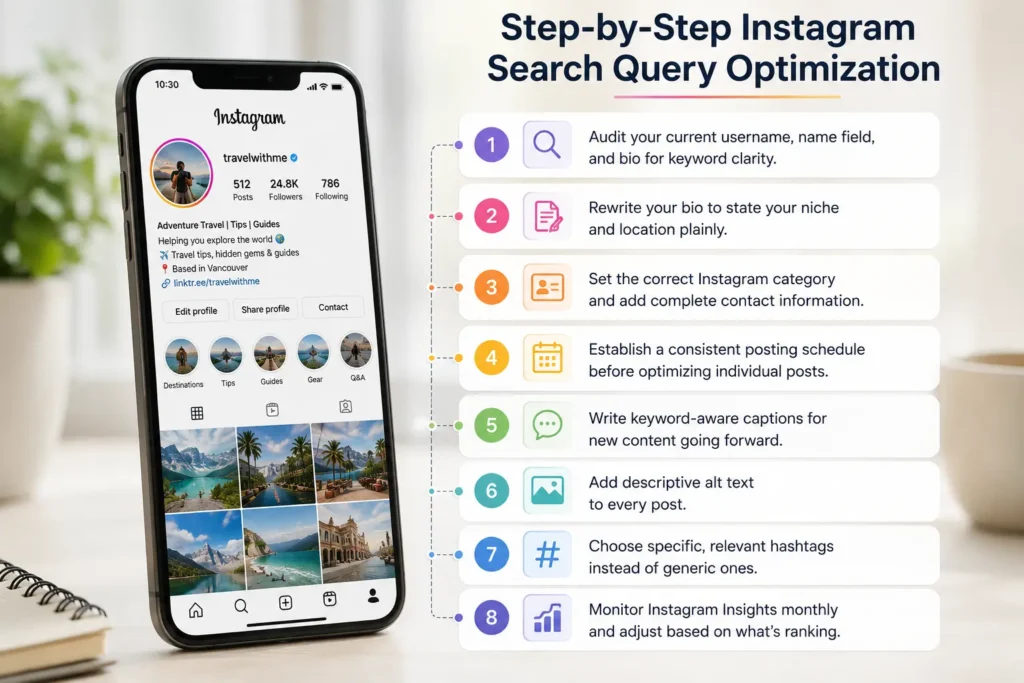
Follow these steps in order, profile-level fixes should come before content-level optimization, since they establish the foundation Instagram uses to interpret everything you post afterward.
- Audit your current username, name field, and bio for keyword clarity.
- Rewrite your bio to state your niche and location plainly.
- Set the correct Instagram category and add complete contact information.
- Establish a consistent posting schedule before optimizing individual posts.
- Write keyword-aware captions for new content going forward.
- Add descriptive alt text to every post.
- Choose specific, relevant hashtags instead of generic ones.
- Monitor Instagram Insights monthly and adjust based on what’s ranking.
Optimize Your Profile
Your profile is the first thing Instagram’s search index evaluates, and it rarely changes, which makes it worth getting right once rather than tweaking repeatedly.
Optimize Username
Keep your username as close to your actual brand or personal name as possible. If it’s taken, add a location or clear descriptor rather than random characters, @janedoe_nutrition reads and indexes better than @janedoe4471.
Optimize Name Field
Use the 30-character name field to add one keyword phrase that isn’t already in your username. For a bakery already using @mapleandryebakery, the name field could read “Maple & Rye | Custom Cakes Austin.”
Optimize Bio
Write your bio in plain, complete phrases rather than emoji-only fragments. State what you do, who it’s for, and where, in that order, so both Instagram and a first-time visitor understand you in under three seconds.
Optimize Categories
Instagram lets business and creator accounts select a category (e.g., “Bakery,” “Fitness Coach,” “Photographer”). This is a direct classification signal — choose the most specific accurate category available, not the broadest one.
Optimize Contact Information
Complete contact details (address, phone, business hours) matter most for local businesses, since they feed into local search and Explore surfacing alongside Instagram’s location-based results. Incomplete contact info can quietly exclude you from local search results entirely.
Optimize Instagram Content
Once your profile is solid, shift focus to individual content formats. Each format is indexed slightly differently, so the same optimization approach doesn’t work identically across all of them.
Reels
Reels currently get the strongest search and Explore distribution of any format. Say your topic out loud in the first few seconds of the video (Instagram uses audio transcription for indexing) and reinforce it in the on-screen caption.
Carousel Posts
Carousels tend to earn strong save rates when the first slide poses a clear question or promise (“5 mistakes killing your Instagram reach”) and later slides deliver on it. Each slide’s visible text also contributes to how Instagram interprets the topic.
Images
Single-image posts benefit most from strong alt text and a caption that states the subject clearly in the first line, since there’s no video transcript for Instagram to draw context from.
Videos
Longer-form videos should include spoken keywords naturally throughout, not just in the intro, since Instagram’s transcription-based indexing can draw context from the entire runtime.
Stories
Stories aren’t heavily indexed for search since they expire in 24 hours, but they still contribute engagement signals that support your overall account relevance.
Highlights
Highlights extend Stories beyond 24 hours and are more visible to profile visitors and, to a lesser degree, search. Organizing Highlights by topic (e.g., “FAQs,” “Reviews,” “Menu”) reinforces the same topical clusters your captions build.
Writing SEO-Friendly Instagram Captions
Keyword Placement
Put your primary topic or keyword phrase in the first sentence. Instagram truncates captions after roughly 125 characters before the “more” cutoff, and that visible portion carries the most search weight.
Natural Language
Write the way you’d explain the topic to a customer standing in front of you. Captions that read naturally perform better with both readers and Instagram’s semantic understanding than captions built around forced keyword phrases.
Semantic Keywords
Include related terms and phrases naturally throughout the caption, not just your single target keyword. A bakery caption about “custom birthday cakes” might also naturally include “custom orders,” “cake designer,” and “Austin bakery” without repeating any single phrase excessively.
Calls to Action
End captions with a clear next step — “Save this for your next order” or “Comment your city and I’ll tell you if we deliver.” CTAs that prompt saves and comments directly support the engagement signals covered earlier.
Hashtag Optimization in 2026
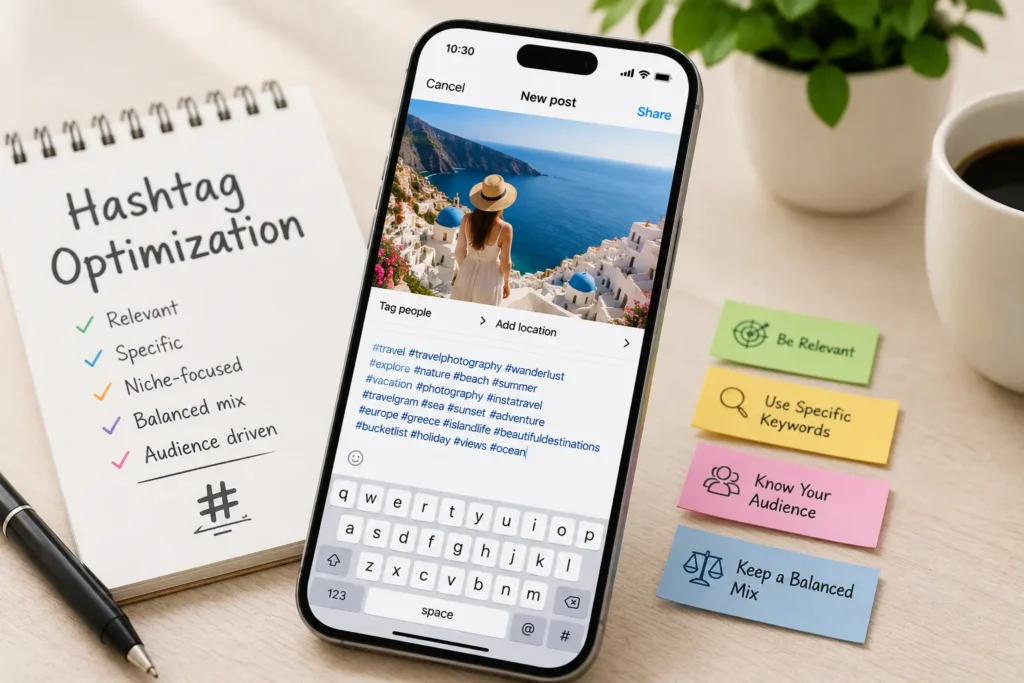
Do Hashtags Still Matter?
Yes, but their role has changed. Hashtags now function more as content categorization and community discovery tools than as a direct search-ranking lever. Relying on hashtags alone, without optimizing your bio and captions, is one of the most common reasons accounts plateau.
Best Practices
- Use 3–8 hashtags per post rather than the maximum of 30.
- Mix broad category tags with specific, niche tags.
- Place hashtags in the caption or the first comment — both are indexed similarly.
- Rotate hashtag sets based on the specific topic of each post, rather than reusing one fixed block on everything.
Common Mistakes
- Using banned or overused hashtags that get deprioritized in Explore.
- Copying a competitor’s exact hashtag set without checking relevance.
- Treating hashtags as a substitute for a clear bio and caption instead of a supplement to them.
Instagram SEO vs Google SEO
| Aspect | Instagram SEO | Google SEO |
|---|---|---|
| Primary ranking unit | Profiles, posts, Reels | Web pages |
| Core text signals | Username, bio, captions, alt text | Title tags, headers, body content |
| Key engagement signals | Saves, shares, comments, watch time | Click-through rate, dwell time, backlinks |
| Authority signal | Follower engagement quality | Backlinks and domain authority |
| Content lifespan | Weeks to months | Months to years |
| Personalization | Heavy — based on user history | Moderate — based on location/history |
Similarities
Both platforms reward genuine relevance over manipulation, both use engagement and behavior as ranking signals, and both increasingly rely on semantic, meaning-based understanding rather than exact keyword matching.
Differences
Instagram content has a much shorter effective lifespan than a well-optimized web page, and Instagram’s ranking leans more heavily on real-time engagement and personalization than Google’s, which still weighs backlinks and domain authority heavily.
How They Work Together
A strong Instagram SEO strategy can feed Google SEO, since Google indexes public Instagram profiles and some posts. Consistent branding and keyword usage across both platforms reinforces the same topical authority in two search engines at once.
Optimizing Instagram Content for Google Search
Public Profiles
Only public Instagram accounts are eligible for Google indexing. If your account is private, none of the following applies until you switch it to public.
Indexable Content
Profile bios, and in some cases individual posts, can appear in Google search results, particularly for branded searches like “[business name] Instagram.” Google does not guarantee indexing, but public, well-established profiles are indexed far more often than newer or low-activity ones.
Search Visibility
To improve the odds of Google indexing, keep your bio keyword-clear, use a consistent business name across platforms, and link your website in your bio so Google can connect the two profiles as the same entity.
Best Practices
- Keep your Instagram business name consistent with your website and Google Business Profile.
- Link your website in your bio.
- Encourage other sites (press, directories) to link to your Instagram profile, which reinforces its authority for Google.
- Don’t expect individual posts to reliably rank — treat Google visibility as a bonus, not the primary goal of Instagram SEO.
Instagram Search Optimization for Different Account Types
Different account types should prioritize different levers. The table below summarizes where each type gets the most return before diving into specifics.
| Account Type | Top Priority | Secondary Priority |
|---|---|---|
| Local Businesses | Location keywords + complete contact info | Local hashtags, geotags |
| Personal Brands | Consistent niche positioning in bio | Authority-building captions |
| Ecommerce | Product-specific keywords in captions | Alt text on product photos |
| Agencies | Case-study driven content and results language | Client-industry keywords |
| Creators | Consistency and content series naming | Trend-relevant captions |
| B2B Companies | Industry terminology and problem-focused captions | LinkedIn-style authority content |
Local Businesses
Local businesses should treat their bio and contact fields as a mini local-SEO listing — city and neighborhood names, service area, and complete hours all directly support local search surfacing. Example: a bakery listing “Custom cakes & pastries, East Austin” outperforms a vague “Sweet treats made with love” for search purposes, even though the second one might sound nicer.
Personal Brands
Personal brand accounts should pick one clear positioning (“nutrition coach for new moms”) and repeat it consistently across bio and captions, rather than drifting between loosely related topics, which weakens topical classification.
Ecommerce
Ecommerce accounts benefit most from naming specific products and use cases directly in captions and alt text — “vitamin C serum for dark spots” ranks for far more relevant searches than “our new favorite product.”
Agencies
Agencies should lean into results-oriented language and named case studies, since prospective clients frequently search for outcome-based phrases like “Instagram ads agency for ecommerce” rather than generic service names.
Creators
Creators benefit from naming recurring content series (“Marketing Monday,” “Ask Me Anything”) consistently, which helps both search and their own audience recognize and return for specific content types.
B2B Companies
B2B accounts should use the actual terminology their buyers search for — often more technical or industry-specific language than typical consumer-facing captions — since B2B search intent tends to be narrower and more specific.
Common Instagram SEO Mistakes
Keyword Stuffing
Cramming keywords unnaturally into a bio or caption (“Bakery Cake Baker Austin Cakes Bakery Near Me”) reads poorly to humans and can actually suppress ranking, since Instagram’s semantic systems are built to detect and deprioritize unnatural text.
Spam Hashtags
Using irrelevant, high-volume hashtags to chase reach (tagging a bakery post #love #instagood #photooftheday) dilutes topical relevance and rarely converts, since the resulting audience isn’t actually interested in your niche.
Weak Captions
Captions that only contain emojis or a single vague line give Instagram almost nothing to index, which is one of the fastest ways to plateau even with strong visuals.
Inconsistent Posting
Long, unpredictable gaps between posts signal a less active, less reliable account, which can quietly erode search ranking even for otherwise strong content.
Ignoring Analytics
Posting without reviewing Instagram Insights means repeating the same mistakes indefinitely. Regularly checking which posts drive search traffic and saves is the only reliable way to know what’s actually working.
Measuring Instagram SEO Success
| Metric | What It Tells You | Where to Find It |
|---|---|---|
| Search Impressions | How often your content appears in search results | Instagram Insights (per post) |
| Profile Visits | How many people click through after finding you | Instagram Insights (profile activity) |
| Reach | Total unique accounts that saw your content | Instagram Insights |
| Saves | Content perceived as genuinely useful | Instagram Insights (per post) |
| Shares | Content resonant enough to send to others | Instagram Insights (per post) |
| Follower Growth | Whether discovery is converting to audience | Instagram Insights (overview) |
| Search Rankings | Direct visibility for target terms | Manual search checks |
Search Impressions
Instagram Insights shows how many impressions a post received specifically through search, separate from Explore or hashtags. This is the clearest direct signal of whether your search optimization is working.
Profile Visits
A rising number of profile visits relative to reach suggests your content is compelling people to learn more about you — a strong sign your bio and content are aligned.
Reach
Reach tells you how far your content traveled, but it should always be read alongside saves and shares, since reach alone doesn’t tell you whether people found the content valuable.
Saves
Saves are one of the strongest indicators of content quality Instagram tracks, and a rising save rate over time is a reliable sign your search optimization strategy is working.
Shares
Shares indicate content compelling enough that someone chose to send it to a specific person, which is a stronger trust signal than a public like.
Follower Growth
Track follower growth alongside search impressions specifically, not just in aggregate, to see whether search-driven discovery is actually converting into an audience.
Search Rankings
There’s no built-in dashboard for this, so periodically search your target terms manually (ideally from an account with no personalization history for that topic) to see where you land relative to competitors.
Best Tools for Instagram Search Query Optimization
| Tool | Best For | Free / Paid |
|---|---|---|
| Instagram Insights | Native performance and search impression data | Free |
| Meta Business Suite | Cross-account scheduling and analytics | Free |
| Google Trends | Spotting seasonal and rising topic interest | Free |
| Ahrefs | Deep keyword and competitor research | Paid |
| Semrush | Keyword research and content gap analysis | Paid |
| KeywordTool.io | Instagram-specific keyword suggestions | Free/Paid tiers |
| ChatGPT | Caption drafting and keyword brainstorming | Free/Paid tiers |
Instagram Insights
The most important tool on this list, simply because it’s the only one with direct access to Instagram’s own search impression data for your account.
Meta Business Suite
Useful for scheduling consistent posting (a direct ranking factor) and viewing performance across Instagram and Facebook in one place.
Google Trends
Best used to plan content calendars around rising seasonal interest rather than for real-time keyword data.
Ahrefs
Primarily a web SEO tool, but useful for researching broader topic and keyword ideas that often translate directly into Instagram caption themes.
Semrush
Similar to Ahrefs — strongest for identifying content gaps and related keyword clusters your competitors haven’t covered yet.
KeywordTool.io
One of the few tools that pulls suggestions directly from Instagram’s own autocomplete data, making it more Instagram-specific than general SEO tools.
ChatGPT
Useful for quickly drafting caption variations or brainstorming semantic keyword lists, though output should always be edited into your own natural voice before posting.
Instagram Search Query Optimization Checklist
- [ ] Username closely matches brand name
- [ ] Name field includes one clear keyword phrase
- [ ] Bio states niche, audience, and location plainly
- [ ] Correct account category selected
- [ ] Contact information fully completed
- [ ] Consistent posting schedule established
- [ ] Captions lead with the topic in the first line
- [ ] Semantic keywords included naturally in captions
- [ ] Alt text added to every image post
- [ ] 3–8 specific, relevant hashtags used per post
- [ ] Reels include spoken keywords in the first few seconds
- [ ] Highlights organized by clear topic
- [ ] Website linked in bio for Google indexing
- [ ] Instagram Insights reviewed monthly
- [ ] Search impressions tracked over time
Frequently Asked Questions
Does Instagram SEO actually work? Yes. Instagram search increasingly rewards clear, relevant profiles and captions with more visibility, similar to how Google rewards well-optimized web pages.
How long does Instagram SEO take to show results? Most accounts see measurable changes in search impressions within 4–8 weeks of consistent optimization, though full results often take longer.
Do hashtags still help with Instagram search? Yes, but as a secondary signal for categorization and discovery, not the primary ranking factor they once were.
Can I rank on Instagram without paid ads? Yes. Search ranking is driven by organic relevance and engagement signals, entirely separate from Instagram’s ad system.
Does changing my username hurt my SEO? It can cause a temporary dip, since Instagram needs to re-associate your history with the new handle, but a more relevant username often benefits ranking long-term.
Is Instagram SEO the same as Google SEO? No, though they share core principles like relevance and engagement. Instagram weighs personalization and real-time engagement much more heavily than Google does.
Do Instagram posts show up on Google? Sometimes. Public profiles and select posts can be indexed by Google, but it’s not guaranteed and shouldn’t be the primary goal of your Instagram strategy.
What’s the most important Instagram ranking factor? Relevance — how consistently your account’s profile, captions, and content align with a specific topic — outweighs any single tactic like hashtags or alt text.
Should I use the same hashtags on every post? No. Reusing one fixed hashtag block reduces topical specificity; tailor hashtags to each post’s actual subject.
Does posting time affect Instagram search ranking? Posting time affects initial engagement more than search ranking directly, but strong early engagement can indirectly support how a post is later surfaced in search.
Do private accounts show up in Instagram search? Private accounts can appear by exact username match but are excluded from broader topical and Google search discovery.
How many hashtags should I use per post? Between 3 and 8 specific, relevant hashtags typically performs better than using the maximum of 30 generic ones.
Does alt text really make a difference? Yes. It’s one of the most under-used optimization levers, since it gives Instagram direct, structured information about image content.
Can Reels rank in Instagram search? Yes, and they currently receive some of the strongest search and Explore distribution of any content format.
Should I change my bio frequently? No. Keep your bio’s core keyword positioning stable, and only update it for genuine changes to your offering or location.
Do saves matter more than likes for SEO? Generally yes. Saves indicate content someone found valuable enough to revisit, which Instagram treats as a stronger quality signal than a like.
Can I optimize old posts for search? You can update alt text and, in some cases, captions on older posts, which can meaningfully refresh their search relevance.
Is keyword stuffing ever effective on Instagram? No. It reads poorly to real users and can be flagged as low-quality or unnatural by Instagram’s semantic ranking systems.
Do location tags help with Instagram search? Yes, particularly for local businesses, since they reinforce the location-based entity signals Instagram uses for local search and Explore.
What’s the difference between Instagram SEO and hashtag strategy? Hashtag strategy is one narrow tactic within the broader discipline of Instagram SEO, which also includes profile optimization, captions, alt text, and engagement.
Final Thoughts
Instagram search query optimization isn’t a trick or a loophole — it’s the same principle that makes any search engine work: give the platform clear, honest information about what you offer, and it will show you to the people looking for exactly that. Usernames, bios, captions, alt text, and consistent posting all feed into one system that’s trying to answer a simple question — is this account relevant to this search?
Start with your profile, since it’s the foundation everything else builds on, then carry the same clarity into every caption and hashtag choice going forward. None of these individual changes is dramatic on its own, but together, they compound into meaningfully better search visibility over time. Accounts that treat Instagram as a search engine, not just a feed, are the ones that keep getting found long after a single viral post fades.