Small business clients routinely arrive with vast aesthetic ambitions and microscopic budgets. They point to cohesive illustration systems built by massive tech companies. Then comes the ask: build identical visual treatments on a three-week timeline.
Custom illustration simply isn’t an option for these freelance projects. Commissioning a dedicated artist takes weeks. It usually eclipses the entire project fee.
Stock assets usually scream “generic corporate template.” Does off-the-shelf have to look cheap? I spent three months integrating Icons8’s Ouch library into my workflow. My goal was simple. Bridging tight deadlines and high visual standards became my sole focus.
Building repeatable systems matters. Relying on random Google image searches destroys profitability. Creating vector art from scratch burns too many hours. Finding a library with genuine depth felt like the only path forward.
The Search for Bespoke Aesthetics on a Deadline
Most stock graphics fail because pieces look completely disconnected. Grab a great hero image. Add secondary graphics for the feature grid. Suddenly your site looks like three different companies stitched together. Ouch fixes that exact problem. Its library groups assets into 101 distinct illustration styles. Browsing by style instead of just keyword changes how you approach art direction.
Thursday morning hit hard last week. I needed to finalize a landing page for an independent pottery studio. Photography didn’t exist. Clients sometimes give you exactly three days to launch something handcrafted and approachable. Sleek corporate vectors wouldn’t work here. Filtering the Ouch library down to a sketchy, simple line graphics style saved the day. That hand-drawn feel matched the brand perfectly.
One specific request stood out. My client wanted a section detailing their clay sourcing process. Pre-made scenes rarely fit that kind of niche brief. Ouch breaks down its layered vector graphics into tagged, searchable objects. Open the Mega Creator tool right in your browser.
Pull a standalone wheel graphic from one scene. Merge it with a character from another. Swap the harsh black strokes for a specific charcoal gray brand color. Done. That unified design system felt completely custom. Assembling everything took forty minutes flat. No external vector software required.
Orchestrating App Empty States
Designing complete user experience flows presents another frequent hurdle. A local food delivery startup recently hired me to overhaul their customer dashboard. Every empty state needed a visual anchor. Missing pages required love too. Onboarding screens demand clear storytelling.
Pichon became my secret weapon here. Desktop apps beat browser tabs for speed. Keep the app open on a secondary monitor. Your design tool occupies the primary display. Ouch styles do more than decorate marketing homepages. They cover entire user experience flows.
Need a distinct visual for an empty cart? Type your search term. Filter by a bold colorful style. Drag the asset directly onto your canvas.
Repeat that process for login screens and payment modals. UX coverage spans all common use cases thoroughly. Finding cohesive illustrations for an entire journey took under an hour. Workflows like this keep freelance margins healthy.
Flat vectors don’t suit every brand.
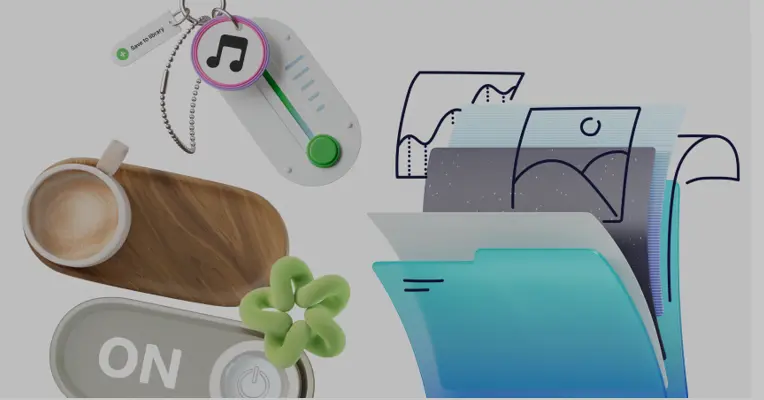
Tactile aesthetics win sometimes. Building a landing page for an IT support firm required modern, volumetric assets. I clicked over to the 3d illustration section.
Finding a pack with identical lighting across dozens of scenes felt like striking gold. Forty-four different 3D styles mean your server error graphic perfectly matches your contact support module. FBX files exist for serious 3D professionals.
Pre-rendered MOV files and high-res PNGs worked perfectly for my quick turnaround. Dropping a pre-lit 3D asset into a Figma frame instantly elevates the perceived value of the final product.
Navigating the Illustration Library Landscape
Evaluating any resource means checking out the competition first.
unDraw remains undisputed for zero-budget wireframes. Quick mockups shine here. Change your primary brand color globally before downloading. Ubiquity ruins the magic though. It’s become painfully recognizable over time. Using those assets instantly makes a site look like a cheap template.
Startups everywhere use the exact same purple characters. Distinct, varied Ouch styles avoid that generic tech trap entirely. Standing out requires avoiding the most downloaded freebies.
Humaaans offers excellent tools for diverse character building. Swap out hair, clothing, and postures in seconds. One massive limitation exists right in the name. Everything focuses strictly on people. Abstract tech elements require hunting elsewhere. Simple objects force another web search. Mixing Humaaans with random icons breaks your visual consistency.
Compare that approach to Ouch. You’ll get over 28,000 business illustrations and 23,000 technology assets alongside those character packs. Having people, objects, and backgrounds in one matching style saves endless searching.
Freepik pushes massive volume. Ensuring consistency becomes an absolute nightmare. Spot a brilliant illustration for your hero section. Try finding three matching secondary graphics by that exact same creator. Good luck. Search results mix dozens of different artist portfolios. Guaranteed consistency within specific style packs makes faking a custom brand system possible. Volume means nothing without visual harmony.
When the Stock System Fails
Bespoke illusions shatter quickly during client pivots. Niche offerings ruin everything. Committing heavily to one highly stylized Ouch pack locks you into that specific ecosystem. Flexibility drops to zero.
Suddenly your client wants an obscure piece of medical equipment. Maybe they demand a highly specific manufacturing process graphic. That exact object doesn’t exist in your chosen style. You hit a brick wall. Illustration Generator tools offer some AI help to fill these gaps.
Results definitely vary. Matching complex vector strokes with a prompt takes patience. Pay a freelance illustrator to mimic the style. Or abandon the aesthetic entirely and rebuild the site’s visual language from scratch. Neither option fits a tight deadline.
Free tiers always carry heavy restrictions for professional client work. Download PNG files for zero cost. Mandatory links back to the source look terrible on paid portfolio sites. Upgrading removes the attribution requirement. SVG file access becomes mandatory for real editing work anyway.
Changing node structures and grouping layers requires vector formats. Paying for a subscription eventually becomes the only logical choice for full-time designers.
Field Notes for Lean Deployments
- Check UX depth first. Verify that a specific style pack includes edge cases before locking in an aesthetic. Look for error states and empty carts. Trendy styles often carry fewer assets than core business packs. Always browse the full pack inventory before showing a concept to your client.
- Strip out background noise. Pre-made scenes usually get visually busy. Download your SVG file. Delete background foliage or abstract geometric blobs. Cleaner visuals always feel more premium. Negative space helps typography breathe.
- Manage monthly credits. Unused downloads roll over to the next period on paid plans. Batch your downloads at the end of the month. Build a personal UI kit of interface elements rather than letting credits sit idle. Stockpiling assets now saves credit shortages during busy seasons later.