You found a photo online and something feels off. Or you want to know where a product image really came from. Or you’re just trying to figure out where a stunning travel photo was taken. In all three cases, the answer is the same tool: reverse image search.
This guide covers what reverse image search is, how it actually works under the hood, the best tools available in 2026, and how to use each one correctly. By the end, you’ll know exactly which tool fits your situation, and how to get better results out of it.
What Is Reverse Image Search?
Reverse image search is a method of searching the internet using an image instead of text. You upload a photo, paste an image URL, or take a screenshot, and the search engine finds visually similar images, the image’s original source, or webpages that contain it.
It’s called “reverse” because it flips the normal search process. Instead of typing words to find images, you feed in an image to find words, sources, and related visuals.
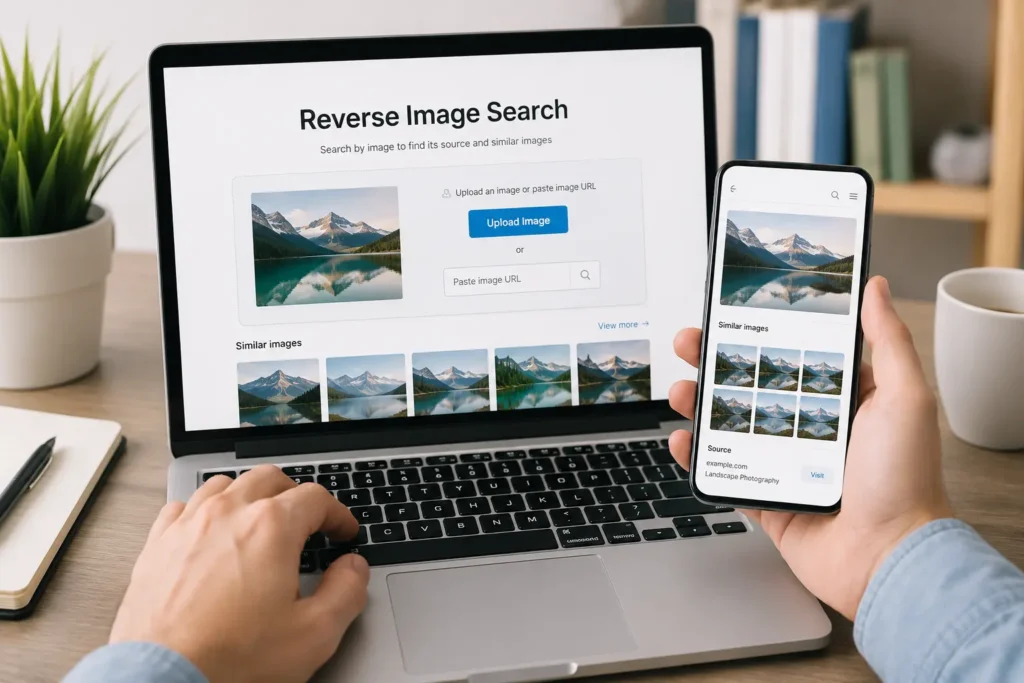
How it differs from text search
Another image search technique, text search matches keywords against indexed web pages. Reverse image search matches visual patterns, shapes, colors, textures, against an index of images. There’s no typing involved, which makes it useful when you don’t know what to call something, like an unfamiliar plant, a landmark, or a product you saw in a photo but can’t name.
How reverse image search works
At a basic level, the search engine converts your image into a mathematical signature, then compares that signature against millions (or billions) of other images already in its index. Matches are ranked by visual similarity, and the engine returns the closest results along with any web pages where those images appear.
Image recognition vs AI visual search
These terms get used interchangeably, but they’re not identical. Image recognition typically refers to identifying what is in an image, a dog, the Eiffel Tower, a specific shoe model.
AI visual search goes further, using machine learning to understand context and intent, like recognizing that a photo of a couch is a furniture-shopping query rather than a request to identify the room’s architectural style. Modern tools like Google Lens blend both.
How Reverse Image Search Works Behind the Scenes
Understanding the mechanics helps explain why some searches succeed and others fail. Five core techniques do most of the work.
Feature extraction
The engine identifies distinctive visual features in an image, edges, corners, textures, and shapes, that remain recognizable even if the image is resized, rotated, or slightly cropped. These features act like fingerprints for specific objects within the photo.
Image hashing
A hash is a short code generated from an image’s visual content. Perceptual hashing (as opposed to cryptographic hashing) creates similar codes for visually similar images, so even a compressed or resized copy of a photo produces a matching or near-matching hash. This is how tools like TinEye find exact and near-exact duplicates so quickly.
Visual embeddings
Modern engines convert images into “embeddings”, numerical vectors that represent the image’s content in a high-dimensional space.
Images with similar embeddings are visually or semantically similar, even if they don’t share any pixels in common. This is what lets Google Lens find a “similar style” couch rather than an identical one.
Computer vision and AI
Computer vision models, trained on massive labeled image datasets, classify objects, scenes, and even actions within a photo. This is the layer that lets a tool tell you “this is a golden retriever” rather than just “here are similar-looking images.”
OCR and text detection
Optical Character Recognition (OCR) extracts readable text from an image, a street sign, a product label, a screenshot of a tweet. Combined with visual search, this lets you search using text embedded in a photo, not just the image itself.
How to Reverse Search an Image
Here’s how to actually run a reverse image search, tool by tool.
Using Google Lens
Open Google Lens (built into the Google app, Chrome, and Google Photos), tap the camera or upload icon, and select your image. Lens identifies objects, offers shopping links, translates text, and surfaces visually similar images. It’s the most versatile free option for most everyday searches.
Using Google Images
On desktop, go to images.google.com, click the camera icon in the search bar, and upload a file or paste an image URL. Google Images is better than Lens for finding a webpage’s original source, since its results emphasize where an image first appeared.
Using TinEye
Go to tineye.com, upload an image or paste a URL, and TinEye returns every indexed instance of that exact image across the web, sorted by earliest date found. TinEye doesn’t do object recognition — it’s built specifically for tracking image duplicates and usage.
Using Bing Visual Search
Bing’s visual search works similarly to Google Lens: upload an image or search with your camera through the Bing app. It’s often underrated for product matches, since Microsoft has invested heavily in shopping-related visual search.
Using Yandex Images
Yandex, the Russian search engine, has a reputation among OSINT researchers for stronger facial recognition results than Google, particularly for images originating in Europe and Asia. Upload at yandex.com/images and browse the “similar images” results.
Using Pinterest Lens
Inside the Pinterest app, tap the camera icon in the search bar and point it at or upload a photo. Pinterest Lens is optimized for style, home decor, and fashion matches rather than exact source-tracking.
Using an image URL
Most tools let you paste a direct image URL (ending in .jpg, .png, etc.) instead of uploading a file. This is faster when you’re already looking at an image online, right-click, copy image address, and paste it into the search tool.
Uploading an image
If the image is saved locally, use the upload button on any of these platforms. Drag-and-drop works on most desktop versions.
Searching with a screenshot
Screenshots work fine for reverse image search, though cropping tightly around the subject before searching improves accuracy significantly, more on that in the tips section below.
Reverse Image Search on Mobile
Reverse image search is arguably more useful on mobile, since it replaces typing entirely.
Android
Google Lens is built into most Android devices, press and hold the home button or use the Lens icon in the Google app. You can also long-press any image in Chrome and select “Search image with Google Lens.”
iPhone
iOS doesn’t have a native reverse image search feature, but the Google app and Google Chrome both include Lens. Safari also supports visual look-up for certain images (plants, landmarks, pets) through Apple’s own on-device recognition.
Chrome
On both desktop and mobile Chrome, right-click (or long-press) any image and select “Search image with Google Lens” or “Search image with Google.”
Safari
Safari’s built-in “Visual Look Up” (tap the image, then the info icon) works for common subjects but isn’t a full reverse image search. For a real reverse search on iPhone, use the Google app instead.
Best Reverse Image Search Tools Compared
Not every tool is built for the same job. Here’s a quick rundown before the full comparison table.
Google Lens
Best all-around free tool. Strong for shopping, object identification, and plant/animal recognition. Weaker for pinpointing an image’s very first appearance online.
Google Images
Best for finding the original source and highest-resolution version of a photo, especially on desktop.
TinEye
Best for exact-match tracking — copyright checks, usage monitoring, and finding every copy of a specific photo across the web.
Bing Visual Search
Strong for shopping and product matches, plus solid integration with Microsoft Edge.
Yandex Images
Best free option for facial similarity searches, frequently used in OSINT and catfishing investigations.
Pinterest Lens
Best for style, fashion, and home decor inspiration rather than exact-source tracking.
Social Catfish
A paid, purpose-built tool for verifying identities behind dating profiles and social accounts, combining reverse image search with public records.
Reversely AI
A newer AI-powered search layer that combines visual embeddings with generative AI descriptions, useful for identifying AI-generated or heavily edited images.
Duplichecker
A free, no-frills web tool aimed at bloggers and small businesses checking for duplicate or stolen images without creating an account.
Comparison Table
| Tool | Accuracy | Face Search | Product Search | Similar Images | Original Source | AI Support | Free Plan | Mobile Support |
|---|---|---|---|---|---|---|---|---|
| Google Lens | High | Limited | Excellent | Excellent | Moderate | Yes | Yes | Yes |
| Google Images | High | Limited | Good | Good | Excellent | Partial | Yes | Yes |
| TinEye | Very High (exact match) | No | No | Limited | Excellent | No | Yes (limited) | Yes |
| Bing Visual Search | High | Limited | Excellent | Good | Moderate | Yes | Yes | Yes |
| Yandex Images | High | Strong | Moderate | Good | Good | Partial | Yes | Yes |
| Pinterest Lens | Moderate | No | Good | Excellent (style) | Weak | Partial | Yes | Yes |
| Social Catfish | Moderate | Strong | No | Limited | Moderate | Yes | No (paid) | Yes |
| Reversely AI | Moderate–High | Moderate | Moderate | Good | Moderate | Yes (generative) | Freemium | Yes |
| Duplichecker | Moderate | No | No | Limited | Moderate | No | Yes | Limited |
Best Tool for Every Use Case
Choosing the right tool depends entirely on what you’re trying to accomplish.
Finding original image source
Use Google Images or TinEye. Google Images tends to surface the earliest high-authority webpage; TinEye gives a chronological list of every indexed appearance.
Detecting fake profiles
Use Yandex Images or Social Catfish. Yandex’s facial matching frequently surfaces results Google misses, which is why it’s a go-to in online dating safety checks.
Shopping
Use Google Lens or Bing Visual Search. Both are built with retailer partnerships that surface “buy now” links alongside visually similar products.
Finding higher-resolution images
Use Google Images and filter by size, then cross-check with TinEye’s duplicate list to find the largest indexed version.
Brand monitoring
Use TinEye or a dedicated brand-monitoring service layered on top of it, since TinEye is built specifically to track where a specific image (like a logo or product photo) reappears.
Journalism
Use a combination: Google Images for source-tracing, TinEye for duplicate/date verification, and Yandex for facial matches when verifying people in a photo.
OSINT investigations
Use Yandex Images as a primary tool, supplemented by Google Lens and Social Catfish for cross-referencing.
Academic research
Use Google Images and TinEye together to trace image provenance and confirm proper attribution before citing a photo in published work.
Common Uses of Reverse Image Search
Beyond the use-case breakdown above, here are the everyday situations where people reach for this tool.
- Copyright protection: Photographers and designers use TinEye or Google Images to find unauthorized use of their work across the web.
- Checking image authenticity: Journalists and fact-checkers verify whether a viral photo is recent, recycled from an old event, or taken out of context.
- Finding stolen photos: Small business owners check whether competitors have lifted product photography without permission.
- Tracking image usage: Brands monitor how widely a marketing image has spread and where it’s being republished.
- Fact checking: Verifying claims attached to viral images, especially during breaking news events.
- Finding similar products: Shoppers snap a photo of an item they like and find where to buy it, or a cheaper alternative.
- Artwork identification: Museums, collectors, and casual browsers identify unattributed paintings or illustrations.
- Travel location identification: Identifying exactly where a photo was taken based on landmarks, architecture, or scenery.
Reverse Image Search for AI-Generated Images
AI-generated imagery has changed what reverse image search needs to do, and the tools haven’t fully caught up.
Can it detect AI images?
Partially. Some tools, including Google’s “About this image” feature and newer entrants like Reversely AI, flag likely AI-generated content by analyzing pixel-level patterns and checking for known AI-image watermarking standards. But detection isn’t guaranteed, especially for heavily edited or upscaled AI images.
Current limitations
AI-generated images often have no prior web presence, so tools relying on matching against an existing index — like TinEye, return nothing useful. Detection instead relies on pattern analysis specific to generative models, which is a fundamentally different (and less mature) capability than traditional reverse search.
Deepfake detection
Deepfake detection typically requires specialized tools beyond standard reverse image search, since deepfakes are often original composites with no earlier version to match against. Detection tools instead look for inconsistencies in lighting, facial movement (in video), or metadata artifacts.
Future developments
Industry efforts like the Coalition for Content Provenance and Authenticity (C2PA) are building standardized, embedded metadata that would let search tools verify an image’s origin and edit history automatically. Expect reverse image search tools to increasingly check for this provenance data rather than relying purely on visual matching.
Limitations of Reverse Image Search
No tool is perfect. Here’s where reverse image search commonly falls short.
- Cropped images: Heavy cropping removes the visual context engines rely on, reducing match accuracy.
- Edited photos: Filters, color grading, or compositing can be enough to break a hash-based match, even if a human would recognize the image instantly.
- Private databases: Images inside closed platforms (private Instagram accounts, internal company systems) aren’t indexed and won’t appear in results.
- Low-resolution images: Blurry or heavily compressed images lose the fine detail needed for accurate feature extraction.
- Recently uploaded images: Search engines need time to crawl and index new images, so very recent uploads may not show up yet, even if they’re publicly posted.
Privacy and Security Considerations
Uploading a photo to a search engine raises legitimate privacy questions, especially when the photo includes a person’s face.
Where uploaded images go
Most major tools temporarily process your uploaded image on their servers to generate a hash or embedding for comparison. Google states that uploaded images may be stored briefly to improve search quality, per its published privacy policy, always worth reviewing before uploading sensitive photos.
Data retention
Retention policies vary by provider and change over time, so check each tool’s current privacy policy rather than assuming. As a rule of thumb, free consumer tools retain data longer than paid or enterprise options built for professional investigators.
Private search options
If privacy is a concern, use tools that don’t require an account, avoid uploading images containing identifiable people when possible, and prefer searching by URL over direct upload, since URL-based search doesn’t require the tool to store a new copy of the file.
Expert Tips to Improve Search Accuracy
Small adjustments to your source image can dramatically improve match quality.
- Crop strategically. Isolate the specific object or face you’re searching for; extra background visual noise dilutes the match.
- Remove borders. Screenshots with app borders, watermarks, or UI elements confuse feature extraction — crop them out first.
- Increase resolution. Low-resolution images produce weaker feature signatures; use the highest-quality version you have.
- Try multiple search engines. Google, TinEye, and Yandex index different portions of the web, so a miss on one is often a hit on another.
- Search by image URL. When available, this often returns cleaner results than uploading a saved copy, since the original file metadata stays intact.
Frequently Asked Questions
Is reverse image search free? Yes. Google Lens, Google Images, TinEye, Bing Visual Search, Yandex Images, and Pinterest Lens are all free to use, though some offer paid tiers with extra features.
Can reverse image search find a person’s identity? It can sometimes find other photos of the same face across the web, which may lead to a name or profile, but it doesn’t directly return personal identity information.
Which reverse image search is most accurate? For exact duplicate detection, TinEye is generally considered the most accurate. For broader visual similarity and object recognition, Google Lens leads.
Does Google Lens work on iPhone? Yes, through the Google app or Google Chrome, though it’s not built into iOS the way it is on Android.
Can I reverse image search on Instagram or TikTok? Not directly within those apps. Screenshot the image, then upload it to Google Lens, TinEye, or another reverse search tool.
How do I reverse image search a screenshot? Upload the screenshot directly to any reverse search tool; cropping out unrelated UI elements first improves accuracy.
Can reverse image search detect edited photos? Sometimes. Heavily edited images may not match their original, but visible manipulation can sometimes be spotted through inconsistent lighting or pixel artifacts using specialized tools.
Is reverse image searching someone illegal? Searching a publicly available photo is generally legal, but using results to harass, stalk, or impersonate someone is not, regardless of which tool is used.
Can reverse image search find the age of a photo? TinEye and Google Images both show the earliest date an image was indexed, which offers a reasonable estimate of when it first appeared online.
Does reverse image search work on drawings or paintings? Yes, particularly for identifying well-known artwork, though obscure or unpublished pieces may return no matches.
What’s the difference between TinEye and Google Images? TinEye focuses on exact and near-exact duplicate matching; Google Images blends duplicate matching with broader visual similarity and source-page ranking.
Can I reverse image search multiple photos at once? Most consumer tools process one image per search, though some paid or enterprise tools support batch uploads.
Does cropping an image affect reverse search results? Yes, cropping tightly around your subject usually improves accuracy by removing distracting background elements.
Can reverse image search identify AI-generated art? Some newer tools attempt this, but detection is inconsistent and still an evolving capability across the industry.
Is there a reverse image search app? Yes. Google Lens, Pinterest, and Social Catfish all offer dedicated mobile apps with built-in reverse image search.
Can reverse image search find where a product is sold? Yes, particularly through Google Lens or Bing Visual Search, both of which link matched products to retailer listings.
Why does reverse image search sometimes return no results? This usually happens with low-resolution images, heavily cropped photos, or images that simply haven’t been indexed yet.
Can I reverse image search using my phone’s camera in real time? Yes, both Google Lens and Pinterest Lens support live camera search without needing to save a photo first.
Does Yandex Images work outside of Russia? Yes, it’s publicly accessible worldwide and is commonly used internationally for its facial recognition strength.
Can reverse image search help with online dating safety? Yes, it’s one of the most common ways people verify that a dating profile photo isn’t stolen from someone else’s social media.
Conclusion
Reverse image search has moved well beyond a novelty feature, it’s now a practical tool for shopping, safety, journalism, and everyday curiosity. The technology behind it, from perceptual hashing to visual embeddings and computer vision, is what makes it possible to find a match without typing a single word.
No single tool does everything well. Google Lens covers most everyday needs, TinEye is unmatched for exact-duplicate tracking, and Yandex Images remains a favorite for facial matches. The smartest approach is matching the tool to the task: use Google Images to trace a source, TinEye to confirm usage history, and Yandex or Social Catfish when verifying a person’s identity.
As AI-generated images become more common, reverse image search will keep evolving, leaning more on provenance standards like C2PA and less on simple pixel matching. For now, understanding how these tools work, and which one fits your specific need, is the best way to get accurate, trustworthy results every time.