If you’re trying to pick between Shopify and Squarespace, you’re not alone. These two platforms come up in almost every conversation about building a website or online store. But here’s the thing: they’re built for very different people, and choosing the wrong one can cost you time, money, and a lot of frustration.
This guide breaks down everything you need to know, from pricing and design to SEO and real-world use cases, so you can make a confident decision without second-guessing yourself.
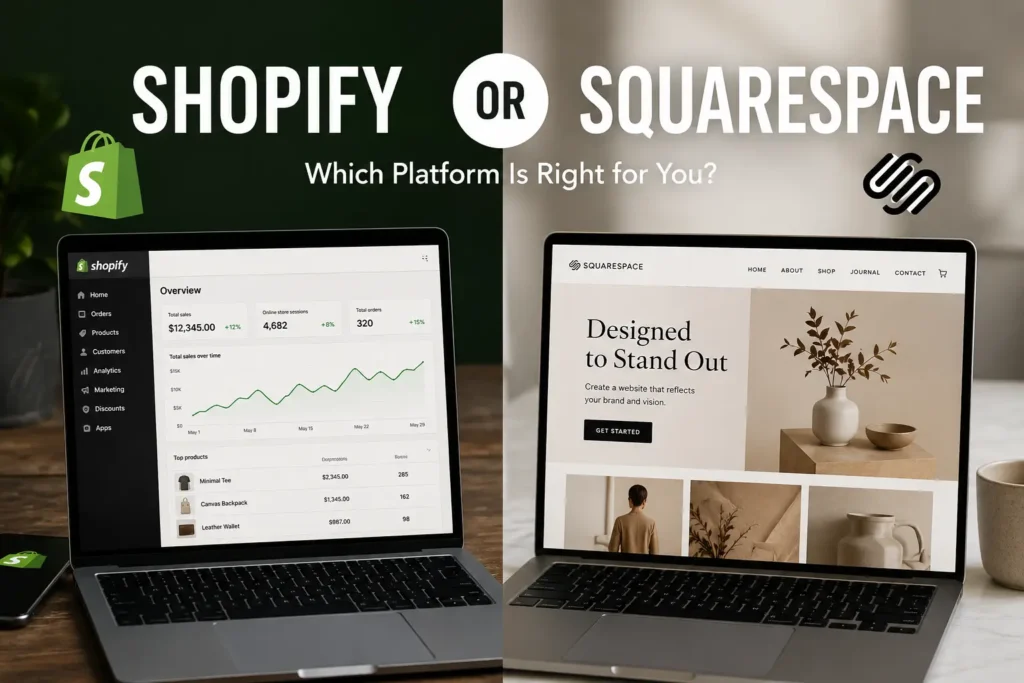
Quick Verdict: Shopify or Squarespace?
Shopify wins if selling products online is your main goal. It’s built from the ground up for ecommerce, and it shows in every feature it offers.
Squarespace wins if you want a beautiful website with some selling capability on the side. It’s a design-first platform that works best for creatives, service providers, and small businesses that don’t have hundreds of SKUs to manage.
Who Should Choose Shopify?
- You’re running, or planning to run, an online store with multiple products
- You need advanced inventory, shipping, and fulfillment tools
- You want access to thousands of third-party apps
- You plan to scale beyond a handful of orders per month
- You want to sell across channels like Instagram, TikTok, and Amazon
Who Should Choose Squarespace?
- You’re a photographer, designer, or creative who wants a portfolio with optional selling
- You run a local service business like a salon, gym, or consulting firm
- You want a clean, professional website without touching code
- Blogging or content marketing is a big part of your strategy
- You don’t need heavy inventory management or complex shipping rules
Our Final Recommendation
For pure ecommerce, Shopify is the better platform in 2026 and it’s not particularly close. But Squarespace is a genuinely excellent tool for businesses where the website itself matters as much as the store. If you sell a handful of products alongside your services or content, Squarespace will serve you well and cost you less.
Shopify vs Squarespace at a Glance
Comparison Table
| Feature | Shopify | Squarespace |
|---|---|---|
| Best for | Ecommerce stores | Creatives and service businesses |
| Starting price | $29/month | $16/month |
| Free plan | No (3-day trial) | No (14-day trial) |
| Templates | 200+ | 100+ |
| App integrations | 8,000+ | 40+ |
| Built-in blogging | Basic | Strong |
| Transaction fees | 0% with Shopify Payments | 0% on Commerce plans |
| POS system | Yes (strong) | Yes (basic) |
| Multi-currency | Yes | Yes |
| Custom code access | Yes | Limited |
| SEO tools | Strong | Good |
| Ease of use | Moderate | Easy |
What Is Shopify?

Shopify launched in 2006 after co-founder Tobias Lutke built it out of frustration with existing ecommerce tools while trying to sell snowboards online. Today Shopify powers millions of online stores worldwide and processes billions of dollars in transactions every year.
It’s a dedicated ecommerce platform, meaning everything on it is designed with selling in mind. From how you add products to how you handle returns and abandoned carts, every feature exists to help you move more products.
Key Features
- Full ecommerce suite with product listings, variants, collections, and tags
- Shopify Payments as a built-in payment processor
- Shopify POS for in-person selling
- Over 8,000 apps in the Shopify App Store
- Multi-channel selling across social media and marketplaces
- Advanced shipping and fulfillment tools
- Shopify Magic and Sidekick for AI-assisted store management
- 24/7 customer support
Pros
- Unmatched ecommerce functionality out of the box
- Massive app ecosystem for nearly any feature you need
- Excellent scalability from one product to thousands
- Strong multi-channel selling capabilities
- Reliable uptime and performance at scale
- Shop Pay checkout increases conversion rates significantly
Cons
- Monthly transaction fees if you don’t use Shopify Payments
- Costs add up quickly once you start adding apps
- Blogging tools are functional but not as polished as competitors
- Design customization requires some learning curve
- Can feel like overkill for businesses that barely sell online
What Is Squarespace?

Squarespace started in 2003 as a blog hosting platform and grew into one of the most design-focused website builders on the market. While it added ecommerce capabilities over the years, its core strength is helping people create beautiful, polished websites without needing a developer.
It’s the platform of choice for photographers, artists, coaches, consultants, restaurants, and anyone who wants their website to look like a real brand built it, not a template someone threw together in an afternoon.
Key Features
- Award-winning templates designed by professional designers
- Built-in blogging with full editorial control
- Scheduling and appointment booking (via Acuity)
- Email campaigns included on higher plans
- Video hosting and portfolio tools
- Basic to moderate ecommerce functionality
- Member areas for gated content
- AI tools for content and design suggestions
Pros
- Templates are genuinely beautiful and professionally designed
- Strong blogging and content features
- Great for creative portfolios and service-based businesses
- All-in-one platform with less need for external apps
- Scheduling and email marketing built in
- More affordable entry-level pricing
Cons
- Ecommerce features lag behind Shopify significantly
- App ecosystem is tiny by comparison
- Limited customization for developers
- Not ideal for stores with large product catalogs
- Can feel limiting as a business grows
Shopify vs Squarespace: Key Differences
Ecommerce Focus
Shopify is an ecommerce platform first. Everything else is secondary. Squarespace is a website builder that happens to have ecommerce. That difference shapes every part of the user experience.
If you open a Shopify dashboard, you see orders, products, customers, analytics. If you open Squarespace, you see pages, blocks, design tools. Both platforms let you sell, but the philosophy behind each is completely different.
Website Building Approach
Squarespace uses a section-based editor where you drag and drop blocks within pre-built page layouts. It’s opinionated in a good way: it guides you toward designs that look professional without requiring any design skill.
Shopify’s website editor, called the Online Store Editor, is more flexible for themes but also more technical. You get more control over layout, but you’ll need to understand how themes work to get the most out of it.
Flexibility
Shopify is more flexible when it comes to functionality. The app store means you can add almost any feature you can think of. Squarespace is more flexible when it comes to design, but within the boundaries of its templates.
Scalability
Shopify scales better for ecommerce. Its infrastructure handles stores doing millions of dollars in revenue, and features like Shopify Plus serve enterprise-level brands. Squarespace scales fine for content-heavy sites and modest stores but starts to show limitations for high-volume sellers.
Pricing Comparison
Shopify Pricing Plans
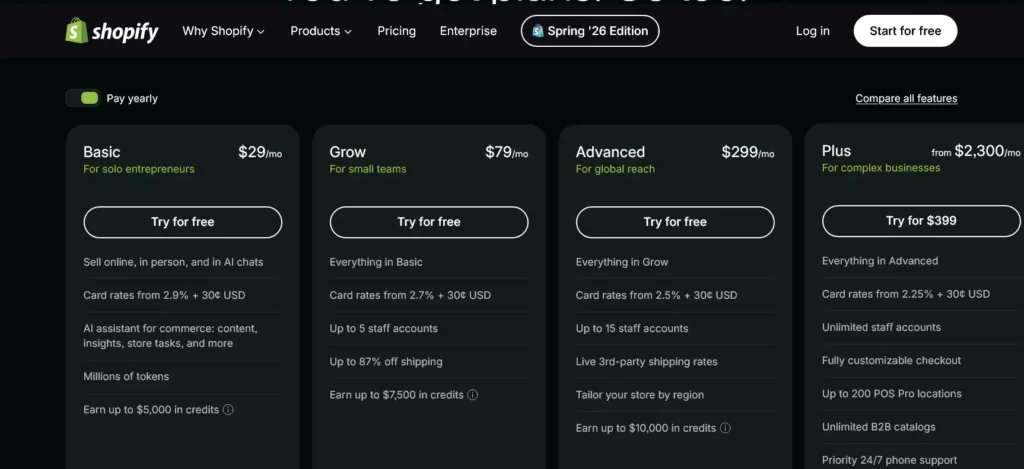
Starter: $5/month Buy buttons and simple selling through social media and messaging apps. No full website included.
Basic: $29/month A full online store, two staff accounts, basic reports, and 2% transaction fees if not using Shopify Payments.
Grow (formerly Shopify): $79/month Five staff accounts, professional reports, and reduced transaction fees. Good for growing stores needing better data.
Advanced: $299/month Up to 15 staff accounts, advanced reporting, third-party calculated shipping rates, and the lowest transaction fees.
Shopify Plus uses custom enterprise pricing that typically starts at several thousand dollars per month.
Squarespace Pricing Plans
Squarespace Pricing Plans
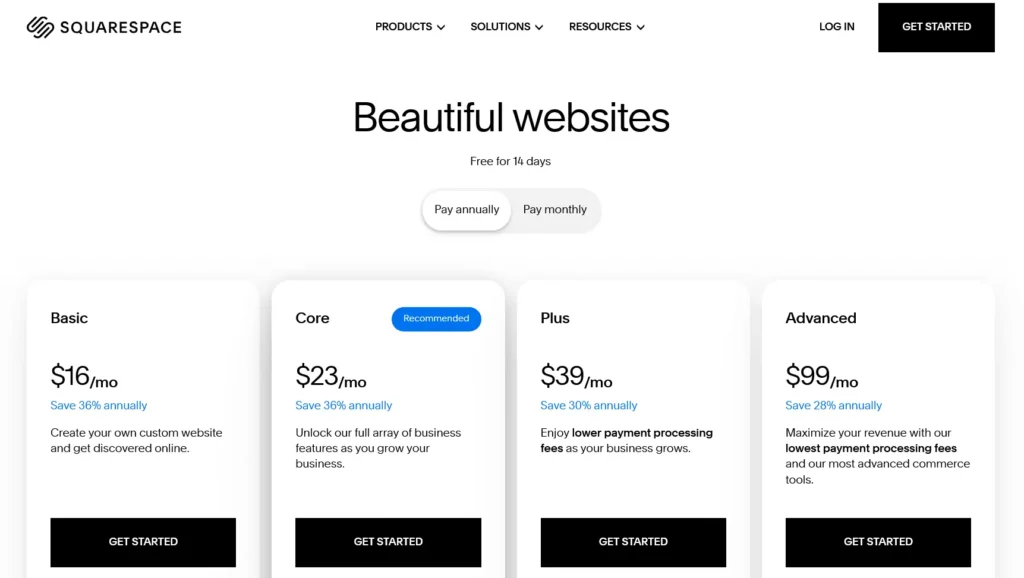
Squarespace offers four plans that scale with your website and business needs.
| Plan | Starting Price* | Best For |
|---|---|---|
| Basic | $16/month | Portfolios, blogs, and business websites |
| Core | $23/month | Small businesses and online stores |
| Plus | $39/month | Growing ecommerce businesses |
| Advanced | $99/month | High-volume online stores |
*Annual billing rates shown.
Which Plan Should You Choose?
- Basic – Best for websites that don’t sell products.
- Core – Best value for most small businesses and creators.
- Plus – Ideal for growing stores that want lower processing fees.
- Advanced – Designed for established ecommerce businesses needing advanced selling tools.
Hidden Costs Comparison
Transaction Fees
Shopify charges 0.5% to 2% on each sale if you use a third-party payment processor instead of Shopify Payments. These fees vanish if you use Shopify Payments, but that’s only available in select countries. Squarespace charges 3% on sales made through the Business plan, dropping to zero on Commerce plans.
Premium Themes
Shopify has free themes, but most stores end up purchasing a premium theme ranging from $100 to $400. Squarespace’s templates are all included with no extra cost.
Apps and Extensions
This is where Shopify costs can spiral. Many apps run $10 to $50 per month each, and it’s easy to end up with five or six installed before you realize your app bill rivals your plan cost. Squarespace’s extension library is much smaller, but that also means you spend less.
Email Marketing Costs
Squarespace includes email campaigns on its Business plan and above, which can replace a standalone email service for basic needs. Shopify’s built-in email tool offers 10,000 free emails per month, with costs applied after that.
Which Platform Offers Better Value?
For ecommerce, Shopify tends to offer better long-term value despite higher upfront costs because its tools drive more revenue. For creative businesses, Squarespace’s all-in-one pricing is genuinely good value since you get email, scheduling, and a beautiful site without piecing together multiple subscriptions.
Ease of Use Comparison
Getting Started
Both platforms offer guided setup experiences. Squarespace’s onboarding is marginally smoother because the platform is simpler overall. Shopify’s setup involves more decisions upfront, like choosing your payment processor and shipping settings, but the prompts walk you through it clearly.
Website Setup
Squarespace wins on design setup. Choose a template, add your content, adjust colors and fonts, and your site looks polished within an hour. Shopify’s theme editor requires a bit more exploration before it clicks.
Learning Curve
Squarespace has a gentler learning curve. Most people figure out the editor within a day. Shopify’s backend takes more time because it has more to it: products, variants, collections, fulfillment rules, discount codes, and more. It’s not hard, just more involved.
Day-to-Day Management
Once you’re up and running, Shopify’s dashboard becomes intuitive for managing orders and inventory. Squarespace’s daily management is simple and clean. Neither platform requires technical knowledge to operate after the initial setup.
Templates and Design Flexibility
Shopify Themes

Shopify offers a collection of free themes and a growing marketplace of premium themes designed for different industries and store sizes. Most premium themes are designed specifically for ecommerce with features like quick-view product panels, sticky add-to-cart buttons, and filtering. The design quality has improved dramatically in recent years, though the visual identity of Shopify stores is still sometimes recognizable.
Squarespace Templates
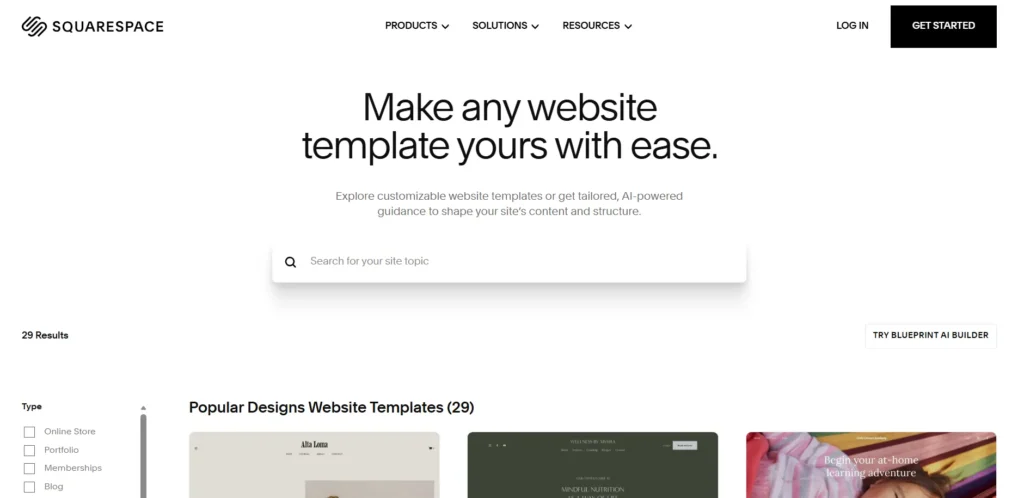
Squarespace’s templates consistently rank among the best-looking of any website builder. They’re organized by industry and are genuinely distinctive. The trade-off is that you’re working within a more constrained system, so two sites using the same template won’t look dramatically different unless you really customize fonts, colors, and imagery.
Mobile Responsiveness
Both platforms deliver fully responsive designs that adapt to any screen size. Shopify’s themes are tested across devices before being listed, and Squarespace’s editor includes a mobile preview mode that lets you adjust how sections look on smaller screens specifically.
Customization Options
Squarespace allows CSS customization for those who know a bit of code. Shopify goes deeper: themes are built with Liquid, Shopify’s templating language, and developers can modify virtually anything. For non-coders, Shopify’s visual editor handles most customization needs well.
Ecommerce Features Comparison
Product Management
Shopify handles complex product catalogs with ease. You can create products with up to 100 variants, set different prices per variant, and manage them all from one dashboard. Squarespace works fine for simpler catalogs but gets cumbersome with large inventories.
Inventory Management
Shopify has native inventory tracking, low stock alerts, and integrates with third-party warehouse systems. Squarespace’s inventory tools are adequate for small stores but lack the depth that growing stores need.
Checkout Experience
Shopify’s checkout is among the highest-converting in the industry. It’s been optimized over millions of transactions and includes features like address autocomplete, express checkout options, and Shop Pay for returning customers. Squarespace’s checkout works fine but doesn’t offer the same level of optimization.
Abandoned Cart Recovery
Shopify includes abandoned cart recovery on all paid plans, automatically sending emails to customers who left without buying. Squarespace only includes this on the Commerce Advanced plan.
Subscriptions
Shopify supports subscriptions natively and through apps like ReCharge. Squarespace added subscription selling on its Commerce Advanced plan, making it a usable option for simple subscription boxes or digital membership payments.
Digital Products
Both platforms sell digital products. Shopify handles digital downloads through apps like Sky Pilot or SendOwl. Squarespace has built-in digital delivery, making it slightly simpler for creators selling courses, presets, or files.
Gift Cards
Shopify includes gift card functionality on all plans. Squarespace offers gift cards on Commerce plans only.
POS Systems
Shopify POS
Shopify’s point-of-sale system is a serious retail tool. It syncs in-person and online inventory in real time, supports multiple staff members with different permission levels, handles complex returns and exchanges, and works with a full range of card readers and hardware. Shopify POS Pro unlocks omnichannel features for stores with physical locations.
Squarespace POS
Squarespace integrates with Square for in-person payments. It works, but it’s a third-party integration rather than a native system, meaning syncing between your online and in-person inventory requires more manual attention.
Payment Processing and Transaction Fees
Shopify Payments
Shopify’s built-in payment processor accepts all major cards and eliminates transaction fees. Rates start at 2.9% plus 30 cents per transaction on Basic and decrease with higher plans.
Stripe
Both platforms work with Stripe. Shopify charges a 0.5% to 2% fee on top of Stripe’s standard rate if you use it instead of Shopify Payments. Squarespace uses Stripe natively without an extra platform fee on Commerce plans.
PayPal
Shopify and Squarespace both support PayPal as a checkout option. Shopify makes it a one-click setup alongside other payment methods.
International Payments
Shopify Markets is the better tool for selling internationally. It handles currency conversion, local payment methods, and international tax rules in one place. Squarespace offers multi-currency support on Commerce plans, but it’s less comprehensive.
Shopify vs Squarespace for SEO
Technical SEO Features
XML Sitemaps: Both platforms auto-generate XML sitemaps. Shopify offers more control over what gets included. Squarespace generates sitemaps automatically but gives fewer options to customize them.
Canonical Tags: Both add canonical tags automatically to prevent duplicate content issues. Shopify handles this well across product variants, which is a common source of duplicate content.
Structured Data: Shopify adds product schema markup automatically, including price, availability, and review ratings, making it easier for Google to display rich results. Squarespace adds some structured data but is less comprehensive.
Robots.txt Controls: Shopify gives full access to the robots.txt file. Squarespace manages crawl directives but doesn’t let you edit robots.txt directly.
On-Page SEO Features
Both platforms let you customize page titles, meta descriptions, heading tags, URL slugs, and image alt text. These are the fundamentals, and both handle them well.
Blogging Capabilities
Squarespace is the better blogging platform. It offers cleaner layouts, stronger editorial tools, proper author profiles, and a more enjoyable writing experience. Shopify’s blog works but clearly wasn’t the priority when the platform was built.
Core Web Vitals Performance
Shopify’s infrastructure has improved significantly, and most modern Shopify themes score well on Core Web Vitals. Squarespace had historical speed issues that have improved with recent platform updates, though image-heavy pages can still be slow.
SEO Winner
Shopify edges out Squarespace for ecommerce SEO thanks to better structured data and more control over technical settings. Squarespace is competitive for content-driven SEO strategies, especially when blogging is central to your approach.
Marketing Features Comparison
Email Marketing
Squarespace includes email campaigns natively. You can build lists, design branded campaigns, and send newsletters without a third-party tool. Shopify Email is included but works best as a simple follow-up tool; most serious Shopify stores use Klaviyo or Mailchimp.
Social Media Integration
Shopify connects directly to Instagram, Facebook, TikTok, Pinterest, and YouTube for product tagging and selling. These aren’t just links: you can list products and process orders through these channels from within Shopify. Squarespace has social sharing and some integration, but it doesn’t support selling directly through social platforms as effectively.
Automation Features
Shopify Flow lets you build automated workflows for tasks like tagging customers, flagging high-risk orders, and triggering fulfillment actions. Squarespace has basic automation through integrations like Zapier but nothing as built-in and ecommerce-specific.
AI Marketing Tools
Shopify Magic
Shopify Magic generates product descriptions, writes email subject lines, suggests SEO titles, and creates campaign copy from inside the dashboard. It’s well-integrated and genuinely saves time for store owners managing lots of products.
Shopify Sidekick
Sidekick is Shopify’s conversational AI assistant. You can ask it to pull up reports, explain metrics, suggest improvements to your store, or help with marketing ideas. It works directly inside the dashboard and continues to improve.
Squarespace AI Tools
Squarespace offers an AI website builder that generates layout suggestions and copy based on prompts. It also includes AI image creation tools and a basic text assistant for page content. These are useful for getting started but aren’t as commerce-focused as Shopify’s AI suite.
Apps and Integrations
Shopify App Store
With Thousands of apps are available through the Shopify App Store, covering everything from loyalty programs to print-on-demand to dropshipping, the Shopify App Store is one of its biggest competitive advantages. Whatever your store needs, there’s almost certainly an app for it.
Squarespace Extensions
Squarespace’s extension library sits around 40 to 50 third-party integrations. It covers accounting, shipping, and a few marketing tools, but it’s a significant limitation compared to Shopify’s ecosystem.
Third-Party Integrations
Both platforms connect to Zapier, which opens up hundreds of additional workflow automations. Shopify also integrates natively with far more business tools, including Avalara for tax, ShipStation for fulfillment, and dozens of ERP systems.
Best Integrations for Growth
Klaviyo: The gold standard for ecommerce email marketing. Works with both platforms but is most powerful with Shopify’s data.
Mailchimp: More accessible for smaller stores and works well with Squarespace for basic email campaigns.
Google Analytics 4: Connects to both platforms. Shopify has a more detailed GA4 integration with ecommerce event tracking built in.
Google Merchant Center: Shopify connects more easily for product listing ads through the Google channel app. Squarespace requires a manual feed or third-party tool.
International Selling Comparison
Multi-Currency Support
Shopify Markets supports over 130 currencies with automatic conversion at checkout. Squarespace supports multiple currencies on Commerce plans but with less automation and fewer supported currencies.
Localization
Shopify supports translated storefronts, localized URLs, and market-specific pricing. Squarespace has limited localization options and doesn’t support multiple languages as seamlessly.
International Shipping
Shopify integrates with DHL, UPS, USPS, and dozens of international carriers with rate calculations at checkout. Squarespace uses ShipBob and third-party tools for more complex international shipping.
Global Tax Management
Shopify handles automatic tax calculations for the US, EU VAT, and other regions through Shopify Tax. Squarespace offers some automatic tax settings but requires more manual configuration for international compliance.
Conversion Rate Optimization Features
Checkout Optimization
Shopify’s checkout is consistently cited as one of the best-converting in ecommerce. It supports one-page checkout, guest checkout, address lookup, and multiple payment options all on one screen.
One-Click Checkout
Shop Pay allows returning customers to complete purchases with a single tap, using saved payment and shipping details. This dramatically improves conversion rates for repeat customers and is one of Shopify’s biggest advantages.
Upselling Tools
Shopify supports post-purchase upsells natively on advanced plans and through apps for all plans. You can show customers a relevant product offer after they’ve already placed an order, without re-entering payment information.
Cart Recovery Features
Shopify’s abandoned cart emails go out automatically and can be customized with discount codes, personalized product reminders, and timing adjustments. Squarespace’s abandoned cart recovery is only available on its highest plan.
Website Performance Comparison
Speed Testing Results
Modern Shopify themes built on the Dawn framework score consistently well on Google PageSpeed Insights. Squarespace has improved performance but remains slightly behind on pages with lots of media.
Mobile Performance
Both platforms produce mobile-responsive sites. Shopify stores with clean themes and compressed images tend to load faster on mobile. Squarespace’s mobile experience is smooth, but its image-heavy templates can drag on slower connections.
Core Web Vitals
Shopify’s infrastructure is built for high traffic and consistently meets Core Web Vitals thresholds for LCP, CLS, and FID. Squarespace performance varies more by template and content density.
Scalability Comparison
Small Businesses
Both platforms serve small businesses well. Squarespace is easier and less expensive to start with. Shopify gives small businesses more room to grow without switching platforms.
Growing Ecommerce Brands
Shopify is the clear choice for ecommerce brands growing beyond a handful of orders per day. The reporting, automation, and fulfillment tools scale with you.
Large Stores
At hundreds of products and thousands of monthly orders, Shopify’s advantages become significant. Inventory management, multi-location fulfillment, and advanced analytics are built for this scale.
Enterprise-Level Businesses
Shopify Plus is a serious enterprise product used by brands like Gymshark, Allbirds, and Heinz. Squarespace doesn’t have a comparable enterprise offering.
Shopify vs Squarespace by Business Type
Best for Ecommerce Stores
Shopify, without question. Even for small stores, Shopify’s checkout experience and payment tools outperform Squarespace.
Best for Local Businesses
Squarespace is better for most local businesses. A restaurant, salon, or dental practice needs a clean website, an appointment booking tool, and maybe a simple menu, not an advanced ecommerce backend.
Best for Service Providers
Squarespace’s built-in scheduling through Acuity, which Squarespace owns, makes it an excellent choice for consultants, coaches, therapists, and anyone who books appointments.
Best for Bloggers
Squarespace. The blogging experience is richer, templates look better for content, and the editorial tools are more refined.
Best for Creators
Squarespace works well for creators selling digital products, courses, or memberships in small quantities. For creators scaling a real product business, Shopify is the better long-term choice.
Best for Artists
Squarespace. The portfolio templates are gorgeous, and the ability to sell prints or originals alongside a portfolio is seamlessly integrated.
Best for Photographers
Squarespace consistently ranks as one of the best platforms for photographers. The gallery tools, full-bleed image display, and client proofing integrations make it ideal.
Best for Agencies
Most agencies building client sites prefer Shopify for ecommerce clients and Squarespace for service or portfolio clients. Both platforms have partner programs with revenue sharing.
Best for Membership Sites
Squarespace’s Member Areas feature is a solid built-in membership solution. Shopify can do memberships through apps like Bold Memberships or Memberful, but it requires more setup.
Best for Dropshipping
Shopify dominates for dropshipping. Its integrations with DSers, AutoDS, and Zendrop make setting up a dropshipping store relatively fast, and the order routing automation saves hours of manual work.
Real-World Scenarios
Scenario 1: New Clothing Brand
You’re launching a brand with 20 SKUs, multiple sizes and colors per item, and plans to sell on Instagram. Shopify is the right call. You’ll use Shopify Payments to avoid transaction fees, connect the Instagram and Facebook channels, and have room to add wholesale tools or a loyalty program when you’re ready.
Scenario 2: Photography Portfolio
You’ve been shooting weddings for five years and want a website that shows off your work and lets clients book consultations. Squarespace is the obvious choice. The portfolio templates are exactly what you need, Acuity handles your bookings, and you can sell prints through the built-in store without overthinking it.
Scenario 3: Local Service Business
You run a massage therapy practice and need a site with service descriptions, online booking, and a contact form. Squarespace handles all of this cleanly, looks professional, and costs less than piecing together a Shopify store with booking apps.
Scenario 4: Fast-Growing Online Store
You started on Squarespace two years ago selling candles, and now you’re doing 500 orders a month with 60 product variations. You’re feeling the limitations. This is the right time to migrate to Shopify. The inventory tools, fulfillment integrations, and conversion optimization features will serve your current volume and the growth ahead.
Migrating Between Shopify and Squarespace
Squarespace to Shopify
Migrating from Squarespace to Shopify is a common transition for stores that outgrow Squarespace. You’ll export your products as a CSV, port your customer list, and recreate your pages in Shopify’s editor. Apps like Cart2Cart automate much of the migration. Budget a few days for this process, plus time to redesign your storefront in a new theme.
Shopify to Squarespace
This is less common but happens when a business decides it no longer needs a full ecommerce setup. Products export from Shopify as CSV and import into Squarespace’s catalog. The bigger challenge is rebuilding your site design in Squarespace’s system, since the template structures are quite different.
Common Migration Challenges
- URL structures change, which can hurt SEO rankings temporarily
- Redirects must be set up manually for every changed URL
- Customer passwords don’t transfer between platforms
- Third-party apps and integrations need to be reconnected
- Design won’t transfer automatically: you’re rebuilding, not copying
Shopify vs Squarespace Pros and Cons
Shopify Pros and Cons
Pros
- Best-in-class ecommerce tools
- Massive app marketplace
- Excellent checkout conversion
- Strong multi-channel selling
- Scales to enterprise level
- AI tools save real time
- 24/7 support
Cons
- Transaction fees without Shopify Payments
- Costs grow quickly with apps
- Blogging is an afterthought
- Takes more time to set up properly
- Overkill for non-ecommerce sites
Squarespace Pros and Cons
Pros
- Beautiful templates
- Easier to learn
- Great for blogging and content
- Email and scheduling included
- More affordable starting price
- Better for portfolios and service sites
Cons
- Limited ecommerce depth
- Small extension library
- Less scalable for growing stores
- Weaker international selling tools
- No real multi-channel commerce
Frequently Asked Questions
Is Shopify better than Squarespace?
For ecommerce, yes. Shopify is the more capable platform for selling products online at any volume. For creative portfolios, service businesses, and content-first sites, Squarespace is often the better fit.
Which is cheaper?
Squarespace starts at $16/month versus Shopify’s $29/month for a full store. However, total cost depends on what apps, themes, and features you add. For an active ecommerce business, costs on both platforms tend to be similar once you factor in the tools you actually need.
Which is easier to use?
Squarespace is easier for most people. The editor is more intuitive, the design decisions are more guided, and there are fewer settings to configure. Shopify takes more time to learn but is still accessible to non-technical users.
Which is better for SEO?
Shopify has a slight edge for ecommerce SEO due to better structured data and more technical control. Squarespace holds its own for content-focused SEO strategies, particularly for blogs and local businesses.
Which is better for blogging?
Squarespace is the better blogging platform. The writing experience is cleaner, templates are designed with content in mind, and features like author profiles and post scheduling are more developed.
Which is better for ecommerce?
Shopify is significantly better for ecommerce. From checkout to inventory to fulfillment to multi-channel selling, it outperforms Squarespace on every meaningful ecommerce metric.
Which platform scales better?
Shopify scales better for ecommerce businesses. Squarespace scales fine for content sites and modest stores but doesn’t have the infrastructure for high-volume selling that Shopify does.
Can you switch platforms later?
Yes, but it takes real effort. Products, customer data, and content can usually be exported and imported, but your design, URLs, and integrations need to be rebuilt. If you’re not sure which you’ll need long-term, Shopify is the safer choice for any business that expects to grow its product sales.