Remote work stopped being short-term test years. It is now work.. Knowing how to log in from your kitchen table is very different from knowing how to actually do well there.
If you have ever finished a workday feeling tired but unsure what you achieved or felt strangely disconnected from a team you talk to every day you are not alone. These remote work tips are based on the issues remote employees face, not the usual “wear pants” advice you have already read many times.
This guide covers productivity, communication, security, AI tools and career growth because succeeding at work is not just about completing tasks. It is about building a way of working that lasts over years, not weeks.
Remote work means doing your job from a location outside a traditional office, usually home, but sometimes a co-working space, a café, or another country entirely. Your output matters more than your location. According to Wikipedia’s overview of telecommuting, the practice has existed in various forms since the 1970s, but it became mainstream only after 2020.
There are a few common flavors:
- Fully remote: no office requirement at all.
- Hybrid: a mix of in-office and remote days.
- Remote-first: a company built around distributed teams, with an office as the exception, not the rule.
Benefits of Remote Work

Remote work is really good for people because it gives them time and control over their lives. When you do not have to commute to work you get hours to do important work, spend time with your family or just rest. A lot of people who work from home say they can focus better because they can make their workspace instead of having to deal with a big open office.
Research from Stanford’s WFH Research project, which’s one of the most trusted sources, on this topic since 2020 shows that working from home and hybrid work have become very common and are here to stay.
This is important because it means the skills you learn for work are not just something you need right now but they are skills that will help you in your career for a long time. Remote work skills are long-term career skills that you will use for years to come. That is why they are so valuable.
Common Challenges
Remote work is great because it gives you the freedom to work from anywhere.. It also has some problems that can hurt how well you work and how happy you are if you do not deal with them. You have to know what these problems are so you can make habits and find ways to solve them.
One big problem is feeling alone. When you are not in an office you miss talking to the people you work with and doing things together like having lunch. After a while this can make you feel less motivated and less happy. It can even affect your health. Remote work is still work. You need to make time for your personal life.
Another problem is making sure you have time for work and time for your life. When your home is also where you work it can be hard to stop working at the end of the day. A lot of people who work from home find themselves working a lot or checking work emails all the time. If you do not set boundaries you can get very tired. I feel burned out. Remote work requires you to be disciplined and separate your work and personal life.
It can also be hard to focus when you’re at home. Your family, kids, pets and even your phone can distract you. Making a place to work and having a routine can help with this. You have to be able to focus on your work when you are working.
Communication is also hard when you are not in the place of your team. You mostly talk by email or video. It is easy to misunderstand each other. If you are in time zones it can take longer to work together. So you have to be careful and communicate clearly. Remote work means you have to be proactive and communicate more than you would in an office.
People have studied work and found out that it can be hard to feel connected to your team and not feel lonely.. Even with these problems most people who work from home like the freedom it gives them and want to keep working from home. Remote work is not perfect. You can make it work if you try. You have to find ways to deal with the problems and make work a positive experience. Remote work is here to stay. It is up to you to make it successful.
Why Following Remote Work Best Practices Matters
1. Productivity
You need to have a plan when you are working from home because things do not just fall into place on their own. Remote employees who do a job every time have good habits that help them. These good habits are what make them different from employees who have a hard time and do not understand what is going wrong.
You need to have a plan when you are working from home because things do not just fall into place on their own. Remote employees who do a job every time have good habits that help them. These good habits are what make them different, from employees who have a hard time and do not understand what is going wrong.
2. Communication
In an office people share information through chats in hallways and conversations they overhear. Remote teams do not get this kind of information sharing automatically. They have to make an effort to create it. They might miss out on important details.
3. Career Growth
You know what they say, “Out of sight out of mind” is a problem. Owl Labs did some research on the workplace. They found out that people in charge often prefer the people they see every day. This is called proximity bias. It is a big hurdle for people who work from home and want to get a promotion.
People who work from home and want to move up at Owl Labs are really affected by proximity bias because it is the tendency for managers to like the people they see in person.
4. Mental Well-Being

You know what they say, “Out of sight out of mind” is a problem. Owl Labs did some research on the workplace. They found out that people in charge often prefer the people they see every day.
This is called proximity bias. It is a big hurdle for people who work from home and want to get a promotion. People who work from home and want to move up at Owl Labs are really affected by proximity bias because it is the tendency for managers to like the people they see in person.
25 Expert Tips for Remote Work Success
1. Create a Dedicated Workspace
Pick a spot in your home just for work. It can be a desk in a corner of a room. This helps your brain think that this spot is for work. You will be able to focus when you are there.
It also helps you keep your work life and personal life separate. When you are done working you can leave that spot. It will be like a signal to your brain that work is over. This makes it easier for you to calm down and get ready for the day.
2. Set a Consistent Daily Routine
I try to start and finish work at the same time every day. This helps my body and my mind get used to a routine. When I do things at the time every day I can focus better and I do not put things off until later. My coworkers also know when I am available to talk to them which makes it easier for us to talk to each other and trust each other especially when we are working from places.
3. Plan Your Day Before Starting Work
Take a minute every day to think about what you need to do. You can do this at the start or the end of the day. Make a list of the things that’re most important to you. Think about how each task will take. Then put them in order from important to least important.
If you do not make a plan you will probably spend your day answering emails and messages. You will also have to deal with things that come up unexpectedly. This means you will not have time to do the things that’re really important to your work. You want to make progress on your tasks like your core responsibilities.
4. Prioritize Your Most Important Tasks
Not every task is the same. Some tasks need a lot of attention. Some do not. I like to use the Eisenhower Matrix to figure out which tasks are really important and which ones are just urgent. This helps me focus on the tasks that’re really important and will make a big difference.
When I work on the tasks during the time of day when I am most productive I get a lot more done and I do not feel as stressed out later. The Eisenhower Matrix is a help with this. It helps me see which tasks are the important and which ones I can do later
5. Use Time Blocking
I like to use my calendar to set aside times for different things. For instance I use the morning for tasks that need a lot of focus like writing or problem solving. The Google calendar is full of meetings in the afternoon. At the end of the day I make time to read and respond to emails. This way of doing things is called time blocking.
Time blocking helps me avoid switching between tasks much and it keeps my schedule from being filled up with notifications and meetings all day. Time blocking is really helpful, for managing my time and staying on track with time blocking.
6. Try the Pomodoro Technique
The Pomodoro Technique is an easy way to stay focused on the Pomodoro Technique. You work for 25 minutes on the Pomodoro Technique without anyone bothering you, then you take a break for five minutes.
After you do the Pomodoro Technique four times you take a break, for 15 to 30 minutes.The Pomodoro Technique helps so you do not get too tired it keeps your energy levels the same. It makes big projects feel easier to do with the Pomodoro Technique.
7. Reduce Distractions
When you work from home you have to deal with things that distract you like cleaning the house or getting messages on your phone. You should turn off notifications that you do not need to see and put your phone in another room when you need to concentrate. Tell the people you live with when you are going to work so they know not to bother you. If you do this you can work without distractions. You will be able to finish your tasks more quickly and do a better job on remote work. This helps you do a job, on your remote work tasks.
8. Schedule Regular Breaks
Taking breaks is not a sign of being unproductive. It is essential for maintaining focus throughout the day. You should stand up. Stretch. You can also walk around the house. Step outside for fresh air every hour or two.
Taking breaks like this can be very helpful. Even a short break of ten minutes can really help you. It can improve your concentration. Reduce eye strain. Taking breaks can also help prevent burnout from taking over your day. Taking breaks is important for your well being and it can help you stay focused on the things you need to do.
9. Maintain Healthy Work-Life Boundaries
One of the challenges of remote work is knowing when to stop working. You should set a finish time for the remote work each day. Try to avoid checking emails or responding to messages after you finish the work unless it is really urgent. When you close your laptop, leave your workspace or change into clothes it helps you separate the remote work from your personal time. This simple act creates a transition that signals the end of the remote work and the start of your personal time.
10. Communicate Proactively
Remote teams really need to talk to each other a lot. So you should not wait for your colleagues or managers to ask you what is going on. You should tell them about what you’re doing all the time. If you have a problem you should explain it to them.
You should let your team know when you need to do something different. When you talk to your team, like this it helps your team trust you. It also helps prevent mistakes and keeps the work going well. Remote teams need this kind of communication to work well.
11. Practice Asynchronous Communication
When we talk to each other we do not need to answer away. Asynchronous communication is really helpful for team members who’re in different parts of the world. They can work together even if they are not online at the time.
So when we write messages to the team we should make sure to include all the information. This means we should give them some background information about what’s going on and tell them what they need to do next.
That way the team members can just keep working on the project without needing to ask us for details about the asynchronous communication. This is especially important for communication because it helps everyone stay on the same page.
12. Improve Virtual Meeting Etiquette
When you are in a meeting you should respect everyone’s time. You do this by being ready for the meeting. Try to join the meeting on time. When you are not talking please turn off your microphone. It is also an idea to keep your camera on when it is okay to do so.
You can make meetings better by sending a list of things to talk about before the meeting. After the meeting write down the things you decided. This helps everyone know what is going on and makes the meeting more useful. Meetings are more productive when you do these things and everyone is on the page, about meetings.
13. Stay Connected with Your Team
When you work from home it can be really lonely at times. So you should try to make friends with the people you work with, not just talk to them about work. You can do this by joining coffee breaks, talking to your team about things that are not work related or posting on social media groups that are just for fun. Having relationships with the people you work with makes it easier to work together makes you happier, with your job and helps you feel less alone when you work remotely.
14. Keep Learning New Skills
Continuous learning is essential for long-term career growth. Set aside time each month to improve technical skills, learn new software, or develop leadership and communication abilities. Employees who consistently invest in their professional development remain adaptable and become more valuable to their organizations.
15. Track Your Productivity
Review your accomplishments at the end of each week rather than simply measuring how busy you felt. Identify which tasks consumed the most time, when you were most productive, and what interrupted your workflow. These insights help you refine your schedule and improve efficiency over time.
16. Secure Your Home Office
Your home office should be just as secure as a traditional workplace. Use strong passwords, enable multi-factor authentication, keep your software updated, and avoid using public Wi-Fi without a VPN. Protecting sensitive company information is an essential responsibility for every remote employee.
17. Invest in Ergonomic Equipment
Comfort directly affects productivity. An ergonomic chair, adjustable desk, external keyboard, and monitor positioned at eye level can prevent back pain, neck strain, and repetitive stress injuries. Investing in proper equipment creates a healthier and more sustainable remote work environment.
18. Optimize Your Internet Setup
A reliable internet connection is critical for remote work. Whenever possible, use a wired Ethernet connection for greater stability during video calls. Keep a mobile hotspot or backup internet option available so unexpected outages don’t interrupt important meetings or deadlines.
19. Automate Repetitive Tasks
Look for repetitive activities that consume unnecessary time, such as organizing files, sending reminders, or updating spreadsheets. Automation tools like Zapier, Microsoft Power Automate, or built-in workflow features can handle these routine tasks, allowing you to focus on higher-value work that requires creativity and decision-making.
20. Use AI to Work Smarter
Artificial intelligence has become an essential productivity partner for remote professionals. AI tools can draft emails, summarize lengthy documents, organize meeting notes, generate reports, and even help brainstorm ideas. By automating repetitive tasks, AI frees up time and mental energy for strategic thinking and creative problem-solving. Businesses investing in AI transformation can further streamline workflows, improve collaboration, and empower remote teams with smarter, data-driven decision-making across every department.
21. Protect Your Mental Health
Remote work offers flexibility, but it can also blur the line between work and personal life. Pay attention to signs of stress, isolation, or exhaustion, and take action before burnout develops. Regular exercise, hobbies, social interaction, and scheduled time away from screens all contribute to better mental well-being.
22. Build Visibility with Your Manager
Working remotely means your contributions aren’t always visible. Share regular updates on completed projects, milestones, and achievements through weekly summaries or one-on-one meetings. Keeping your manager informed helps ensure your work is recognized during performance reviews and promotion discussions.
23. Network While Working Remotely
Remote work shouldn’t limit your professional network. Participate in LinkedIn discussions, attend virtual conferences and webinars, and engage with online communities related to your industry. Building relationships outside your company can lead to new ideas, mentorship opportunities, and future career prospects.
24. Review and Improve Your Workflow
Your work habits should evolve as your responsibilities change. Every few months, evaluate your tools, routines, and productivity systems. Identify what’s helping you stay efficient and eliminate processes that no longer add value. Small improvements made consistently can lead to significant productivity gains over time.
25. Celebrate Small Wins
Without the informal recognition that happens naturally in an office, it’s important to acknowledge progress yourself. Celebrate completed projects, successful meetings, or personal milestones, and recognize your teammates’ achievements whenever possible. Small moments of appreciation boost motivation, strengthen team morale, and make remote work more rewarding over the long term.
Essential Remote Work Tools
| Category | Tools | Best Use |
| Communication | Slack, Microsoft Teams, Discord | Real-time team chat and quick coordination |
| Video Meetings | Zoom, Google Meet | Face-to-face calls and screen sharing |
| Project Management | Asana, Trello, ClickUp, Monday.com, Notion | Tracking tasks, deadlines, and team projects |
| AI Productivity | ChatGPT, Microsoft Copilot, Google Gemini, Claude, Notion AI, Grammarly | Drafting, summarizing, editing, and organizing work |
| Time Management | Toggl, Google Calendar, Focus timers | Time blocking and tracking where hours actually go |
| Password Managers | Bitwarden, 1Password | Storing credentials securely without reusing passwords |
| VPNs | NordVPN and similar services | Encrypting your connection on unsecured networks |
| Cloud Storage | Google Drive, Dropbox, OneDrive | Sharing and backing up files across devices |
| Visual Collaboration | Miro, Figma, Loom | Whiteboarding, design feedback, and async video walkthroughs |
1. Communication Tools
Slack and Microsoft Teams handle the day-to-day chatter, while Zoom and Google Meet cover face-to-face conversations that text can’t replace. Pick one primary channel for each type of message so everyone knows where to find information.
For teams that rely on centralized reporting and analytics, ETL tools help integrate data from multiple communication and business platforms, making it easier to access accurate information and support better decision-making.
2. Project Management Tools
Notion, Trello, Asana, and ClickUp all solve the same core problem, making work visible without a meeting. The best one is whichever your whole team will actually use consistently.
3. AI Productivity Tools
Tools like ChatGPT, Microsoft Copilot, Google Gemini, Claude, and Notion AI can draft first versions of emails, meeting summaries, and reports. Grammarly AI catches tone and clarity issues before you hit send. Used well, these tools save hours a week, but they work best as a first draft, not a final answer.
4. Time Management Apps
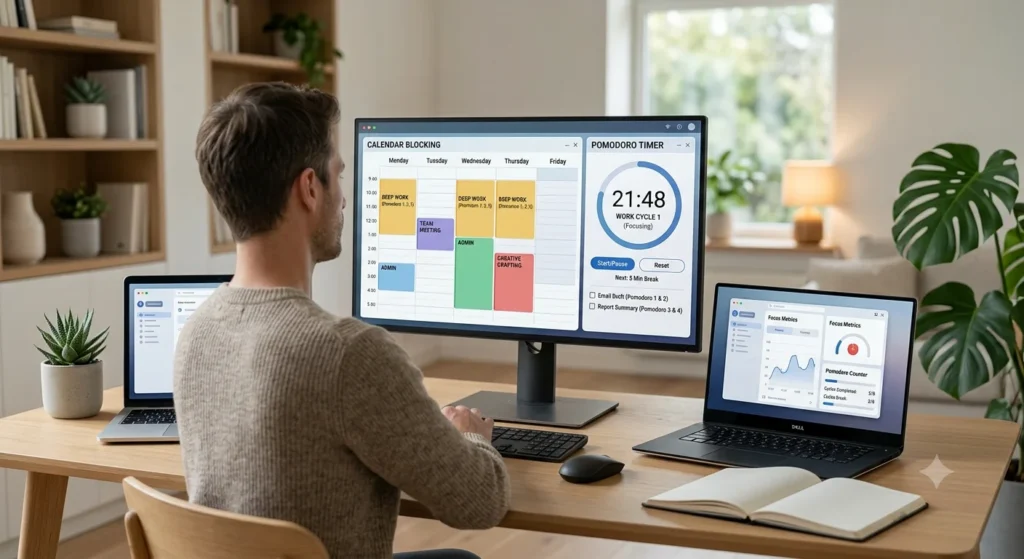
Simple timers and calendar blocking apps make the Pomodoro Technique and time blocking easy to actually stick to, instead of just being ideas you meant to try.
5. Password Managers
Bitwarden and 1Password generate and store strong, unique passwords so you’re not reusing the same one across every work account, a major security risk for remote employees using personal devices.
6. VPNs
A VPN encrypts your internet traffic, which matters most when you’re working from a café, airport, or any Wi-Fi network you don’t control.
7. Cloud Storage Platforms
Google Drive, Dropbox, and OneDrive keep your files backed up and accessible from any device, which matters a lot more when there’s no office server to fall back on.
Home Office Setup Checklist
- Desk: enough surface for your monitor, keyboard, and notes without clutter.
- Chair: proper lumbar support; your back will thank you after month three.
- Lighting: natural light where possible, or a desk lamp that doesn’t wash out video calls.
- Webcam: eye-level placement, since it makes conversations feel more natural.
- Microphone: a decent external mic dramatically improves how you sound on calls.
- Internet Backup: a mobile hotspot or neighbor’s guest Wi-Fi for outages.
- Noise Control: a closed door, white noise, or noise-canceling headphones for focus.
Remote Work Security Best Practices
Working remotely gives you the flexibility to work from anywhere, but it also places more responsibility on you to protect sensitive company information. Unlike a traditional office where IT teams monitor networks and devices, home offices often rely on individual employees to follow good cybersecurity practices.
A single weak password or accidental click on a phishing email can lead to data breaches, financial losses, or unauthorized access to confidential information. By adopting a few simple security habits, you can significantly reduce these risks and create a safer remote work environment.
1. Use Strong, Unique Passwords
Your password is the first line of defense against cybercriminals. Avoid using simple passwords or reusing the same password across multiple accounts, as one compromised account can put all your other accounts at risk. Instead, create long, unique passwords that combine uppercase and lowercase letters, numbers, and special characters.
Using a password manager such as Bitwarden, 1Password, or LastPass can make this much easier. These tools securely generate and store complex passwords, so you only need to remember one master password. Regularly updating important passwords is another good habit, especially for work-related accounts.
2. Enable Multi-Factor Authentication (MFA)
Even the strongest password can be stolen through phishing attacks or data breaches. That’s why enabling Multi-Factor Authentication (MFA) is one of the most effective security measures you can take. MFA requires a second form of verification, such as a one-time code from an authenticator app, a text message, or a biometric scan—before granting access to your account.
This additional layer of security prevents most unauthorized login attempts, even if someone manages to obtain your password. Whenever possible, use an authenticator app instead of SMS-based verification, as it generally provides stronger protection.
3. Use a VPN on Public or Untrusted Networks
If you work from coffee shops, airports, hotels, or coworking spaces, avoid connecting directly to public Wi-Fi without protection. Public networks are often less secure and can expose your internet traffic to attackers.
A Virtual Private Network (VPN) encrypts your internet connection, making it much harder for anyone to intercept your data. Many organizations provide employees with a company-approved VPN for accessing internal systems securely. If your employer has a VPN policy, make sure you follow it whenever working outside your home network.
4. Secure Your Home Wi-Fi Network
Your home Wi-Fi network should be protected just like any business network. Start by changing your router’s default username and password, as these are often publicly available. Use WPA3 encryption whenever your router supports it, or WPA2 if WPA3 isn’t available.
Keep your router’s firmware updated to protect against newly discovered security vulnerabilities. If you have smart home devices such as cameras, speakers, or smart TVs, consider placing them on a separate guest network. This helps isolate your work devices from other internet-connected devices that may have weaker security.
5. Learn to Recognize Phishing Attempts
Phishing emails remain one of the most common ways cybercriminals steal passwords and sensitive information. These messages often create a false sense of urgency, asking you to click a link, download an attachment, verify your account, or share confidential information.
Before responding to unexpected emails, carefully check the sender’s email address, look for spelling mistakes, and avoid clicking suspicious links. If a request seems unusual or urgent, verify it by contacting the sender through another trusted communication channel, such as a phone call or a direct message. Taking a few extra seconds to verify a request can prevent costly security incidents.
6. Keep Your Devices and Software Updated
Software updates do more than introduce new features, they often include critical security patches that fix vulnerabilities discovered by developers. Delaying updates leaves your devices exposed to threats that attackers actively exploit.
Enable automatic updates for your operating system, web browser, antivirus software, and work applications whenever possible. Keeping your devices up to date ensures you have the latest security protections without having to remember to install updates manually.
7. Lock Your Devices When Away
Even in your own home, it’s a good habit to lock your computer whenever you step away from your desk. This prevents unauthorized access by visitors, family members, or roommates and protects confidential work information.
Set your computer to lock automatically after a few minutes of inactivity, and always require a password, PIN, or biometric authentication to unlock it.
8. Back Up Important Work Files
Unexpected hardware failures, ransomware attacks, or accidental file deletions can result in lost work. Regularly back up important documents using your company’s approved cloud storage or backup solution.
If your organization provides services like Microsoft OneDrive, Google Drive, or Dropbox Business, save work files there instead of storing them only on your local computer. Cloud backups help ensure your data can be recovered quickly if something goes wrong.
9. Follow Your Company’s Security Policies
Every organization has its own cybersecurity guidelines regarding remote work, including approved software, file-sharing methods, device management, and data handling procedures. Following these policies helps protect both you and your employer from security risks.
If you’re ever unsure whether a tool or process is secure, consult your IT or security team before using it. It’s always better to ask questions than to unintentionally create a security vulnerability.
By following these remote work security best practices, you can protect sensitive information, reduce cybersecurity risks, and create a safer and more reliable remote working environment for yourself and your organization.
Common Remote Work Mistakes to Avoid
1. Overworking
One of the biggest challenges of remote work is knowing when to stop. Without a daily commute or clear office hours, it’s easy to keep checking emails, finishing “just one more task,” or working late into the evening. Over time, this can lead to stress, burnout, and lower productivity. Set a fixed work schedule, log off at the end of your workday, and make time for personal activities to maintain a healthy work-life balance.
2. Isolation
Working from home can sometimes feel lonely, especially if you rarely interact with colleagues outside of work-related meetings. Skipping casual conversations and team activities can make you feel disconnected from your coworkers and company culture. Schedule regular virtual coffee chats, participate in team meetings, and stay active in workplace communication channels to maintain strong professional relationships.
3. Poor Communication
In a remote environment, your teammates cannot easily see what you’re working on or ask quick questions in person. Assuming everyone already knows your progress can lead to misunderstandings, duplicated work, or missed deadlines. Keep your team informed with regular updates, ask questions when something is unclear, and communicate proactively through emails, chat, or project management tools.
4. Multitasking
It may seem efficient to balance household chores, messages, and work tasks at the same time, but constant task switching often reduces focus and increases mistakes. Instead of trying to do everything at once, dedicate specific time blocks to one task at a time. Focused work sessions help you complete tasks more quickly while producing higher-quality results.
5. Skipping Breaks
Many remote workers spend hours sitting at their desks without taking a break because they want to stay productive. However, working continuously can reduce concentration, creativity, and energy levels as the day goes on. Taking short breaks to stretch, walk around, or step away from your screen helps refresh your mind, reduce fatigue, and improve productivity throughout the day.
Remote vs Hybrid Work
Key Differences
Remote work allows employees to perform their jobs from anywhere without a regular requirement to visit a physical office. Communication and collaboration primarily happen through digital tools such as video conferencing, messaging apps, and project management platforms. Hybrid work combines remote work with scheduled office days, typically two or three times a week. This model gives employees the flexibility of working from home while still benefiting from face-to-face meetings, team collaboration, and workplace interactions.
Pros and Cons
| Factor | Remote Work | Hybrid Work |
| Flexibility | Highest flexibility with the freedom to work from almost any location. | Moderate flexibility, as employees balance remote work with office schedules. |
| In-person collaboration | Limited, relying mainly on virtual meetings and online communication. | Regular opportunities for brainstorming, meetings, and team building in person. |
| Commute | No commuting, saving both time and travel costs. | Partial commute on designated office days. |
| Career visibility | Requires employees to communicate achievements and stay engaged proactively. | Easier to build relationships and maintain visibility through regular face-to-face interactions. |
| Best for | Independent, focused work that requires minimal interruptions. | Roles that benefit from collaboration, mentoring, and frequent team interaction. |
Which Is Better for Different Roles?
The best work model depends on the nature of the job and the organization’s needs. Roles that involve deep concentration and individual output, such as software development, content writing, graphic design, data analysis, accounting, and research, often perform well in a fully remote environment because employees can work with fewer distractions.
On the other hand, positions that depend heavily on teamwork, brainstorming, client meetings, mentoring, or hands-on collaboration often benefit from a hybrid approach. Sales professionals, project managers, marketing teams, HR professionals, consultants, and leadership roles frequently gain value from regular in-person interactions while still enjoying the flexibility of working remotely for part of the week.
Many organizations now adopt hybrid work because it offers a balance between flexibility and collaboration, allowing employees to enjoy the benefits of remote work without losing the connection and teamwork that an office environment provides.
Sample Daily Remote Work Routine
Morning (7:30–9:00 AM) Wake, get ready as if leaving the house, and review your task list over coffee. Avoid opening email first thing, it puts you in reactive mode before the day even starts.
Deep Work Block (9:00–11:30 AM) Tackle your hardest or most important task while your focus is freshest. Notifications off, door closed.
Meetings (11:30 AM–1:00 PM) Batch calls together where possible, so focus time isn’t constantly interrupted.
Afternoon Focus (2:00–4:30 PM) Handle secondary tasks, emails, and collaborative work. Energy naturally dips here, so lighter tasks fit well.
End-of-Day Shutdown Ritual (4:30–5:00 PM) Review what got done, note tomorrow’s top priority, and close the laptop. This small ritual is what actually creates the boundary between work and home life.
Frequently Asked Questions
What are the best tips for working remotely?
Build a consistent routine, protect focus time with time blocking, over-communicate with your team, and set a firm boundary for when the workday ends.
How can I stay productive while working from home?
Plan your day in advance, prioritize your hardest task for your peak energy hours, and track your output weekly to spot what’s actually working.
How do remote employees avoid distractions?
They create a dedicated workspace, silence non-essential notifications during focus blocks, and set clear expectations with anyone sharing their home.
What tools do remote workers use?
Common tools include Slack or Teams for chat, Zoom for calls, Asana or Notion for project tracking, and AI assistants like ChatGPT or Copilot for drafting and summarizing.
How do I stay motivated working remotely?
Set clear daily goals, track small wins, and stay connected to teammates so the work doesn’t feel isolating.
How do I separate work from home life?
Use a dedicated workspace, a consistent shutdown ritual, and a firm end time you actually stick to.
How do remote teams communicate effectively?
They combine proactive updates, clear async messages with full context, and well-run meetings with agendas, not just constant real-time chat.
Conclusion
Remote work rewards people who build real structure instead of waiting for an office to provide it. The tips for remote work in this guide, from time blocking and async communication to home office security and AI tools, aren’t complicated, but they compound. Small, consistent habits are what separate a good remote career from a stressful one.
Start with two or three tips that address your biggest current struggle, whether that’s distractions, isolation, or burnout. Build from there. Remote work isn’t going away, and the people who invest in doing it well now are the ones who’ll keep growing in it for years to come.