If you get a security alert that says your email address has been compromised do not worry you are not the one. A lot of people see this warning every year. They do not know what to do. They wonder if they should be scared to ignore it or do something about it away.
The simple answer is that a compromised email address means that your email or the password for your email has been seen by people who should not have it. This usually happens when there is a data breach, a phishing attack or a database leak. It does not always mean that someone has gotten into your email account. It does mean that you are in danger if you do not do anything.
This guide will tell you what a compromised email address is, how it happens, what bad people do with that information and what you can do to keep yourself safe.
A compromised email address is an email address that bad people have gotten their hands on. This can happen in a few ways: the company that gives you email was hacked, a website where you used that email address had a data breach or you got tricked by a phishing attack into giving away your login information.
When we say an email address is compromised it means that your email address is known to people who should not have it. Sometimes these bad people also get your password, name, phone number or other personal information about you. They get to know your email address. They can use it to do bad things.
Why Security Alerts Mention Compromised Emails
Some companies, like Google, Microsoft Defender and Bitdefender keep an eye on places where peoples private information gets leaked like breach databases and the dark web.
They look for email addresses and passwords that have been exposed. If Google, Microsoft Defender or Bitdefender find your email address in one of these places they will send you a warning.
The warning Google, Microsoft Defender or Bitdefender send you does not mean that someone is using your email account now.
It means that your email address and password have been found in a place where they should not be which’s a problem for Google, Microsoft Defender and Bitdefender to alert you about.
Does It Mean Your Account Was Hacked?
That is not always the case. Your email address being leaked in a breach is different, from someone actually getting into your email account. These are two things that happen in different ways. Your email address being leaked in a breach is one thing. Someone getting
into your email account is another thing. They need to be dealt with in ways. Compromised Email vs Hacked Email vs Leaked Email
These three terms are often used interchangeably, but they describe very different situations with different levels of urgency.
| Term | What It Means | Urgency Level |
| Leaked Email | Your email address appeared in a public or sold database, usually from a third-party website breach | Low to Medium |
| Compromised Email | Your email and possibly your password were exposed; unauthorized access is a risk | Medium to High |
| Hacked Email | Someone has gained active access to your email account | High to Critical |
1. Compromised Email Explained
Your email address is not safe when it is found in a list of stolen information with a password. This usually happens because a website or an app you use got hacked and the bad people took all the user information from that website or app. Your email address and password are now in the hands of those people.
2. Hacked Email Explained
A hacked email account is a problem. This means someone has used your stolen login details to get into your account. They can now read all your emails.
They can also change passwords on your accounts. They can even pretend to be you.
3. Leaked Email Explained
A leaked email is really not that bad. Your email address might be in a list that someone shared online. It probably does not have a password, with it. This means you will get junk mail and fake messages trying to trick you but nobody can actually get into your email account.
How Email Addresses Become Compromised
1. Data Breaches
When a company’s database gets hacked the attackers copy user records. These records include email addresses, passwords and personal details. They sell these records on web marketplaces or post them publicly. Your email gets. It’s not your fault.
Big companies, like LinkedIn, Adobe and Yahoo have had breaches. Each of these breaches exposed hundreds of millions of accounts.
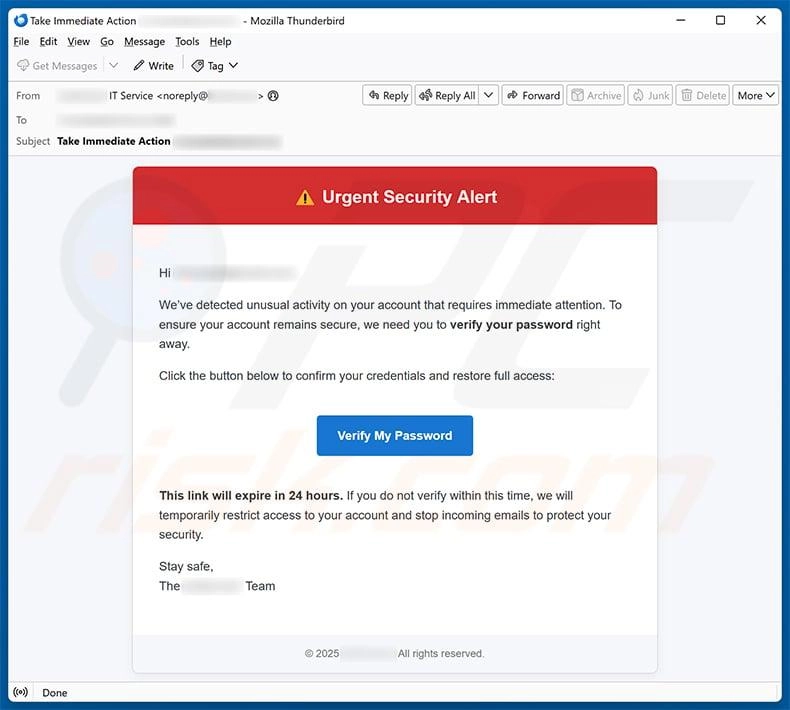
2. Phishing Attacks
Phishing happens when someone sends you an email that says it is from a place you trust like your bank or the company that you use for email.
This email has a link that takes you to a page that looks like a page where you log in.. It is not real. When you put in your user name and password the bad person who sent the email gets them. People get their passwords stolen this way a lot. Phishing is a problem because it is easy to fall for a fake email that looks real.
The people who do phishing try to make the email look like it is from a trusted source, like your email provider or a website you use all the time. They want you to think it is an email, from a place you trust so you will click on the link and give them your credentials.
3. Malware Infections
Some bad programs, like keyloggers or info-stealers will quietly record everything you type on your device. They will record usernames and passwords. If your device has these programs your usernames and passwords can be sent to someone who should not have them.
You will not see anything that looks wrong on your device. These keyloggers or info-stealers are a type of malware. Malware programs like keyloggers or info-stealers are very bad for your device.
4. Credential Stuffing
Credential stuffing is an automated attack where criminals use login credentials stolen from one breach to try to access accounts on completely different websites.
If you reuse the same password across multiple sites, attackers only need one breach to gain access to many of your accounts. Bots test millions of credential combinations every hour across thousands of sites.
5. Weak or Reused Passwords
Using passwords like “password123” is not an idea. This is because these simple passwords can be figured out in a few seconds by people who want to break into your accounts. They use tools to try lots of passwords really fast.
If you use the password for lots of different sites you are taking a big risk. This is because if one of those sites gets hacked then all of your accounts that use that password are in trouble, at the same time.
6. Public Exposure of Personal Data
Using passwords like “password123” is not an idea. This is because these simple passwords can be figured out in a few seconds by people who want to break into your accounts. They use tools to try lots of passwords really fast.
If you use the password for lots of different sites you are taking a big risk. This is because if one of those sites gets hacked then all of your accounts that use that password are in trouble, at the same time.
Signs Your Email Address May Be Compromised
1. Unexpected Login Alerts
When your email provider or other services send you notifications that someone logged in from a device or location you should pay attention. These notifications from your email provider or other services can be important.
You might not think it is a deal but do not ignore these alerts from your email provider or other services. They are trying to tell you something. Your email provider or other services are looking out for you so take a look at these notifications.
2. Password Reset Emails You Did Not Request
Receiving password reset emails, for accounts you did not try to reset is a warning sign. It usually means someone is trying to take over your accounts. They use your email address to trigger the reset process.
This is a sign that someone is attempting to hack into your accounts.You should be careful. Take action to secure your accounts if you receive such emails.
The password reset emails are a clue that someone is trying to get into your accounts. So you need to reset your passwords and make sure your accounts are secure.
3. Messages Sent Without Your Knowledge
People you know say they got emails from you but you did not send them. This means someone has gotten into your account and is using it to send messages to the people you know.
4. Suspicious Account Activity
When you look at your login history you will see that someone has signed in from cities or countries that you have never been to. Most email providers will show you a list of logins and this list will include the type of device that was used and the location of the login.
This is really helpful because it lets you see where your email account has been accessed from. If you see that someone has signed in from a city or country that you have never visited then you know that something is not right with your email account.
Your email provider will show you the login history. This will include the device type and the location of each login so you can check if someone else has been using your email account.
Your login history will have a list of all the logins, including the device type and location so you can see if anyone has been signing in to your email account, from a city or country that you have never visited.
5. Missing Emails or Settings Changes
If emails have disappeared, your forwarding address has changed, or your password recovery email has been altered, someone may already have access to your account and is modifying it.
What Happens After an Email Address Is Compromised?
Understanding what attackers actually do with a compromised email gives you a clearer picture of why acting quickly matters.
1. Access to Other Online Accounts
Your email address is used to recover most of your accounts. If someone gets into your email they can reset passwords on your bank account, social media, shopping sites and cloud storage.
This can lock you out of your accounts. Your email is like a key to many of your accounts. If someone has access to it they can control those accounts. For example they can reset your bank account password. Log into your social media.
This is why it is important to keep your email account secure.
2. Identity Theft Risks
Our email address is used to recover most of your accounts. If someone gets into your email they can reset passwords on your bank account, social media, shopping sites and cloud storage.
This can lock you out of your accounts. Your email is like a key to many of your accounts. If someone has access to it they can control those accounts. For example they can reset your bank account password. Log into your social media.
This is why it is important to keep your email account secure.
3. Financial Fraud Risks
If your email address is connected to your banking or places where you make payments, someone who is not supposed to have access can get the special codes that are sent to you by text message or email. This person can then use these codes to do things like take money out of your account or move your money to someone’s account.
Even if this person cannot get directly into your bank account they can still make purchases on websites where you buy things and your payment information is already saved.
4. Spam and Phishing Campaigns
Your email address is added to spam lists and sold to other attackers. You will likely see a significant increase in phishing emails, scam messages, and unsolicited contact.
5. Account Takeovers
The most serious outcome is a full account takeover, where the attacker changes your password and recovery options, locking you out permanently. Recovering a fully taken over account can take days and requires proving your identity to your email provider.
What Does a Dark Web Alert Mean?
How Dark Web Monitoring Works
There are services like Have I Been Pwned, Microsoft Defender and different antivirus tools that check the web forums and places where people share information.
They also look at breach databases where stolen credentials are bought and sold. When these services find your email address in one of these places they will send you a notification. They do this to let you know that your email address has been found in a place where it should not be. Have I Been.
These other services are always looking for email addresses, like yours in the dark web forums and breach databases.
Why Your Email Appears in Breach Databases
Your email address ended up in a breach database because a website or a service that you signed up for was hacked at some point it could have been years ago.
The thing is, breach information gets passed around and sold times on the dark web so even if the hack happened a long time ago it can still cause new problems today.
Is Every Dark Web Alert Serious?
Not every alert requires the same response. The key question is whether your password was also exposed and whether that password is still in use anywhere.
How to Evaluate Risk
Use this framework to assess how seriously you should treat an alert:
| Situation | Risk Level | Priority Action |
| Email address only, no password | Low | Monitor for phishing; no immediate action required |
| Email and old password, no longer in use | Low to Medium | Confirm you have updated that password |
| Email and current password | High | Change password immediately and enable MFA |
| Email, password, and active unauthorized logins | Critical | Secure account immediately and check all linked accounts |
How to Check Whether Your Email Address Has Been Compromised
1. Review Security Alerts
Check the security notifications in your email provider. Gmail, Outlook, and Yahoo all have a security center or alert history where you can see recent warnings.
2. Check Recent Login Activity
Most email providers show a login history. In Gmail, scroll to the bottom of your inbox and click “Details” to see recent activity. In Outlook, go to Account Security and review sign-in activity. Look for logins from unfamiliar devices or locations.
3. Use Breach Monitoring Tools
Visit HaveIBeenPwned.com and enter your email address. This free tool checks your email against hundreds of known data breaches and tells you which ones your email appeared in, including what information was exposed.
4. Monitor Password Changes
If you did not request a password change but received a confirmation email, treat it as a security emergency. Contact your provider immediately.
5. Check Connected Accounts
Review which third-party apps and services have access to your email account. Remove any you do not recognize or no longer use.
What to Do Immediately If Your Email Is Compromised
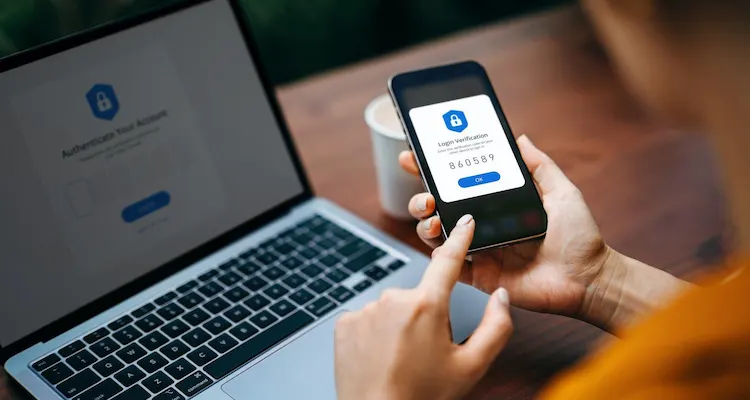
Act in this order. The first steps matter most.
Step 1: Change your email password immediately. Create a password that is at least 14 characters long and contains a mix of letters, numbers, and symbols. Do not reuse any password you have used before.
Step 2: Enable multi-factor authentication (MFA). This requires a second form of verification, such as a code sent to your phone or generated by an authentication app, every time someone tries to log in. Even if an attacker has your password, MFA blocks them.
Step 3: Sign out of all active sessions. Most email providers have an option to sign out of all devices simultaneously. Use it to end any session an attacker may currently have open.
Step 4: Review and update recovery options. Check that your account recovery email and phone number are still your own. If they have been changed, update them immediately.
Step 5: Remove suspicious devices. Check which devices are connected to your account and remove any you do not recognize.
Step 6: Scan your devices for malware. If malware was responsible for capturing your credentials, changing your password will only be a temporary fix unless you remove the malware first. Run a full scan using a reputable antivirus tool.
Step 7: Update passwords on all accounts linked to this email. Prioritize your bank, payment services, social media accounts, and any site that stores personal information.
How to Prevent Email Compromise in the Future
1. Use Unique Passwords for Every Account
This is the single most effective protection against credential stuffing. If each account has a different password, a breach at one site cannot affect any other account.
2. Use a Password Manager
A password manager generates and stores complex, unique passwords for every account so you never have to remember them. Tools like Bitwarden, 1Password, and Dashlane are widely trusted and easy to use.
3. Enable MFA on Every Important Account
Multi-factor authentication is one of the strongest defenses against unauthorized access. Prioritize your email, banking, social media, and cloud storage accounts. Use an authenticator app rather than SMS where possible, as SMS codes can be intercepted.
4. Recognize Phishing Attempts
Before clicking any link in an email, check the sender address carefully. Phishing emails often use addresses that look similar to real ones but contain small differences. Hover over links to see the actual destination URL before clicking. When in doubt, go directly to the website by typing the address in your browser.
5. Monitor Breach Notifications
Sign up for breach alerts at HaveIBeenPwned.com. This free service emails you whenever your address appears in a newly detected breach so you can act quickly.
6. Secure Your Personal Devices
Keep your operating system and apps updated, as updates often include security patches. Avoid using public Wi-Fi for sensitive accounts without a VPN. Lock your devices with a PIN or biometric authentication.
Email Security Best Practices Checklist
Daily Habits
- Do not click links in unexpected emails, even from known senders
- Check the sender address on any email asking for personal information
- Log out of email accounts on shared or public devices
Monthly Security Reviews
- Review connected apps and revoke access to anything unused
- Check login history for unfamiliar activity
- Confirm your recovery phone number and email are still accurate
- Review any security alerts you may have dismissed
Annual Security Audit
- Change passwords on high-value accounts even if no breach is detected
- Check HaveIBeenPwned.com for any new breaches involving your email
- Review which accounts you no longer use and consider deleting them
- Test that your MFA setup still works correctly
Common Myths About Compromised Email Addresses
1. Changing My Password Solves Everything
Changing your password is a first step. It does not fix any damage that’s already been done. If someone has already taken your contacts, read your emails or changed passwords on your other accounts those things still happen even if you change your password.
You have to look at all your connected accounts and think about what someone could have seen.
2, A Leaked Email Is Not Dangerous
An email address alone can be used for targeted phishing attacks, and combined with publicly available information, it can be enough to impersonate you or guess security questions. Never treat an email-only leak as harmless.
3. Only Businesses Get Targeted
Individual users are targeted constantly, often more successfully than businesses because they are less likely to have security monitoring in place. Personal accounts are attractive targets because they hold financial, medical, and personal information.
4. Two-Factor Authentication Is Optional
Two-factor authentication is arguably the most effective security control available to individual users today. It stops the majority of automated account takeover attempts, even when the attacker has the correct password. Treating it as optional is one of the most common and costly security mistakes.
When to Seek Professional Help
Most compromised email situations can be handled independently using the steps above. However, some situations call for professional assistance.
Business Email Compromise
If you run a business and your email account has been accessed, the stakes are much higher. Attackers may have intercepted financial communications, impersonated you with clients, or gained access to business banking. Contact your IT provider or a cybersecurity firm immediately and notify any affected clients or partners.
Financial Account Exposure
If you believe your bank accounts or payment services have been accessed as a result of the email compromise, contact your bank directly, freeze any cards if needed, and file a report with relevant authorities. In many countries, banks have dedicated fraud teams that can act quickly.
Repeated Unauthorized Access
If you have secured your account multiple times but keep seeing unauthorized logins, your device may be infected with malware that is capturing your new credentials each time you set them. At this point, you may need professional malware removal, device replacement, or help from your email provider’s security team.
Conclusion
A compromised email address is a serious warning, not a reason to panic, but also not something to ignore. The risk level depends on what was exposed, whether your password was included, and whether anyone has actively accessed your account.
The most important actions are: change your password immediately, turn on multi-factor authentication, check all accounts linked to your email, and scan your devices. These four steps eliminate the majority of risk from most email compromises.
Going forward, using unique passwords, enabling MFA on every important account, and monitoring breach alerts will protect you from most future threats. Email security does not require technical expertise. It requires consistent habits and quick action when an alert appears.
Frequently Asked Questions
What does it mean when my email address is compromised?
It means your email address, and possibly the password linked to it, has been exposed through a data breach, phishing attack, or leaked database. It does not always mean someone has broken into your account, but it is a warning that requires action.
Is a compromised email address the same as a hacked email?
No. A compromised email means your credentials have been exposed. A hacked email means someone has actively gained access to your account. Compromise is a potential risk; hacking is an active incident.
Can someone steal my identity using my email address?
If they only have your email address, the risk is limited to phishing and spam. If they also have your password and access to your inbox, they can use password resets to access other accounts and collect personal information that enables identity theft.
How do I know if my email account has been hacked?
Signs include: password reset emails you did not request, login alerts from unfamiliar locations, emails you did not send appearing in your Sent folder, missing messages, or changed account settings.
Should I change my password after a breach notification?
Yes, always. Even if the breach is old, if you are still using the same password anywhere, change it immediately.
What is credential stuffing?
Credential stuffing is an automated attack where stolen username and password combinations from one breach are tested against hundreds of other websites. It is why reusing passwords across sites is so dangerous.
Why did I receive a dark web alert?
A monitoring service found your email address in a breach database that was posted or sold on the dark web. This usually means a website you used was hacked and your account details were part of the stolen data.
Can a compromised email affect my bank account?
Yes. If your bank sends password reset links or authentication codes to your email, and your email is compromised, an attacker could intercept those messages and access your banking. Contact your bank and enable alternative authentication methods.
How long does it take to recover a compromised email account?
For most users, securing a compromised account takes less than an hour if you still have access. A full account takeover where you are locked out can take one to several days, depending on your email provider’s recovery process.
How can I prevent my email from being compromised again?
Use a unique password for every account, enable multi-factor authentication, stay alert to phishing emails, and monitor your email on HaveIBeenPwned.com for future breach notifications.