Custom software products can resolve certain issues that basic software can’t resolve for small businesses. Specific business needs and workflows can be customized into a customer self-portal/booking system/inventory system/internal dashboard, or a mobile app.
However, custom software does so as well, with regard to the cybersecurity aspect. Any app with data, access to users, and integration with other systems could become a security risk. This can be particularly difficult if it occurs in a small business that may not have the financial resources or technical know-how to deal with it.
Therefore, addressing cybersecurity from the initial development stage is important and better than tackling the issue when the software is ready to go. Proactive planning, development, testing, and maintenance are vital to any business’s security, and it is important to build that to ensure the system is secure, customers are secure as well, and sensitive information is secure.
Define Security Requirements Before Development
Identify Security Requirements As Early In The Development Process As Possible.
It is helpful for such businesses to predict what information is needed for the application and how it will be accessed, stored, processed, and shared during its operation prior to development.
- Sensitive Data Types: This can involve products or services, customer information (names, e-mail addresses, passwords, payments, and other information), staff records, or confidential business information.
- Security & Access Levels: The security level will depend on the type of information. Businesses must also consider the types of users and the extent to which they need to access the application.
- Security Guidance: The National Institute of Standards and Technology (NIST) offers advice on the principles and methods of information security.
Use Strong Authentication and Access Controls
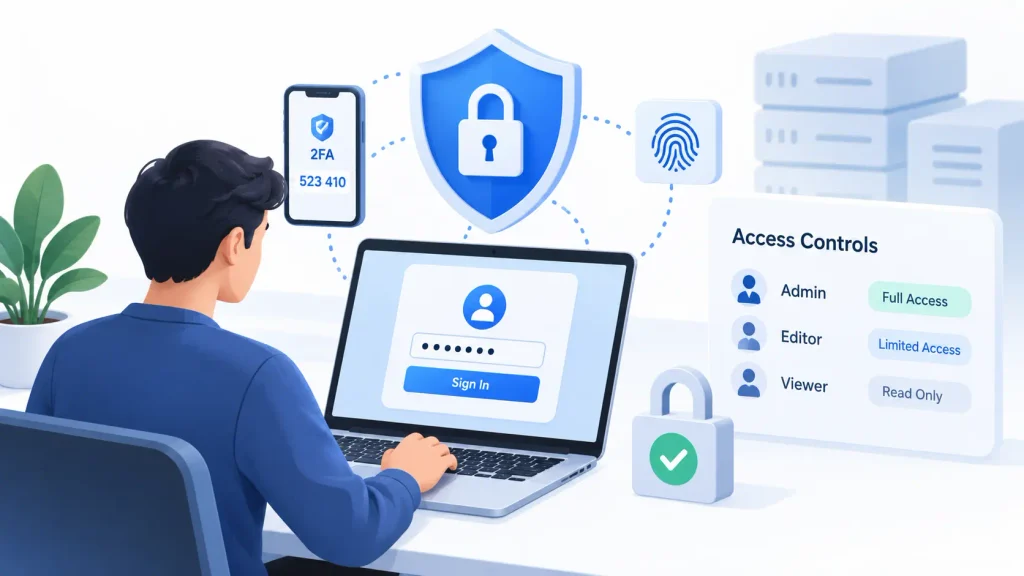
Avoid weak password policies and apply access controls. Beat weak password policies with Strong Authentication and Access Controls.
- Password Protection: A lack of robust sign-on security can be a significant risk to custom apps. There is never a place where the password is stored in clear text, and it’s always securely password – hashed.
- Multi-Factor Authentication: More security layers can be added into play, like multi-factor authentication, particularly for the administrators and employees of sensitive systems.
- Principle of Least Privilege: Access controls are also of utmost strength. Access should be limited in line with the principle of least privilege: users should have access only to what they need to do their work.
- Account Controls: System information must not be accessible by the users, and the administrator must be used to manage information about the users and the system. A reduction in unnecessary access could help minimize the risk of the impacts caused by an account compromise.
Protect Data in Transit and at Rest
Security is a problem for data in transit and data at rest. Security is for data on the journey and at rest.
- Data Transmission: Proper handling and transmission, as well as storage, of sensitive information is critical. Web Applications should communicate via HTTPS between the user and the application. Secure communication must also be used with APIs and integrations.
- Data Encryption: Sensitive data stored in databases and other systems, including private customer records, financial information, and authentication data, should be encrypted.
- Access Limitation: Also, use databases and storage systems that are limited in access. Limiting the quantity of data that can be collected to that which is actually needed for the application can further minimize possible security risks.
Build Secure APIs and Integrations
Develop Secure APIs and Integrations.
- Integration Risks: Many modern custom software systems will be connected to payment systems, customer relationship management (CRM) systems, email applications, cloud storage, and analytics program. While these connections are beneficial, each is an added security concern.
- Credential Safety: Do not have API keys, passwords, or other credentials ‘hardcoded’ into the source code, nor use the internet. Developers are encouraged to store and secure sensitive credentials in a secure manner.
- Input Validation: Applications should also check and validate information coming from external services and the user providing the information. Users entering data into a form, via an API, or from a system should not be expected to automatically trust that it is correct.
- Third-Party Review: Additionally, firms ought to check the third parties prior to linking them with systems that have sensitive details.
Test for Common Security Vulnerabilities
Round-trip to test with Common Security Vulnerabilities.
- Application Security Checks: Application security checks should be an integral part of software development. Custom applications can be compromised by insecure software components, insecure security controls, and/or authentication issues. Security settings, insecure software components, access control and authentication issues are all potential issues with custom applications.
- OWASP Framework: Well known document called OWASP Top 10, that can help development teams in determining the most common areas to focus on and can help identify the most important web application security issues out there.
- Proactive Testing: Prioritizing the security of the code with code review, automated security testing, dependency checking and vulnerability scanning can prevent major issues.
- Post-Launch Testing: Testing should also be performed after launch ,and this is where security testing should be carried out, since new functionality or changes could involve new risks.
Keep Software and Dependencies Updated
Regularly update software and dependencies When developing custom software, many times frameworks, libraries, packages and other third party implementations are involved in the development process. You can use these tools to help speed up development, but you may find vulnerabilities in them over time.
- Patch Management: Security patches that are needed should be applied, and important dependencies should be monitored.
- Outdated Components: Unsupported software and outdated components should be avoided as much as possible.
- Lifecycle Maintenance: Security maintenance should be performed for the entire life of the software product. There needs to be a process in development teams to track vulnerabilities, test changes to fix vulnerabilities a,nd implement critical patches.
Secure Remote Access
A lot of small businesses invariably have remote members, external developers, freelancers, and distributed teams. PIP security access is something to consider, since this is one of the things new iStaff can connect to applications on the internal network, cloud services, source code repositories,and business systems from a variety of locations and networks.
- Authentication for Remote Access: It is always important to use strong authentication and access controls when using remote access.
- VPN Security: Another thing to consider is that a VPN may offer an extra level of security when employees connect via public or possibly insecure networks. VPN services can help improve the privacy of users when they access internet-based resources by encrypting the internet connection, according to Cybernews.
- Comprehensive Strategy: But VPN is not a complete security solution; it should be part of your whole cybersecurity plan. Nevertheless, businesses must adhere to multi-factor authentication, secure endpoints, grant access on a limited basis, and conduct frequent audits of accounts.
Prepare for Backups and Security Incidents
Ensure that you are ready for any backup failure or security incident.
- System Failure & Data Loss: Even the most robust systems can have problems and undergo a security breach or accidentally lose data.
- Routine Backups: Routine Backups are imperative. Secured and secured backup of important business and customer information is required; the business needs to be certain that it will be able to retrieve that babackupSmall businesses should also have an incident response plan.
- Incident Response Plan: It should pinpoint the principals to be called upon to respond in an incident, identify which systems are likely to have to be isolated, and identify how important services will be restored. Having these steps preplanned can minimize confusion and downtime in an emergency.
Make Cybersecurity an Ongoing Process
Don’t do Cybersecurity as a One-Time Event.
- Post-Release Vulnerabilities: The work on cybersecurity doesn’t stop at the point of release of the custom software. This can mean new vulnerabilities can emerge, staff can move around,and the business can add new features or integrations.
- Continuous Maintenance: Regularly developing software, conducting access reviews, security testing, backup checks, and vulnerability monitoring should be part of continuous maintenance.
- Gradual Enhancement: Small businesses don’t have to install all of the security controls. The best way to do that is to find out what the biggest threats are and enhance security gradually.
Conclusion
While humanizing software solutions can be helpful for small businesses and driven by their unique requirements, security should be considered during the solution development process.
Using strong authentication, limiting users’ access, providing encryption, especially secure integrations, conducting vulnerability testing, regularly updating, protecting remote access, and offering reliable backups all mitigate cybersecurity risks.
The objective is not to make software complicated for no reason. It’s important to know what to protect and put in place usable protection from the start of development.
Approaching cybersecurity in a way that is integrated into the software development process, instead of being tackled at the end of the process, small businesses can benefit from its expansion, as well as improve protection of their systems, data a,nd customers.