SEO can feel tricky until you look at it step by step. Basically it’s about making your website simple for Google to find, simple for Google to figure out what it’s about and useful enough that people want to visit it.
This guide brings together the SEO tips that really make a difference based on what tends to work when you start from nothing.
There’s no secret that will push you to the top of the search results overnight. If someone says they can, they are probably trying to sell you something. What you will find here is a list: what to fix first, how much time each fix takes and what to ignore.
Short answer if you don’t have time: the most important easy things to do are matching what people are looking for, writing clear headlines, adding a few relevant links inside your site, fixing clear problems with your website and checking your results in Google Search Console. All the other steps come after these five things.
What Is SEO and How Does It Work?
SEO stands for search engine optimization. In words it means making your website better so that it appears when people look for things you offer.
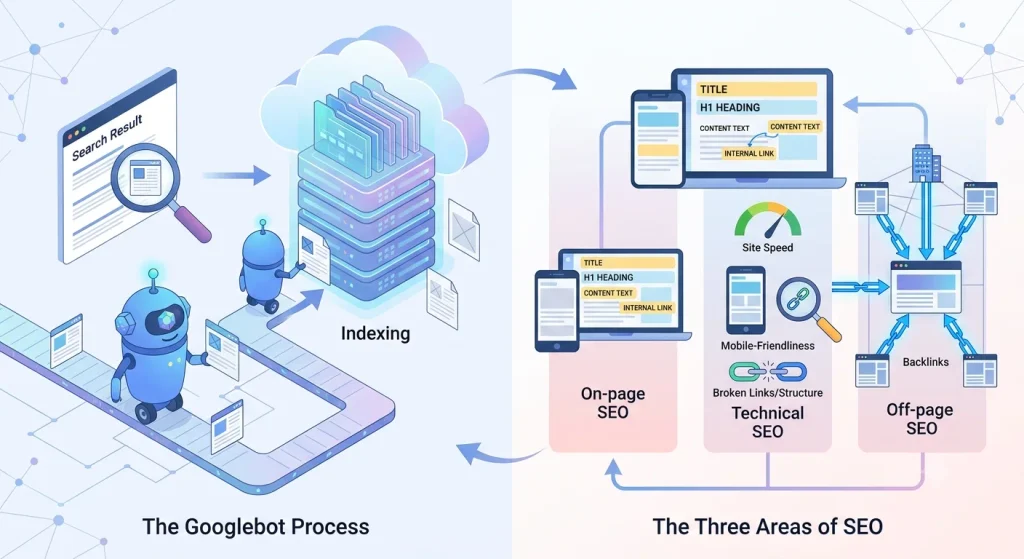
Google finds web pages by using automated programs called bots. These bots go through the internet. Look at web pages.
When a bot finds a page Google decides if it should be added to its database. That’s called indexing. If a page isn’t indexed it will never show up in search results no matter how good the content is.
SEO breaks down into three areas:
On-page SEO covers what’s on the page itself: titles, headings, content, and internal links.
Technical SEO covers whether Google can crawl and index your site properly: site speed, mobile-friendliness, broken links, and site structure.
Off-page SEO covers signals from outside your site, mainly backlinks from other websites that point to yours.
You don’t need to master all three before you start. Most beginners get more out of fixing on-page basics first, since those changes are fast and fully within your control.
The 25 Easy SEO Tips You Can Start Using Today
1. Choose the right keyword for each page
I suggest that each page should aim at a main keyword and a few close related keyword terms. Choose keywords by looking at how people search for them, how useful they are to your business and how many others are using them. A free tool such as Google Keyword Planner or Google Trends helps you start without any cost.
2. Match the search intent
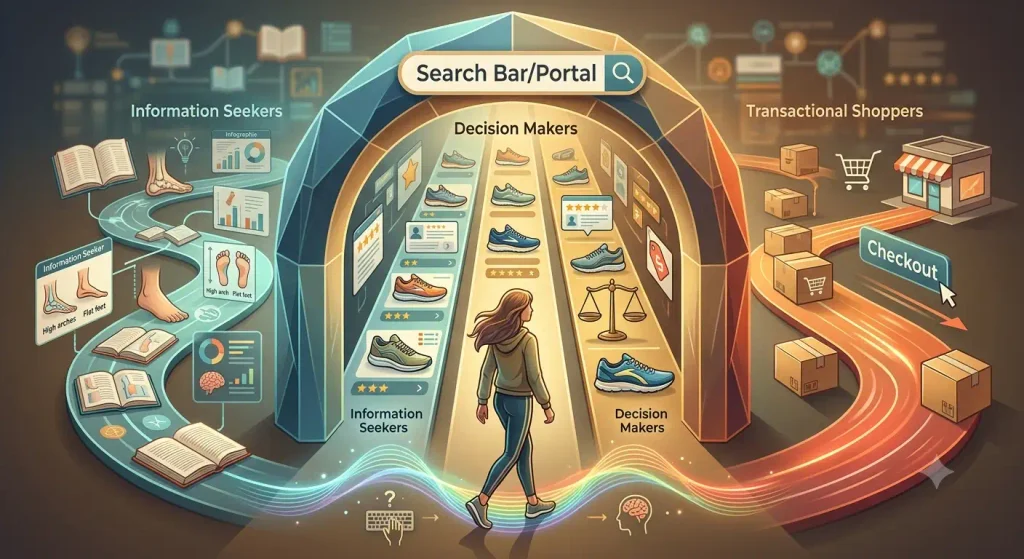
This is where many new people miss out on their chance to rank high without knowing it. Search intent is what makes someone search: are they looking for information, checking choices about to make a purchase or searching for a particular website? If someone types ” running shoes, for flat feet ” they want to see a comparison, not a sales message. Create content that gives the searcher what they are looking for and rankings usually come along with it.
3. Write a clear, compelling title tag
I think the title tag is the link that people see in search results. The title tag should state the topic in language and give the reader a clear reason to click but the title tag must not be stuffed with keywords. The example title tag, ” SEO Tips: 25 Simple Ways to Improve Your Google Rankings ” tells you exactly what you will receive.
4. Create a useful H1
Your H1 is the heading on the page. The H1 should match the title tag closely. Explain to both readers and Google what the page is about. It is standard to have one H1 on each page.
5. Organize content with descriptive headings
I recommend putting your content into sections that have H2 and H3 headings. Each heading should explain what the section holds. This lets readers scan the page. It also tells Google how the page is built. Headings, like “More Info” are vague. Do not make the best use of this chance.
6. Improve your introduction
Answer the readers question away instead of building up. In the two or three sentences tell the reader what the page covers and why it is worth the readers time. People decide quickly whether to keep reading.
7. Make your content genuinely useful
This part cannot be replaced by any shortcut. Original insights, real examples and specific details always beat generic advice. A strong SEO-driven content strategy can help you turn useful content into a consistent source of organic traffic and qualified leads. If a page says the thing as the next ten results there is no reason for Google or a reader to prefer the page.
For example the landscaping business improved rankings. The small landscaping business added photos of completed jobs with notes on soil type and drainage issues, in the local area information that a generic competitor page simply did not have.
8. Use related terms naturally
Search engines care about how your content goes on a topic, not just how many times you repeat the same keyword. Include synonyms, ideas and supporting questions when they fit naturally into the flow of your writing.
Don’t try to stuff them in just to meet some requirement. Let the content unfold in a way that feels real and helpful to the reader.
9. Optimize your URLs
Keep URLs short and descriptive. /easy-seo-tips tells a reader and a search engine more than /page-id-4471. Google’s own SEO Starter Guide recommends descriptive URLs specifically because they help users understand what a page is about before they even click.
10. Add relevant internal links
Link from one page on your website to another page when it is truly useful for the person reading. This helps share the strength of your website and allows Google to see how your pages are connected.
A blog post that talks about “SEO for businesses” linking to your “local SEO checklist” page makes sense. Link from one page on your website to another page when it is truly useful for the person reading.
This helps share the strength of your website and allows Google to see how your pages are connected. A blog post that talks about “SEO, for businesses” linking to your “local SEO checklist” page makes sense.
11. Use descriptive anchor text
Anchor text is the clickable words in a link. “Click here” tells nobody anything. “Read our local SEO checklist” tells both the reader and Google what’s on the other end.
12. Optimize images and alt text
Compress images so they load fast, and write alt text that describes what’s actually in the image. This helps with accessibility and gives Google another way to understand your content.
13. Improve page speed
Slow pages lose visitors before they even see your content. Run your site through Google’s PageSpeed Insights, which is free, and fix the issues it flags in order of impact. Even small gains here tend to help conversions as much as rankings.
14. Make your site mobile-friendly
Most searches happen on phones. If your site is hard to use on a small screen, it’s hard to use for most of your audience. Test it yourself on your phone before trusting any tool’s report.
15. Secure your website with HTTPS
If your site still runs on HTTP, switch to HTTPS. It’s a basic trust signal for both visitors and search engines, and most hosting providers offer free SSL certificates now.
16. Check that Google can crawl your pages
A robots.txt file or accidental “noindex” tag can block Google from crawling pages you actually want ranked. Check your settings, especially after a website redesign, since this is a common and easy-to-miss mistake.
17. Check which pages Google has indexed
Type site:yourdomain.com into Google to see a rough list of indexed pages, or check the Pages report in Search Console for the full picture. If important pages are missing, that’s your first fix, before you worry about anything else.
18. Submit your sitemap
A sitemap is a file listing all your important pages, and submitting it through Search Console helps Google find them faster. It takes about five minutes to set up.
19. Fix broken links and obvious technical issues
Broken links frustrate visitors and waste the crawl budget Google spends on your site. Tools like Screaming Frog (free for small sites) will scan your whole site and flag broken links in minutes.
20. Keep important content updated
Outdated statistics, dead links, or old screenshots signal that a page has been neglected. Reviewing and refreshing your top pages every few months is often faster than writing something new from scratch, and it tends to pay off quickly.
21. Build high-quality backlinks
A backlink is a link from another website to yours. Your link profile includes the backlinks pointing to your website, along with factors such as link quality, relevance, referring domains, and anchor text.
It still counts as one of Google’s strongest trust signals. Focus on backlinks, from reputable sites that you earn through genuine outreach guest posts or useful content that people want to reference. Avoid paid link schemes; they usually cause harm than the ranking boost is worth.
22. Optimize your Google Business Profile
If you run a local business, this single free listing can drive as much traffic as your website. Fill it out completely: hours, categories, photos, and a clear description.
23. Earn genuine customer reviews
Reviews influence both local rankings and whether people trust you enough to click. Ask satisfied customers directly rather than waiting for reviews to show up on their own.
24. Create content around real customer questions
Look at what customers actually ask you by email, in calls, or in comments, and turn the recurring ones into content. This approach works especially well when combined with a content marketing and blog writing strategy that keeps your content useful, consistent, and optimized for search.
This tends to match search intent naturally, since real questions are usually the same ones people type into Google.
25. Monitor your results in Google Search Console
Search Console is free and shows you exactly which queries bring people to your site, your click-through rate, and your average position. Check it monthly at minimum. Without this step, you’re optimizing blind.
Easy SEO Tips Ranked by Difficulty and Impact
Not every tip deserves the same amount of your time. Here’s how the easy wins stack up against each other.
| SEO task | Difficulty | Time required | Potential impact |
| Improve title tags | Easy | 15 min | High |
| Add internal links | Easy | 30 min | High |
| Improve headings | Easy | 15 to 30 min | Medium |
| Update outdated content | Easy to Medium | 1 to 2 hrs | High |
| Fix technical issues | Medium | Varies | High |
| Build backlinks | Medium to Hard | Ongoing | High |
Start at the top of this table. The easiest tasks often have the biggest short-term payoff, because they’re the ones most sites neglect.
The 10-Minute SEO Checklist
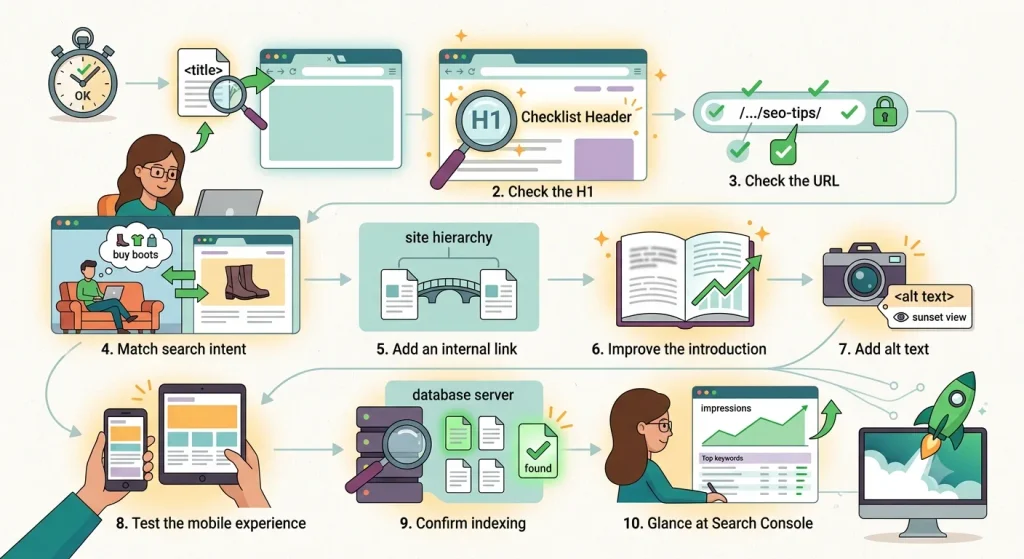
When you don’t have time for a full audit, run through this on any page:
- Check the title tag
- Check the H1
- Check the URL
- Confirm the content matches search intent
- Add one relevant internal link
- Improve the introduction
- Add descriptive alt text to at least one image
- Test the mobile experience
- Confirm the page is indexed
- Glance at its performance in Search Console
Free SEO Tools for Beginners
You don’t need a paid subscription to get started. These free tools cover most of what a beginner needs:
- Google Search Console: tracks how your site performs in search and flags indexing problems
- Google Analytics: shows how visitors behave once they land on your site
- Google Trends: reveals what’s rising or falling in search interest
- Google Keyword Planner: free with a Google Ads account, useful for keyword volume
- PageSpeed Insights: tests and scores your site speed
- Google Business Profile: manages your local listing
- Bing Webmaster Tools: Bing’s equivalent of Search Console, worth setting up since it’s free
Once you outgrow the free tools, platforms like Semrush, Ahrefs, or Screaming Frog add deeper keyword and technical data, and Yoast or Rank Math help with on-page SEO if you run WordPress.
Easy SEO Tips for Different Types of Websites
Local businesses should prioritize a complete Google Business Profile, consistent name/address/phone details across the web, and location-specific pages.
Ecommerce websites should focus on unique product descriptions, clean category structure, and fast page speed, since slow product pages directly hurt sales as well as rankings.
Service businesses benefit most from pages built around specific services and locations, paired with genuine client testimonials.
Blogs and publishers should prioritize content depth, internal linking between related posts, and a regular update schedule for older articles.
New websites should start with technical basics and indexing before chasing backlinks, since there’s little point building authority for pages Google hasn’t found yet.
Established websites usually get more out of updating existing content and fixing technical debt than publishing constantly.
What NOT to Do When Optimizing for SEO
Don’t stuff keywords. Repeating a phrase unnaturally makes content harder to read and doesn’t help rankings the way it did years ago.
Don’t buy spammy backlinks. Paid, low-quality links can trigger penalties that take far longer to undo than the ranking boost was worth.
Don’t create thin pages. A page with barely any content, built only to target a keyword, rarely ranks and rarely helps readers.
Don’t publish content just to target keywords. Write for a real question or need first, and let the keyword targeting follow from that.
Don’t copy competing pages. Beyond the plagiarism problem, copied content has nothing original to offer, so there’s no reason for it to outrank the source.
Don’t change URLs without a reason. Every URL change risks breaking links and losing the ranking history tied to that address. If you must change one, set up a redirect.
Don’t expect overnight rankings. SEO is a compounding process, not a light switch.
What to Do If Your Website Isn’t Ranking
- Check indexing first. If Google hasn’t indexed the page, nothing else matters yet.
- Check search intent. Look at what’s currently ranking for your target keyword and compare it to what you built.
- Compare your content with the top results. Are you missing something they cover?
- Improve content depth and usefulness. Add detail, examples, or data the competition doesn’t have.
- Strengthen internal links. Make sure your important pages are actually linked from elsewhere on your site.
- Fix technical problems. Speed, mobile issues, and broken links all quietly cap your ranking potential.
- Build relevant authority. A few strong backlinks often outperform many weak ones.
- Give it time. Google’s own guidance is that ranking changes can take weeks or longer to show up clearly, so don’t judge a fix after two days.
How Long Does SEO Take to Work?
SEO rarely produces results overnight. Technical fixes, such as fixing crawl errors, improving page accessibility or unblocking a page from search engines can sometimes show an impact within a few days or weeks.
Content improvements, keyword targeting, internal linking and building website authority usually take several weeks to a few months because Google needs time to recrawl your pages, reassess their quality and relevance and compare them with competing results.
Don’t judge your SEO efforts based on days of no movement. Rankings can fluctuate while Google processes changes and some improvements may first appear as increases in impressions before they lead to clicks or higher rankings.
Give your strategy time to produce meaningful data then use Google Search Console to track impressions, clicks, average position and the queries bringing visitors to your site. Review these metrics, over least a month or longer before deciding whether your SEO work is producing results or needs adjustment.
How to Measure Whether Your SEO Tips Are Working
- Organic clicks: how many people click through from search results
- Impressions: how often your page appears in search results, even without a click
- Click-through rate (CTR): clicks divided by impressions; a low CTR with high impressions often points to a weak title or meta description
- Average position: roughly where your page ranks for its target queries
- Indexed pages: how many of your pages Google has actually added to its index
- Organic conversions: whether that traffic turns into signups, sales, or leads, which is the number that actually matters to a business
A Simple 30-Day SEO Plan for Beginners
Week 1: Research and technical basics. Set up Search Console and Analytics, confirm your important pages are indexed, and run a speed and mobile check.
Week 2: On-page optimization. Rewrite title tags and headings on your top five pages, and confirm each one matches its search intent.
Week 3: Content and internal linking. Update your best-performing older content, and add internal links between related pages.
Week 4: Authority and measurement. Reach out for a few relevant backlinks, optimize your Google Business Profile if applicable, and review your first month of Search Console data to plan what’s next.
Frequently Asked Questions
What are the easiest SEO tips for beginners?
Matching search intent, writing clear title tags, adding internal links, fixing obvious technical issues, and checking Search Console regularly. These five cover most of the early impact.
How can I improve my SEO quickly?
Focus on fixes that take under an hour: titles, headings, alt text, and internal links. These won’t replace a long-term strategy, but they remove the most common quick mistakes.
Can I do SEO myself?
Yes, for most small and medium sites. The basics don’t require coding knowledge, though large or highly technical sites sometimes benefit from expert help.
How long does SEO take?
Expect a few weeks at minimum before you can judge whether a change worked, and a few months for meaningful ranking movement on competitive terms.
How do I find keywords?
Start with what your customers actually ask you, then check search volume with a free tool like Google Keyword Planner or Google Trends.
Conclusion
None of these SEO tips are hidden. What makes some websites show up in search results and others not is usually doing the work regularly.
Start by picking the keyword knowing what people are looking for, improving your title, headings, writing, pictures links inside your site and the technical parts of your website and making sure your site works well on phones and loads fast.
Check that your pages are listed in search engines, send your sitemap to improve for SEO when it matters and start getting good links from other sites.
The important thing is to create a Google Search Console account and check your clicks, how often people see your site, your rankings and other information.
Concentrate on the important things first use Search Console to find out what is working and then keep making one part better at a time.
Further reading: Google’s SEO Starter Guide for the official technical guidance referenced throughout this article, the Wikipedia entry on Search Engine Optimization for background on how the practice developed, and the active r/SEO community on Reddit for ongoing practitioner discussion and troubleshooting threads.