Every time you buy something online without checking the price history, there is a real chance you are overpaying. Retailers adjust prices dozens of times per day, and the “sale” badge you see may not reflect a genuine discount at all. The good news: you don’t have to guess anymore.
Whether you are a deal-hunter trying to save your next purchase or an eCommerce business competing on price, there is a tool built exactly for your situation.
This guide breaks down the best price tracking tools for 2026, from plug-and-play browser extensions to a fully custom Python-built tracker, so you can pick the right one and get started today.
This is a simple Python price tracker to help you understand how tracking works. For real-world use, you’ll need to customize it based on the website and your requirements.
What Type of Price Tracker Do You Actually Need?
Not all price tracking tools are created for the same purpose. Using the wrong one wastes time, or worse, gives you incomplete data when it matters most. Here is how to decide before you download anything:
| Your Situation | Right Tool Type |
| Buying on Amazon only | Keepa or CamelCamelCamel |
| Shopping across retailers | Karma or Honey |
| Running an online store | Prisync or Competera |
| Tracking niche/custom site | DIT Python Tracker |
| Zero setup, casual use | Google Shopping Price Tracker |
A quick rule of thumb: if you need alerts and price history, use a consumer tool. If you need competitive intelligence at scale, use a business platform. And if neither fits your stack, build your own.
Best Browser Extensions for Everyday Shoppers
These four tools install in under a minute, run in the background while you shop, and alert you the moment prices drop, no spreadsheets, no manual checking.
1. Karma – Best All-in-One Shopping Companion

Karma tracks prices across 1,00,000+ retailers, auto-applies coupons at checkout, sends real-time price drop alerts, and offers cashback, all from one free extension. It is the only consumer tool that stacks savings from multiple angles simultaneously. Available on Chrome, Firefox, Safari, iOS, and Android.
StandOut: Track 100K+ retailers and applies coupons automatically.
Limitation: No deep analytics, not built for business use
Pricing: Free (cashback-funded model)
Best for: Shoppers who buy across multiple stores and want one tool to do it all.
2. Keepa – Best for Amazon Power Users
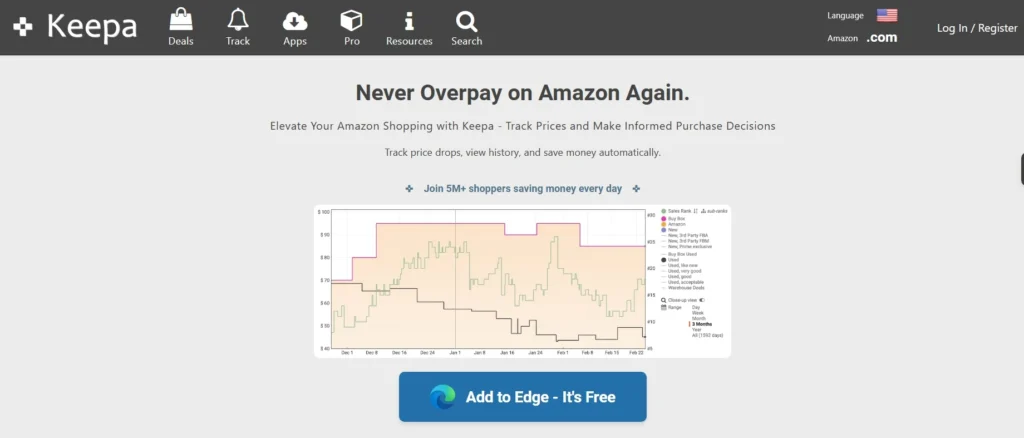
Keepa embeds detailed price history charts directly on every Amazon product page. The free version shows basic charts; the premium plan (€19/month) unlocks sales rank history, stock tracking, Buy Box data, and API access. Over 4 million Chrome users and a 4.7/5 rating make it the gold standard for Amazon deal hunters and sellers.
Standout: Embeds live price charts directly on Amazon product pages.
Limitation: Amazon only, no multi-retailer support
Pricing: Free (basic) / €19/month (premium)
Best for: Amazon-focused deal hunters and sellers who need granular pricing data.
3. CamelCamelCamel – Best Free Amazon Price History Tool
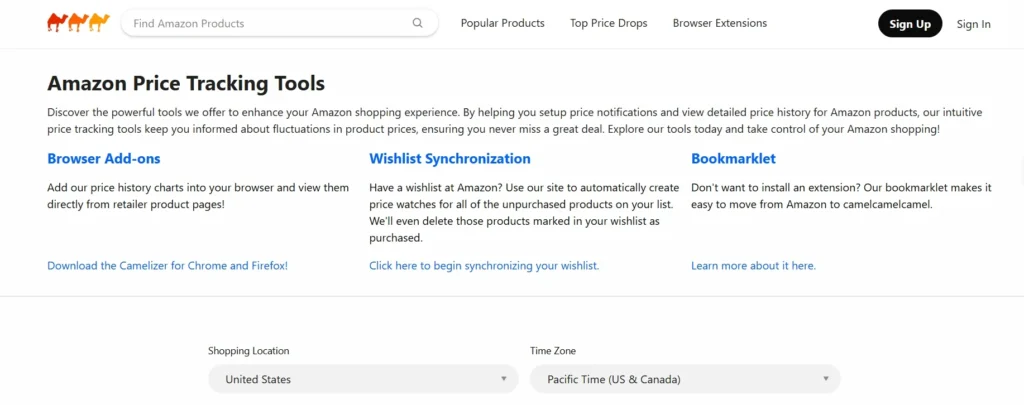
CamelCamelCamel has tracked Amazon prices since 2008. Paste any Amazon URL to instantly see a full price history chart, highest, lowest, and average over time. Set a target price and get email alerts when it drops. The Camelizer extension overlays these charts on Amazon pages across Chrome, Firefox, Edge, Safari, and Opera. Completely free, always.
Standout: Multi-year price history that reveals fake discounts.
Limitation: Amazon only, useless for other retailers
Pricing: Free (affiliate-funded)
Best for: Casual Amazon shoppers who want to verify if a ‘deal’ is actually a deal.
4. Honey by PayPal – Best for Passive Coupon + Price Tracking
Honey monitors prices across 30,000+ websites and automatically applies coupon codes at checkout. Add items to your Honey Droplist to receive email alerts when prices fall. It runs silently in the background, you shop normally and Honey handles the savings. Free across Chrome, Firefox, Safari, and Edge.
Standout: Auto-applies coupons and tracks price drops simultaneously
Limitation: Price tracking is secondary, coupon tool at heart
Pricing: Free (PayPal-owned)
Best for: Shoppers who want savings on autopilot with zero manual effort.
Best Apps & Platforms for eCommerce Businesses
Consumer tools don’t cut it for online retailers. You need competitor intelligence, dynamic pricing data, and actionable insights, not just personal alerts.
5. Prisync – Competitor Price Monitoring for Online Retailers
Prisync automatically monitors competitor product prices and stock availability across any eCommerce site, delivering consolidated reports you can act on. Built specifically for online retailers who need to respond to rival pricing, not guess at it. Plans start at $99/month and scale with the number of products tracked.
Standout: Tracks competitor prices and stock levels in one dashboard.
Limitation: No AI pricing, you still make the pricing decisions.
Pricing: $99/month
Best for: Mid-sized eCommerce stores that need automated competitor price surveillance.
6. Competera – AI-Powered Dynamic Pricing for Scaling Brands
Competera uses machine learning to monitor competitor prices across markets and recommend price points based on demand elasticity, competitive position, and margin targets. It goes beyond tracking, it tells you what to charge. Custom pricing makes it best suited to large retailers with complex, high-volume catalogs.
Standout: AI recommends price points, not just monitors them.
Limitation: Pricing is custom and steep, not for small stores.
Pricing: Custom (enterprise pricing)
Best for: Enterprise retailers needing AI-driven pricing strategy, not just competitive data.
7. Google Shopping Price Tracker – Zero-Setup for Lean Teams
Often overlooked, Google’s buil-in tracker requires no extension or account. Search for any product in Google Shopping, tap “Track Price,” and receive push notifications or emails when prices drop. Chrome also shows Shopping Insights directly in the address bar on product pages, instantly showing whether a current price is low, typical, or high.
Standout: Zero setup, no extension, no account, no cost.
Limitation: Shallow data, no price history charts or custom thresholds.
Pricing: Free (built into Google).
Best for: Small eCommerce teams that need basic price awareness without adding another tool.
These platforms are strong out of the box, but businesses with niche catalogs, proprietary platforms, or complex tracking requirements often hit a ceiling fast. That is where a custom-built solution becomes the smarter investment.
How eCommerce Businesses Use Price Tracking to Win
Price tracking is not just about knowing what competitor charge. The businesses that use it strategically turn raw pricing data into a sustainable competitive edge. Here is how:
1. Stay Ahead of Competitor Repricing
Dynamic pricing means your competitors may reprice dozens of times per day. Real-time tracking tools give you visibility into those moves the moment they happen, letting you respond with precision instead of reacting too late to protect margin or capture demand.
2. Enforce MAP Compliance Across Channels
Brands selling through third-party retailers need to know when resellers undercut Minimum Advertised Price (MAP) policies. Automated price monitoring flags violations in real time, protecting brand equity and preventing the race-to-the-bottom pricing that erodes margins across your entire channel.
3. Time Promotions for Maximum Impact
Historical pricing data reveals when competitors run sales, what discount depths they use, and how long they hold promotional prices. eCommerce teams can use this intelligence to time their own promotions for moments when competitors are at full price, maximizing visibility and conversion rates.
4. Build a Data-Driven Pricing Engine
The most advanced eCommerce teams do not just track prices manually; they pipe competitor pricing data into their own systems through custom eCommerce development services, built pricing engines that auto-adjust prices based on rules, thresholds, and inventory levels. This eliminates manual decisions and scales pricing intelligence across thousands of SKUs simultaneously.
5. Catch Supplier Price Changes Before They Hit Your Margins
Price tracking is not only outward-facing. Monitoring your own suppliers’ pricing page and wholesale catalogs with a custom tracker gives you early warning on cost increases, giving your procurement team time to negotiate, reorder, or adjust retail pricing before margins compress.
Build Your Own: DIY Python Price Tracker
Ready-made tools don’t track every website. If you are monitoring a niche supplier, a B2B pricing page, or a competitor that actively blocks popular scrapers, you need something custom.
A Python price tracker is far more accessible than it sounds, and with the right Python Development Services, you can take it from a weekend script to a production-grade system.
This is a simple Python price tracker to help you understand how tracking works. For real-world use, you’ll need to customize it based on the website and your requirements.
Who This is For
- eCommerce businesses tracking competitor sites not covered by commercial tools
- Developers building internal pricing dashboards or ERP integrations
- Teams that need custom alert logic, multi-URL monitoring, or long-term data storage
A Simple Python Price Tracker
Start by installing the required libraries:
| pip install curl_cffi beautifulsoup4 pandas schedule |
1. Fetch the Price
Unlike standard requests, curl_cffi mimics a real Chrome browser fingerprint, which means most retailer sites won’t flag it as a bot. Pair it with BeautifulSoup to parse the HTML and extract the price:
| Python from curl_cffi import requestsfrom bs4 import BeautifulSoupimport re def get_price(url): response = requests.get(url, impersonate=”chrome”, timeout=15) response.raise_for_status() soup = BeautifulSoup(response.content, ‘html.parser’) # Try the site’s primary price element first for sel in [{“data-testid”: “customer-price”}, {“class”: “priceView-hero-price priceView-customer-price”}]: tag = soup.find(“div”, sel) if tag: span = tag.find(“span”) if span: return float(span.get_text().replace(“$”, “”).replace(“,”, “”)) # Fallback: regex scan the full page text match = re.search(r’\$[\d,]+\.\d{2}’, soup.get_text()) if match: return float(match.group().replace(“$”, “”).replace(“,”, “”)) raise ValueError(“Price not found — inspect the target page and update the CSS selector.”) |
The selector values (data-testid, CSS class names) vary by retailer and change over time. To find the right ones: open the product page in Chrome -> right-click the price -> Inspect -> note the class or ID on the price element.
2. Log Prices to CSV
Every price check should be recorded with a timestamp. This builds your historical dataset over time and lets you spot trends, validate alerts, and audit your data later:
| Python import pandas as pdfrom datetime import datetime def save_to_csv(price, url): data = { ‘Date’: [datetime.now()], ‘Price’: [price], ‘URL’: [url] } df = pd.DataFrame(data) df.to_csv(‘price_history.csv’, mode=’a’, header=False, index=False) |
Each run appends a new row, no data is overwritten. Over days and weeks, this CSV becomes a complete price history you own entirely.
3. Send Email Alerts
When the price hits your target, you want to know immediately. Use a Gmail app password (not your main account password) and set one up via Google Account -> Security -> App Passwords:
| Python import smtplib def send_email(price, url, threshold): if price <= threshold: server = smtplib.SMTP(‘smtp.gmail.com’, 587) server.starttls() server.login(“your_email@gmail.com”, “your_app_password”) message = f”Subject: Price Drop Alert!\n\nPrice dropped to ${price}.\nCheck it here: {url}” server.sendmail(“your_email@gmail.com”, “your_email@gmail.com”, message) server.quit() |
If any real development, store credentials using python-dotenv rather than hardcoding them. Hardcoded credentials in source code are a security liability, especially if the file is ever committed to a repository.
4. Schedule it to Run Automatically
A price tracker that only runs when you manually trigger it is not a price tracker; it is a script. The schedule library turns it into a persistent background process:
| Python import scheduleimport time url = “https://yourstore.com/product-page”threshold = 49.99 def job(): price = get_price(url) save_to_csv(price, url) send_email(price, url, threshold) schedule.every().day.at(“09:00”).do(job) while True: schedule.run_pending() time.sleep(60) |
Set the time once, and the script handles everything from there – fetching, logging, and alerting on a daily cadence without any manual input.
Quick Comparison: Which Tool Fits Your Situation?
Match your use case to the right tool at a glance:
| Tool | Best For | Pricing | Multi-Store? |
| Karma | Everyday shoppers | Free | Yes |
| Keepa | Amazon power users | Free/ €19/mo | Amazon Only |
| CamelCamelCamel | Amazon Price History | Free | Amazon Only |
| Honey by PayPal | Passive coupon + alerts | Free | 30,000+ Sites |
| Prisync | eCommerce stores | From $99/mo | Yes |
| Competera | AI dynamic pricing | Custom | Yes |
| DIY Python Tracker | Custom/niche needs | Dev cost only | Unlimited |
The Bottom Line
There is no single best price tracking tool, only the right one for your situation.
- Individual Shoppers: Start with Karma for multi-store coverage, or Keepa if Amazon is your primary battlefield.
- eCommerce Businesses: Prisync for competitor monitoring, Competera for AI-driven dynamic pricing.
- Custom or Complex Needs: A DIY Python tracker gives you full control with no commercial limitations.